[WIKI] rephrasing, link updates, sidebar update #19
16
docs/Home.md
16
docs/Home.md
@@ -1,24 +1,24 @@
|
|||||||
# Welcome to The Basalt Wiki!<br>
|
# Welcome to The Basalt Wiki!
|
||||||
|
|
||||||
_Note: The Basalt Wiki is a work in progress. Please treat Wiki errors the same as bugs and report them accordingly._
|
*Note: The Basalt Wiki is a work in progress. Please treat Wiki errors the same as bugs and report them accordingly.*
|
||||||
|
|
||||||
Here you can find information about how to use Basalt as well as examples of functional Basalt code. The aim of Basalt is to improve user interaction through visual display.
|
Here you can find information about how to use Basalt as well as examples of functional Basalt code. The aim of Basalt is to improve user interaction through visual display.
|
||||||
|
|
||||||
## About Basalt
|
## About Basalt
|
||||||
|
|
||||||
Basalt is intended to be an easy-to-understand UI Framework designed for CC:Tweaked (AKA Computer Craft: Tweaked) - a popular minecraft mod. For more information about CC:Tweaked, checkout the project's <a href="https://tweaked.cc/">home page</a>.
|
Basalt is intended to be an easy-to-understand UI Framework designed for CC:Tweaked (Also know as "ComputerCraft: Tweaked") - a popular minecraft mod. For more information about CC:Tweaked, checkout the project's [wiki](https://tweaked.cc/) or [download](https://www.curseforge.com/minecraft/mc-mods/cc-tweaked).
|
||||||
<br><br>
|
|
||||||
|
|
||||||
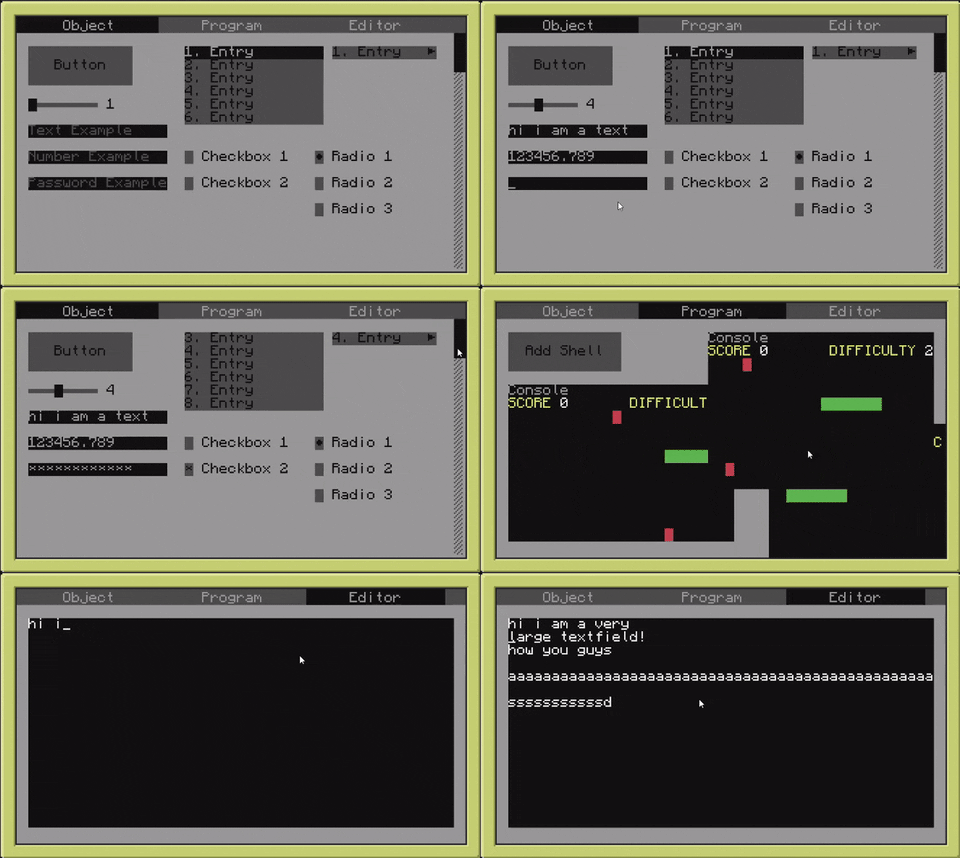
## Quick Demo
|
## Quick Demo
|
||||||
|

|
||||||
<br><br>
|
|
||||||
|
|
||||||
## Questions & Bugs
|
## Questions & Bugs
|
||||||
|
|
||||||
Obviously I've implemented some easter eggs, _some people_ call them "bugs". If you happen to discover one of these just make a new <a href="https://github.com/NoryiE/Basalt/issues">issue</a>.
|
Obviously NyoriE has implemented some easter eggs, *some people* call them "bugs". If you happen to discover one of these just make a new <a href="https://github.com/Pyroxenium/Basalt/issues">issue</a>.
|
||||||
|
|
||||||
Additionally, if you have questions about Basalt or how to make use of it, feel free to create a new discussion on <a href="https://github.com/NoryiE/Basalt/discussions">Basalt's Discussion Board</a>.
|
Additionally, if you have questions about Basalt or how to make use of it, feel free to create a new discussion on <a href="https://github.com/Pyroxenium/Basalt/discussions">Basalt's Discussion Board</a>, or ask in our [discord](https://discord.gg/yNNnmBVBpE).
|
||||||
|
|
||||||
You may also message me on Discord: NyoriE#8206
|
---
|
||||||
|
|
||||||
|
Feel free to join our [discord](https://discord.gg/yNNnmBVBpE)!
|
||||||
|
|
||||||
<br><br>
|
<br><br>
|
||||||
@@ -28,4 +28,3 @@
|
|||||||
- Tips & Tricks
|
- Tips & Tricks
|
||||||
- [Component Logic](tips/logic)
|
- [Component Logic](tips/logic)
|
||||||
- [Changing Button Color](tips/buttons)
|
- [Changing Button Color](tips/buttons)
|
||||||
- [Design Tips](tips/design.md)
|
|
||||||
|
|||||||
@@ -1,71 +0,0 @@
|
|||||||
# Getting Started!
|
|
||||||
|
|
||||||
Basalt aims to be a relatively small, easy to use framework.
|
|
||||||
|
|
||||||
Accordingly, we have provided an installation script.
|
|
||||||
|
|
||||||
|
|
||||||
Just use the following command in any CC:Tweaked shell:
|
|
||||||
|
|
||||||
`wget https://github.com/Pyroxenium/Basalt/raw/master/basalt.lua basalt.lua`
|
|
||||||
|
|
||||||
This will download `basalt.lua` to your local directory.
|
|
||||||
|
|
||||||
To load the framework, make use of the following snippet:
|
|
||||||
````lua
|
|
||||||
--> For those who are unfamiliar with lua, dofile executes the code in the referenced file
|
|
||||||
local basalt = dofile("basalt.lua")
|
|
||||||
````
|
|
||||||
|
|
||||||
|
|
||||||
Here is a fully functioning example of Basalt code:
|
|
||||||
|
|
||||||
````lua
|
|
||||||
local basalt = dofile("basalt.lua") --> Load the Basalt framework
|
|
||||||
|
|
||||||
--> Create the first frame. Please note that Basalt needs at least one active "non-parent" frame to properly supply events
|
|
||||||
--> When Basalt#createFrame makes use of unique identifiers (commonly referred to as UIDs), meaning that the supplied value must be UNIQUE
|
|
||||||
--> If the supplied UID is ambiguous, Basalt#createFrame returns a nil value
|
|
||||||
local mainFrame = basalt.createFrame("mainFrame")
|
|
||||||
|
|
||||||
--> Show the frame to the user
|
|
||||||
mainFrame:show()
|
|
||||||
|
|
||||||
local button = mainFrame:addButton("clickableButton") --> Add a button to the mainFrame (With a unique identifier)
|
|
||||||
|
|
||||||
--> Set the position of the button, Button#setPosition follows an x, y pattern.
|
|
||||||
--> The x value is how far right the object should be from its anchor (negative values from an anchor will travel left)
|
|
||||||
--> The y value is how far down the object should be from its anchor (negative values from an anchor will travel up)
|
|
||||||
button:setPosition(4, 4)
|
|
||||||
|
|
||||||
button:setText("Click me!") --> Set the text of our button
|
|
||||||
|
|
||||||
local function buttonClick() --> This function serves as our click logic
|
|
||||||
basalt.debug("I got clicked!")
|
|
||||||
end
|
|
||||||
|
|
||||||
--> Remember! You cannot supply buttonClick(), that will only supply the result of the function
|
|
||||||
--> Make sure the button knows which function to call when it's clicked
|
|
||||||
button:onClick(buttonClick)
|
|
||||||
|
|
||||||
button:show() --> Make the button visible, so the user can click it
|
|
||||||
|
|
||||||
basalt.autoUpdate() --> Basalt#autoUpdate starts the event listener to detect user input
|
|
||||||
````
|
|
||||||
If you're like us and strive for succinct and beautiful code, here is a cleaner implementation of the code above:
|
|
||||||
````lua
|
|
||||||
local basalt = dofile("basalt.lua")
|
|
||||||
|
|
||||||
local mainFrame = basalt.createFrame("mainFrame"):show()
|
|
||||||
local button = mainFrame --> Basalt returns an instance of the object on most methods, to make use of "call-chaining"
|
|
||||||
:addButton("clickableButton") --> This is an example of call chaining
|
|
||||||
:setPosition(4,4)
|
|
||||||
:setText("Click me!")
|
|
||||||
:onClick(
|
|
||||||
function()
|
|
||||||
basalt.debug("I got clicked!")
|
|
||||||
end)
|
|
||||||
:show()
|
|
||||||
|
|
||||||
basalt.autoUpdate()
|
|
||||||
````
|
|
||||||
@@ -18,7 +18,7 @@ end
|
|||||||
|
|
||||||
parallel.waitForAll(basalt.autoUpdate, yourCustomHandler) -- here it will handle your function (yourCustomHandler) and basalts handlers at the time
|
parallel.waitForAll(basalt.autoUpdate, yourCustomHandler) -- here it will handle your function (yourCustomHandler) and basalts handlers at the time
|
||||||
````
|
````
|
||||||
You can read [here](http://www.computercraft.info/wiki/Parallel_(API)) what exactly parallel.waitForAll() does
|
You can read [here (tweaked.cc)](https://tweaked.cc/module/parallel.html) what exactly parallel.waitForAll() does
|
||||||
|
|
||||||
## Method 2:
|
## Method 2:
|
||||||
Using threads
|
Using threads
|
||||||
|
|||||||
Reference in New Issue
Block a user