Docs update, mostly Basalt, Sidebar and Footer. #28
17
docs/Home.md
17
docs/Home.md
@@ -1,24 +1,19 @@
|
||||
# Welcome to The Basalt Wiki!
|
||||
|
||||
*Note: The Basalt Wiki is a work in progress. Please treat Wiki errors the same as bugs and report them accordingly.*
|
||||
*Note: The Basalt Wiki is a work in progress. Please treat wiki errors the same as bugs and report them accordingly.*
|
||||
|
||||
Here you can find information about how to use Basalt as well as examples of functional Basalt code. The aim of Basalt is to improve user interaction through visual display.
|
||||
|
||||
## About Basalt
|
||||
|
||||
Basalt is intended to be an easy-to-understand UI Framework designed for CC:Tweaked (Also know as "ComputerCraft: Tweaked") - a popular minecraft mod. For more information about CC:Tweaked, checkout the project's [wiki](https://tweaked.cc/) or [download](https://www.curseforge.com/minecraft/mc-mods/cc-tweaked).
|
||||
Basalt is intended to be an easy-to-understand UI Framework designed for CC:Tweaked (Also know as "ComputerCraft: Tweaked") - a popular minecraft mod. For more information about CC:Tweaked, checkout the project's [wiki](https://tweaked.cc/) or [download](https://modrinth.com/mod/cc-tweaked).
|
||||
|
||||
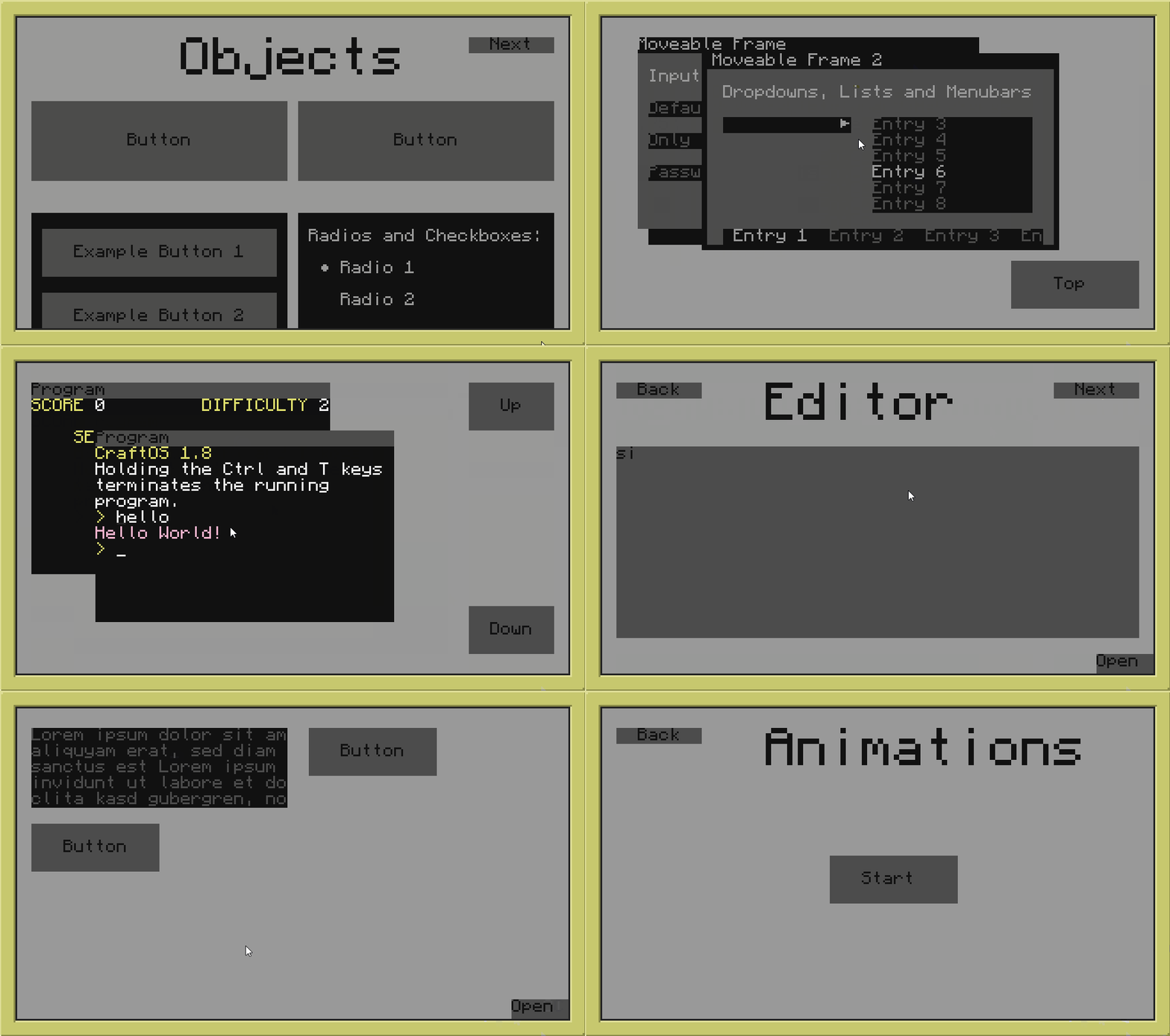
## Quick Demo
|
||||
<img src="https://raw.githubusercontent.com/Pyroxenium/Basalt/master/docs/_media/basaltPreview2.gif" width="600">
|
||||
|
||||
|
||||
|
||||
## Questions & Bugs
|
||||
|
||||
Obviously NyoriE has implemented some easter eggs, *some people* call them "bugs". If you happen to discover one of these just make a new <a href="https://github.com/Pyroxenium/Basalt/issues">issue</a>.
|
||||
Obviously NyoriE has implemented some easter eggs, *some people* call them "bugs". If you happen to discover one of these just make a new [Github Issue](https://github.com/Pyroxenium/Basalt/issues)
|
||||
|
||||
Additionally, if you have questions about Basalt or how to make use of it, feel free to create a new discussion on <a href="https://github.com/Pyroxenium/Basalt/discussions">Basalt's Discussion Board</a>, or ask in our [discord](https://discord.gg/yNNnmBVBpE).
|
||||
|
||||
---
|
||||
|
||||
Feel free to join our [discord](https://discord.gg/yNNnmBVBpE)!
|
||||
|
||||
<br><br>
|
||||
Additionally, if you have questions about Basalt or how to make use of it, feel free to create a new discussion on [Basalt's Discussion Board (Github)](https://github.com/Pyroxenium/Basalt/discussions), or ask in our [discord](https://discord.gg/yNNnmBVBpE).
|
||||
|
||||
@@ -1 +1,3 @@
|
||||
Thanks for checking out our wiki, join our discord for more help: [discord.gg/yM7kndJdJJ](discord.gg/yM7kndJdJJ)
|
||||
---
|
||||
|
||||
Thanks for checking out our wiki, join our discord for more help: [discord.gg/yM7kndJdJJ](discord.gg/yNNnmBVBpE)
|
||||
@@ -1,4 +1,4 @@
|
||||
- Getting Started
|
||||
- [Home](Home.md)
|
||||
- [Quick Start](home/Quick-Start.md)
|
||||
- [Home](Home)
|
||||
- [Quick Start](home/Quick-Start)
|
||||
- [Installer](home/installer)
|
||||
|
||||
@@ -1,32 +1,32 @@
|
||||
- About
|
||||
- [Home](Home.md)
|
||||
- [Home](Home.md)
|
||||
- [Quick Start](home/Quick-Start.md)
|
||||
- [Installer](home/installer)
|
||||
- Objects
|
||||
- [Basalt](objects/Basalt.md)
|
||||
- [Object](objects/Object.md)
|
||||
- [Button](objects/Button.md)
|
||||
- [Checkbox](objects/Checkbox.md)
|
||||
- [Dropdown](objects/Dropdown.md)
|
||||
- [Frame](objects/Frame.md)
|
||||
- [Image](objects/Image.md)
|
||||
- [Input](objects/Input.md)
|
||||
- [Label](objects/Label.md)
|
||||
- [List](objects/List.md)
|
||||
- [Menubar](objects/Menubar.md)
|
||||
- [Pane](objects/Pane.md)
|
||||
- [Program](objects/Program.md)
|
||||
- [Progressbar](objects/Progressbar.md)
|
||||
- [Radio](objects/Radio.md)
|
||||
- [Scrollbar](objects/Scrollbar.md)
|
||||
- [Slider](objects/Slider.md)
|
||||
- [Textfield](objects/Textfield.md)
|
||||
- [Animation](objects/Animation.md)
|
||||
- [Thread](objects/Thread.md)
|
||||
- [Timer](objects/Timer.md)
|
||||
- [Basalt](objects/Basalt.md)
|
||||
- [Object](objects/Object.md)
|
||||
- [Button](objects/Button.md)
|
||||
- [Checkbox](objects/Checkbox.md)
|
||||
- [Dropdown](objects/Dropdown.md)
|
||||
- [Frame](objects/Frame.md)
|
||||
- [Image](objects/Image.md)
|
||||
- [Input](objects/Input.md)
|
||||
- [Label](objects/Label.md)
|
||||
- [List](objects/List.md)
|
||||
- [Menubar](objects/Menubar.md)
|
||||
- [Pane](objects/Pane.md)
|
||||
- [Program](objects/Program.md)
|
||||
- [Progressbar](objects/Progressbar.md)
|
||||
- [Radio](objects/Radio.md)
|
||||
- [Scrollbar](objects/Scrollbar.md)
|
||||
- [Slider](objects/Slider.md)
|
||||
- [Textfield](objects/Textfield.md)
|
||||
- [Animation](objects/Animation.md)
|
||||
- [Thread](objects/Thread.md)
|
||||
- [Timer](objects/Timer.md)
|
||||
- Tips & Tricks
|
||||
- [Your Logic](tips/logic.md)
|
||||
- [Button coloring](tips/buttonColoring.md)
|
||||
- [Designing/Animating](tips/design.md)
|
||||
- [Dynamic Values](tips/dynamicvalues.md)
|
||||
- [XML](tips/xml.md)
|
||||
- [Your Logic](tips/logic.md)
|
||||
- [Button coloring](tips/buttonColoring.md)
|
||||
- [Designing/Animating](tips/design.md)
|
||||
- [Dynamic Values](tips/dynamicvalues.md)
|
||||
- [XML](tips/xml.md)
|
||||
|
||||
@@ -1,18 +1,21 @@
|
||||
## HowTo Use
|
||||
# Quick Start
|
||||
|
||||
To load the framework into your project, make use of the following code on top of your code.
|
||||
## How to use
|
||||
|
||||
To load Basalt into your project, make use of the following code on top of your code.
|
||||
```lua
|
||||
local basalt = require("basalt")
|
||||
```
|
||||
|
||||
It does not matter if you have installed the single file version or the full folder project. <br>
|
||||
It does not matter if you have installed the single file version or the full folder project.
|
||||
Both versions can be loaded by using `require("Basalt")`, you dont need to add `.lua`.
|
||||
|
||||
## Download
|
||||
|
||||
### Download the folder version
|
||||
This version is for people who'd like to work with Basalt, change something in Basalt or checkout the project.<br>
|
||||
But you are also able to just use it to create your own UI.<br>
|
||||
This version is for people who'd like to work with Basalt, change something in Basalt, or checkout the project.
|
||||
But you are also able to just use it to create your own UI.
|
||||
|
||||
|
||||
To install the full project to your CC:Tweaked Computer, use the following command on your CC:Tweaked shell:
|
||||
|
||||
@@ -30,7 +33,7 @@ This will download the project as a single file called "basalt.lua". You are imm
|
||||
|
||||
### Basalt Package Manager
|
||||
|
||||
The Basalt Package Manager is still in alpha!<br><br>
|
||||
**The Basalt Package Manager is still in alpha!**
|
||||
The Basalt Package Manager is a visual installer, you are able to change some settings, also to choose which objects are necessary for your projects and which are not.
|
||||
|
||||
To install the BPM (Basalt Package Manager) use the following command on your CC:Tweaked shell:
|
||||
|
||||
@@ -1,12 +1,12 @@
|
||||
# Installer
|
||||
|
||||
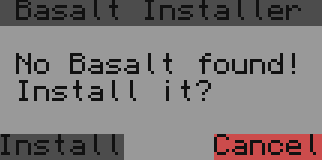
This is just a script which helps you to setup your program to automatically install the Basalt UI Framework, if it doesn't exists. Means, you create your program (which requires basalt) and add this on the top of your program. Now, everytime you execute your program it checks if basalt.lua (or your custom filepath) exists or not, if not it installs it, or if you are using the advanced installer, it asks the user if the program is allowed to install basalt for you.
|
||||
This is just a script which helps you to setup your program to automatically install the Basalt UI Framework if it doesn't exist. Which means you create your program (which requires basalt), and add this on the top of your program. Now everytime you execute your program it checks if basalt.lua (or your custom filepath) exists or not. If it dosent exist it installs it, or if you are using the advanced installer it asks the user if the program is allowed to install basalt for you.
|
||||
|
||||
## Basic Installer
|
||||
Here is a very basic one which just installs basalt.lua if don't exist:
|
||||
Here is a very basic installer which just installs basalt.lua if it dosen't exist:
|
||||
```lua
|
||||
--Basalt configurated installer
|
||||
local filePath = "basalt.lua" --here you can change the file path default: basalt
|
||||
local filePath = "basalt.lua" --here you can change the file path that it installs to. default: /basalt.lua
|
||||
if not(fs.exists(filePath))then
|
||||
shell.run("pastebin run ESs1mg7P packed true "..filePath:gsub(".lua", "")) -- this is an alternative to the wget command
|
||||
end
|
||||
@@ -18,8 +18,8 @@ This is a visual version, it asks the user if he wants to install basalt.lua (if
|
||||
|
||||
```lua
|
||||
--Basalt configurated installer
|
||||
local filePath = "basalt.lua" --here you can change the file path default: basalt
|
||||
if not(fs.exists(filePath))then
|
||||
local filePath = "basalt.lua" --here you can change the file path it installs to. Default: /basalt.lua
|
||||
if not fs.exists(filePath) then
|
||||
local w,h = term.getSize()
|
||||
term.clear()
|
||||
local _installerWindow = window.create(term.current(),w/2-8,h/2-3,18,6)
|
||||
@@ -68,7 +68,4 @@ if not(fs.exists(filePath))then
|
||||
term.setCursorPos(1,1)
|
||||
term.clear()
|
||||
end
|
||||
|
||||
local basalt = require(filePath:gsub(".lua", "")) -- here you can change the variablename in any variablename you want default: basalt
|
||||
------------------------------
|
||||
```
|
||||
|
||||
@@ -38,8 +38,9 @@
|
||||
logo: '/_media/logo.png',
|
||||
loadNavbar: true,
|
||||
loadSidebar: true,
|
||||
loadFooter: '_footer.md',
|
||||
autoHeader: true,
|
||||
subMaxLevel: 2,
|
||||
subMaxLevel: 3,
|
||||
homepage: 'Home.md',
|
||||
name: 'Basalt',
|
||||
repo: 'https://github.com/Pyroxenium/Basalt',
|
||||
@@ -50,5 +51,7 @@
|
||||
<script src="//cdn.jsdelivr.net/npm/docsify@4"></script>
|
||||
<script src="https://cdn.jsdelivr.net/npm/docsify-themeable@0/dist/js/docsify-themeable.min.js"></script>
|
||||
<script src="//cdn.jsdelivr.net/npm/prismjs@1.28.0/components/prism-lua.min.js"></script>
|
||||
<script src="//cdn.jsdelivr.net/npm/@alertbox/docsify-footer/dist/docsify-footer.min.js"></script>
|
||||
|
||||
</body>
|
||||
</html>
|
||||
|
||||
@@ -1,37 +1,46 @@
|
||||
# Basalt
|
||||
|
||||
This is the UI Manager and the first thing you want to access.
|
||||
Before you can access Basalt, you need to add the following code on top of your file:
|
||||
|
||||
`local basalt = require("basalt")`
|
||||
```lua
|
||||
local basalt = require("basalt")
|
||||
```
|
||||
|
||||
require loads the UI Framework into your project.
|
||||
|
||||
Now you are able to access the following list of methods:
|
||||
What this code does is it loads basalt into the basalt variable.
|
||||
You are now able to access the following list of methods:
|
||||
|
||||
| | |
|
||||
|---|---|
|
||||
|[autoUpdate](objects/Basalt/autoUpdate.md)|Starts the event and draw listener
|
||||
|[createFrame](objects/Basalt/createFrame.md)|Creates a new base frame
|
||||
|[removeFrame](objects/Basalt/removeFrame.md)|Removes a previously created base frame
|
||||
|[debug](objects/Basalt/debug.md)|Writes something into the debug console
|
||||
|[getFrame](objects/Basalt/getFrame.md)|Returns a frame object by it's id
|
||||
|[getActiveFrame](objects/Basalt/getActiveFrame.md)|Returns the currently active base frame
|
||||
|[autoUpdate](objects/Basalt/autoUpdate.md)|Starts the event and draw listener
|
||||
|[update](objects/Basalt/update.md)|Starts the event and draw listener once
|
||||
|[stopUpdate](objects/Basalt/stopUpdate.md)|Stops the currently active event and draw listener
|
||||
|[getTheme](objects/Basalt/getTheme.md)|Returns the currently active theme
|
||||
|[getVariable](objects/Basalt/getVariable.md)|Returns a variable defined with setVariable
|
||||
|[getVersion](objects/Basalt/getVersion.md)|Returns the Basalt version
|
||||
|[isKeyDown](objects/Basalt/isKeyDown.md)|Returns if the key is held down
|
||||
|[debug](objects/Basalt/debug.md)|Writes something into the debug console
|
||||
|[log](objects/Basalt/log.md)|Writes something into the log file
|
||||
|[onEvent](objects/Basalt/onEvent.md)|Event listener
|
||||
|[removeFrame](objects/Basalt/removeFrame.md)|Removes a previously created base frame
|
||||
|[schedule](objects/Basalt/schedule.md)|Schedules a new task
|
||||
|[setActiveFrame](objects/Basalt/setActiveFrame.md)|Sets the active frame
|
||||
|[setTheme](objects/Basalt/setTheme.md)|Changes the base theme of basalt
|
||||
|[setVariable](objects/Basalt/setVariable.md)|Sets a variable which you can access via XML
|
||||
|[schedule](objects/Basalt/schedule.md)|Schedules a new task
|
||||
|[stopUpdate / stop](objects/Basalt/stopUpdate.md)|Stops the currently active event and draw listener
|
||||
|[update](objects/Basalt/update.md)|Starts the event and draw listener once
|
||||
|
||||
# Examples
|
||||
## Examples
|
||||
|
||||
Here is a lua example on how to create a empty base frame and start basalt's listener.
|
||||
|
||||
```lua
|
||||
local basalt = require("basalt") -- we load the UI Framework into our project
|
||||
local basalt = require("basalt") -- Loads Basalt into our project
|
||||
|
||||
local main = basalt.createFrame() -- we create a base frame - on that frame we are able to add object's
|
||||
local main = basalt.createFrame() -- Creates a base frame. On that frame we are able to add object's
|
||||
|
||||
-- here we would add additional object's
|
||||
-- Here we would add additional object's
|
||||
|
||||
basalt.autoUpdate() -- we start listening to incoming events and draw stuff on the screen
|
||||
```
|
||||
basalt.autoUpdate() -- Starts listening to incoming events and draw stuff on the screen. This should nearly always be the last line.
|
||||
```
|
||||
|
||||
@@ -1,12 +1,18 @@
|
||||
## basalt.autoUpdate
|
||||
# Basalt
|
||||
|
||||
## autoUpdate
|
||||
|
||||
This starts the event and draw handler for you. The listeners will run until you stop them.
|
||||
|
||||
#### Parameters:
|
||||
1. `boolean` optional - if you use false as the first parameter it would stop the listeners.
|
||||
### Parameters
|
||||
|
||||
1. `boolean` optional - if you use false as the first parameter it would stop the listeners. Using false is a synonym for [`basalt.stopUpdate()`](objects/Basalt/stopUpdate.md).
|
||||
|
||||
### Usage
|
||||
|
||||
* Enables the basalt listeners, otherwise the screen will not continue to update
|
||||
|
||||
#### Usage:
|
||||
* Enable the basalt listeners, otherwise the screen will not continue to update
|
||||
```lua
|
||||
local main = basalt.createFrame()
|
||||
basalt.autoUpdate()
|
||||
```
|
||||
```
|
||||
|
||||
@@ -1,17 +1,24 @@
|
||||
## basalt.createFrame
|
||||
# Basalt
|
||||
|
||||
## createFrame
|
||||
|
||||
Creates a new base-frame, you can have as many base-frames as you want, but only 1 can be active (visible) at the same time.
|
||||
You can always switch between your base frames.
|
||||
|
||||
Only the currently active base-frame listens to incoming events (except for some events like time-events and peripheral-events)
|
||||
|
||||
#### Parameters:
|
||||
### Parameters
|
||||
|
||||
1. `string` id - optional (if you dont set a id it will automatically create a uuid for you)
|
||||
|
||||
#### Returns:
|
||||
### Returns
|
||||
|
||||
1. `frame` object
|
||||
|
||||
#### Usage:
|
||||
### Usage
|
||||
|
||||
* How to use multiple base frames:
|
||||
|
||||
```lua
|
||||
local main1 = basalt.createFrame() -- Visible base frame on program start
|
||||
local main2 = basalt.createFrame()
|
||||
@@ -24,4 +31,5 @@ main1:addButton()
|
||||
end)
|
||||
main2:addLabel()
|
||||
:setText("We are currently on main2")
|
||||
```
|
||||
basalt.autoUpdate()
|
||||
```
|
||||
|
||||
@@ -1,22 +1,29 @@
|
||||
## basalt.debug
|
||||
# Basalt
|
||||
|
||||
## debug
|
||||
|
||||
Creates a label with some information on the main frame on the bottom left. When you click on that label it will open a log view for you. See it as the new print for debugging
|
||||
|
||||
You can also edit the default debug Label (change position, change color or whatever you want) by accessing the variable basalt.debugLabel
|
||||
You can also edit the default debug Label (change position, change color or whatever you want) by accessing the variable `basalt.debugLabel`
|
||||
which returns the debug Label.
|
||||
|
||||
Also basalt.debugFrame and basalt.debugList are available.
|
||||
`basalt.debugFrame` and `basalt.debugList` are also available.
|
||||
|
||||
### Parameters
|
||||
|
||||
#### Parameters:
|
||||
1. `...` (multiple parameters are possible, like print does)
|
||||
|
||||
#### Usage:
|
||||
### Usage
|
||||
|
||||
* Prints "Hello! ^-^" to the debug console
|
||||
|
||||
```lua
|
||||
basalt.debug("Hello! ", "^-^")
|
||||
```
|
||||
|
||||
* Changes the debug label's anchor
|
||||
|
||||
```lua
|
||||
basalt.debugLabel:setAnchor("topLeft") -- default anchor is bottomLeft
|
||||
basalt.debug("Hello!")
|
||||
```
|
||||
```
|
||||
|
||||
@@ -1,12 +1,18 @@
|
||||
## basalt.getActiveFrame
|
||||
Returns the currently active/visible base frame
|
||||
# Basalt
|
||||
|
||||
## getActiveFrame
|
||||
|
||||
Returns the currently active/visible base frame.
|
||||
|
||||
### Returns
|
||||
|
||||
#### Returns:
|
||||
1. `frame` The current frame
|
||||
|
||||
#### Usage:
|
||||
### Usage
|
||||
|
||||
* Displays the active frame name in the debug console
|
||||
|
||||
```lua
|
||||
local main = basalt.createFrame()
|
||||
basalt.debug(basalt.getActiveFrame():getName()) -- returns the id
|
||||
```
|
||||
```
|
||||
|
||||
@@ -1,14 +1,21 @@
|
||||
## basalt.getFrame
|
||||
Returns a base frame by the given id
|
||||
# Basalt
|
||||
|
||||
## getFrame
|
||||
|
||||
Returns a base frame by the given id.
|
||||
|
||||
### Parameters
|
||||
|
||||
#### Parameters:
|
||||
1. `string` id
|
||||
|
||||
#### Returns:
|
||||
1. `frame` object
|
||||
### Returns
|
||||
|
||||
1. `frame` The frame with the supplied id.
|
||||
|
||||
### Usage
|
||||
|
||||
#### Usage:
|
||||
* Creates, fetches and shows the "myFirstFrame" object
|
||||
|
||||
```lua
|
||||
local main = basalt.createFrame("firstBaseFrame")
|
||||
local main2 = basalt.createFrame("secondBaseFrame")
|
||||
@@ -16,8 +23,9 @@ main:addButton()
|
||||
:setText("Show")
|
||||
:onClick(function()
|
||||
local frame2 = basalt.getFrame("secondBaseFrame")
|
||||
if(frame2~=nil)then
|
||||
if(frame2 ~= nil)then
|
||||
frame2:show()
|
||||
end
|
||||
end)
|
||||
```
|
||||
basalt.autoUpdate()
|
||||
```
|
||||
|
||||
18
docs/objects/Basalt/getTheme.md
Normal file
18
docs/objects/Basalt/getTheme.md
Normal file
@@ -0,0 +1,18 @@
|
||||
# Basalt
|
||||
|
||||
## basalt.getTheme
|
||||
|
||||
Returns the current base-theme. This base-theme can be set using setTheme.md.
|
||||
A list of base-theme keys can be found [here](https://github.com/Pyroxenium/Basalt/blob/master/Basalt/theme.lua).
|
||||
|
||||
### Returns
|
||||
|
||||
1. `number` The color of the requested base-theme key.
|
||||
|
||||
### Usage
|
||||
|
||||
* Displays the color of the main background in the debug console
|
||||
|
||||
```lua
|
||||
basalt.debug(basalt.getTheme("BasaltBG"))
|
||||
```
|
||||
26
docs/objects/Basalt/getVariable.md
Normal file
26
docs/objects/Basalt/getVariable.md
Normal file
@@ -0,0 +1,26 @@
|
||||
# Basalt
|
||||
|
||||
## getVariable
|
||||
|
||||
Returns a variable defined with [setVariable](objects/Basalt/setVariable)
|
||||
|
||||
### Returns
|
||||
|
||||
1. `variable` The variable stored
|
||||
|
||||
### Usage
|
||||
|
||||
* Displays the stored variable in the debug console
|
||||
|
||||
```lua
|
||||
basalt.setVariable("abc", function()
|
||||
basalt.debug("I got clicked")
|
||||
return 1
|
||||
end)
|
||||
|
||||
basalt.debug(basalt.getVariable("abc")()) -- Should debug log "I got clicked" and debug log 1 (which was returned from the function)
|
||||
```
|
||||
|
||||
```xml
|
||||
<button onClick="abc" text="Click me" />
|
||||
```
|
||||
17
docs/objects/Basalt/getVersion.md
Normal file
17
docs/objects/Basalt/getVersion.md
Normal file
@@ -0,0 +1,17 @@
|
||||
# Basalt
|
||||
|
||||
## getVersion
|
||||
|
||||
Returns the currently active/visible base frame.
|
||||
|
||||
### Returns
|
||||
|
||||
1. `string` The current version of Basalt
|
||||
|
||||
### Usage
|
||||
|
||||
* Displays the version of Basalt in the debug console
|
||||
|
||||
```lua
|
||||
basalt.debug(basalt.getVersion()) -- Example: 1.6.2
|
||||
```
|
||||
@@ -1,14 +1,21 @@
|
||||
## basalt.isKeyDown
|
||||
# Basalt
|
||||
|
||||
## isKeyDown
|
||||
|
||||
Checks if the user is currently holding a key
|
||||
|
||||
#### Parameters:
|
||||
1. `number` key code (use the keys table for that)
|
||||
### Parameters
|
||||
|
||||
1. `number` key code (use the [keys table](https://tweaked.cc/module/keys.html) for that)
|
||||
|
||||
### Returns
|
||||
|
||||
#### Returns:
|
||||
1. `boolean` true or false
|
||||
|
||||
#### Usage:
|
||||
### Usage
|
||||
|
||||
* Shows a debug message with true or false if the left ctrl key is down, as soon as you click on the button.
|
||||
|
||||
```lua
|
||||
local main = basalt.createFrame()
|
||||
local aButton = mainFrame:addButton()
|
||||
@@ -18,4 +25,4 @@ local aButton = mainFrame:addButton()
|
||||
basalt.debug(basalt.isKeyDown(keys.leftCtrl))
|
||||
end)
|
||||
basalt.autoUpdate()
|
||||
```
|
||||
```
|
||||
|
||||
@@ -1,15 +1,28 @@
|
||||
## basalt.log
|
||||
This writes something into a file. The main goal is to make debugging errors easier. Lets say you'r program is crashing and
|
||||
you don't know why, you could use basalt.log
|
||||
# Basalt
|
||||
|
||||
The log files will automatically removed after you start your program again
|
||||
## log
|
||||
|
||||
This writes something into a file. The main goal is to make debugging errors easier. Lets say you'r program is crashing and you don't know why, you could use basalt.log The log files will automatically removed after you start your program again.
|
||||
|
||||
### Parameters
|
||||
|
||||
#### Parameters:
|
||||
1. `string` The text to write into the log file
|
||||
2. `string` - optional (default: "Debug") - the type to write
|
||||
|
||||
#### Usage:
|
||||
### Usage
|
||||
|
||||
* Writes "Hello!" into the log file
|
||||
|
||||
```lua
|
||||
basalt.log("Hello!")
|
||||
```
|
||||
|
||||
This should result in there beeing a file called `basaltLog.txt`. In the file it should say `[Basalt][Debug]: Hello!`.
|
||||
|
||||
* Writes "Config file missing" into the log file, with warning as prefix.
|
||||
|
||||
```lua
|
||||
basalt.log("Config file is missing", "WARNING")
|
||||
```
|
||||
|
||||
This should result in there beeing a file called `basaltLog.txt`. In the file it should say `[Basalt][WARNING]: Config file is missing`.
|
||||
|
||||
11
docs/objects/Basalt/onEvent.md
Normal file
11
docs/objects/Basalt/onEvent.md
Normal file
@@ -0,0 +1,11 @@
|
||||
# Basalt
|
||||
|
||||
## onEvent
|
||||
|
||||
Every event the computer receives, from the bulit-in event "api", will get passed into basalt.onEvent, except for all mouse events, the key events (key and key_up), char and monitor_touch.
|
||||
|
||||
### Parameters
|
||||
|
||||
### Usage
|
||||
|
||||
TODO
|
||||
@@ -1,17 +1,37 @@
|
||||
## basalt.removeFrame
|
||||
Removes the base frame by it's id. This only works for base-frames.
|
||||
# Basalt
|
||||
|
||||
#### Parameters:
|
||||
1. `string` id
|
||||
## removeFrame
|
||||
|
||||
Removes the base frame by it's id. **This only works for base-frames.**
|
||||
|
||||
### Parameters
|
||||
|
||||
1. `string` id - ID of the base-frame.
|
||||
|
||||
### Usage
|
||||
|
||||
* Removes the previously created frame with id "secondBaseFrame"
|
||||
The frame id is gotten from a frame variable's `:getName()`
|
||||
|
||||
#### Usage:
|
||||
* Removes the previously created frame with id "myFirstFrame"
|
||||
```lua
|
||||
local main = basalt.createFrame("firstBaseFrame")
|
||||
local main2 = basalt.createFrame("secondBaseFrame")
|
||||
main:addButton()
|
||||
:setText("Remove")
|
||||
:onClick(function()
|
||||
basalt.removeFrame(main2:getName()) -- you can use main2:getName() to find out the id or just use "secondBaseFrame"
|
||||
basalt.removeFrame(main2:getName())
|
||||
end)
|
||||
```
|
||||
```
|
||||
|
||||
* Removes the previously created frame with id "secondBaseFrame", without frame stored in variable
|
||||
The frame id is the frame's name
|
||||
|
||||
```lua
|
||||
local main = basalt.createFrame("firstBaseFrame")
|
||||
local main2 = basalt.createFrame("secondBaseFrame")
|
||||
main:addButton()
|
||||
:setText("Remove")
|
||||
:onClick(function()
|
||||
basalt.removeFrame("secondBaseFrame")
|
||||
end)
|
||||
```
|
||||
|
||||
@@ -1,14 +1,22 @@
|
||||
## basalt.schedule
|
||||
Schedules a function which gets called in a coroutine. After the coroutine is finished it will get destroyed immediatly. It's something like threads, but with some limits.
|
||||
# Basalt
|
||||
|
||||
## schedule
|
||||
|
||||
Schedules a function which gets called in a coroutine. After the coroutine is finished it will get destroyed immediatly. It's something like threads, but with some limits.
|
||||
**A guide can be found [here](/tips/logic).**
|
||||
|
||||
### Parameters
|
||||
|
||||
#### Parameters:
|
||||
1. `function` a function which should get executed
|
||||
|
||||
#### Returns:
|
||||
### Returns
|
||||
|
||||
1. `function` it returns the function which you have to execute in order to start the coroutine
|
||||
|
||||
#### Usage:
|
||||
### Usage
|
||||
|
||||
* Creates a schedule which switches the color between red and gray
|
||||
|
||||
```lua
|
||||
local mainFrame = basalt.createFrame()
|
||||
local aButton = mainFrame:addButton():setText("Click me")
|
||||
@@ -25,4 +33,4 @@ aButton:onClick(basalt.schedule(function(self)
|
||||
os.sleep(0.1)
|
||||
self:setBackground(colors.gray)
|
||||
end))
|
||||
```
|
||||
```
|
||||
|
||||
13
docs/objects/Basalt/setActiveFrame.md
Normal file
13
docs/objects/Basalt/setActiveFrame.md
Normal file
@@ -0,0 +1,13 @@
|
||||
# Basalt
|
||||
|
||||
## setActiveFrame
|
||||
|
||||
Sets what should be the active baseframe.
|
||||
|
||||
### Parameters
|
||||
|
||||
1. `frame` frame - The frame that should be the active base-frame.
|
||||
|
||||
### Usage
|
||||
|
||||
TODO
|
||||
@@ -1,15 +1,21 @@
|
||||
## basalt.setTheme
|
||||
Sets the base theme of the project! Make sure to cover all existing objects, otherwise it will result in errors. A good example is [theme](https://github.com/Pyroxenium/Basalt/blob/master/Basalt/theme.lua)
|
||||
# Basalt
|
||||
|
||||
## setTheme
|
||||
|
||||
Sets the base theme of the project! Make sure to cover all existing objects, otherwise it will result in errors. A good example is [theme](https://github.com/Pyroxenium/Basalt/blob/master/Basalt/theme.lua). The theme can also be gotten with [`basalt.getTheme()`](objects/Basalt/getTheme)
|
||||
|
||||
### Parameters
|
||||
|
||||
#### Parameters:
|
||||
1. `table` theme layout look into [theme](https://github.com/Pyroxenium/Basalt/blob/master/Basalt/theme.lua) for a example
|
||||
|
||||
#### Usage:
|
||||
### Usage
|
||||
|
||||
* Sets the default theme of basalt.
|
||||
|
||||
```lua
|
||||
basalt.setTheme({
|
||||
ButtonBG = colors.yellow,
|
||||
ButtonText = colors.red,
|
||||
...,
|
||||
})
|
||||
```
|
||||
```
|
||||
|
||||
@@ -1,17 +1,25 @@
|
||||
## basalt.setVariable
|
||||
# Basalt
|
||||
|
||||
## setVariable
|
||||
|
||||
This stores a variable which you're able to access via xml. You are also able to add a function, which then gets called by object events created in XML.
|
||||
|
||||
#### Parameters:
|
||||
1. `string` a key name
|
||||
1. `any` any variable
|
||||
### Parameters
|
||||
|
||||
1. `string` a key name
|
||||
2. `any` any variable
|
||||
|
||||
### Usage
|
||||
|
||||
#### Usage:
|
||||
* Adds a function to basalt.
|
||||
|
||||
```lua
|
||||
basalt.setVariable("clickMe", function()
|
||||
basalt.debug("I got clicked")
|
||||
end)
|
||||
|
||||
```
|
||||
|
||||
```xml
|
||||
<button onClick="clickMe" text="Click me" />
|
||||
```
|
||||
```
|
||||
|
||||
@@ -1,15 +1,21 @@
|
||||
## basalt.stopUpdate or basalt.stop
|
||||
Stops the automatic draw and event handler which got started by basalt.autoUpdate()
|
||||
# Basalt
|
||||
|
||||
## stopUpdate / stop
|
||||
|
||||
Stops the automatic draw and event handler which got started by `basalt.autoUpdate()`.
|
||||
`basalt.autoUpdate(false)` also does the same.
|
||||
|
||||
### Usage
|
||||
|
||||
#### Usage:
|
||||
* When the quit button is clicked, the button stops basalt's event listeners and draw handlers
|
||||
|
||||
```lua
|
||||
local main = basalt.createFrame()
|
||||
local aButton = main:addButton()
|
||||
main:addButton()
|
||||
:setPosition(2,2)
|
||||
:setText("Stop Basalt!")
|
||||
:onClick(function()
|
||||
basalt.stopUpdate()
|
||||
end)
|
||||
basalt.autoUpdate()
|
||||
```
|
||||
```
|
||||
|
||||
@@ -1,18 +1,24 @@
|
||||
## basalt.update
|
||||
# Basalt
|
||||
|
||||
## update
|
||||
|
||||
Calls the draw and event handler once - this gives more flexibility about which events basalt should process. For example you could filter the terminate event.
|
||||
Which means you have to pass the events into basalt.update.
|
||||
|
||||
#### Parameters:
|
||||
1. `string` The event to be received
|
||||
### Parameters
|
||||
|
||||
1. `string` The event to be received
|
||||
2. `...` Additional event variables to capture
|
||||
|
||||
#### Usage:
|
||||
### Usage
|
||||
|
||||
* Creates and starts a custom update cycle
|
||||
|
||||
```lua
|
||||
local mainFrame = basalt.createFrame()
|
||||
local aButton = mainFrame:addButton():setPosition(2,2)
|
||||
mainFrame:addButton():setPosition(2,2)
|
||||
while true do
|
||||
local ev = table.pack(os.pullEventRaw())
|
||||
basalt.update(table.unpack(ev))
|
||||
end
|
||||
```
|
||||
```
|
||||
|
||||
Reference in New Issue
Block a user