Compare commits
58 Commits
feature-co
...
v1.0
| Author | SHA1 | Date | |
|---|---|---|---|

|
797a48ea95 | ||
|
|
ccdebe30ef | ||
|
|
91b16fbd80 | ||
|
|
71e8870c7c | ||
|
|
1198a5b4e0 | ||
|
|
c280f8b9d6 | ||
|
|
8326d02a33 | ||
|
|
3799cf9013 | ||
|
|
ccfc2eecd0 | ||
|
|
a763990b0c | ||
|
|
2edff41380 | ||
|
|
1c668ef34b | ||
|
|
226471821f | ||
|
|
2919803846 | ||
|
|
1b1b4ae22c | ||
|
|
813bf7d2cf | ||
|
|
39b3d1f732 | ||
|
|
5253d03c60 | ||
|
|
02a11d656d | ||
|
|
72e633ec21 | ||
|
|
df4ad896b2 | ||
|
|
94cb23fd58 | ||
|
|
939be0764e | ||
|
|
9858bce3f6 | ||
|
|
3e937033b9 | ||
|
|
989fefe330 | ||
|
|
6b3a7cd73f | ||
|
|
a899b1d247 | ||
|
|
b6ee09636b | ||
|
|
4b8f3c2d5c | ||
|
|
5a6811930b | ||
|
|
7759b720b6 | ||
|
|
64e7d777c1 | ||
|
|
332be95285 | ||
|
|
cb98307e44 | ||
|
|
eb2dd86ac8 | ||
|
|
5b9a3bb565 | ||
|
|
b6e2aefb68 | ||
|
|
4f3ffc328d | ||
|
|
c5b9a5f568 | ||
|
|
b0b104ee82 | ||
|
|
e833d4bcf1 | ||
|
|
7b2556bd8c | ||
|
|
f2972417a7 | ||
|
|
2a577fff9f | ||
|
|
cfcdbce8d5 | ||
|
|
980b016b2c | ||
|
|
1c7f465cd8 | ||
|
|
038bab11ba | ||
|
|
3cfc2fca9c | ||
|
|
2e11c99ef2 | ||
|
|
98b84a9509 | ||
|
|
50b0bf6b95 | ||
|
|
42450d42d3 | ||
|
|
e29e5cc77d | ||
|
|
a50ed1f486 | ||
|
|
6d66757ae4 | ||
|
|
e5839c3704 |
55
.github/workflows/ci.yml
vendored
55
.github/workflows/ci.yml
vendored
@@ -1,55 +0,0 @@
|
||||
# This is a basic workflow to help you get started with Actions
|
||||
|
||||
name: CI
|
||||
|
||||
# Controls when the workflow will run
|
||||
on:
|
||||
# Triggers the workflow on push or pull request events but only for the master branch
|
||||
push:
|
||||
branches: [ master, feature-compile-ci ]
|
||||
pull_request:
|
||||
branches: [ master, feature-compile-ci ]
|
||||
|
||||
# Allows you to run this workflow manually from the Actions tab
|
||||
workflow_dispatch:
|
||||
|
||||
# A workflow run is made up of one or more jobs that can run sequentially or in parallel
|
||||
jobs:
|
||||
# This workflow contains a single job called "build"
|
||||
build:
|
||||
# The type of runner that the job will run on
|
||||
runs-on: ubuntu-latest
|
||||
|
||||
# Steps represent a sequence of tasks that will be executed as part of the job
|
||||
steps:
|
||||
# Checks-out your repository under $GITHUB_WORKSPACE, so your job can access it
|
||||
- uses: actions/checkout@v3
|
||||
|
||||
- name: start-message
|
||||
run: echo Starting compilation
|
||||
|
||||
# Runs a set of commands using the runners shell
|
||||
- name: setup-lua
|
||||
uses: leafo/gh-actions-lua@v9
|
||||
with:
|
||||
luaVersion: "5.1"
|
||||
|
||||
- name: setup-luarocks
|
||||
uses: leafo/gh-actions-luarocks@v4
|
||||
with:
|
||||
luarocksVersion: "3.9.0"
|
||||
|
||||
- name: install-lfs
|
||||
run: luarocks install luafilesystem
|
||||
|
||||
- name: compile-basalt
|
||||
run: lua scripts/compiler.lua
|
||||
|
||||
- name: dir-check
|
||||
run: "pwd && ls -la && find -L . basalt.lua | grep basalt.lua"
|
||||
|
||||
- name: Upload artifact
|
||||
uses: actions/upload-artifact@v3
|
||||
with:
|
||||
name: Basalt-Artifact
|
||||
path: ${{ github.workspace }}/build/basalt.lua
|
||||
1
.gitignore
vendored
1
.gitignore
vendored
@@ -1 +0,0 @@
|
||||
/build/
|
||||
@@ -9,12 +9,3 @@ Basalt is still under developement and you may find bugs!
|
||||
|
||||
Check out the [wiki](https://basalt.madefor.cc/) for information<br>
|
||||
If you have questions, feel free to join the discord server: [https://discord.gg/yM7kndJdJJ](https://discord.gg/yM7kndJdJJ)
|
||||
|
||||
Todo:<br>
|
||||
- Improve performance<br>
|
||||
- Fix menubar scroll functionality<br>
|
||||
- Fix frames moving incorrectly when anchor is bottom/right<br>
|
||||
- Fix click event and lose focus event order<br>
|
||||
- Improve event system<br>
|
||||
- Add info to image and pane object, and onBackgroundKey
|
||||
- Fix mouse events for frames with a program
|
||||
|
||||
1228
basalt-source.lua
1228
basalt-source.lua
File diff suppressed because it is too large
Load Diff
1
basalt.lua
Normal file
1
basalt.lua
Normal file
File diff suppressed because one or more lines are too long
16
docs/Home.md
16
docs/Home.md
@@ -1,24 +1,24 @@
|
||||
# Welcome to The Basalt Wiki!<br>
|
||||
# Welcome to The Basalt Wiki!
|
||||
|
||||
_Note: The Basalt Wiki is a work in progress. Please treat Wiki errors the same as bugs and report them accordingly._
|
||||
*Note: The Basalt Wiki is a work in progress. Please treat Wiki errors the same as bugs and report them accordingly.*
|
||||
|
||||
Here you can find information about how to use Basalt as well as examples of functional Basalt code. The aim of Basalt is to improve user interaction through visual display.
|
||||
|
||||
## About Basalt
|
||||
|
||||
Basalt is intended to be an easy-to-understand UI Framework designed for CC:Tweaked (AKA Computer Craft: Tweaked) - a popular minecraft mod. For more information about CC:Tweaked, checkout the project's <a href="https://tweaked.cc/">home page</a>.
|
||||
<br><br>
|
||||
Basalt is intended to be an easy-to-understand UI Framework designed for CC:Tweaked (Also know as "ComputerCraft: Tweaked") - a popular minecraft mod. For more information about CC:Tweaked, checkout the project's [wiki](https://tweaked.cc/) or [download](https://www.curseforge.com/minecraft/mc-mods/cc-tweaked).
|
||||
|
||||
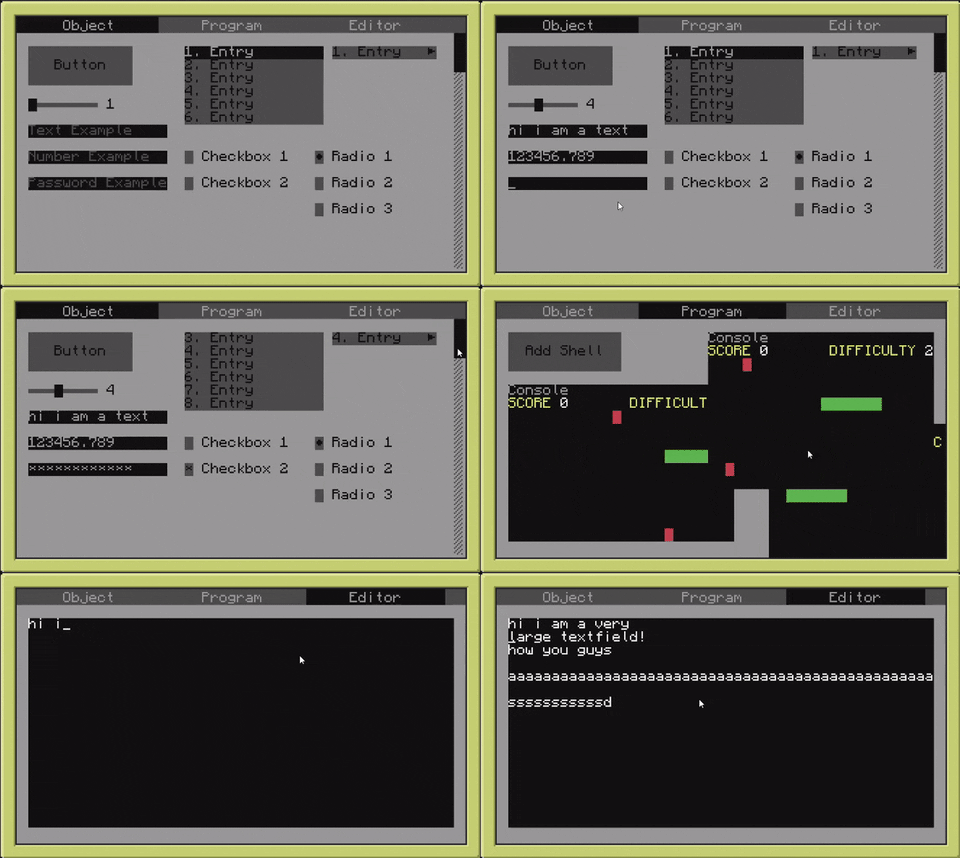
## Quick Demo
|
||||
|
||||
<br><br>
|
||||
|
||||
## Questions & Bugs
|
||||
|
||||
Obviously I've implemented some easter eggs, _some people_ call them "bugs". If you happen to discover one of these just make a new <a href="https://github.com/NoryiE/Basalt/issues">issue</a>.
|
||||
Obviously NyoriE has implemented some easter eggs, *some people* call them "bugs". If you happen to discover one of these just make a new <a href="https://github.com/Pyroxenium/Basalt/issues">issue</a>.
|
||||
|
||||
Additionally, if you have questions about Basalt or how to make use of it, feel free to create a new discussion on <a href="https://github.com/NoryiE/Basalt/discussions">Basalt's Discussion Board</a>.
|
||||
Additionally, if you have questions about Basalt or how to make use of it, feel free to create a new discussion on <a href="https://github.com/Pyroxenium/Basalt/discussions">Basalt's Discussion Board</a>, or ask in our [discord](https://discord.gg/yNNnmBVBpE).
|
||||
|
||||
You may also message me on Discord: NyoriE#8206
|
||||
---
|
||||
|
||||
Feel free to join our [discord](https://discord.gg/yNNnmBVBpE)!
|
||||
|
||||
<br><br>
|
||||
BIN
docs/_media/installer.png
Normal file
BIN
docs/_media/installer.png
Normal file

Binary file not shown.
|
After Width: | Height: | Size: 4.6 KiB |
@@ -1,4 +1,4 @@
|
||||
- Getting Started
|
||||
- [Home](Home.md)
|
||||
- [Quick Start](home/Quick-Start.md)
|
||||
- [Installer](objects/Installer.md)
|
||||
- [Installer](home/installer)
|
||||
|
||||
@@ -3,8 +3,8 @@
|
||||
- [Quick Start](home/Quick-Start.md)
|
||||
- [Installer](home/installer)
|
||||
- Objects
|
||||
- - [Object](objects/Object)
|
||||
- [Basalt](objects/Basalt)
|
||||
- [Object](objects/Object)
|
||||
- [Button](objects/Button)
|
||||
- [Checkbox](objects/Checkbox)
|
||||
- [Dropdown](objects/Dropdown)
|
||||
@@ -16,6 +16,7 @@
|
||||
- [Menubar](objects/Menubar)
|
||||
- [Pane](objects/Pane)
|
||||
- [Program](objects/Program)
|
||||
- [Progressbar](objects/Progressbar)
|
||||
- [Radio](objects/Radio)
|
||||
- [Scrollbar](objects/Scrollbar)
|
||||
- [Slider](objects/Slider)
|
||||
@@ -25,7 +26,10 @@
|
||||
- [Timer](objects/Timer)
|
||||
- Events
|
||||
- [Mouse Events](events/mouseEvents.md)
|
||||
- [Keyboard Events](events/keyEvents.md)
|
||||
- [Other Events](events/otherEvents.md)
|
||||
- Tips & Tricks
|
||||
- [Component Logic](tips/logic)
|
||||
- [Changing Button Color](tips/buttons)
|
||||
- [Design Tips](tips/design.md)
|
||||
- [Advanced usage of Events](tips/events.md)
|
||||
- [Example Designs](tips/design.md)
|
||||
|
||||
39
docs/events/keyEvents.md
Normal file
39
docs/events/keyEvents.md
Normal file
@@ -0,0 +1,39 @@
|
||||
Here we will talk about keyboard events and how you can manipulate them. There are 2 possible key events you can add to almost every visual object.
|
||||
|
||||
# onKey
|
||||
`onKey(self, event, key)`<br>
|
||||
The computercraft event which triggers this method is `key`.
|
||||
Any visual object can register onKey events.
|
||||
|
||||
Here is a example on how to add a onKey event to your frame:
|
||||
|
||||
```lua
|
||||
local basalt = dofile("basalt.lua")
|
||||
|
||||
local mainFrame = basalt.createFrame("myMainFrame"):show()
|
||||
local subFrame = mainFrame:addFrame("subFrame"):setPosition(3,3):setSize(18,6):setBar("Sub Frame",colors.black):showBar():show()
|
||||
|
||||
function openSubFrame()
|
||||
subFrame:show()
|
||||
end
|
||||
mainFrame:onKey(openSubFrame)
|
||||
```
|
||||
|
||||
# onKeyUp
|
||||
`onKeyUp(self, event, key)`<br>
|
||||
The computercraft event which triggers this method is `key_up`.
|
||||
Any visual object can register onKeyUp events.
|
||||
|
||||
Here is a example on how to add a onKeyUp event to your frame:
|
||||
|
||||
```lua
|
||||
local basalt = dofile("basalt.lua")
|
||||
|
||||
local mainFrame = basalt.createFrame("myMainFrame"):show()
|
||||
local subFrame = mainFrame:addFrame("subFrame"):setPosition(3,3):setSize(18,6):setBar("Sub Frame",colors.black):showBar():show()
|
||||
|
||||
function openSubFrame()
|
||||
subFrame:show()
|
||||
end
|
||||
mainFrame:onKeyUp(openSubFrame)
|
||||
```
|
||||
@@ -32,12 +32,12 @@ local basalt = dofile("basalt.lua")
|
||||
local mainFrame = basalt.createFrame("myMainFrame"):show()
|
||||
local button = mainFrame:addButton("myButton"):setPosition(3,3):setSize(12,3):setText("Click"):show()
|
||||
|
||||
function buttonOnClick()
|
||||
function buttonOnClick(self, button, x, y)
|
||||
basalt.debug("Button got clicked!")
|
||||
end
|
||||
button:onClick(buttonOnClick)
|
||||
|
||||
function buttonOnRelease()
|
||||
function buttonOnRelease(self, button, x, y)
|
||||
basalt.debug("Button got released!")
|
||||
end
|
||||
button:onClickUp(buttonOnRelease)
|
||||
@@ -46,7 +46,7 @@ button:onClickUp(buttonOnRelease)
|
||||
# onScroll
|
||||
`onScroll(self, direction, x, y)`<br>
|
||||
The computercraft event which triggers this method is `mouse_scroll`.
|
||||
Any visual object can register a onScroll events.
|
||||
Any visual object can register onScroll events.
|
||||
|
||||
Here is a example on how to add a onScroll event to your button:
|
||||
|
||||
@@ -56,43 +56,27 @@ local basalt = dofile("basalt.lua")
|
||||
local mainFrame = basalt.createFrame("myMainFrame"):show()
|
||||
local button = mainFrame:addButton("myButton"):setPosition(3,3):setSize(12,3):setText("Click"):show()
|
||||
|
||||
function buttonOnScroll()
|
||||
function buttonOnScroll(self, direction, x, y)
|
||||
basalt.debug("Someone scrolls on me!")
|
||||
end
|
||||
button:onScroll(buttonOnScroll)
|
||||
```
|
||||
|
||||
# Beginner Tips
|
||||
# onDrag
|
||||
`onDrag(self, button, x, y)`<br>
|
||||
The computercraft event which triggers this method is `mouse_drag`.
|
||||
Any visual object can register onDrag events.
|
||||
|
||||
## 1
|
||||
Not everyone knows that a function (or in other words a method) does not need to have a name. Instead of a function name you are also able to add the function itself as a argument.
|
||||
Here is a example on how to add a onDrag event to your button:
|
||||
|
||||
Both do the exact same thing:
|
||||
```lua
|
||||
local function clickButton()
|
||||
basalt.debug("I got clicked!")
|
||||
local basalt = dofile("basalt.lua")
|
||||
|
||||
local mainFrame = basalt.createFrame("myMainFrame"):show()
|
||||
local button = mainFrame:addButton("myButton"):setPosition(3,3):setSize(12,3):setText("Click"):show()
|
||||
|
||||
function buttonOnDrag(self, button, x, y)
|
||||
basalt.debug("Someone drags me (i know i wont reposition myself)!")
|
||||
end
|
||||
button:onClick(clickButton)
|
||||
button:onDrag(buttonOnDrag)
|
||||
```
|
||||
|
||||
```lua
|
||||
button:onClick(function()
|
||||
basalt.debug("I got clicked!")
|
||||
end)
|
||||
```
|
||||
|
||||
## 2
|
||||
there is also a function with which you can check if the user is holding a key down, it is called `basalt.isKeyDown()`. It's especially useful for click events.
|
||||
Let us say you want a button to execute something, but if you are holding ctrl down, something in the execution should get changed. This is how you would
|
||||
achieve that:
|
||||
|
||||
```lua
|
||||
button:onClick(function()
|
||||
if(basalt.isKeyDown(keys.LeftCtrl)then
|
||||
basalt.debug("Ctrl is down!")
|
||||
else
|
||||
basalt.debug("Ctrl is up!")
|
||||
end
|
||||
end)
|
||||
```
|
||||
|
||||
|
||||
75
docs/events/otherEvents.md
Normal file
75
docs/events/otherEvents.md
Normal file
@@ -0,0 +1,75 @@
|
||||
There are also other useful events you can listen to:
|
||||
|
||||
# onChange
|
||||
`onChange(self)`<br>
|
||||
This is a custom event which gets triggered as soon as the function :setValue() is called. This function is also called by basalt, for example if you change the input, textfield or checkbox (or all the different types of lists) objects.
|
||||
|
||||
Here is a example on how to add a onChange event to your input, and also another example for your checkbox:
|
||||
|
||||
```lua
|
||||
local basalt = dofile("basalt.lua")
|
||||
|
||||
local mainFrame = basalt.createFrame("myMainFrame"):show()
|
||||
local aInput = mainFrame:addInput("specialInput"):setPosition(3,3):show()
|
||||
local aCheckbox = mainFrame:addCheckbox("specialCheckbox"):setPosition(3,5):show()
|
||||
|
||||
local function checkInput(input)
|
||||
if(string.lower(input:getValue())=="hello")then
|
||||
basalt.debug("Hello back!")
|
||||
end
|
||||
end
|
||||
|
||||
local function checkCheckbox(checkbox)
|
||||
if(checkbox:getValue()==true)then -- or if(checkbox:getValue())then
|
||||
basalt.debug("Checkbox is active, let us do something!")
|
||||
end
|
||||
end
|
||||
|
||||
aInput:onChange(checkInput)
|
||||
aCheckbox:onChange(checkCheckbox)
|
||||
```
|
||||
|
||||
# onResize
|
||||
`onResize(self)`<br>
|
||||
This is a custom event which gets triggered as soon as the parent frame gets resized.
|
||||
|
||||
Here is a example on how to add a onResize event to your button:
|
||||
|
||||
```lua
|
||||
local basalt = dofile("basalt.lua")
|
||||
|
||||
local mainFrame = basalt.createFrame("myMainFrame"):show()
|
||||
local aButton = mainFrame:addButton("myButton"):setPosition(3,3):show()
|
||||
|
||||
local function onButtonResize(button)
|
||||
local width = mainFrame:getWidth()
|
||||
button:setSize()
|
||||
end
|
||||
|
||||
aButton:onResize(onButtonResize)
|
||||
```
|
||||
# onLoseFocus
|
||||
`onLoseFocus(self)`<br>
|
||||
This event gets triggered as soon as the object loses its focus.
|
||||
|
||||
```lua
|
||||
local mainFrame = basalt.createFrame("myFirstFrame"):show()
|
||||
local aButton = mainFrame:addButton("exampleButton"):setPosition(3,3):onLoseFocus(
|
||||
function(self)
|
||||
basalt.debug("Please come back... :(")
|
||||
end
|
||||
):show()
|
||||
```
|
||||
|
||||
# onGetFocus
|
||||
`onGetFocus(self)`<br>
|
||||
This event gets triggered as soon as the object is the currently focused object.
|
||||
|
||||
```lua
|
||||
local mainFrame = basalt.createFrame("myFirstFrame"):show()
|
||||
local aButton = mainFrame:addButton("exampleButton"):setPosition(3,3):onGetFocus(
|
||||
function(self)
|
||||
basalt.debug("Welcome back!")
|
||||
end
|
||||
):show()
|
||||
```
|
||||
BIN
docs/favicon-16x16.png
Normal file
BIN
docs/favicon-16x16.png
Normal file

Binary file not shown.
|
After Width: | Height: | Size: 1.0 KiB |
BIN
docs/favicon-32x32.png
Normal file
BIN
docs/favicon-32x32.png
Normal file

Binary file not shown.
|
After Width: | Height: | Size: 2.2 KiB |
BIN
docs/favicon.ico
Normal file
BIN
docs/favicon.ico
Normal file
Binary file not shown.
|
After Width: | Height: | Size: 15 KiB |
@@ -10,16 +10,16 @@ Just use the following command in any CC:Tweaked shell:
|
||||
This will download `basalt.lua` to your local directory
|
||||
|
||||
To load the framework, make use of the following snippet
|
||||
````lua
|
||||
```lua
|
||||
--> For those who are unfamiliar with lua, dofile executes the code in the referenced file
|
||||
local basalt = dofile("basalt.lua")
|
||||
````
|
||||
```
|
||||
|
||||
|
||||
|
||||
Here is a fully functioning example of Basalt code
|
||||
|
||||
````lua
|
||||
```lua
|
||||
local basalt = dofile("basalt.lua") --> Load the Basalt framework
|
||||
|
||||
--> Create the first frame. Please note that Basalt needs at least one active "non-parent" frame to properly supply events
|
||||
@@ -50,9 +50,9 @@ button:onClick(buttonClick)
|
||||
button:show() --> Make the button visible, so the user can click it
|
||||
|
||||
basalt.autoUpdate() --> Basalt#autoUpdate starts the event listener to detect user input
|
||||
````
|
||||
```
|
||||
If you're like us and strive for succinct and beautiful code, here is a cleaner implementation of the code above:
|
||||
````lua
|
||||
```lua
|
||||
local basalt = dofile("basalt.lua")
|
||||
|
||||
local mainFrame = basalt.createFrame("mainFrame"):show()
|
||||
@@ -67,4 +67,4 @@ local button = mainFrame --> Basalt returns an instance of the object on most me
|
||||
:show()
|
||||
|
||||
basalt.autoUpdate()
|
||||
````
|
||||
```
|
||||
@@ -1,71 +0,0 @@
|
||||
# Getting Started!
|
||||
|
||||
Basalt aims to be a relatively small, easy to use framework.
|
||||
|
||||
Accordingly, we have provided an installation script.
|
||||
|
||||
|
||||
Just use the following command in any CC:Tweaked shell:
|
||||
|
||||
`wget https://github.com/Pyroxenium/Basalt/raw/master/basalt.lua basalt.lua`
|
||||
|
||||
This will download `basalt.lua` to your local directory.
|
||||
|
||||
To load the framework, make use of the following snippet:
|
||||
````lua
|
||||
--> For those who are unfamiliar with lua, dofile executes the code in the referenced file
|
||||
local basalt = dofile("basalt.lua")
|
||||
````
|
||||
|
||||
|
||||
Here is a fully functioning example of Basalt code:
|
||||
|
||||
````lua
|
||||
local basalt = dofile("basalt.lua") --> Load the Basalt framework
|
||||
|
||||
--> Create the first frame. Please note that Basalt needs at least one active "non-parent" frame to properly supply events
|
||||
--> When Basalt#createFrame makes use of unique identifiers (commonly referred to as UIDs), meaning that the supplied value must be UNIQUE
|
||||
--> If the supplied UID is ambiguous, Basalt#createFrame returns a nil value
|
||||
local mainFrame = basalt.createFrame("mainFrame")
|
||||
|
||||
--> Show the frame to the user
|
||||
mainFrame:show()
|
||||
|
||||
local button = mainFrame:addButton("clickableButton") --> Add a button to the mainFrame (With a unique identifier)
|
||||
|
||||
--> Set the position of the button, Button#setPosition follows an x, y pattern.
|
||||
--> The x value is how far right the object should be from its anchor (negative values from an anchor will travel left)
|
||||
--> The y value is how far down the object should be from its anchor (negative values from an anchor will travel up)
|
||||
button:setPosition(4, 4)
|
||||
|
||||
button:setText("Click me!") --> Set the text of our button
|
||||
|
||||
local function buttonClick() --> This function serves as our click logic
|
||||
basalt.debug("I got clicked!")
|
||||
end
|
||||
|
||||
--> Remember! You cannot supply buttonClick(), that will only supply the result of the function
|
||||
--> Make sure the button knows which function to call when it's clicked
|
||||
button:onClick(buttonClick)
|
||||
|
||||
button:show() --> Make the button visible, so the user can click it
|
||||
|
||||
basalt.autoUpdate() --> Basalt#autoUpdate starts the event listener to detect user input
|
||||
````
|
||||
If you're like us and strive for succinct and beautiful code, here is a cleaner implementation of the code above:
|
||||
````lua
|
||||
local basalt = dofile("basalt.lua")
|
||||
|
||||
local mainFrame = basalt.createFrame("mainFrame"):show()
|
||||
local button = mainFrame --> Basalt returns an instance of the object on most methods, to make use of "call-chaining"
|
||||
:addButton("clickableButton") --> This is an example of call chaining
|
||||
:setPosition(4,4)
|
||||
:setText("Click me!")
|
||||
:onClick(
|
||||
function()
|
||||
basalt.debug("I got clicked!")
|
||||
end)
|
||||
:show()
|
||||
|
||||
basalt.autoUpdate()
|
||||
````
|
||||
@@ -4,19 +4,19 @@ This is just a script which helps you to setup your program to automatically ins
|
||||
|
||||
## Basic Installer
|
||||
Here is a very basic one which just installs basalt.lua if don't exist:
|
||||
````lua
|
||||
```lua
|
||||
--Basalt configurated installer
|
||||
local filePath = "basalt.lua" --here you can change the file path default: basalt.lua
|
||||
if not(fs.exists(filePath))then
|
||||
shell.run("pastebin run ESs1mg7P "..filePath) -- this is an alternative to the wget command
|
||||
end
|
||||
local basalt = dofile(filePath) -- here you can change the variablename in any variablename you want default: basalt
|
||||
````
|
||||
```
|
||||
|
||||
## Advanced Installer
|
||||
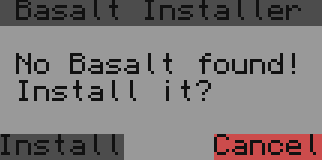
This is a visual version, it asks the user if he wants to install basalt.lua (if not found)<br>
|
||||

|
||||
````lua
|
||||
|
||||
```lua
|
||||
--Basalt configurated installer
|
||||
local filePath = "basalt.lua" --here you can change the file path default: basalt.lua
|
||||
if not(fs.exists(filePath))then
|
||||
@@ -51,12 +51,12 @@ if not(fs.exists(filePath))then
|
||||
local event, p1,p2,p3,p4 = os.pullEvent()
|
||||
if(event=="mouse_click")then
|
||||
if(p3==math.floor(h/2+2))and(p2>=w/2-8)and(p2<=w/2-2)then
|
||||
shell.run("pastebin run ESs1mg7P "..filePath) -- this is an alternative to the wget command
|
||||
shell.run("pastebin run ESs1mg7P "..filePath)
|
||||
_installerWindow.setVisible(false)
|
||||
term.clear()
|
||||
break
|
||||
end
|
||||
if(p3==h/2+2)and(p2<=w/2+9)and(p2>=w/2+4)then
|
||||
if(p3==math.floor(h/2+2))and(p2<=w/2+9)and(p2>=w/2+4)then
|
||||
_installerWindow.clear()
|
||||
_installerWindow.setVisible(false)
|
||||
term.setCursorPos(1,1)
|
||||
@@ -70,4 +70,5 @@ if not(fs.exists(filePath))then
|
||||
end
|
||||
|
||||
local basalt = dofile(filePath) -- here you can change the variablename in any variablename you want default: basalt
|
||||
````
|
||||
------------------------------
|
||||
```
|
||||
|
||||
@@ -8,6 +8,9 @@
|
||||
<meta name="viewport" content="width=device-width, initial-scale=1.0, minimum-scale=1.0">
|
||||
<!-- <link rel="stylesheet" href="//cdn.jsdelivr.net/npm/docsify@4/lib/themes/vue.css">-->
|
||||
<link rel="stylesheet" href="https://cdn.jsdelivr.net/npm/docsify-themeable@0/dist/css/theme-simple-dark.css">
|
||||
<link rel="stylesheet" href="https://cdn.jsdelivr.net/npm/prismjs@1.28.0/themes/prism-tomorrow.min.css">
|
||||
<link rel="icon" type="image/png" sizes="32x32" href="/favicon-32x32.png">
|
||||
<link rel="icon" type="image/png" sizes="16x16" href="/favicon-16x16.png">
|
||||
<style>
|
||||
:root {
|
||||
--theme-color: #16CC27;
|
||||
@@ -43,9 +46,9 @@
|
||||
auto2top: true
|
||||
}
|
||||
</script>
|
||||
<script src="//cdn.jsdelivr.net/npm/prismjs@1/components/prism-lua.min.js"></script>
|
||||
<!-- Docsify v4 -->
|
||||
<script src="//cdn.jsdelivr.net/npm/docsify@4"></script>
|
||||
<script src="https://cdn.jsdelivr.net/npm/docsify-themeable@0/dist/js/docsify-themeable.min.js"></script>
|
||||
<script src="//cdn.jsdelivr.net/npm/prismjs@1.28.0/components/prism-lua.min.js"></script>
|
||||
</body>
|
||||
</html>
|
||||
|
||||
@@ -31,13 +31,13 @@ Sets a wait timer for the next function after the previous function got executed
|
||||
1. `animation` Animation in use
|
||||
|
||||
#### Usage:
|
||||
````lua
|
||||
```lua
|
||||
local mainFrame = basalt.createFrame("myFirstFrame"):show()
|
||||
local testButton = mainFrame:addButton("myTestButton"):show()
|
||||
local aAnimation = mainFrame:addAnimation("anim1"):add(function() testButton:setPosition(3,3) end):wait(1):add(function() testButton:setPosition(1,1,"r") end):wait(2):add(function() testButton:setPosition(1,1,"r") end)
|
||||
|
||||
aAnimation:play()
|
||||
````
|
||||
```
|
||||
|
||||
## play
|
||||
Plays the animation
|
||||
@@ -48,13 +48,13 @@ Plays the animation
|
||||
1. `animation` Animation in use
|
||||
|
||||
#### Usage:
|
||||
````lua
|
||||
```lua
|
||||
local mainFrame = basalt.createFrame("myFirstFrame"):show()
|
||||
local testButton = mainFrame:addButton("myTestButton"):show()
|
||||
local aAnimation = mainFrame:addAnimation("anim1"):add(function() testButton:setBackground(colors.black) end):wait(1):add(function() testButton:setBackground(colors.gray) end):wait(1):add(function() testButton:setBackground(colors.lightGray) end)
|
||||
|
||||
aAnimation:play() -- changes the background color of that button from black to gray and then to lightGray
|
||||
````
|
||||
```
|
||||
|
||||
## cancel
|
||||
Cancels the animation
|
||||
@@ -64,10 +64,10 @@ Cancels the animation
|
||||
|
||||
#### Usage:
|
||||
|
||||
````lua
|
||||
```lua
|
||||
local mainFrame = basalt.createFrame("myFirstFrame"):show()
|
||||
local testButton = mainFrame:addButton("myTestButton"):show()
|
||||
local aAnimation = mainFrame:addAnimation("anim1"):add(function() testButton:setBackground(colors.black) end):wait(1):add(function() aAnimation:cancel() end):wait(1):add(function() testButton:setBackground(colors.lightGray) end)
|
||||
|
||||
aAnimation:play()
|
||||
````
|
||||
```
|
||||
|
||||
@@ -4,10 +4,10 @@ To start using Basalt you have to do the following line of code:
|
||||
|
||||
remember you need the basalt.lua file on your computer!
|
||||
|
||||
Now you are able to call all these functions:
|
||||
Now you are able to use the following functions:
|
||||
|
||||
## basalt.createFrame
|
||||
Create a frame without a parent
|
||||
Create a base-frame (main frame)
|
||||
#### Parameters:
|
||||
1. `string` name
|
||||
|
||||
@@ -16,25 +16,25 @@ Create a frame without a parent
|
||||
|
||||
#### Usage:
|
||||
* Create and show a frame with id "myFirstFrame"
|
||||
````lua
|
||||
```lua
|
||||
local mainFrame = basalt.createFrame("myFirstFrame"):show()
|
||||
````
|
||||
```
|
||||
|
||||
## basalt.removeFrame
|
||||
Removes a frame (only possible for non-parent frames)
|
||||
Removes a base frame
|
||||
|
||||
#### Parameters:
|
||||
1. `string` name
|
||||
|
||||
#### Usage:
|
||||
* Removes the previously created frame with id "myFirstFrame"
|
||||
````lua
|
||||
```lua
|
||||
local mainFrame = basalt.createFrame("myFirstFrame"):show()
|
||||
basalt.removeFrame("myFirstFrame")
|
||||
````
|
||||
```
|
||||
|
||||
## basalt.getFrame
|
||||
With that function you can get frames, but only frames without a parent!
|
||||
Returns a base frame with the given name
|
||||
#### Parameters:
|
||||
1. `string` name
|
||||
|
||||
@@ -43,81 +43,86 @@ With that function you can get frames, but only frames without a parent!
|
||||
|
||||
#### Usage:
|
||||
* Creates, fetches and shows the "myFirstFrame" object
|
||||
````lua
|
||||
```lua
|
||||
basalt.createFrame("myFirstFrame")
|
||||
basalt.getFrame("myFirstFrame"):show()
|
||||
````
|
||||
```
|
||||
|
||||
|
||||
## basalt.getActiveFrame
|
||||
Returns the currently active (without a parent) frame
|
||||
Returns the currently active base frame
|
||||
|
||||
#### Returns:
|
||||
1. `frame` The current frame
|
||||
|
||||
#### Usage:
|
||||
* Displays the active frame name in the debug console
|
||||
````lua
|
||||
```lua
|
||||
basalt.createFrame("myFirstFrame"):show()
|
||||
basalt.debug(basalt.getActiveFrame():getName()) -- returns myFirstFrame
|
||||
````
|
||||
```
|
||||
|
||||
## basalt.autoUpdate
|
||||
Starts the draw and event handler until basalt.stopUpdate() is called
|
||||
|
||||
#### Usage:
|
||||
* Enable the basalt updates, otherwise the screen will not continue to update
|
||||
````lua
|
||||
```lua
|
||||
local mainFrame = basalt.createFrame("myFirstFrame"):show()
|
||||
basalt.autoUpdate()
|
||||
````
|
||||
```
|
||||
|
||||
|
||||
## basalt.update
|
||||
Calls the draw and event handler method once
|
||||
Calls the draw and event handler once - this gives more flexibility about which events basalt should process. For example you could filter the terminate event.
|
||||
|
||||
#### Parameters:
|
||||
1. `string` The event to be received
|
||||
2. `...` Additional event variables to capture
|
||||
|
||||
#### Usage:
|
||||
* Prints "Left Mouse Button clicked!" when clicked
|
||||
````lua
|
||||
quitButton:onClick(
|
||||
function(obj, event, x, y)
|
||||
if(event == "mouse_click") and (button == 1) then --> The button at index 1 is left
|
||||
basalt.debug("Left Mouse Button clicked!")
|
||||
end
|
||||
end
|
||||
)
|
||||
````
|
||||
* Creates and starts a custom update cycle
|
||||
```lua
|
||||
local mainFrame = basalt.createFrame("myFirstFrame"):show()
|
||||
local aButton = mainFrame:addButton("myButton"):setPosition(2,2):show()
|
||||
|
||||
while true do
|
||||
basalt.update(os.pullEventRaw())
|
||||
end
|
||||
```
|
||||
|
||||
## basalt.stopUpdate
|
||||
Stops the draw and event handler _(including, but not limited to mouse clicks)_
|
||||
Stops the automatic draw and event handler which got started by basalt.autoUpdate()
|
||||
|
||||
#### Usage:
|
||||
* When the quit button is clicked, the button stops basalt updates and clears the terminal
|
||||
````lua
|
||||
quitButton:onClick(
|
||||
function(obj, event)
|
||||
if (event == "mouse_click") and (obj == quitButton) then --> The button at index 1 is left
|
||||
basalt.stopUpdate()
|
||||
term.clear()
|
||||
end
|
||||
end
|
||||
)
|
||||
````
|
||||
```lua
|
||||
```lua
|
||||
local mainFrame = basalt.createFrame("myFirstFrame"):show()
|
||||
local aButton = mainFrame:addButton("myButton"):setPosition(2,2):setText("Stop Basalt!"):show()
|
||||
|
||||
aButton:onClick(function()
|
||||
basalt.stopUpdate()
|
||||
end)
|
||||
|
||||
basalt.autoUpdate()
|
||||
```
|
||||
|
||||
|
||||
## basalt.debug
|
||||
creates a label with some information on the main frame on the bottom left, if you click on that label it will open a log view for you see it as the new print for debugging
|
||||
creates a label with some information on the main frame on the bottom left, if you click on that label it will open a log view for you. See it as the new print for debugging
|
||||
|
||||
You can also edit the default debug Label (change position, change color or whatever you want) by accessing the variable basalt.debugLabel
|
||||
which returns the debug Label.
|
||||
|
||||
Also basalt.debugFrame and basalt.debugList are available.
|
||||
|
||||
#### Parameters:
|
||||
1. `...` (multiple parameters are possible, like print does)<br>
|
||||
|
||||
#### Usage:
|
||||
* Prints "Hello! ^-^" to the debug console
|
||||
````lua
|
||||
basalt.debug("Hello! ^-^")
|
||||
````
|
||||
```lua
|
||||
basalt.debug("Hello! ", "^-^")
|
||||
```
|
||||
|
||||
|
||||
@@ -5,20 +5,20 @@ Remember button also inherits from [Object](objects/Object.md)
|
||||
|
||||
## setText
|
||||
Sets the displayed button text
|
||||
````lua
|
||||
```lua
|
||||
local mainFrame = basalt.createFrame("myFirstFrame"):show()
|
||||
local aButton = mainFrame:addButton("myFirstButton"):setText("Click"):show() -- you could also use :setValue() instead of :setText() - no difference
|
||||
````
|
||||
**Arguments:** string text<br>
|
||||
**returns:** self<br>
|
||||
```
|
||||
#### Parameters: string text<br>
|
||||
#### Returns: self<br>
|
||||
|
||||
# Examples
|
||||
Add a onClick event:
|
||||
````lua
|
||||
```lua
|
||||
local mainFrame = basalt.createFrame("myFirstFrame"):show()
|
||||
local aButton = mainFrame:addButton("myFirstButton"):setText("Click"):onClick(function(self,event,button,x,y)
|
||||
if(event=="mouse_click")and(button==1)then
|
||||
basalt.debug("Left mousebutton got clicked!")
|
||||
end
|
||||
end):show()
|
||||
````
|
||||
```
|
||||
@@ -5,9 +5,9 @@ Remember button also inherits from [Object](objects/Object.md)
|
||||
|
||||
|
||||
Create a onChange event:
|
||||
````lua
|
||||
```lua
|
||||
local mainFrame = basalt.createFrame("myFirstFrame"):show()
|
||||
local aCheckbox = mainFrame:addCheckbox("myFirstCheckbox"):onChange(function(self) basalt.debug("The value got changed into "..self:getValue()) end):show()
|
||||
|
||||
````
|
||||
```
|
||||
|
||||
|
||||
@@ -2,10 +2,10 @@ Dropdowns are objects where you can create endless entrys the user can click on
|
||||
|
||||
Here is a example of how to create a standard dropdown:
|
||||
|
||||
````lua
|
||||
```lua
|
||||
local mainFrame = basalt.createFrame("myFirstFrame"):show()
|
||||
local aDropdown = mainFrame:addDropdown("myFirstDropdown"):show()
|
||||
````
|
||||
```
|
||||
|
||||
Here are all possible functions available for dropdowns: <br>
|
||||
Remember Dropdown also inherits from [Object](objects/Object.md)
|
||||
@@ -13,166 +13,166 @@ Remember Dropdown also inherits from [Object](objects/Object.md)
|
||||
## addItem
|
||||
Adds a item to the dropdown
|
||||
|
||||
````lua
|
||||
```lua
|
||||
local mainFrame = basalt.createFrame("myFirstFrame"):show()
|
||||
local aDropdown = mainFrame:addDropdown("myFirstDropdown"):show()
|
||||
aDropdown:addItem("1. Entry")
|
||||
aDropdown:addItem("2. Entry",colors.yellow)
|
||||
aDropdown:addItem("3. Entry",colors.yellow,colors.green)
|
||||
````
|
||||
**parameters:** string text, number bgcolor, number fgcolor, any ... - (text is the displayed text, bgcolor and fgcolors the colors of background/text and args (...) is something dynamic, you wont see them but if you require some more information per item you can use that)<br>
|
||||
**returns:** self<br>
|
||||
```
|
||||
#### Parameters: string text, number bgcolor, number fgcolor, any ... - (text is the displayed text, bgcolor and fgcolors the colors of background/text and args (...) is something dynamic, you wont see them but if you require some more information per item you can use that)<br>
|
||||
#### Returns: self<br>
|
||||
|
||||
## removeItem
|
||||
Removes a item from the dropdown
|
||||
|
||||
````lua
|
||||
```lua
|
||||
local mainFrame = basalt.createFrame("myFirstFrame"):show()
|
||||
local aDropdown = mainFrame:addDropdown("myFirstDropdown"):show()
|
||||
aDropdown:addItem("1. Entry")
|
||||
aDropdown:addItem("2. Entry",colors.yellow)
|
||||
aDropdown:addItem("3. Entry",colors.yellow,colors.green)
|
||||
aDropdown:removeItem(2)
|
||||
````
|
||||
**parameters:** number index<br>
|
||||
**returns:** self<br>
|
||||
```
|
||||
#### Parameters: number index<br>
|
||||
#### Returns: self<br>
|
||||
|
||||
## editItem
|
||||
Edits a item on the dropdown
|
||||
|
||||
````lua
|
||||
```lua
|
||||
local mainFrame = basalt.createFrame("myFirstFrame"):show()
|
||||
local aDropdown = mainFrame:addDropdown("myFirstDropdown"):show()
|
||||
aDropdown:addItem("1. Entry")
|
||||
aDropdown:addItem("2. Entry",colors.yellow)
|
||||
aDropdown:addItem("3. Entry",colors.yellow,colors.green)
|
||||
aDropdown:editItem(3,"3. Edited Entry",colors.yellow,colors.green)
|
||||
````
|
||||
**parameters:** number index, string text, number bgcolor, number fgcolor, any ...<br>
|
||||
**returns:** self<br>
|
||||
```
|
||||
#### Parameters: number index, string text, number bgcolor, number fgcolor, any ...<br>
|
||||
#### Returns: self<br>
|
||||
|
||||
## setScrollable
|
||||
Makes the dropdown scrollable
|
||||
|
||||
````lua
|
||||
```lua
|
||||
local mainFrame = basalt.createFrame("myFirstFrame"):show()
|
||||
local aDropdown = mainFrame:addDropdown("myFirstDropdown"):show()
|
||||
aDropdown:addItem("1. Entry")
|
||||
aDropdown:addItem("2. Entry",colors.yellow)
|
||||
aDropdown:addItem("3. Entry",colors.yellow,colors.green)
|
||||
aDropdown:setScrollable(true)
|
||||
````
|
||||
**parameters:** boolean isScrollable<br>
|
||||
**returns:** self<br>
|
||||
```
|
||||
#### Parameters: boolean isScrollable<br>
|
||||
#### Returns: self<br>
|
||||
|
||||
## selectItem
|
||||
selects a item in the dropdown (same as a player would click on a item)
|
||||
|
||||
````lua
|
||||
```lua
|
||||
local mainFrame = basalt.createFrame("myFirstFrame"):show()
|
||||
local aDropdown = mainFrame:addDropdown("myFirstDropdown"):show()
|
||||
aDropdown:addItem("1. Entry")
|
||||
aDropdown:addItem("2. Entry",colors.yellow)
|
||||
aDropdown:addItem("3. Entry",colors.yellow,colors.green)
|
||||
aDropdown:selectItem(1)
|
||||
````
|
||||
**parameters:** number index<br>
|
||||
**returns:** self<br>
|
||||
```
|
||||
#### Parameters: number index<br>
|
||||
#### Returns: self<br>
|
||||
|
||||
## clear
|
||||
clears the entire list (dropdown)
|
||||
|
||||
````lua
|
||||
```lua
|
||||
local mainFrame = basalt.createFrame("myFirstFrame"):show()
|
||||
local aDropdown = mainFrame:addDropdown("myFirstDropdown"):show()
|
||||
aDropdown:addItem("1. Entry")
|
||||
aDropdown:addItem("2. Entry",colors.yellow)
|
||||
aDropdown:addItem("3. Entry",colors.yellow,colors.green)
|
||||
aDropdown:clear()
|
||||
````
|
||||
**parameters:** -<br>
|
||||
**returns:** self<br>
|
||||
```
|
||||
#### Parameters: -<br>
|
||||
#### Returns: self<br>
|
||||
|
||||
## getItemIndex
|
||||
returns the item index of the currently selected item
|
||||
|
||||
````lua
|
||||
```lua
|
||||
local mainFrame = basalt.createFrame("myFirstFrame"):show()
|
||||
local aDropdown = mainFrame:addDropdown("myFirstDropdown"):show()
|
||||
aDropdown:addItem("1. Entry")
|
||||
aDropdown:addItem("2. Entry",colors.yellow)
|
||||
aDropdown:addItem("3. Entry",colors.yellow,colors.green)
|
||||
aDropdown:getItemIndex()
|
||||
````
|
||||
**parameters:** -<br>
|
||||
**returns:** number index<br>
|
||||
```
|
||||
#### Parameters: -<br>
|
||||
#### Returns: number index<br>
|
||||
|
||||
## setSelectedItem
|
||||
Sets the background of the item which is currently selected
|
||||
|
||||
````lua
|
||||
```lua
|
||||
local mainFrame = basalt.createFrame("myFirstFrame"):show()
|
||||
local aDropdown = mainFrame:addDropdown("myFirstDropdown"):show()
|
||||
aDropdown:addItem("1. Entry")
|
||||
aDropdown:addItem("2. Entry",colors.yellow)
|
||||
aDropdown:addItem("3. Entry",colors.yellow,colors.green)
|
||||
aDropdown:setSelectedItem(colors.green, colors.blue)
|
||||
````
|
||||
**parameters:** number bgcolor, number fgcolor, boolean isActive (isActive means if different colors for selected item should be used)<br>
|
||||
**returns:** self<br>
|
||||
```
|
||||
#### Parameters: number bgcolor, number fgcolor, boolean isActive (isActive means if different colors for selected item should be used)<br>
|
||||
#### Returns: self<br>
|
||||
|
||||
## setOffset
|
||||
sets the dropdown offset (will automatically change if scrolling is active)
|
||||
|
||||
````lua
|
||||
```lua
|
||||
local mainFrame = basalt.createFrame("myFirstFrame"):show()
|
||||
local aDropdown = mainFrame:addDropdown("myFirstDropdown"):show()
|
||||
aDropdown:addItem("1. Entry")
|
||||
aDropdown:addItem("2. Entry",colors.yellow)
|
||||
aDropdown:addItem("3. Entry",colors.yellow,colors.green)
|
||||
aDropdown:setOffset(3)
|
||||
````
|
||||
**parameters:** number offsetValue<br>
|
||||
**returns:** self<br>
|
||||
```
|
||||
#### Parameters: number offsetValue<br>
|
||||
#### Returns: self<br>
|
||||
|
||||
## getOffset
|
||||
returns the current offset
|
||||
|
||||
````lua
|
||||
```lua
|
||||
local mainFrame = basalt.createFrame("myFirstFrame"):show()
|
||||
local aDropdown = mainFrame:addDropdown("myFirstDropdown"):show()
|
||||
aDropdown:addItem("1. Entry")
|
||||
aDropdown:addItem("2. Entry",colors.yellow)
|
||||
aDropdown:addItem("3. Entry",colors.yellow,colors.green)
|
||||
aDropdown:getOffset()
|
||||
````
|
||||
**parameters:** -<br>
|
||||
**returns:** number offsetValue<br>
|
||||
```
|
||||
#### Parameters: -<br>
|
||||
#### Returns: number offsetValue<br>
|
||||
|
||||
## getOffset
|
||||
returns the current offset
|
||||
|
||||
````lua
|
||||
```lua
|
||||
local mainFrame = basalt.createFrame("myFirstFrame"):show()
|
||||
local aDropdown = mainFrame:addDropdown("myFirstDropdown"):show()
|
||||
aDropdown:addItem("1. Entry")
|
||||
aDropdown:addItem("2. Entry",colors.yellow)
|
||||
aDropdown:addItem("3. Entry",colors.yellow,colors.green)
|
||||
aDropdown:getOffset()
|
||||
````
|
||||
**parameters:** -<br>
|
||||
**returns:** number offsetValue<br>
|
||||
```
|
||||
#### Parameters: -<br>
|
||||
#### Returns: number offsetValue<br>
|
||||
|
||||
## setDropdownSize
|
||||
sets the dropdown size (if you click on the button)
|
||||
|
||||
````lua
|
||||
```lua
|
||||
local mainFrame = basalt.createFrame("myFirstFrame"):show()
|
||||
local aDropdown = mainFrame:addDropdown("myFirstDropdown"):show()
|
||||
aDropdown:addItem("1. Entry")
|
||||
aDropdown:addItem("2. Entry",colors.yellow)
|
||||
aDropdown:addItem("3. Entry",colors.yellow,colors.green)
|
||||
aDropdown:setDropdownSize(12, 4)
|
||||
````
|
||||
**parameters:** number width, number height<br>
|
||||
**returns:** self<br>
|
||||
```
|
||||
#### Parameters: number width, number height<br>
|
||||
#### Returns: self<br>
|
||||
@@ -15,9 +15,9 @@ Creates a new non-parent frame - in most cases it is the first thing you'll need
|
||||
|
||||
#### Usage:
|
||||
* Create a frame with an id "myFirstFrame", stored in a variable named frame
|
||||
````lua
|
||||
```lua
|
||||
local myFrame = basalt.createFrame("myFirstFrame")
|
||||
````
|
||||
```
|
||||
|
||||
## addFrame
|
||||
Creates a child frame on the frame, the same as [basalt.createFrame](https://github.com/Pyroxenium/Basalt/wiki/Frame#basaltcreateframe) except the frames are given a parent-child relationship automatically
|
||||
@@ -30,16 +30,16 @@ Creates a child frame on the frame, the same as [basalt.createFrame](https://git
|
||||
|
||||
#### Usage:
|
||||
* Create a frame with id "myFirstFrame" then create a child of that frame, named "myFirstSubFrame"
|
||||
````lua
|
||||
```lua
|
||||
local mainFrame = basalt.createFrame("myFirstFrame")
|
||||
local myFrame = mainFrame:addFrame("myFirstSubFrame")
|
||||
````
|
||||
```
|
||||
|
||||
## setBar
|
||||
Sets the text, background, and foreground of the upper bar of the frame, accordingly.
|
||||
|
||||
#### Parameters:
|
||||
1. `string` The text to set the bar to
|
||||
1. `string` The title text to set the bar to
|
||||
2. `number` The background color
|
||||
2. `number` The foreground color
|
||||
|
||||
@@ -47,21 +47,22 @@ Sets the text, background, and foreground of the upper bar of the frame, accordi
|
||||
1. `frame` The frame being used
|
||||
|
||||
#### Usage:
|
||||
* Set the title to "My first frame!", with a background of gray and a foreground of light gray.
|
||||
````lua
|
||||
frame:setBar("My first Frame!", colors.gray, colors.lightGray)
|
||||
````
|
||||
* Set the title to "My first frame!", with a background of black and a foreground of light gray.
|
||||
```lua
|
||||
frame:setBar("My first Frame!", colors.black, colors.lightGray)
|
||||
```
|
||||
* Store the frame, use the named frame variable after assigning.
|
||||
````lua
|
||||
local mainFrame = basalt.createFrame("myFirstFrame")
|
||||
```lua
|
||||
local mainFrame = basalt.createFrame("myFirstFrame"):show()
|
||||
local myFrame = MainFrame:addFrame("myFirstSubFrame")
|
||||
myFrame:setBar("My first Frame!")
|
||||
````
|
||||
myFrame:show()
|
||||
```
|
||||
* This abuses the call-chaining that Basalt uses.
|
||||
````lua
|
||||
local mainFrame = basalt.createFrame("myFirstFrame")
|
||||
local myFrame = mainFrame:addFrame("myFirstSubFrame"):setBar("My first Frame!")
|
||||
````
|
||||
```lua
|
||||
local mainFrame = basalt.createFrame("myFirstFrame"):show()
|
||||
local myFrame = mainFrame:addFrame("myFirstSubFrame"):setBar("My first Frame!"):show()
|
||||
```
|
||||
|
||||
## setBarTextAlign
|
||||
Sets the frame's bar-text alignment
|
||||
@@ -74,9 +75,9 @@ Sets the frame's bar-text alignment
|
||||
|
||||
#### Usage:
|
||||
* Set the title of myFrame to "My first frame!", and align it to the right.
|
||||
````lua
|
||||
```lua
|
||||
local mainFrame = myFrame:setBar("My first Frame!"):setBarTextAlign("right")
|
||||
````
|
||||
```
|
||||
|
||||
## showBar
|
||||
Toggles the frame's upper bar
|
||||
@@ -89,75 +90,26 @@ Toggles the frame's upper bar
|
||||
|
||||
#### Usage:
|
||||
* Sets myFrame to have a bar titled "Hello World!" and subsequently displays it.
|
||||
````lua
|
||||
```lua
|
||||
local mainFrame = myFrame:setBar("Hello World!"):showBar()
|
||||
````
|
||||
```
|
||||
|
||||
## addMonitor
|
||||
adds a monitor to the active main frame.
|
||||
## setMonitor
|
||||
Sets this frame as a monitor frame
|
||||
|
||||
#### Parameters:
|
||||
1. `string` The monitor name ("right", "left",... "monitor_1", "monitor_2",...)
|
||||
|
||||
#### Returns:
|
||||
1. `frame` returns a frame which you can use like normal frames
|
||||
1. `frame` The frame being used
|
||||
|
||||
#### Usage:
|
||||
* Adds a monitor to the mainFrame. Only as long as this frame is also the active Frame, the monitor will be shown.
|
||||
````lua
|
||||
* Creates a new monitor frame, you can use to show objects on a monitor.
|
||||
```lua
|
||||
local mainFrame = basalt.createFrame("mainFrame"):show()
|
||||
local monitor1 = mainFrame:addMonitor("right"):show()
|
||||
|
||||
monitor1:setBar("Monitor 1"):showBar()
|
||||
````
|
||||
|
||||
## setMonitorScale
|
||||
changes the monitor scale (almost the same as setTextScale())
|
||||
|
||||
#### Parameters:
|
||||
1. `number` Possible values are: 1, 2, 3, 4, 5, 6, 7, 8, 9, 10 (1 is the same as 0.5 by setTextScale, and 10 is the same as 5)
|
||||
|
||||
#### Returns:
|
||||
1. `monitor` The monitor being used
|
||||
|
||||
#### Usage:
|
||||
* Changes the monitor scale to 2
|
||||
````lua
|
||||
local mainFrame = basalt.createFrame("mainFrame"):show()
|
||||
local monitor1 = mainFrame:addMonitor("right"):setMonitorScale(2):show()
|
||||
|
||||
monitor1:setBar("Monitor 1"):showBar()
|
||||
````
|
||||
|
||||
## ~~isModifierActive~~
|
||||
### _Disabled, this function is a WIP_
|
||||
Returns true if the user is currently holding the respective key down
|
||||
|
||||
#### Parameters:
|
||||
1. `number | string` - Any os.queueEvent("key") key, or you can use the following strings: "shift", "ctrl", "alt"
|
||||
|
||||
#### Returns:
|
||||
1. `boolean` - Whether the user is holding the key down
|
||||
|
||||
#### Usage:
|
||||
* Checks if the "shift" modifier is active on the myFrame frame
|
||||
````lua
|
||||
local isActive = myFrame:isModifierActive("shift")
|
||||
````
|
||||
* Creates a label, changing the text to "Shift is inactive oh no :(" and "Shift is active yay!", accordingly.
|
||||
````lua
|
||||
local aLabel = myFrame:addLabel("myFirstLabel"):setText("Shift is inactive oh no :(")
|
||||
myFrame:addButton("myFirstButton"):setText("Click"):onClick(
|
||||
function()
|
||||
if myFrame:isModifierActive("shift") then
|
||||
aLabel:setText("Shift is active yay!")
|
||||
else
|
||||
aLabel:setText("Shift is inactive oh no :(")
|
||||
end
|
||||
end
|
||||
)
|
||||
````
|
||||
|
||||
local monitorFrame = basalt.createFrame("mainFrame"):setMonitor("right"):show()
|
||||
monitorFrame:setBar("Monitor 1"):showBar()
|
||||
```
|
||||
## getObject
|
||||
Returns a child object of the frame
|
||||
|
||||
@@ -169,10 +121,10 @@ Returns a child object of the frame
|
||||
|
||||
#### Usage:
|
||||
* Adds a button with id "myFirstButton", then retrieves it again through the frame object
|
||||
````lua
|
||||
```lua
|
||||
myFrame:addButton("myFirstButton")
|
||||
local aButton = myFrame:getObject("myFirstButton")
|
||||
````
|
||||
```
|
||||
|
||||
## removeObject
|
||||
Removes a child object from the frame
|
||||
@@ -185,10 +137,10 @@ Removes a child object from the frame
|
||||
|
||||
#### Usage:
|
||||
* Adds a button with the id "myFirstButton", then removes it with the aforementioned id
|
||||
````lua
|
||||
```lua
|
||||
myFrame:addButton("myFirstButton")
|
||||
myFrame:removeObject("myFirstButton")
|
||||
````
|
||||
```
|
||||
|
||||
## setFocusedObject
|
||||
Sets the currently focused object
|
||||
@@ -201,10 +153,10 @@ Sets the currently focused object
|
||||
|
||||
#### Usage:
|
||||
* Creates button with id "myFirstButton", sets the focused object to the previously mentioned button
|
||||
````lua
|
||||
```lua
|
||||
local aButton = myFrame:addButton("myFirstButton")
|
||||
myFrame:setFocusedObject(aButton)
|
||||
````
|
||||
```
|
||||
## removeFocusedObject
|
||||
Removes the focus of the supplied object
|
||||
|
||||
@@ -216,10 +168,10 @@ Removes the focus of the supplied object
|
||||
|
||||
#### Usage:
|
||||
* Creates a button with id "myFirstButton", then removes the focus from that button
|
||||
````lua
|
||||
```lua
|
||||
local aButton = myFrame:addButton("myFirstButton")
|
||||
myFrame:removeFocusedObject(aButton)
|
||||
````
|
||||
```
|
||||
|
||||
## getFocusedObject
|
||||
Gets the currently focused object
|
||||
@@ -228,9 +180,9 @@ Gets the currently focused object
|
||||
|
||||
#### Usage:
|
||||
* Gets the currently focused object from the frame, storing it in a variable
|
||||
````lua
|
||||
```lua
|
||||
local focusedObject = myFrame:getFocusedObject()
|
||||
````
|
||||
```
|
||||
## setMovable
|
||||
|
||||
Sets whether the frame can be moved. _In order to move the frame click and drag the upper bar of the frame_
|
||||
@@ -242,28 +194,12 @@ Sets whether the frame can be moved. _In order to move the frame click and drag
|
||||
|
||||
#### Usage:
|
||||
* Creates a frame with id "myFirstFrame" and makes it movable
|
||||
````lua
|
||||
```lua
|
||||
local myFrame = basalt.createFrame("myFirstFrame"):setMovable(true)
|
||||
````
|
||||
|
||||
## ~~setMoveable~~
|
||||
### _Deprecated in favor of setMovable_
|
||||
|
||||
Sets whether the frame can be moved. _In order to move the frame use the upper bar of the frame_
|
||||
#### Parameters:
|
||||
1. `boolean` Whether the object is movable
|
||||
|
||||
#### Returns:
|
||||
1. `frame` The frame being used
|
||||
|
||||
#### Usage:
|
||||
* Creates a frame with id "myFirstFrame" and makes it movable
|
||||
````lua
|
||||
local myFrame = basalt.createFrame("myFirstFrame"):setMoveable(true)
|
||||
````
|
||||
```
|
||||
|
||||
## setOffset
|
||||
Sets the frame's coordinate offset. The frame's child objects will receive the frame's coordinate offset. For example, when using the scrollbar, if you use its value to add an offset to a frame, you will get a scrollable frame.
|
||||
Sets the frame's coordinate offset. The frame's child objects will receive the frame's coordinate offset. For example, when using a scrollbar, if you use its value to add an offset to a frame, you will get a scrollable frame.
|
||||
Objects are also able to ignore the offset by using :ignoreOffset() (For example, you may want to ignore the offset on the scrollbar itself)
|
||||
|
||||
The function can be supplied negative offsets
|
||||
@@ -277,10 +213,10 @@ The function can be supplied negative offsets
|
||||
|
||||
#### Usage:
|
||||
* Creates "myFirstFrame" with an x offset of 5 and a y offset of 3
|
||||
````lua
|
||||
```lua
|
||||
local myFrame = basalt.createFrame("myFirstFrame"):setOffset(5, 3)
|
||||
````
|
||||
```
|
||||
* Creates "myFirstFrame" with an x offset of 5 and a y offset of -5 (Meaning if you added a button with y position 5, it would be at y position 0)
|
||||
````lua
|
||||
```lua
|
||||
local myFrame = basalt.createFrame("myFirstFrame"):setOffset(5, -5)
|
||||
````
|
||||
```
|
||||
|
||||
@@ -7,30 +7,30 @@ Remember Image inherits from [Object](objects/Object.md)
|
||||
|
||||
## loadImage
|
||||
loads a image into the memory.
|
||||
````lua
|
||||
```lua
|
||||
local mainFrame = basalt.createFrame("myFirstFrame"):show()
|
||||
local aImage = mainFrame:addImage("myFirstImage"):loadImage("randomImage.nfp"):show()
|
||||
````
|
||||
**Arguments:** string path<br>
|
||||
**returns:** self<br>
|
||||
```
|
||||
#### Parameters: string path<br>
|
||||
#### Returns: self<br>
|
||||
|
||||
|
||||
## loadBlittleImage -- not finished yet
|
||||
loads a blittle image into the memory.
|
||||
````lua
|
||||
```lua
|
||||
local mainFrame = basalt.createFrame("myFirstFrame"):show()
|
||||
local aImage = mainFrame:addImage("myFirstImage"):loadBlittleImage("blittleImage.blt"):show()
|
||||
````
|
||||
**Arguments:** string path<br>
|
||||
**returns:** self<br>
|
||||
```
|
||||
#### Parameters: string path<br>
|
||||
#### Returns: self<br>
|
||||
|
||||
## shrink
|
||||
If you were loading a normal (paint) image into the memory, this function would shrink it to a
|
||||
blittle image and immediatly draws it (if it's visible)
|
||||
````lua
|
||||
```lua
|
||||
local mainFrame = basalt.createFrame("myFirstFrame"):show()
|
||||
local aImage = mainFrame:addImage("myFirstImage"):loadBlittleImage("randomImage.nfp"):shrink():show()
|
||||
````
|
||||
**Arguments:** -<br>
|
||||
**returns:** self<br>
|
||||
```
|
||||
#### Parameters: -<br>
|
||||
#### Returns: self<br>
|
||||
|
||||
|
||||
@@ -5,9 +5,9 @@ Remember Input inherits from [Object](objects/Object.md)
|
||||
|
||||
## setInputType
|
||||
changes the input type
|
||||
````lua
|
||||
```lua
|
||||
local mainFrame = basalt.createFrame("myFirstFrame"):show()
|
||||
local aInput = mainFrame:addInput("myFirstInput"):setInputType("password"):show()
|
||||
````
|
||||
**parameters:** string value ("text", "password", "number")<br>
|
||||
**returns:** self<br>
|
||||
```
|
||||
#### Parameters: string value ("text", "password", "number")<br>
|
||||
#### Returns: self<br>
|
||||
|
||||
@@ -3,7 +3,7 @@ This is just a script which helps you to install basalt.lua, if it's not already
|
||||
## Visual Installer
|
||||
This is a visual version, it asks the user if he wants to install basalt.lua (if not found)<br>
|
||||

|
||||
````lua
|
||||
```lua
|
||||
--Basalt configurated installer
|
||||
local filePath = "basalt.lua" --here you can change the file path default: basalt.lua
|
||||
if not(fs.exists(filePath))then
|
||||
@@ -58,11 +58,11 @@ end
|
||||
|
||||
local basalt = dofile(filePath) -- here you can change the variablename in any variablename you want default: basalt
|
||||
------------------------------
|
||||
````
|
||||
```
|
||||
|
||||
## Basic Installer
|
||||
Here is a very basic one which just installs basalt.lua if don't exist:
|
||||
````lua
|
||||
```lua
|
||||
--Basalt configurated installer
|
||||
local filePath = "basalt.lua" --here you can change the file path default: basalt.lua
|
||||
if not(fs.exists(filePath))then
|
||||
@@ -70,4 +70,4 @@ shell.run("pastebin run ESs1mg7P")
|
||||
end
|
||||
local basalt = dofile(filePath) -- here you can change the variablename in any variablename you want default: basalt
|
||||
|
||||
````
|
||||
```
|
||||
@@ -7,28 +7,29 @@ Remember Label inherits from [Object](objects/Object.md)
|
||||
|
||||
## setText
|
||||
sets the text which gets displayed.
|
||||
````lua
|
||||
```lua
|
||||
local mainFrame = basalt.createFrame("myFirstFrame"):show()
|
||||
local aInput = mainFrame:addLabel("myFirstLabel"):setText("Hello lovely basalt community!"):show()
|
||||
````
|
||||
**arguments:** string text<br>
|
||||
**returns:** self<br>
|
||||
```
|
||||
#### Parameters: string text<br>
|
||||
#### Returns: self<br>
|
||||
|
||||
## setFontSize
|
||||
sets the font size of that text.
|
||||
````lua
|
||||
The font size is handled by bigfonts, if you're curious what bigfonts is, check out this page: http://www.computercraft.info/forums2/index.php?/topic/25367-bigfont-api-write-bigger-letters-v10/
|
||||
```lua
|
||||
local mainFrame = basalt.createFrame("myFirstFrame"):show()
|
||||
local aInput = mainFrame:addLabel("myFirstLabel"):setText("Hello"):setFontSize(2):show()
|
||||
````
|
||||
**arguments:** number size (1 = default, 2 = big, 3 = bigger, 4 = huge)<br>
|
||||
**returns:** self<br>
|
||||
```
|
||||
#### Parameters: number size (1 = default, 2 = big, 3 = bigger, 4 = huge)<br>
|
||||
#### Returns: self<br>
|
||||
|
||||
## getFontSize
|
||||
returns the fontsize
|
||||
````lua
|
||||
```lua
|
||||
local mainFrame = basalt.createFrame("myFirstFrame"):show()
|
||||
local aInput = mainFrame:addLabel("myFirstLabel"):setText("Hello"):setFontSize(2):show()
|
||||
basalt.debug(aInput:getFontSize()) -- returns 2
|
||||
````
|
||||
**arguments:** <br>
|
||||
**returns:** number<br>
|
||||
```
|
||||
#### Parameters: <br>
|
||||
#### Returns: number<br>
|
||||
|
||||
@@ -2,10 +2,10 @@ Lists are objects where you can create endless entrys and the user can choose on
|
||||
|
||||
Here is a example of how to create a standard list:
|
||||
|
||||
````lua
|
||||
```lua
|
||||
local mainFrame = basalt.createFrame("myFirstFrame"):show()
|
||||
local aList = mainFrame:addList("myFirstList"):show()
|
||||
````
|
||||
```
|
||||
|
||||
This will create a default list with the size 8 width and 5 height on position 1 1 (relative to its parent frame), the default background is colors.lightGray, the default text color is colors.black and the default zIndex is 5. The default horizontal text align is "center", default symbol is ">"
|
||||
|
||||
@@ -14,138 +14,138 @@ Here are all possible functions available for lists. Remember List inherits from
|
||||
## addItem
|
||||
Adds a item into the list
|
||||
|
||||
````lua
|
||||
```lua
|
||||
local mainFrame = basalt.createFrame("myFirstFrame"):show()
|
||||
local aList = mainFrame:addList("myFirstList"):show()
|
||||
aList:addItem("1. Entry")
|
||||
aList:addItem("2. Entry",colors.yellow)
|
||||
aList:addItem("3. Entry",colors.yellow,colors.green)
|
||||
````
|
||||
**parameters:** string text, number bgcolor, number fgcolor, any ... - (text is the displayed text, bgcolor and fgcolors the colors of background/text and args (...) is something dynamic, you wont see them but if you require some more information per item you can use that)<br>
|
||||
**returns:** self<br>
|
||||
```
|
||||
#### Parameters: string text, number bgcolor, number fgcolor, any ... - (text is the displayed text, bgcolor and fgcolors the colors of background/text and args (...) is something dynamic, you wont see them but if you require some more information per item you can use that)<br>
|
||||
#### Returns: self<br>
|
||||
|
||||
## removeItem
|
||||
Removes a item from the list
|
||||
|
||||
````lua
|
||||
```lua
|
||||
local mainFrame = basalt.createFrame("myFirstFrame"):show()
|
||||
local aList = mainFrame:addList("myFirstList"):show()
|
||||
aList:addItem("1. Entry")
|
||||
aList:addItem("2. Entry",colors.yellow)
|
||||
aList:addItem("3. Entry",colors.yellow,colors.green)
|
||||
aList:removeItem(2)
|
||||
````
|
||||
**parameters:** number index<br>
|
||||
**returns:** self<br>
|
||||
```
|
||||
#### Parameters: number index<br>
|
||||
#### Returns: self<br>
|
||||
|
||||
## editItem
|
||||
Edits a item on the list
|
||||
|
||||
````lua
|
||||
```lua
|
||||
local mainFrame = basalt.createFrame("myFirstFrame"):show()
|
||||
local aList = mainFrame:addList("myFirstList"):show()
|
||||
aList:addItem("1. Entry")
|
||||
aList:addItem("2. Entry",colors.yellow)
|
||||
aList:addItem("3. Entry",colors.yellow,colors.green)
|
||||
aList:editItem(3,"3. Edited Entry",colors.yellow,colors.green)
|
||||
````
|
||||
**parameters:** number index, string text, number bgcolor, number fgcolor, any ...<br>
|
||||
**returns:** self<br>
|
||||
```
|
||||
#### Parameters: number index, string text, number bgcolor, number fgcolor, any ...<br>
|
||||
#### Returns: self<br>
|
||||
|
||||
## setScrollable
|
||||
Makes the list scrollable
|
||||
|
||||
````lua
|
||||
```lua
|
||||
local mainFrame = basalt.createFrame("myFirstFrame"):show()
|
||||
local aList = mainFrame:addList("myFirstList"):show()
|
||||
aList:addItem("1. Entry")
|
||||
aList:addItem("2. Entry",colors.yellow)
|
||||
aList:addItem("3. Entry",colors.yellow,colors.green)
|
||||
aList:setScrollable(true)
|
||||
````
|
||||
**parameters:** boolean isScrollable<br>
|
||||
**returns:** self<br>
|
||||
```
|
||||
#### Parameters: boolean isScrollable<br>
|
||||
#### Returns: self<br>
|
||||
|
||||
## selectItem
|
||||
selects a item in the list (same as a player would click on a item)
|
||||
|
||||
````lua
|
||||
```lua
|
||||
local mainFrame = basalt.createFrame("myFirstFrame"):show()
|
||||
local aList = mainFrame:addList("myFirstList"):show()
|
||||
aList:addItem("1. Entry")
|
||||
aList:addItem("2. Entry",colors.yellow)
|
||||
aList:addItem("3. Entry",colors.yellow,colors.green)
|
||||
aList:selectItem(1)
|
||||
````
|
||||
**parameters:** number index<br>
|
||||
**returns:** self<br>
|
||||
```
|
||||
#### Parameters: number index<br>
|
||||
#### Returns: self<br>
|
||||
|
||||
## clear
|
||||
clears the entire list
|
||||
|
||||
````lua
|
||||
```lua
|
||||
local mainFrame = basalt.createFrame("myFirstFrame"):show()
|
||||
local aDropdown = mainFrame:addDropdown("myFirstDropdown"):show()
|
||||
aDropdown:addItem("1. Entry")
|
||||
aDropdown:addItem("2. Entry",colors.yellow)
|
||||
aDropdown:addItem("3. Entry",colors.yellow,colors.green)
|
||||
aDropdown:clear()
|
||||
````
|
||||
**parameters:** -<br>
|
||||
**returns:** self<br>
|
||||
```
|
||||
#### Parameters: -<br>
|
||||
#### Returns: self<br>
|
||||
|
||||
## getItemIndex
|
||||
returns the item index of the currently selected item
|
||||
|
||||
````lua
|
||||
```lua
|
||||
local mainFrame = basalt.createFrame("myFirstFrame"):show()
|
||||
local aDropdown = mainFrame:addDropdown("myFirstDropdown"):show()
|
||||
aDropdown:addItem("1. Entry")
|
||||
aDropdown:addItem("2. Entry",colors.yellow)
|
||||
aDropdown:addItem("3. Entry",colors.yellow,colors.green)
|
||||
aDropdown:getItemIndex()
|
||||
````
|
||||
**parameters:** -<br>
|
||||
**returns:** number index<br>
|
||||
```
|
||||
#### Parameters: -<br>
|
||||
#### Returns: number index<br>
|
||||
|
||||
## setSelectedItem
|
||||
Sets the background of the item which is currently selected
|
||||
|
||||
````lua
|
||||
```lua
|
||||
local mainFrame = basalt.createFrame("myFirstFrame"):show()
|
||||
local aList = mainFrame:addList("myFirstList"):show()
|
||||
aList:addItem("1. Entry")
|
||||
aList:addItem("2. Entry",colors.yellow)
|
||||
aList:addItem("3. Entry",colors.yellow,colors.green)
|
||||
aList:setSelectedItem(colors.green, colors.blue)
|
||||
````
|
||||
**parameters:** number bgcolor, number fgcolor, boolean isActive (isActive means if different colors for selected item should be used)<br>
|
||||
**returns:** self<br>
|
||||
```
|
||||
#### Parameters: number bgcolor, number fgcolor, boolean isActive (isActive means if different colors for selected item should be used)<br>
|
||||
#### Returns: self<br>
|
||||
|
||||
## setOffset
|
||||
sets the list offset (will automatically change if scrolling is active)
|
||||
|
||||
````lua
|
||||
```lua
|
||||
local mainFrame = basalt.createFrame("myFirstFrame"):show()
|
||||
local aList = mainFrame:addList("myFirstList"):show()
|
||||
aList:addItem("1. Entry")
|
||||
aList:addItem("2. Entry",colors.yellow)
|
||||
aList:addItem("3. Entry",colors.yellow,colors.green)
|
||||
aList:setOffset(3)
|
||||
````
|
||||
**parameters:** number offsetValue<br>
|
||||
**returns:** self<br>
|
||||
```
|
||||
#### Parameters: number offsetValue<br>
|
||||
#### Returns: self<br>
|
||||
|
||||
## getOffset
|
||||
returns the current offset
|
||||
|
||||
````lua
|
||||
```lua
|
||||
local mainFrame = basalt.createFrame("myFirstFrame"):show()
|
||||
local aList = mainFrame:addList("myFirstList"):show()
|
||||
aList:addItem("1. Entry")
|
||||
aList:addItem("2. Entry",colors.yellow)
|
||||
aList:addItem("3. Entry",colors.yellow,colors.green)
|
||||
aList:getOffset()
|
||||
````
|
||||
**parameters:** -<br>
|
||||
**returns:** number offsetValue<br>
|
||||
```
|
||||
#### Parameters: -<br>
|
||||
#### Returns: number offsetValue<br>
|
||||
@@ -1 +1,296 @@
|
||||
WIP
|
||||
Menubars are like lists but instead of being vertical, they are horizontal. Imagine you are creating a Operating System and you would like to add a taskbar, menubars would be exactly what you need, because they are also scrollable, which means they have endless entry possibility.
|
||||
|
||||
If you want to access values inside items this is how the table for single items is made (just a example):
|
||||
|
||||
```lua
|
||||
item = {
|
||||
text="1. Entry",
|
||||
bgCol=colors.black,
|
||||
fgCol=colors.white
|
||||
args = {}
|
||||
}
|
||||
```
|
||||
|
||||
Here are all possible functions available for menubars. Remember menubar inherits from [Object](objects/Object.md)
|
||||
|
||||
## addItem
|
||||
Adds a item into the menubar
|
||||
|
||||
#### Parameters:
|
||||
1. `string` The entry name
|
||||
2. `number|color` unique default background color
|
||||
3. `number|color` unique default text color
|
||||
4. `any` any value - you could access this later in a :onChange() event (you need to use :getValue()).
|
||||
|
||||
#### Returns:
|
||||
1. `object` The object in use
|
||||
|
||||
#### Usage:
|
||||
* Creates a default menubar with 3 entries
|
||||
```lua
|
||||
local mainFrame = basalt.createFrame("myFirstFrame"):show()
|
||||
local aMenubar = mainFrame:addMenubar("myFirstMenubar"):show()
|
||||
aMenubar:addItem("1. Entry")
|
||||
aMenubar:addItem("2. Entry",colors.yellow)
|
||||
aMenubar:addItem("3. Entry",colors.yellow,colors.green)
|
||||
```
|
||||
|
||||
## removeItem
|
||||
Removes a item from the menubar
|
||||
|
||||
#### Parameters:
|
||||
1. `number` The index which should get removed
|
||||
|
||||
#### Returns:
|
||||
1. `object` The object in use
|
||||
|
||||
#### Usage:
|
||||
* Creates a default menubar with 3 entries and removes the second one.
|
||||
```lua
|
||||
local mainFrame = basalt.createFrame("myFirstFrame"):show()
|
||||
local aMenubar = mainFrame:addMenubar("myFirstMenubar"):show()
|
||||
aMenubar:addItem("1. Entry")
|
||||
aMenubar:addItem("2. Entry",colors.yellow)
|
||||
aMenubar:addItem("3. Entry",colors.yellow,colors.green)
|
||||
aMenubar:removeItem(2)
|
||||
```
|
||||
|
||||
## editItem
|
||||
Edits item from the menubar
|
||||
|
||||
#### Parameters:
|
||||
1. `number` The index which should be edited
|
||||
2. `string` The new item name
|
||||
3. `number` the new item background color
|
||||
4. `number` The new item text color
|
||||
5. `any` New additional information
|
||||
|
||||
#### Returns:
|
||||
1. `object` The object in use
|
||||
|
||||
#### Usage:
|
||||
* Creates a default menubar with 3 entries and edits the second one.
|
||||
```lua
|
||||
local mainFrame = basalt.createFrame("myFirstFrame"):show()
|
||||
local aMenubar = mainFrame:addMenubar("myFirstMenubar"):show()
|
||||
aMenubar:addItem("1. Entry")
|
||||
aMenubar:addItem("2. Entry",colors.yellow)
|
||||
aMenubar:addItem("3. Entry",colors.yellow,colors.green)
|
||||
aMenubar:editItem(2, "Still 2. Entry", colors.red)
|
||||
```
|
||||
|
||||
## getItem
|
||||
Returns a item by index
|
||||
|
||||
#### Parameters:
|
||||
1. `number` The index which should be returned
|
||||
|
||||
#### Returns:
|
||||
1. `table` The item table example: {text="1. Entry", bgCol=colors.black, fgCol=colors.white}
|
||||
|
||||
#### Usage:
|
||||
* Creates a default menubar with 3 entries and edits the second one.
|
||||
```lua
|
||||
local mainFrame = basalt.createFrame("myFirstFrame"):show()
|
||||
local aMenubar = mainFrame:addMenubar("myFirstMenubar"):show()
|
||||
aMenubar:addItem("1. Entry")
|
||||
aMenubar:addItem("2. Entry",colors.yellow)
|
||||
aMenubar:addItem("3. Entry",colors.yellow,colors.green)
|
||||
aMenubar:editItem(2, "Still 2. Entry", colors.red)
|
||||
```
|
||||
|
||||
## getItemCount
|
||||
Returns the current item count
|
||||
|
||||
#### Returns:
|
||||
1. `number` The item list count
|
||||
|
||||
#### Usage:
|
||||
* Creates a default menubar with 3 entries and prints the current item count.
|
||||
```lua
|
||||
local mainFrame = basalt.createFrame("myFirstFrame"):show()
|
||||
local aMenubar = mainFrame:addMenubar("myFirstMenubar"):show()
|
||||
aMenubar:addItem("1. Entry")
|
||||
aMenubar:addItem("2. Entry",colors.yellow)
|
||||
aMenubar:addItem("3. Entry",colors.yellow,colors.green)
|
||||
basalt.debug(aMenubar:getItemCount())
|
||||
```
|
||||
|
||||
## getAll
|
||||
Returns all items as table
|
||||
|
||||
#### Returns:
|
||||
1. `table` All items
|
||||
|
||||
#### Usage:
|
||||
* Creates a default menubar with 3 entries and prints a table.
|
||||
```lua
|
||||
local mainFrame = basalt.createFrame("myFirstFrame"):show()
|
||||
local aMenubar = mainFrame:addMenubar("myFirstMenubar"):show()
|
||||
aMenubar:addItem("1. Entry")
|
||||
aMenubar:addItem("2. Entry",colors.yellow)
|
||||
aMenubar:addItem("3. Entry",colors.yellow,colors.green)
|
||||
basalt.debug(aMenubar:getAll())
|
||||
```
|
||||
|
||||
## setSpace
|
||||
Sets the space between entries
|
||||
|
||||
#### Parameters:
|
||||
1. `number` The space between each entry
|
||||
|
||||
#### Returns:
|
||||
1. `object` The object in use
|
||||
|
||||
#### Usage:
|
||||
* Creates a default menubar with 3 entries and changes the space to 3.
|
||||
```lua
|
||||
local mainFrame = basalt.createFrame("myFirstFrame"):show()
|
||||
local aMenubar = mainFrame:addMenubar("myFirstMenubar"):show()
|
||||
aMenubar:addItem("1. Entry")
|
||||
aMenubar:addItem("2. Entry",colors.yellow)
|
||||
aMenubar:addItem("3. Entry",colors.yellow,colors.green)
|
||||
aMenubar:setSpace(3)
|
||||
```
|
||||
|
||||
|
||||
|
||||
## setScrollable
|
||||
Makes the menubar scrollable. The menubar will be scrollable as soon as the menubar is to small for all the entries.
|
||||
|
||||
#### Parameters:
|
||||
1. `boolean` if this menubar should be scrollable or not
|
||||
|
||||
#### Returns:
|
||||
1. `object` The object in use
|
||||
|
||||
#### Usage:
|
||||
* Creates a default menubar with 3 entries and makes it scrollable.
|
||||
```lua
|
||||
local mainFrame = basalt.createFrame("myFirstFrame"):show()
|
||||
local aMenubar = mainFrame:addMenubar("myFirstMenubar"):show()
|
||||
aMenubar:addItem("1. Entry")
|
||||
aMenubar:addItem("2. Entry",colors.yellow)
|
||||
aMenubar:addItem("3. Entry",colors.yellow,colors.green)
|
||||
aMenubar:setScrollable(true)
|
||||
```
|
||||
|
||||
## selectItem
|
||||
selects a item in the list (same as a player would click on a item)
|
||||
|
||||
#### Parameters:
|
||||
1. `number` The index which should get selected
|
||||
|
||||
#### Returns:
|
||||
1. `object` The object in use
|
||||
|
||||
#### Usage:
|
||||
* Creates a default menubar with 3 entries and selects the second entry.
|
||||
```lua
|
||||
local mainFrame = basalt.createFrame("myFirstFrame"):show()
|
||||
local aMenubar = mainFrame:addMenubar("myFirstMenubar"):show()
|
||||
aMenubar:addItem("1. Entry")
|
||||
aMenubar:addItem("2. Entry",colors.yellow)
|
||||
aMenubar:addItem("3. Entry",colors.yellow,colors.green)
|
||||
aMenubar:selectItem(2)
|
||||
```
|
||||
## clear
|
||||
Removes all items.
|
||||
|
||||
#### Returns:
|
||||
1. `object` The object in use
|
||||
|
||||
#### Usage:
|
||||
* Creates a default menubar with 3 entries and removes them immediatley. Which makes no sense.
|
||||
```lua
|
||||
local mainFrame = basalt.createFrame("myFirstFrame"):show()
|
||||
local aMenubar = mainFrame:addMenubar("myFirstMenubar"):show()
|
||||
aMenubar:addItem("1. Entry")
|
||||
aMenubar:addItem("2. Entry",colors.yellow)
|
||||
aMenubar:addItem("3. Entry",colors.yellow,colors.green)
|
||||
aMenubar:clear()
|
||||
```
|
||||
|
||||
## getItemIndex
|
||||
returns the item index of the currently selected item
|
||||
|
||||
#### Returns:
|
||||
1. `number` The current index
|
||||
|
||||
#### Usage:
|
||||
* Creates a default menubar with 3 entries selects the second entry and prints the currently selected index.
|
||||
```lua
|
||||
local mainFrame = basalt.createFrame("myFirstFrame"):show()
|
||||
local aMenubar = mainFrame:addMenubar("myFirstMenubar"):show()
|
||||
aMenubar:addItem("1. Entry")
|
||||
aMenubar:addItem("2. Entry",colors.yellow)
|
||||
aMenubar:addItem("3. Entry",colors.yellow,colors.green)
|
||||
aMenubar:selectItem(2)
|
||||
basalt.debug(aMenubar:getItemIndex())
|
||||
```
|
||||
|
||||
## setSelectedItem
|
||||
Sets the background and the foreground of the item which is currently selected
|
||||
|
||||
#### Parameters:
|
||||
1. `number|color` The background color which should be used
|
||||
2. `number|color` The text color which should be used
|
||||
|
||||
#### Returns:
|
||||
1. `object` The object in use
|
||||
|
||||
#### Usage:
|
||||
* Creates a default menubar with 4 entries and sets the selection background color to green.
|
||||
```lua
|
||||
local mainFrame = basalt.createFrame("myFirstFrame"):show()
|
||||
local aMenubar = mainFrame:addMenubar("myFirstMenubar"):show()
|
||||
aMenubar:addItem("1. Entry")
|
||||
aMenubar:addItem("2. Entry")
|
||||
aMenubar:addItem("3. Entry")
|
||||
aMenubar:addItem("4. Entry")
|
||||
aMenubar:setSelectedItem(colors.green)
|
||||
```
|
||||
|
||||
## setPositionOffset
|
||||
Sets the offset of the menubar (the same as you would scroll) - default is 0
|
||||
|
||||
#### Parameters:
|
||||
1. `number` The offset value
|
||||
|
||||
#### Returns:
|
||||
1. `object` The object in use
|
||||
|
||||
#### Usage:
|
||||
* Creates a default menubar with 6 entries and sets the offset to 3.
|
||||
```lua
|
||||
local mainFrame = basalt.createFrame("myFirstFrame"):show()
|
||||
local aMenubar = mainFrame:addMenubar("myFirstMenubar"):show()
|
||||
aMenubar:addItem("1. Entry")
|
||||
aMenubar:addItem("2. Entry")
|
||||
aMenubar:addItem("3. Entry")
|
||||
aMenubar:addItem("4. Entry")
|
||||
aMenubar:addItem("5. Entry")
|
||||
aMenubar:addItem("6. Entry")
|
||||
aMenubar:setPositionOffset(3)
|
||||
```
|
||||
|
||||
## getPositionOffset
|
||||
returns the current offset
|
||||
|
||||
#### Returns:
|
||||
1. `number` Current offset
|
||||
|
||||
#### Usage:
|
||||
* Creates a default menubar with 6 entries and sets the offset to 3.
|
||||
```lua
|
||||
local mainFrame = basalt.createFrame("myFirstFrame"):show()
|
||||
local aMenubar = mainFrame:addMenubar("myFirstMenubar"):show()
|
||||
aMenubar:addItem("1. Entry")
|
||||
aMenubar:addItem("2. Entry")
|
||||
aMenubar:addItem("3. Entry")
|
||||
aMenubar:addItem("4. Entry")
|
||||
aMenubar:addItem("5. Entry")
|
||||
aMenubar:addItem("6. Entry")
|
||||
aMenubar:setPositionOffset(3)
|
||||
basalt.debug(aMenubar:getPositionOffset())
|
||||
```
|
||||
|
||||
@@ -1,247 +1,382 @@
|
||||
This is the base class of all visual objects. This means, if you create a button, label, frame or something else visual (no timers, threads or animations) the following list can be used:
|
||||
This is the base class of all visual objects. This means, if you create a button, label, frame or something else visual (no timers, threads or animations) the following methods apply:
|
||||
|
||||
## show
|
||||
shows the object (only if the parent frame is already visible)
|
||||
````lua
|
||||
Shows the object (only if the parent frame is already visible)
|
||||
#### Returns:
|
||||
1. `object` The object in use
|
||||
|
||||
#### Usage:
|
||||
* Shows a frame named "myFirstFrame"
|
||||
```lua
|
||||
local mainFrame = basalt.createFrame("myFirstFrame"):show()
|
||||
local button = mainFrame:addButton("myFirstButton")
|
||||
button:show()
|
||||
````
|
||||
#### Parameters: -<br>
|
||||
#### Returns: self<br>
|
||||
```
|
||||
|
||||
## hide
|
||||
hides the object
|
||||
````lua
|
||||
Hides the object
|
||||
|
||||
#### Returns:
|
||||
1. `object` The object in use
|
||||
|
||||
#### Usage:
|
||||
* Hides a frame named "myFirstFrame"
|
||||
```lua
|
||||
local mainFrame = basalt.createFrame("myFirstFrame"):show()
|
||||
local button = mainFrame:addButton("myFirstButton"):setText("Close"):onClick(function() mainFrame:hide() end)
|
||||
button:show()
|
||||
````
|
||||
#### Parameters: -<br>
|
||||
#### Returns: self<br>
|
||||
```
|
||||
|
||||
## setPosition
|
||||
Changes the position relative to its parent frame
|
||||
````lua
|
||||
local mainFrame = basalt.createFrame("myFirstFrame"):setPosition(2,3)
|
||||
````
|
||||
#### Parameters: number x, number y[, boolean relative], if relative is set to true it will add/remove instead of set x, y<br>
|
||||
#### Returns: self<br>
|
||||
#### Parameters:
|
||||
1. `number` x coordinate
|
||||
2. `number` y coordinate
|
||||
3. `boolean` Whether it will add/remove to the current coordinates instead of setting them
|
||||
|
||||
#### Returns:
|
||||
1. `object` The object in use
|
||||
|
||||
#### Usage:
|
||||
* Sets the Buttons position to an x coordinate of 2 with a y coordinate of 3
|
||||
```lua
|
||||
local mainFrame = basalt.createFrame("myFirstFrame"):show()
|
||||
mainFrame:addButton("myFirstButton"):setPosition(2,3)
|
||||
```
|
||||
|
||||
## setBackground
|
||||
Changes the object background color
|
||||
````lua
|
||||
local mainFrame = basalt.createFrame("myFirstFrame"):setBackground(colors.lightGray)
|
||||
````
|
||||
#### Parameters: number color<br>
|
||||
#### Returns: self<br>
|
||||
Changes the object background color, if you set the value to false the background wont be visible. For example you could see trough a frame.
|
||||
#### Parameters:
|
||||
1. `number|color` Background color
|
||||
|
||||
#### Returns:
|
||||
1. `object` The object in use
|
||||
|
||||
#### Usage:
|
||||
* Creates a frame, and sets its background color to `colors.gray`
|
||||
```lua
|
||||
local mainFrame = basalt.createFrame("myFirstFrame"):setBackground(colors.gray)
|
||||
```
|
||||
|
||||
## setForeground
|
||||
Changes the object text color
|
||||
````lua
|
||||
local mainFrame = basalt.createFrame("myFirstFrame"):setForeground(colors.black)
|
||||
````
|
||||
#### Parameters: number color<br>
|
||||
#### Returns: self<br>
|
||||
#### Parameters:
|
||||
1. `number|color` Foreground color
|
||||
|
||||
#### Returns:
|
||||
1. `object` The object in use
|
||||
|
||||
#### Usage:
|
||||
* Creates a frame, and sets its foreground color to `colors.green`
|
||||
```lua
|
||||
local mainFrame = basalt.createFrame("myFirstFrame"):setForeground(colors.green)
|
||||
```
|
||||
|
||||
## setSize
|
||||
Changes the object size
|
||||
````lua
|
||||
local mainFrame = basalt.createFrame("myFirstFrame"):setSize(15,5)
|
||||
````
|
||||
#### Parameters: number width, number length<br>
|
||||
#### Returns: self<br>
|
||||
#### Parameters:
|
||||
1. `number` width
|
||||
2. `number` height
|
||||
|
||||
#### Returns:
|
||||
1. `object` The object in use
|
||||
|
||||
#### Usage:
|
||||
* Sets the frame to have a width of 15 and a height of 12
|
||||
```lua
|
||||
local mainFrame = basalt.createFrame("myFirstFrame"):show()
|
||||
local subFrame = mainFrame:addFrame("myFirstSubFrame"):setSize(15,12):show()
|
||||
```
|
||||
|
||||
## setFocus
|
||||
sets the object to be the focused object.
|
||||
If you click on a object, it's normaly automatically the focused object. As example, if you :show() a frame and you want this particular frame to be in
|
||||
the foreground, you have to use :setFocus()
|
||||
````lua
|
||||
Sets the object to be the focused object.
|
||||
If you click on an object, it's normally automatically the focused object. For example, if you call :show() on a frame, and you want this particular frame to be in
|
||||
the foreground, you should also use :setFocus()
|
||||
#### Returns:
|
||||
1. `object` The object in use
|
||||
|
||||
#### Usage:
|
||||
* Sets the button to the focused object
|
||||
```lua
|
||||
local mainFrame = basalt.createFrame("myFirstFrame"):show()
|
||||
local aButton = mainFrame:addButton("myFirstButton"):setFocus():show()
|
||||
````
|
||||
#### Parameters: -<br>
|
||||
#### Returns: self<br>
|
||||
```
|
||||
|
||||
## setZIndex
|
||||
changes the z index (higher z index do have higher draw/event priority) 10 is more important than 5 or 1. You are also able to add multiple objects to the same z index, which means if you create a couple of buttons, you set their z index to 10, everything below 10 is less important, everything above 10 is more important. On the same z index: the last object which gets created is the most important one.
|
||||
````lua
|
||||
Sets the z-index. Higher value means higher draw/event priority. You can also add multiple objects to the same z-index, if so the last added object will have the highest priority.
|
||||
#### Parameters:
|
||||
1. `number` z-index
|
||||
|
||||
#### Returns:
|
||||
1. `object` The object in use
|
||||
|
||||
#### Usage:
|
||||
* Sets the z-index of "myFirstButton" to `1` and the z-index of "myFirstLabel" to `1`
|
||||
```lua
|
||||
local mainFrame = basalt.createFrame("myFirstFrame"):show()
|
||||
local aButton = mainFrame:addButton("myFirstButton"):setZIndex(1):show()
|
||||
````
|
||||
#### Parameters: number index<br>
|
||||
#### Returns: self<br>
|
||||
local aButton = mainFrame:addButton("myFirstButton"):setZIndex(1):setPosition(2,2):show()
|
||||
local aLabel = mainFrame:addButton("myFirstLabel"):setZIndex(2):setPosition(2,2):setText("I am a label!"):show()
|
||||
```
|
||||
|
||||
## setParent
|
||||
changes the frame parent of that object
|
||||
````lua
|
||||
Sets the parent frame of the object
|
||||
#### Parameters:
|
||||
1. `frame` The to-be parent frame
|
||||
|
||||
#### Returns:
|
||||
1. `object` The object in use
|
||||
|
||||
#### Usage:
|
||||
* Sets the parent frame of the random frame, adding it to the main frame when the button is clicked"
|
||||
```lua
|
||||
local mainFrame = basalt.createFrame("myFirstFrame"):show()
|
||||
local aRandomFrame = basalt.createFrame("aRandomFrame"):show()
|
||||
local aButton = mainFrame:addButton("myFirstButton"):onClick(function() aRandomFrame:setParent(mainFrame) end):show()
|
||||
````
|
||||
#### Parameters: frame object<br>
|
||||
#### Returns: self<br>
|
||||
local aButton = mainFrame:addButton("myFirstButton"):onClick(
|
||||
function()
|
||||
aRandomFrame:setParent(mainFrame)
|
||||
end
|
||||
):show()
|
||||
```
|
||||
|
||||
## isFocused
|
||||
returns if the object is currently the focused object of the parent frame
|
||||
Returns if the object is currently the focused object of the parent frame
|
||||
|
||||
````lua
|
||||
#### Returns:
|
||||
1. `boolean` Whether the object is focused
|
||||
|
||||
#### Usage:
|
||||
* Prints whether the button is focused to the debug console
|
||||
```lua
|
||||
local mainFrame = basalt.createFrame("myFirstFrame"):show()
|
||||
local aButton = mainFrame:addButton("myFirstButton"):show()
|
||||
basalt.debug(aButton:isFocused()) -- shows true or false as a debug message
|
||||
````
|
||||
#### Parameters: -<br>
|
||||
#### Returns: boolean<br>
|
||||
```
|
||||
|
||||
## getAnchorPosition
|
||||
converts the x,y coordinates into the anchor coordinates of that object
|
||||
Converts the x and y coordinates into the anchor coordinates of the object
|
||||
|
||||
````lua
|
||||
#### Parameters:
|
||||
1. `number|nil` x
|
||||
2. `number|nil` y, if nothing it uses the object's x, y
|
||||
|
||||
#### Returns:
|
||||
1. `number` x
|
||||
2. `number` y
|
||||
|
||||
#### Usage:
|
||||
* Prints the anchor position to the debug console
|
||||
```lua
|
||||
local mainFrame = basalt.createFrame("myFirstFrame"):setSize(15,15):show()
|
||||
local aButton = mainFrame:addButton("myFirstButton"):setAnchor("right","bottom"):setSize(8,1):setPosition(1,1):show()
|
||||
local aButton = mainFrame:addButton("myFirstButton")
|
||||
:setAnchor("bottomRight")
|
||||
:setSize(8,1)
|
||||
:setPosition(1,1)
|
||||
:show()
|
||||
basalt.debug(aButton:getAnchorPosition()) -- returns 7,14 (framesize - own size) instead of 1,1
|
||||
````
|
||||
#### Parameters: number x, number y - or nothing (if nothing it uses the object's x, y)<br>
|
||||
#### Returns: number x, number y (converted)<br>
|
||||
```
|
||||
|
||||
## setAnchor
|
||||
sets the anchor of that object
|
||||
Sets the anchor of the object
|
||||
|
||||
````lua
|
||||
local mainFrame = basalt.createFrame("myFirstFrame"):setAnchor("right"):show()
|
||||
local aButton = mainFrame:addButton("myFirstButton"):setAnchor("bottom","right"):setSize(8,1):setPosition(1,1):show()
|
||||
````
|
||||
#### Parameters: string sides - ("left", "right", "top", "bottom") you can stack positions like so ..:setAnchor("right", "bottom")<br>
|
||||
#### Returns: self<br>
|
||||
#### Parameters:
|
||||
1. `string` Anchor sides `("topLeft" "top", "topRight", "right", "bottomRight", "bottom", "bottomLeft", "left", "center")`
|
||||
|
||||
#### Returns:
|
||||
1. `object` The object in use
|
||||
|
||||
#### Usage:
|
||||
* Sets the button to have an anchor of `bottomRight`
|
||||
```lua
|
||||
local mainFrame = basalt.createFrame("myFirstFrame"):show()
|
||||
local aButton = mainFrame:addButton("myFirstButton")
|
||||
:setAnchor("bottomRight")
|
||||
:setSize(8,1)
|
||||
:setPosition(-8,1)
|
||||
:show()
|
||||
```
|
||||
|
||||
## getAbsolutePosition
|
||||
converts the relative coordinates into absolute coordinates
|
||||
````lua
|
||||
Converts the relative coordinates into absolute coordinates
|
||||
#### Parameters:
|
||||
1. `number|nil` x
|
||||
2. `number|nil` y
|
||||
|
||||
#### Returns:
|
||||
1. `object` The object in use
|
||||
|
||||
#### Usage:
|
||||
* Creates a frame and a button and prints the button's absolute position to the debug console
|
||||
```lua
|
||||
local mainFrame = basalt.createFrame("myFirstFrame"):setPosition(3,3):show()
|
||||
local aButton = mainFrame:addButton("myFirstButton"):setSize(8,1):setPosition(4,2):show()
|
||||
basalt.debug(aButton:getAbsolutePosition()) -- returns 7,5 (frame coords + own coords) instead of 4,2
|
||||
````
|
||||
#### Parameters: number x, number y - or nothing (if nothing it uses the object's x, y)<br>
|
||||
#### Returns: self<br>
|
||||
```
|
||||
|
||||
## setTextAlign
|
||||
sets the text align of the object (for example buttons)
|
||||
````lua
|
||||
Sets the text align of the object (for example buttons)
|
||||
#### Parameters:
|
||||
1. `string` horizontal
|
||||
2. `string` vertical ("left", "center", "right")
|
||||
|
||||
#### Returns:
|
||||
1. `object` The object in use
|
||||
|
||||
#### Usage:
|
||||
* Creates a button with text aligned to `right, center`
|
||||
```lua
|
||||
local mainFrame = basalt.createFrame("myFirstFrame"):show()
|
||||
local aButton = mainFrame:addButton("myFirstButton"):setSize(12,3):setTextAlign("right", "center"):setText("Dont't..."):show()
|
||||
````
|
||||
#### Parameters: string horizontal, string vertical - ("left", "center", "right")<br>
|
||||
#### Returns: self<br>
|
||||
local aButton = mainFrame:addButton("myFirstButton")
|
||||
:setSize(12,3)
|
||||
:setTextAlign("right", "center")
|
||||
:setText("Don't...")
|
||||
:show()
|
||||
```
|
||||
|
||||
## setValue
|
||||
sets the value of that object (input, label, checkbox, textfield, scrollbar,...)
|
||||
````lua
|
||||
Sets the value of that object (input, label, checkbox, textfield, scrollbar,...)
|
||||
#### Parameters:
|
||||
1. `any` Value to set the object to
|
||||
|
||||
#### Returns:
|
||||
1. `object` The object in use
|
||||
|
||||
#### Usage:
|
||||
* Creates a checkbox and ticks it
|
||||
```lua
|
||||
local mainFrame = basalt.createFrame("myFirstFrame"):show()
|
||||
local aCheckbox = mainFrame:addCheckbox("myFirstCheckbox"):setValue(true):show()
|
||||
````
|
||||
#### Parameters: any value<br>
|
||||
#### Returns: self<br>
|
||||
```
|
||||
|
||||
## getValue
|
||||
returns the currently saved value
|
||||
````lua
|
||||
Returns the currently saved value
|
||||
#### Returns:
|
||||
1. `any` Object's value
|
||||
|
||||
#### Usage:
|
||||
* Prints the value of the checkbox to the debug console
|
||||
```lua
|
||||
local mainFrame = basalt.createFrame("myFirstFrame"):show()
|
||||
local aCheckbox = mainFrame:addCheckbox("myFirstCheckbox"):setValue(true):show()
|
||||
basalt.debug(aCheckbox:getValue()) -- returns true
|
||||
````
|
||||
#### Parameters:-<br>
|
||||
#### Returns: any value<br>
|
||||
```
|
||||
|
||||
## getHeight/getWidth
|
||||
returns the height or width
|
||||
````lua
|
||||
Returns the respective height/width of the object
|
||||
#### Returns:
|
||||
1. `number` height/width
|
||||
|
||||
#### Usage:
|
||||
* Prints the height of the object to the debug console
|
||||
```lua
|
||||
local mainFrame = basalt.createFrame("myFirstFrame"):show()
|
||||
local aButton = mainFrame:addButton("myFirstButton"):setSize(5,8):show()
|
||||
basalt.debug(aButton:getHeight()) -- returns 8
|
||||
````
|
||||
#### Parameters:-<br>
|
||||
#### Returns: number height/width<br>
|
||||
```
|
||||
|
||||
## isVisible
|
||||
returns if the object is currently visible
|
||||
````lua
|
||||
Returns if the object is currently visible
|
||||
#### Returns:
|
||||
1. `boolean`
|
||||
|
||||
#### Usage:
|
||||
* Prints boolean visibility of object to debug console
|
||||
```lua
|
||||
local mainFrame = basalt.createFrame("myFirstFrame"):show()
|
||||
local aButton = mainFrame:addButton("myFirstButton"):setSize(5,8):show()
|
||||
basalt.debug(aButton:isVisible()) -- returns true
|
||||
````
|
||||
#### Parameters:-<br>
|
||||
#### Returns: boolean<br>
|
||||
```
|
||||
|
||||
## getName
|
||||
returns the given name of that object
|
||||
````lua
|
||||
Returns the given name of the object
|
||||
|
||||
#### Returns:
|
||||
1. `string` name
|
||||
|
||||
#### Usage:
|
||||
* Prints name of object to debug window
|
||||
```lua
|
||||
local mainFrame = basalt.createFrame("myFirstFrame"):show()
|
||||
basalt.debug(mainFrame:getName()) -- returns myFirstFrame
|
||||
````
|
||||
#### Parameters:-<br>
|
||||
#### Returns: string name<br>
|
||||
```
|
||||
|
||||
# Object Events
|
||||
These object events are available for all objects, if a object got some unique events, you can see them in their own category
|
||||
## setShadow
|
||||
Sets the shadow color - default: colors.black
|
||||
|
||||
## onClick
|
||||
creates a mouse_click event
|
||||
````lua
|
||||
#### Parameters:
|
||||
1. `number|color` Shadow color
|
||||
|
||||
#### Returns:
|
||||
1. `object` The object in use
|
||||
|
||||
#### Usage:
|
||||
* Sets the shadow to green and shows it:
|
||||
```lua
|
||||
local mainFrame = basalt.createFrame("myFirstFrame"):show()
|
||||
local aButton = mainFrame:addButton("myFirstButton"):setSize(10,3):onClick(function(self,event,button,x,y) basalt.debug("Hellooww UwU") end):show()
|
||||
````
|
||||
#### Parameters: function func<br>
|
||||
#### Returns: self<br>
|
||||
local subFrame = mainFrame:addFrame("mySubFrame")
|
||||
:setMoveable()
|
||||
:setSize(18,6)
|
||||
:setShadow(colors.green)
|
||||
:showShadow(true)
|
||||
:show()
|
||||
```
|
||||
|
||||
## onClickUp
|
||||
creates a click_up event
|
||||
````lua
|
||||
## showShadow
|
||||
Shows or hides the shadow
|
||||
|
||||
#### Parameters:
|
||||
1. `boolean` Whether it should show or hide the shadow
|
||||
|
||||
#### Returns:
|
||||
1. `object` The object in use
|
||||
|
||||
#### Usage:
|
||||
* Shows the shadow:
|
||||
```lua
|
||||
local mainFrame = basalt.createFrame("myFirstFrame"):show()
|
||||
local aButton = mainFrame:addButton("myFirstButton"):setSize(10,3):onClickUp(function(self,event,button,x,y) basalt.debug("Byeeeee UwU") end):show()
|
||||
````
|
||||
#### Parameters: function func<br>
|
||||
#### Returns: self<br>
|
||||
local subFrame = mainFrame:addFrame("mySubFrame")
|
||||
:setMoveable()
|
||||
:setSize(18,6)
|
||||
:showShadow(true)
|
||||
:show()
|
||||
```
|
||||
|
||||
## onMouseDrag
|
||||
creates a mouse_drag event
|
||||
````lua
|
||||
## setBorder
|
||||
Sets the border color - default: colors.black
|
||||
|
||||
#### Parameters:
|
||||
1. `number|color` Border color
|
||||
|
||||
#### Returns:
|
||||
1. `object` The object in use
|
||||
|
||||
#### Usage:
|
||||
* Sets the border to green and shows it:
|
||||
```lua
|
||||
local mainFrame = basalt.createFrame("myFirstFrame"):show()
|
||||
local aButton = mainFrame:addButton("myFirstButton"):setSize(10,3):onClickUp(function(self,event,button,x,y) basalt.debug("Byeeeee UwU") end):show()
|
||||
````
|
||||
#### Parameters: function func<br>
|
||||
#### Returns: self<br>
|
||||
local subFrame = mainFrame:addFrame("mySubFrame")
|
||||
:setMoveable()
|
||||
:setSize(18,6)
|
||||
:setBorder(colors.green)
|
||||
:showBorder("left", "top", "right", "bottom")
|
||||
:show()
|
||||
```
|
||||
|
||||
## onChange
|
||||
creates a change event (fires as soon as the value gets changed)
|
||||
````lua
|
||||
## showBorder
|
||||
Shows or hides the border
|
||||
|
||||
#### Parameters:
|
||||
1. `strings` Whether it should show or hide the border on the specific sides ("left", "top", "right", "bottom")
|
||||
|
||||
#### Returns:
|
||||
1. `object` The object in use
|
||||
|
||||
#### Usage:
|
||||
* Shows the border:
|
||||
```lua
|
||||
local mainFrame = basalt.createFrame("myFirstFrame"):show()
|
||||
local aCheckbox = mainFrame:addCheckbox("myFirstCheckbox"):onChange(function(self) basalt.debug("i got changed into "..self:getValue()) end):show()
|
||||
````
|
||||
#### Parameters: function func<br>
|
||||
#### Returns: self<br>
|
||||
|
||||
## onKey
|
||||
creates a key(board) - event can be key or char
|
||||
````lua
|
||||
local mainFrame = basalt.createFrame("myFirstFrame"):onKey(function(self,event,key) basalt.debug("you clicked "..key) end):show()
|
||||
````
|
||||
#### Parameters: function func<br>
|
||||
#### Returns: self<br>
|
||||
|
||||
## onLoseFocus
|
||||
creates a lose focus event
|
||||
````lua
|
||||
local mainFrame = basalt.createFrame("myFirstFrame"):onLoseFocus(function(self) basalt.debug("please come back..") end):show()
|
||||
````
|
||||
#### Parameters: function func<br>
|
||||
#### Returns: self<br>
|
||||
|
||||
## onGetFocus
|
||||
creates a get focus event
|
||||
````lua
|
||||
local mainFrame = basalt.createFrame("myFirstFrame"):onGetFocus(function(self) basalt.debug("thanks!") end):show()
|
||||
````
|
||||
#### Parameters: function func<br>
|
||||
#### Returns: self<br>
|
||||
local subFrame = mainFrame:addFrame("mySubFrame")
|
||||
:setMoveable()
|
||||
:setSize(18,6)
|
||||
:showBorder("left", "top", "right", "bottom")
|
||||
:show()
|
||||
```
|
||||
|
||||
@@ -7,10 +7,10 @@ Pane doesn't have any custom functionallity. If you want to change the color/pos
|
||||
|
||||
## Example:
|
||||
|
||||
````lua
|
||||
```lua
|
||||
local mainFrame = basalt.createFrame("myFirstFrame"):show()
|
||||
local aPane = mainFrame:addPane("myFirstBackground")
|
||||
aPane:setSize(30, 10)
|
||||
aPane:setBackground(colors.yellow)
|
||||
aPane:show()
|
||||
````
|
||||
```
|
||||
@@ -5,99 +5,99 @@ Remember Program inherits from [Object](objects/Object.md)
|
||||
|
||||
## getStatus
|
||||
returns the current status
|
||||
````lua
|
||||
```lua
|
||||
local mainFrame = basalt.createFrame("myFirstFrame"):show()
|
||||
local aProgram = mainFrame:addProgram("myFirstProgram"):show()
|
||||
basalt.debug(aProgram:getStatus()) -- returns "running", "normal", "suspended" or "dead"
|
||||
````
|
||||
**parameters:**-<br>
|
||||
**returns:** string "running" - if its running, "normal" - is active but not running (waiting for a event), "suspended" - is suspended or not started, "dead" - has finished or stopped with an error<br>
|
||||
```
|
||||
#### Parameters:-<br>
|
||||
#### Returns: string "running" - if its running, "normal" - is active but not running (waiting for a event), "suspended" - is suspended or not started, "dead" - has finished or stopped with an error<br>
|
||||
|
||||
## execute
|
||||
executes the given path (-program)
|
||||
````lua
|
||||
```lua
|
||||
local mainFrame = basalt.createFrame("myFirstFrame"):show()
|
||||
local aProgram = mainFrame:addProgram("myFirstProgram"):show()
|
||||
aProgram:execute("rom/programs/fun/worm.lua") -- executes worm
|
||||
````
|
||||
**parameters:** string filepath - (the path to the program you want to execute)<br>
|
||||
**returns:** self<br>
|
||||
```
|
||||
#### Parameters: string filepath - (the path to the program you want to execute)<br>
|
||||
#### Returns: self<br>
|
||||
|
||||
## stop
|
||||
gives a terminate event to the program, which means if you are running a shell, and the shell executes a program by itself you have to call stop 2 times to entirely close the running program
|
||||
````lua
|
||||
```lua
|
||||
local mainFrame = basalt.createFrame("myFirstFrame"):show()
|
||||
local aProgram = mainFrame:addProgram("myFirstProgram"):execute("rom/programs/shell.lua"):show()
|
||||
mainFrame:addButton("myFirstButton"):setText("close"):onClick(function() aProgram:stop() end):show()
|
||||
|
||||
````
|
||||
**parameters:**-<br>
|
||||
**returns:** self<br>
|
||||
```
|
||||
#### Parameters:-<br>
|
||||
#### Returns: self<br>
|
||||
|
||||
## pause
|
||||
pauses the program (prevents the program from receiving events)
|
||||
````lua
|
||||
```lua
|
||||
local mainFrame = basalt.createFrame("myFirstFrame"):show()
|
||||
local aProgram = mainFrame:addProgram("myFirstProgram"):execute("rom/programs/shell.lua"):show()
|
||||
mainFrame:addButton("myFirstButton"):setText("close"):onClick(function() aProgram:pause(true) end):show()
|
||||
|
||||
````
|
||||
**parameters:** boolean pause<br>
|
||||
**returns:** self<br>
|
||||
```
|
||||
#### Parameters: boolean pause<br>
|
||||
#### Returns: self<br>
|
||||
|
||||
## isPaused
|
||||
returns if the program is currently paused
|
||||
````lua
|
||||
```lua
|
||||
local mainFrame = basalt.createFrame("myFirstFrame"):show()
|
||||
local aProgram = mainFrame:addProgram("myFirstProgram"):execute("rom/programs/shell.lua"):show()
|
||||
mainFrame:addButton("myFirstButton"):setText("pause"):onClick(function() basalt.debug(aProgram:isPaused()) end):show()
|
||||
|
||||
````
|
||||
**parameters:** -<br>
|
||||
**returns:** boolean isPaused<br>
|
||||
```
|
||||
#### Parameters: -<br>
|
||||
#### Returns: boolean isPaused<br>
|
||||
|
||||
## injectEvent
|
||||
injects a event into the program manually
|
||||
````lua
|
||||
```lua
|
||||
local mainFrame = basalt.createFrame("myFirstFrame"):show()
|
||||
local aProgram = mainFrame:addProgram("myFirstProgram"):execute("rom/programs/shell.lua"):show()
|
||||
mainFrame:addButton("myFirstButton"):setText("inject"):onClick(function() aProgram:injectEvent("char", "w") end):show()
|
||||
|
||||
````
|
||||
**parameters:** string event, any parameter, any parameter, any parameter, any parameter, boolean ignorePause<br>
|
||||
**returns:** self<br>
|
||||
```
|
||||
#### Parameters: string event, any parameter, any parameter, any parameter, any parameter, boolean ignorePause<br>
|
||||
#### Returns: self<br>
|
||||
|
||||
## injectEvents
|
||||
injects a event table into the program manually
|
||||
````lua
|
||||
```lua
|
||||
local mainFrame = basalt.createFrame("myFirstFrame"):show()
|
||||
local aProgram = mainFrame:addProgram("myFirstProgram"):execute("rom/programs/shell.lua"):show()
|
||||
--example will follow
|
||||
|
||||
````
|
||||
**parameters:** string event, any parameter, any parameter, any parameter, any parameter, boolean ignorePause<br>
|
||||
**returns:** self<br>
|
||||
```
|
||||
#### Parameters: string event, any parameter, any parameter, any parameter, any parameter, boolean ignorePause<br>
|
||||
#### Returns: self<br>
|
||||
|
||||
## getQueuedEvents
|
||||
returns a table of all currently queued events (while pause is active incomming events will go into a queueEvents table) as soon as the program gets unpaused
|
||||
it will inject these events
|
||||
````lua
|
||||
```lua
|
||||
local mainFrame = basalt.createFrame("myFirstFrame"):show()
|
||||
local aProgram = mainFrame:addProgram("myFirstProgram"):execute("rom/programs/shell.lua"):show()
|
||||
mainFrame:addButton("myFirstButton"):setText("inject"):onClick(function() basalt.debug(aProgram:getQueuedEvents()) end):show()
|
||||
|
||||
````
|
||||
**parameters:** -<br>
|
||||
**returns:** table queuedEvents<br>
|
||||
```
|
||||
#### Parameters: -<br>
|
||||
#### Returns: table queuedEvents<br>
|
||||
|
||||
## updateQueuedEvents
|
||||
here you can manipulate the queuedEvents table with your own events table
|
||||
````lua
|
||||
```lua
|
||||
local mainFrame = basalt.createFrame("myFirstFrame"):show()
|
||||
local aProgram = mainFrame:addProgram("myFirstProgram"):execute("rom/programs/shell.lua"):show()
|
||||
--example will follow
|
||||
|
||||
````
|
||||
**parameters:** table queuedEvents<br>
|
||||
**returns:** self<br>
|
||||
```
|
||||
#### Parameters: table queuedEvents<br>
|
||||
#### Returns: self<br>
|
||||
|
||||
|
||||
110
docs/objects/Progressbar.md
Normal file
110
docs/objects/Progressbar.md
Normal file
@@ -0,0 +1,110 @@
|
||||
Progressbars are objects to visually display the current state of your progression. They always go from 0 to 100 (%) - no matter how big they are. which means if you
|
||||
want to add some energy progress you have to do simple maths: currentValue / maxValue * 100
|
||||
|
||||
Here are all possible functions available for progessbars. Remember progressbar inherits from [Object](objects/Object.md)
|
||||
|
||||
## setDirection
|
||||
Sets the direction in which the bar should be expanding.
|
||||
|
||||
#### Parameters:
|
||||
1. `number` x direction (0 = left to right, 1 = top to bottom, 2 = right to left and 3 = bottom to top)
|
||||
|
||||
#### Returns:
|
||||
1. `object` The object in use
|
||||
|
||||
#### Usage:
|
||||
* Creates a progressbar and sets the direction from bottom to top
|
||||
```lua
|
||||
local mainFrame = basalt.createFrame("myFirstFrame"):show()
|
||||
local aProgressbar = mainFrame:addProgressbar("myFirstProgressbar"):show()
|
||||
aProgressbar:setDirection(3)
|
||||
```
|
||||
|
||||
## setProgress
|
||||
This is the function you need to call if you want the progression to change.
|
||||
|
||||
#### Parameters:
|
||||
1. `number` a number from 0 to 100
|
||||
|
||||
#### Returns:
|
||||
1. `object` The object in use
|
||||
|
||||
#### Usage:
|
||||
* Creates a progressbar and sets the current progress to 50
|
||||
```lua
|
||||
local mainFrame = basalt.createFrame("myFirstFrame"):show()
|
||||
local aProgressbar = mainFrame:addProgressbar("myFirstProgressbar"):show()
|
||||
aProgressbar:setProgress(50)
|
||||
```
|
||||
|
||||
## getProgress
|
||||
Returns the current progress status
|
||||
|
||||
|
||||
#### Returns:
|
||||
1. `number` progress (0-100)
|
||||
|
||||
#### Usage:
|
||||
* Creates a progressbar, sets the current progress to 50 and prints the current progress
|
||||
```lua
|
||||
local mainFrame = basalt.createFrame("myFirstFrame"):show()
|
||||
local aProgressbar = mainFrame:addProgressbar("myFirstProgressbar"):show()
|
||||
aProgressbar:setProgress(50)
|
||||
basalt.debug(aProgressbar:getProgress())
|
||||
```
|
||||
|
||||
## setProgressBar
|
||||
This function will change the visual display of your progress bar
|
||||
|
||||
#### Parameters:
|
||||
1. `number|color` the expanding progress bar color
|
||||
2. `char` optional - the bar symbol - default is " " (space)
|
||||
3. `number|color` optional - the bar symbol color
|
||||
|
||||
#### Returns:
|
||||
1. `object` The object in use
|
||||
|
||||
#### Usage:
|
||||
* Creates a progressbar and sets the progressbar color to green
|
||||
```lua
|
||||
local mainFrame = basalt.createFrame("myFirstFrame"):show()
|
||||
local aProgressbar = mainFrame:addProgressbar("myFirstProgressbar"):show()
|
||||
aProgressbar:setProgressBar(colors.green)
|
||||
```
|
||||
|
||||
## setBackgroundSymbol
|
||||
Will change the default background symbol (default is " " - space)
|
||||
|
||||
#### Parameters:
|
||||
1. `char` the background symbol
|
||||
|
||||
#### Returns:
|
||||
1. `object` The object in use
|
||||
|
||||
#### Usage:
|
||||
* Creates a progressbar and sets the progressbar background symbol to X
|
||||
```lua
|
||||
local mainFrame = basalt.createFrame("myFirstFrame"):show()
|
||||
local aProgressbar = mainFrame:addProgressbar("myFirstProgressbar"):show()
|
||||
aProgressbar:setBackgroundSymbol("X")
|
||||
```
|
||||
|
||||
# Events
|
||||
|
||||
# onProgressDone
|
||||
`onProgressDone(self)`<br>
|
||||
A custom event which gets triggered as soon as the progress reaches 100.
|
||||
|
||||
Here is a example on how to add a onProgressDone event to your progressbar:
|
||||
|
||||
```lua
|
||||
local basalt = dofile("basalt.lua")
|
||||
|
||||
local mainFrame = basalt.createFrame("myMainFrame"):show()
|
||||
local aProgressbar = mainFrame:addProgressbar("myFirstProgressbar"):show()
|
||||
|
||||
function progressDone()
|
||||
basalt.debug("The Progressbar reached 100%!")
|
||||
end
|
||||
aProgressbar:onProgressDone(progressDone)
|
||||
```
|
||||
@@ -2,10 +2,10 @@ Radios are objects where you can create endless entrys the user can click on a b
|
||||
|
||||
Here is an example of how to create a standard radio:
|
||||
|
||||
````lua
|
||||
```lua
|
||||
local mainFrame = basalt.createFrame("myFirstFrame"):show()
|
||||
local aRadio = mainFrame:addRadio("myFirstRadio"):show()
|
||||
````
|
||||
```
|
||||
|
||||
Here are all possible functions available for radios: <br>
|
||||
Remember Radio inherits from [Object](objects/Object.md)
|
||||
@@ -13,110 +13,110 @@ Remember Radio inherits from [Object](objects/Object.md)
|
||||
## addItem
|
||||
Adds a item to the radio
|
||||
|
||||
````lua
|
||||
```lua
|
||||
local mainFrame = basalt.createFrame("myFirstFrame"):show()
|
||||
local aRadio = mainFrame:addRadio("myFirstRadio"):show()
|
||||
aRadio:addItem("1. Entry",3,4)
|
||||
aRadio:addItem("2. Entry",3,5,colors.yellow)
|
||||
aRadio:addItem("3. Entry",3,6,colors.yellow,colors.green)
|
||||
````
|
||||
**parameters:** string text, number x, number y, number bgcolor, number fgcolor, any ... - (text is the displayed text, bgcolor and fgcolors the colors of background/text and args (...) is something dynamic, you wont see them but if you require some more information per item you can use that)<br>
|
||||
**returns:** self<br>
|
||||
```
|
||||
#### Parameters: string text, number x, number y, number bgcolor, number fgcolor, any ... - (text is the displayed text, bgcolor and fgcolors the colors of background/text and args (...) is something dynamic, you wont see them but if you require some more information per item you can use that)<br>
|
||||
#### Returns: self<br>
|
||||
|
||||
## removeItem
|
||||
Removes a item from the radio
|
||||
|
||||
````lua
|
||||
```lua
|
||||
local mainFrame = basalt.createFrame("myFirstFrame"):show()
|
||||
local aRadio = mainFrame:addRadio("myFirstRadio"):show()
|
||||
aRadio:addItem("1. Entry",3,4)
|
||||
aRadio:addItem("2. Entry",3,5,colors.yellow)
|
||||
aRadio:addItem("3. Entry",3,6,colors.yellow,colors.green)
|
||||
aRadio:removeItem(2)
|
||||
````
|
||||
**parameters:** number index<br>
|
||||
**returns:** self<br>
|
||||
```
|
||||
#### Parameters: number index<br>
|
||||
#### Returns: self<br>
|
||||
|
||||
## editItem
|
||||
Edits a item on the radio
|
||||
|
||||
````lua
|
||||
```lua
|
||||
local mainFrame = basalt.createFrame("myFirstFrame"):show()
|
||||
local aRadio = mainFrame:addRadio("myFirstRadio"):show()
|
||||
aRadio:addItem("1. Entry",3,4)
|
||||
aRadio:addItem("2. Entry",3,5,colors.yellow)
|
||||
aRadio:addItem("3. Entry",3,6,colors.yellow,colors.green)
|
||||
aRadio:editItem(3,"3. Edited Entry",3,6,colors.yellow,colors.green)
|
||||
````
|
||||
**parameters:** number index, string text, number x, number y, number bgcolor, number fgcolor, any ...<br>
|
||||
**returns:** self<br>
|
||||
```
|
||||
#### Parameters: number index, string text, number x, number y, number bgcolor, number fgcolor, any ...<br>
|
||||
#### Returns: self<br>
|
||||
|
||||
## setScrollable
|
||||
Makes the radio scrollable
|
||||
|
||||
````lua
|
||||
```lua
|
||||
local mainFrame = basalt.createFrame("myFirstFrame"):show()
|
||||
local aRadio = mainFrame:addRadio("myFirstRadio"):show()
|
||||
aRadio:addItem("1. Entry",3,4)
|
||||
aRadio:addItem("2. Entry",3,5,colors.yellow)
|
||||
aRadio:addItem("3. Entry",3,6,colors.yellow,colors.green)
|
||||
aRadio:setScrollable(true)
|
||||
````
|
||||
**parameters:** boolean isScrollable<br>
|
||||
**returns:** self<br>
|
||||
```
|
||||
#### Parameters: boolean isScrollable<br>
|
||||
#### Returns: self<br>
|
||||
|
||||
## selectItem
|
||||
selects a item in the radio (same as a player would click on a item)
|
||||
|
||||
````lua
|
||||
```lua
|
||||
local mainFrame = basalt.createFrame("myFirstFrame"):show()
|
||||
local aRadio = mainFrame:addRadio("myFirstRadio"):show()
|
||||
aRadio:addItem("1. Entry",3,4)
|
||||
aRadio:addItem("2. Entry",3,5,colors.yellow)
|
||||
aRadio:addItem("3. Entry",3,6,colors.yellow,colors.green)
|
||||
aRadio:selectItem(1)
|
||||
````
|
||||
**parameters:** number index<br>
|
||||
**returns:** self<br>
|
||||
```
|
||||
#### Parameters: number index<br>
|
||||
#### Returns: self<br>
|
||||
|
||||
## clear
|
||||
clears the entire list (radio)
|
||||
|
||||
````lua
|
||||
```lua
|
||||
local mainFrame = basalt.createFrame("myFirstFrame"):show()
|
||||
local aRadio = mainFrame:addRadio("myFirstRadio"):show()
|
||||
aRadio:addItem("1. Entry",3,4)
|
||||
aRadio:addItem("2. Entry",3,5,colors.yellow)
|
||||
aRadio:addItem("3. Entry",3,6,colors.yellow,colors.green)
|
||||
aRadio:clear()
|
||||
````
|
||||
**parameters:** -<br>
|
||||
**returns:** self<br>
|
||||
```
|
||||
#### Parameters: -<br>
|
||||
#### Returns: self<br>
|
||||
|
||||
## getItemIndex
|
||||
returns the item index of the currently selected item
|
||||
|
||||
````lua
|
||||
```lua
|
||||
local mainFrame = basalt.createFrame("myFirstFrame"):show()
|
||||
local aRadio = mainFrame:addRadio("myFirstRadio"):show()
|
||||
aRadio:addItem("1. Entry",3,4)
|
||||
aRadio:addItem("2. Entry",3,5,colors.yellow)
|
||||
aRadio:addItem("3. Entry",3,6,colors.yellow,colors.green)
|
||||
aRadio:getItemIndex()
|
||||
````
|
||||
**parameters:** -<br>
|
||||
**returns:** number index<br>
|
||||
```
|
||||
#### Parameters: -<br>
|
||||
#### Returns: number index<br>
|
||||
|
||||
## setSelectedItem
|
||||
Sets the background of the item which is currently selected
|
||||
|
||||
````lua
|
||||
```lua
|
||||
local mainFrame = basalt.createFrame("myFirstFrame"):show()
|
||||
local aRadio = mainFrame:addRadio("myFirstRadio"):show()
|
||||
aRadio:addItem("1. Entry",3,4)
|
||||
aRadio:addItem("2. Entry",3,5,colors.yellow)
|
||||
aRadio:addItem("3. Entry",3,6,colors.yellow,colors.green)
|
||||
aRadio:setSelectedItem(colors.green, colors.blue)
|
||||
````
|
||||
**parameters:** number bgcolor, number fgcolor, boolean isActive (isActive means if different colors for selected item should be used)<br>
|
||||
**returns:** self<br>
|
||||
```
|
||||
#### Parameters: number bgcolor, number fgcolor, boolean isActive (isActive means if different colors for selected item should be used)<br>
|
||||
#### Returns: self<br>
|
||||
@@ -1,48 +1,48 @@
|
||||
Scrollbars are objects, the user can scroll vertically or horizontally, this can change the value.<br>
|
||||
Here is a example of how to create a standard scrollbar:
|
||||
|
||||
````lua
|
||||
```lua
|
||||
local mainFrame = basalt.createFrame("myFirstFrame"):show()
|
||||
local aScrollbar = mainFrame:addScrollbar("myFirstScrollbar"):show()
|
||||
````
|
||||
```
|
||||
Here are all possible functions available for scrollbars. Remember Scrollbar inherits from [Object](objects/Object.md)
|
||||
|
||||
## setSymbol
|
||||
Changes the symbol
|
||||
|
||||
````lua
|
||||
```lua
|
||||
local mainFrame = basalt.createFrame("myFirstFrame"):show()
|
||||
local aScrollbar = mainFrame:addScrollbar("myFirstScrollbar"):setSymbol("X"):show()
|
||||
````
|
||||
**parameters:** char symbol<br>
|
||||
**returns:** self<br>
|
||||
```
|
||||
#### Parameters: char symbol<br>
|
||||
#### Returns: self<br>
|
||||
|
||||
## setBackgroundSymbol
|
||||
Changes the background symbol color
|
||||
|
||||
````lua
|
||||
```lua
|
||||
local mainFrame = basalt.createFrame("myFirstFrame"):show()
|
||||
local aScrollbar = mainFrame:addScrollbar("myFirstScrollbar"):setSymbol("X"):setBackgroundSymbol(colors.green):show()
|
||||
````
|
||||
**parameters:** number symbolcolor<br>
|
||||
**returns:** self<br>
|
||||
```
|
||||
#### Parameters: number symbolcolor<br>
|
||||
#### Returns: self<br>
|
||||
|
||||
## setBarType
|
||||
If the bar goes vertically or horizontally
|
||||
|
||||
````lua
|
||||
```lua
|
||||
local mainFrame = basalt.createFrame("myFirstFrame"):show()
|
||||
local aScrollbar = mainFrame:addScrollbar("myFirstScrollbar"):setBarType("horizontal"):show()
|
||||
````
|
||||
**parameters:** string value ("vertical" or "horizontal")<br>
|
||||
**returns:** self<br>
|
||||
```
|
||||
#### Parameters: string value ("vertical" or "horizontal")<br>
|
||||
#### Returns: self<br>
|
||||
|
||||
## setMaxValue
|
||||
the default max value is always the width (if horizontal) or height (if vertical), if you change the max value the bar will always calculate the value based on its width or height - example: you set the max value to 100, the height is 10 and it is a vertical bar, this means if the bar is on top, the value is 10, if the bar goes one below, it is 20 and so on.
|
||||
|
||||
````lua
|
||||
```lua
|
||||
local mainFrame = basalt.createFrame("myFirstFrame"):show()
|
||||
local aScrollbar = mainFrame:addScrollbar("myFirstScrollbar"):setMaxValue(123):show()
|
||||
````
|
||||
**parameters:** any number<br>
|
||||
**returns:** self<br>
|
||||
```
|
||||
#### Parameters: any number<br>
|
||||
#### Returns: self<br>
|
||||
|
||||
@@ -5,38 +5,38 @@ Remember slider also inherits from [object](https://github.com/NoryiE/Basalt/wik
|
||||
|
||||
## setSymbol
|
||||
this will change the foreground symbol
|
||||
````lua
|
||||
```lua
|
||||
local mainFrame = basalt.createFrame("myFirstFrame"):show()
|
||||
local aSlider = mainFrame:addSlider("myFirstSlider"):setSymbol("X"):show()
|
||||
````
|
||||
**parameters:** char symbol<br>
|
||||
**returns:** self<br>
|
||||
```
|
||||
#### Parameters: char symbol<br>
|
||||
#### Returns: self<br>
|
||||
|
||||
## setBackgroundSymbol
|
||||
this will change the symbol background color
|
||||
````lua
|
||||
```lua
|
||||
local mainFrame = basalt.createFrame("myFirstFrame"):show()
|
||||
local aSlider = mainFrame:addSlider("myFirstSlider"):setBackgroundSymbol(colors.yellow):show()
|
||||
````
|
||||
**parameters:** number color<br>
|
||||
**returns:** self<br>
|
||||
```
|
||||
#### Parameters: number color<br>
|
||||
#### Returns: self<br>
|
||||
|
||||
## setSymbolColor
|
||||
this will change the symbol color
|
||||
````lua
|
||||
```lua
|
||||
local mainFrame = basalt.createFrame("myFirstFrame"):show()
|
||||
local aSlider = mainFrame:addSlider("myFirstSlider"):setSymbolColor(colors.red):show()
|
||||
````
|
||||
**parameters:** number color<br>
|
||||
**returns:** self<br>
|
||||
```
|
||||
#### Parameters: number color<br>
|
||||
#### Returns: self<br>
|
||||
|
||||
## setBarType
|
||||
this will change the bar to vertical/horizontal (default is horizontal)
|
||||
````lua
|
||||
```lua
|
||||
local mainFrame = basalt.createFrame("myFirstFrame"):show()
|
||||
local aSlider = mainFrame:addSlider("myFirstSlider"):setBarType("vertical"):show()
|
||||
````
|
||||
**parameters:** string value ("vertical", "horizontal"<br>
|
||||
**returns:** self<br>
|
||||
```
|
||||
#### Parameters: string value ("vertical", "horizontal"<br>
|
||||
#### Returns: self<br>
|
||||
|
||||
|
||||
|
||||
@@ -1,10 +1,10 @@
|
||||
Textfields are objects, where the user can write something on multiple lines. it act's like the default edit script (without coloring)<br>
|
||||
Here is a example of how to create a default textfield:
|
||||
|
||||
````lua
|
||||
```lua
|
||||
local mainFrame = basalt.createFrame("myFirstFrame"):show()
|
||||
local aTextfield = mainFrame:addTextfield("myFirstTextfield"):show()
|
||||
````
|
||||
```
|
||||
|
||||
This will create a default textfield with the size 10 width and 4 height on position 1 1 (relative to its parent frame), the default background is colors.gray, the default text color is colors.black and the default zIndex is 5.
|
||||
|
||||
@@ -13,60 +13,60 @@ A list of all possible functions available for textfields. Remember Textfield in
|
||||
|
||||
## getLines
|
||||
returns all lines
|
||||
````lua
|
||||
```lua
|
||||
local mainFrame = basalt.createFrame("myFirstFrame"):show()
|
||||
local aTextfield = mainFrame:addTextfield("myFirstTextfield"):show()
|
||||
basalt.debug(aTextfield:getLines())
|
||||
````
|
||||
**parameters:** -<br>
|
||||
**returns:** table lines<br>
|
||||
```
|
||||
#### Parameters: -<br>
|
||||
#### Returns: table lines<br>
|
||||
|
||||
## getLine
|
||||
returns the line on index position
|
||||
````lua
|
||||
```lua
|
||||
local mainFrame = basalt.createFrame("myFirstFrame"):show()
|
||||
local aTextfield = mainFrame:addTextfield("myFirstTextfield"):show()
|
||||
basalt.debug(aTextfield:getLine(2))
|
||||
````
|
||||
**parameters:** number index<br>
|
||||
**returns:** string line<br>
|
||||
```
|
||||
#### Parameters: number index<br>
|
||||
#### Returns: string line<br>
|
||||
|
||||
## editLine
|
||||
edits line on index position
|
||||
````lua
|
||||
```lua
|
||||
local mainFrame = basalt.createFrame("myFirstFrame"):show()
|
||||
local aTextfield = mainFrame:addTextfield("myFirstTextfield"):show()
|
||||
aTextfield:editLine(2, "hellow")
|
||||
````
|
||||
**parameters:** number index, string text<br>
|
||||
**returns:** self<br>
|
||||
```
|
||||
#### Parameters: number index, string text<br>
|
||||
#### Returns: self<br>
|
||||
|
||||
## addLine
|
||||
adds a line on index position (if index is nil it just adds the line on the bottom)
|
||||
````lua
|
||||
```lua
|
||||
local mainFrame = basalt.createFrame("myFirstFrame"):show()
|
||||
local aTextfield = mainFrame:addTextfield("myFirstTextfield"):show()
|
||||
aTextfield:addLine("hellow")
|
||||
````
|
||||
**parameters:** string text, number index<br>
|
||||
**returns:** self<br>
|
||||
```
|
||||
#### Parameters: string text, number index<br>
|
||||
#### Returns: self<br>
|
||||
|
||||
## removeLine
|
||||
removes the line on index position
|
||||
````lua
|
||||
```lua
|
||||
local mainFrame = basalt.createFrame("myFirstFrame"):show()
|
||||
local aTextfield = mainFrame:addTextfield("myFirstTextfield"):show()
|
||||
aTextfield:removeLine(1)
|
||||
````
|
||||
**parameters:** number index<br>
|
||||
**returns:** self<br>
|
||||
```
|
||||
#### Parameters: number index<br>
|
||||
#### Returns: self<br>
|
||||
|
||||
## getTextCursor
|
||||
returns the cursor position
|
||||
````lua
|
||||
```lua
|
||||
local mainFrame = basalt.createFrame("myFirstFrame"):show()
|
||||
local aTextfield = mainFrame:addTextfield("myFirstTextfield"):show()
|
||||
basalt.debug(aTextfield:getTextCursor())
|
||||
````
|
||||
**parameters:** -<br>
|
||||
**returns:** number x, number y<br>
|
||||
```
|
||||
#### Parameters: -<br>
|
||||
#### Returns: number x, number y<br>
|
||||
@@ -4,7 +4,7 @@ Here is a list of all available functions for threads: <br>
|
||||
|
||||
## start
|
||||
starts a new thread and executes the function
|
||||
````lua
|
||||
```lua
|
||||
local mainFrame = basalt.createFrame("myFirstFrame"):show()
|
||||
local aThread = mainFrame:addThread("myFirstThread"):show()
|
||||
local function randomThreadFunction()
|
||||
@@ -14,23 +14,23 @@ local function randomThreadFunction()
|
||||
end
|
||||
end
|
||||
aThread:start(randomThreadfunction)
|
||||
````
|
||||
**parameters:**function func<br>
|
||||
**returns:** self<br>
|
||||
```
|
||||
#### Parameters:function func<br>
|
||||
#### Returns: self<br>
|
||||
|
||||
## getStatus
|
||||
gets the thread status
|
||||
````lua
|
||||
```lua
|
||||
local mainFrame = basalt.createFrame("myFirstFrame"):show()
|
||||
local aThread = mainFrame:addThread("myFirstThread"):show()
|
||||
basalt.debug(aThread:getStatus()) -- returns "running", "normal", "suspended" or "dead"
|
||||
````
|
||||
**parameters:** -<br>
|
||||
**returns:** string "running" - if its running, "normal" - is active but not running (waiting for a event), "suspended" - is suspended<br>
|
||||
```
|
||||
#### Parameters: -<br>
|
||||
#### Returns: string "running" - if its running, "normal" - is active but not running (waiting for a event), "suspended" - is suspended<br>
|
||||
|
||||
## stop
|
||||
stops the thread
|
||||
````lua
|
||||
```lua
|
||||
local mainFrame = basalt.createFrame("myFirstFrame"):show()
|
||||
local aThread = mainFrame:addThread("myFirstThread"):show()
|
||||
local function randomThreadFunction()
|
||||
@@ -42,6 +42,6 @@ end
|
||||
aThread:start(randomThreadfunction)
|
||||
local aButton = mainFrame:addButton("myFirstButton"):setText("Stop Thread"):onClick(function() aThread:stop() end):show()
|
||||
|
||||
````
|
||||
**parameters:** -<br>
|
||||
**returns:** self<br>
|
||||
```
|
||||
#### Parameters: -<br>
|
||||
#### Returns: self<br>
|
||||
@@ -4,39 +4,39 @@ Here is a list of all available functions for timers: <br>
|
||||
|
||||
## setTime
|
||||
sets the time the timer should wait after calling your function
|
||||
````lua
|
||||
```lua
|
||||
local mainFrame = basalt.createFrame("myFirstFrame"):show()
|
||||
local aTimer = mainFrame:addTimer("myFirstTimer")
|
||||
aTimer:setTime(5)
|
||||
````
|
||||
**parameters:**number time[, number repeats] - (time in seconds, if repeats is -1 it will call the function infinitly (every x seconds)<br>
|
||||
**returns:** self<br>
|
||||
```
|
||||
#### Parameters:number time[, number repeats] - (time in seconds, if repeats is -1 it will call the function infinitly (every x seconds)<br>
|
||||
#### Returns: self<br>
|
||||
|
||||
## start
|
||||
starts the timer
|
||||
````lua
|
||||
```lua
|
||||
local mainFrame = basalt.createFrame("myFirstFrame"):show()
|
||||
local aTimer = mainFrame:addTimer("myFirstTimer")
|
||||
aTimer:setTime(5):start()
|
||||
````
|
||||
**parameters:** -<br>
|
||||
**returns:** self<br>
|
||||
```
|
||||
#### Parameters: -<br>
|
||||
#### Returns: self<br>
|
||||
|
||||
## cancel
|
||||
stops/cancels the timer
|
||||
````lua
|
||||
```lua
|
||||
local mainFrame = basalt.createFrame("myFirstFrame"):show()
|
||||
local aTimer = mainFrame:addTimer("myFirstTimer")
|
||||
aTimer:setTime(5):start()
|
||||
aTimer:cancel()
|
||||
````
|
||||
**parameters:** -<br>
|
||||
**returns:** self<br>
|
||||
```
|
||||
#### Parameters: -<br>
|
||||
#### Returns: self<br>
|
||||
|
||||
|
||||
## onCall
|
||||
adds a function to the timer
|
||||
````lua
|
||||
```lua
|
||||
local function timerCall(self)
|
||||
basalt.debug("i got called!")
|
||||
end
|
||||
@@ -44,6 +44,6 @@ local mainFrame = basalt.createFrame("myFirstFrame"):show()
|
||||
local aTimer = mainFrame:addTimer("myFirstTimer")
|
||||
aTimer:setTime(5):onCall(timerCall):start()
|
||||
|
||||
````
|
||||
**parameters:** function func<br>
|
||||
**returns:** self<br>
|
||||
```
|
||||
#### Parameters: function func<br>
|
||||
#### Returns: self<br>
|
||||
|
||||
@@ -4,7 +4,7 @@ To make this possible the button needs 1 onClick event, 1 onClickUp event and 1
|
||||
|
||||
Very interesting sidetip: events can hold multiple functions!<br>
|
||||
**Example snippet:**
|
||||
````lua
|
||||
```lua
|
||||
local function buttonColoring()
|
||||
-- here you can add some coloring for your button
|
||||
end
|
||||
@@ -13,14 +13,14 @@ local function buttonLogic()
|
||||
end
|
||||
local button = mainFrame:addButton("ExampleButton"):show()
|
||||
button:onClick(buttonColoring):onClick(buttonLogic) -- yes this would work, if not its a bug!
|
||||
````
|
||||
```
|
||||
|
||||
This means you can create a function wich handles only the coloring side of your button, and if your button also needs some logic you just create your own unique function for that and add it to your button.
|
||||
|
||||
With this knowledge we create now a function where we pass a button-object as parameter and this will setup the coloring of our button:
|
||||
|
||||
**Example snippet:**
|
||||
````lua
|
||||
```lua
|
||||
local basalt = dofile("basalt.lua")
|
||||
local mainFrame = basalt.createFrame("mainFrame"):show()
|
||||
local button = mainFrame:addButton("firstButton"):setPosition(3,3):setSize(12,3):setText("Click me"):setBackground(colors.gray):setForeground(colors.black):show()
|
||||
@@ -36,6 +36,6 @@ setupButtonColoring(button)
|
||||
setupButtonColoring(button2)
|
||||
|
||||
basalt.autoUpdate()
|
||||
````
|
||||
```
|
||||
|
||||
Now you've got a function which sets your buttons up.
|
||||
54
docs/tips/design.md
Normal file
54
docs/tips/design.md
Normal file
@@ -0,0 +1,54 @@
|
||||
Hello! This page contains some tips on how to create cool designs with Basalt
|
||||
|
||||
To understand this page, it is recommended to familiarize yourself with [Animations](../objects/Animation.md) as animations are important for creating complex designs
|
||||
|
||||
Let us begin with simple things:
|
||||
|
||||
## Recolor objects
|
||||
|
||||
Let's create a Button:
|
||||
|
||||
```lua
|
||||
local basalt = dofile("basalt.lua")
|
||||
local mainFrame = basalt.createFrame("myFirstFrame"):setBackground(colors.black):show()
|
||||
local aButton = mainFrame:addButton("myFirstButton"):setSize(10, 3):setText("Beautiful"):setBackground(colors.gray):show()
|
||||
```
|
||||
|
||||
Here lets make use of the event system:<br>
|
||||
```lua
|
||||
local function changeButtonColor(self,event,typ,x,y)
|
||||
if(event=="mouse_click")then
|
||||
self:setBackground(colors.lightGray)
|
||||
end
|
||||
if(event=="mouse_up")then
|
||||
self:setBackground(colors.gray)
|
||||
end
|
||||
end
|
||||
|
||||
local function buttonLogic()
|
||||
-- here you can do some logic when button gets the mouse_up event
|
||||
end
|
||||
|
||||
aButton:onClick(changeButtonColor) -- button color change on click
|
||||
aButton:onClickUp(changeButtonColor) -- button color change on click up
|
||||
aButton:onClickUp(buttonLogic) -- button logic on click up
|
||||
aButton:onLoseFocus(function(self) self:setBackground(colors.gray) end) -- if user is clicking on the button and dragging out of button size this event will change the bg color back to gray
|
||||
```
|
||||
|
||||
## Fade In/Out Objects
|
||||
instead of recoloring we are also able to slowly reposition the button, something like fade in:<br>
|
||||
```lua
|
||||
local buttonAnimation = mainFrame:addAnimation("buttonFadeAnim")
|
||||
local function fadeButtonIn(btn)
|
||||
if(btn.x < 5)then
|
||||
btn:setPosition(1,0,"r")
|
||||
else
|
||||
buttonAnimation:cancel() -- here you cancel the loop
|
||||
end
|
||||
end
|
||||
|
||||
buttonAnimation:wait(0.1):add(function() fadeButtonIn(aButton) end):play(true) -- with play(true) you will create a infinite loop
|
||||
```
|
||||
This is also possible with entire frames and its children objects. So keep that in mind if you want to create something like a bigger panel to the right or a menu bar
|
||||
|
||||
WIP
|
||||
34
docs/tips/events.md
Normal file
34
docs/tips/events.md
Normal file
@@ -0,0 +1,34 @@
|
||||
|
||||
## Short way of adding functions to events
|
||||
Not everyone knows that a function (or in other words a method) does not need to have a name. Instead of a function name you are also able to add the function itself as a argument.
|
||||
|
||||
Both do the exact same thing:
|
||||
```lua
|
||||
local function clickButton()
|
||||
basalt.debug("I got clicked!")
|
||||
end
|
||||
button:onClick(clickButton)
|
||||
```
|
||||
|
||||
```lua
|
||||
button:onClick(function()
|
||||
basalt.debug("I got clicked!")
|
||||
end)
|
||||
```
|
||||
|
||||
## Using isKeyDown for shortcuts
|
||||
there is also a function with which you can check if the user is holding a key down, it is called `basalt.isKeyDown()`. It's especially useful for click events.
|
||||
Let us say you want a button to execute something, but if you are holding ctrl down, something in the execution should get changed. This is how you would
|
||||
achieve that:
|
||||
|
||||
```lua
|
||||
button:onClick(function()
|
||||
if(basalt.isKeyDown(keys.leftCtrl)then
|
||||
basalt.debug("Ctrl is down!")
|
||||
else
|
||||
basalt.debug("Ctrl is up!")
|
||||
end
|
||||
end)
|
||||
```
|
||||
|
||||
Make sure to always use the available `keys` table: https://computercraft.info/wiki/Keys_(API)
|
||||
@@ -3,7 +3,7 @@ You question yourself how you can execute your own logic while basalt is also ac
|
||||
## Method 1:
|
||||
Using parallel.waitForAll
|
||||
|
||||
````lua
|
||||
```lua
|
||||
local basalt = dofile("basalt.lua")
|
||||
|
||||
local mainFrame = basalt.createFrame("mainFrame"):show()-- lets create a frame and a button without functionality
|
||||
@@ -17,13 +17,13 @@ local function yourCustomHandler()
|
||||
end
|
||||
|
||||
parallel.waitForAll(basalt.autoUpdate, yourCustomHandler) -- here it will handle your function (yourCustomHandler) and basalts handlers at the time
|
||||
````
|
||||
You can read [here](http://www.computercraft.info/wiki/Parallel_(API)) what exactly parallel.waitForAll() does
|
||||
```
|
||||
You can read [here (tweaked.cc)](https://tweaked.cc/module/parallel.html) what exactly parallel.waitForAll() does
|
||||
|
||||
## Method 2:
|
||||
Using threads
|
||||
|
||||
````lua
|
||||
```lua
|
||||
local basalt = dofile("basalt.lua")
|
||||
|
||||
local mainFrame = basalt.createFrame("mainFrame"):show()-- lets create a frame, a button without functionality and a thread
|
||||
@@ -37,12 +37,12 @@ local function yourCustomHandler()
|
||||
end
|
||||
end
|
||||
thread:start(yourCustomHandler) -- this will create a coroutine and starts the coroutine, os.sleep does the rest, so you just have to call start once.
|
||||
````
|
||||
```
|
||||
|
||||
## Method 3:
|
||||
Using timers
|
||||
|
||||
````lua
|
||||
```lua
|
||||
local basalt = dofile("basalt.lua")
|
||||
|
||||
local mainFrame = basalt.createFrame("mainFrame"):show()-- lets create a frame, a button without functionality and a timer
|
||||
@@ -53,4 +53,4 @@ local function yourCustomHandler()
|
||||
-- add your logic here
|
||||
end
|
||||
timer:onCall(yourCustomHandler):setTime(1, -1):start() -- this will call your function every second until you :cancel() the timer
|
||||
````
|
||||
```
|
||||
@@ -1,9 +1,9 @@
|
||||
--Basalt configurated installer
|
||||
local filePath = "basalt.lua" --here you can change the file path default: basalt.lua
|
||||
if not(fs.exists(filePath))then
|
||||
shell.run("wget https://raw.githubusercontent.com/Pyroxenium/Basalt/master/basalt.lua "..filePath)
|
||||
shell.run("pastebin run ESs1mg7P "..filePath) -- this is an alternative to the wget command
|
||||
end
|
||||
local basalt = dofile("basalt.lua") -- here you can change the variablename in any variablename you want default: basalt
|
||||
local basalt = dofile(filePath) -- here you can change the variablename in any variablename you want default: basalt
|
||||
|
||||
local w, h = term.getSize()
|
||||
|
||||
@@ -54,8 +54,8 @@ objFrame:addLabel("radio1Label"):setPosition(37,10):setText("Radio 1"):show()
|
||||
objFrame:addLabel("radio2Label"):setPosition(37,12):setText("Radio 2"):show()
|
||||
objFrame:addLabel("radio3Label"):setPosition(37,14):setText("Radio 3"):show()
|
||||
|
||||
objFrame:addScrollbar("exampleScrollbar"):setPosition(objFrame:getWidth(),1):setMaxValue(objFrame:getHeight()):setSize(1,objFrame:getHeight()):setSymbolSize(3):ignoreOffset():onChange(function(self) objFrame:setOffset(0, (self:getValue()-1)) end):setAnchor("right"):show():setZIndex(15)
|
||||
local prog = objFrame:addProgressbar("exampleProgressbar"):setAnchor("bottom"):setSize(30, 3):setBackground(colors.gray):setPosition(2,3):onProgressDone(function()
|
||||
objFrame:addScrollbar("exampleScrollbar"):setPosition(objFrame:getWidth(),1):setMaxValue(objFrame:getHeight()):setSize(1,objFrame:getHeight()):setSymbolSize(3):ignoreOffset():onChange(function(self) objFrame:setOffset(0, (self:getValue()-1)) end):setAnchor("topRight"):show():setZIndex(15)
|
||||
local prog = objFrame:addProgressbar("exampleProgressbar"):setAnchor("bottomLeft"):setSize(30, 3):setBackground(colors.gray):setPosition(2,3):onProgressDone(function()
|
||||
basalt.debug("Progress done!")
|
||||
end):show()
|
||||
|
||||
|
||||
52
examples/progressBarEnergyExample.lua
Normal file
52
examples/progressBarEnergyExample.lua
Normal file
@@ -0,0 +1,52 @@
|
||||
-- This is a example on how to use progressbars for energy. I used the Mekanism Ultimate Energy Cube.
|
||||
|
||||
|
||||
local filePath = "basalt.lua" --here you can change the file path default: basalt.lua
|
||||
if not(fs.exists(filePath))then
|
||||
shell.run("pastebin run ESs1mg7P "..filePath) -- this is an alternative to the wget command
|
||||
end
|
||||
local basalt = dofile(filePath) -- here you can change the variablename in any variablename you want default: basalt
|
||||
|
||||
local energyCube = peripheral.find("ultimateEnergyCube")
|
||||
|
||||
local main = basalt.createFrame("main"):show()
|
||||
|
||||
local progressText = main:addLabel("currentEnergyValue")
|
||||
:setText(0)
|
||||
:setForeground(colors.gray)
|
||||
:setBackground(false)
|
||||
:setPosition(10, 3)
|
||||
:setZIndex(6)
|
||||
:show()
|
||||
|
||||
local energyProgress = main:addProgressbar("mainEnergyCube")
|
||||
:setSize(20,3)
|
||||
:setPosition(2,2)
|
||||
:setBackground(colors.black)
|
||||
:setProgressBar(colors.green)
|
||||
:show()
|
||||
|
||||
energyProgress:onChange(function()
|
||||
local energy = tostring(energyCube.getEnergy())
|
||||
progressText:setText(energy)
|
||||
progressText:setPosition(energyProgress:getWidth()/2+1 - math.floor(energy:len()/2), 3)
|
||||
end)
|
||||
|
||||
|
||||
local function checkCurrentEnergy()
|
||||
while true do
|
||||
energyCube = peripheral.find("ultimateEnergyCube")
|
||||
if(energyCube~=nil)then
|
||||
local energyCalculation = energyCube.getEnergy() / energyCube.getMaxEnergy() * 100
|
||||
energyProgress:setProgress(energyCalculation)
|
||||
else
|
||||
energyProgress:setProgress(0)
|
||||
os.sleep(3)
|
||||
end
|
||||
os.sleep(1)
|
||||
end
|
||||
end
|
||||
|
||||
main:addThread("energyThread"):start(checkCurrentEnergy)
|
||||
|
||||
basalt.autoUpdate()
|
||||
1
oldVersions/v1.1/basalt.lua
Normal file
1
oldVersions/v1.1/basalt.lua
Normal file
File diff suppressed because one or more lines are too long
@@ -1,44 +0,0 @@
|
||||
lfs = require "lfs"
|
||||
sourcesPath = "source/"
|
||||
scriptsPath = "scripts/"
|
||||
buildPath = "build/"
|
||||
sourceFileName = "basalt.lua"
|
||||
|
||||
fetchFiles = function(...)
|
||||
local tbl = {}
|
||||
for _, directory in pairs{...} do
|
||||
for file in lfs.dir(directory) do
|
||||
if file ~= "." and file ~= ".." then
|
||||
table.insert(tbl, file)
|
||||
end
|
||||
end
|
||||
end
|
||||
|
||||
return tbl
|
||||
end
|
||||
|
||||
dirExists = function(path)
|
||||
local _, endIndex = string.find(path, "/")
|
||||
if(endIndex == #path) then
|
||||
path = string.sub(path, 1, #path - 1)
|
||||
end
|
||||
if(lfs.attributes(path, "mode") == "directory") then
|
||||
return true
|
||||
end
|
||||
return false
|
||||
end
|
||||
|
||||
local compiledSource = dofile(scriptsPath .. "packager.lua") -- path to packager
|
||||
|
||||
if not dirExists(buildPath) then
|
||||
lfs.mkdir(buildPath)
|
||||
assert(dirExists(buildPath), "Failed to make build directory, exiting...")
|
||||
return
|
||||
end
|
||||
|
||||
print(string.format("Writing to %s/%s%s", lfs.currentdir(), buildPath, sourceFileName))
|
||||
os.execute("echo ".. string.format("Writing to %s/%s%s", lfs.currentdir(), buildPath, sourceFileName))
|
||||
local sourceFile = io.open(buildPath .. sourceFileName, "w")
|
||||
|
||||
sourceFile:write(compiledSource)
|
||||
sourceFile:close()
|
||||
@@ -1,3 +0,0 @@
|
||||
local basalt = dofile(scriptsPath .. "packager.lua")
|
||||
|
||||
return (load(basalt, "t")())
|
||||
@@ -1,47 +0,0 @@
|
||||
local requiredFiles = {
|
||||
"mainTop.lua",
|
||||
"mainBottom.lua",
|
||||
"Frame.lua",
|
||||
"Object.lua",
|
||||
"defaultTheme.lua",
|
||||
"lib/drawHelper.lua",
|
||||
"lib/eventSystem.lua",
|
||||
"lib/process.lua",
|
||||
"lib/utils.lua",
|
||||
}
|
||||
for _, value in pairs(requiredFiles)do
|
||||
assert(io.open(sourcesPath .. value), "File ".. value .." not found!")
|
||||
end
|
||||
|
||||
local lib = fetchFiles(sourcesPath .. "lib")
|
||||
local objects = fetchFiles(sourcesPath .. "objects")
|
||||
|
||||
local filesOrdered = {}
|
||||
|
||||
table.insert(filesOrdered, "mainTop.lua")
|
||||
table.insert(filesOrdered, "defaultTheme.lua")
|
||||
|
||||
for _, libFile in pairs(lib) do
|
||||
table.insert(filesOrdered, "lib/" .. libFile)
|
||||
end
|
||||
|
||||
table.insert(filesOrdered, "Object.lua")
|
||||
|
||||
for _, objectFile in pairs(objects) do
|
||||
table.insert(filesOrdered, "objects/" .. objectFile)
|
||||
end
|
||||
|
||||
table.insert(filesOrdered, "Frame.lua")
|
||||
table.insert(filesOrdered, "mainBottom.lua")
|
||||
|
||||
--local basalt = io.open(sourcesPath .. sourceFileName, "w")
|
||||
local compiledSource = ""
|
||||
|
||||
for _, file in ipairs(filesOrdered) do
|
||||
local currentSource = io.open(sourcesPath .. file, "r")
|
||||
compiledSource = compiledSource .. currentSource:read("*a") .. "\n"
|
||||
end
|
||||
|
||||
--basalt:write(compiledSource)
|
||||
--basalt:close()
|
||||
return compiledSource
|
||||
@@ -1,19 +0,0 @@
|
||||
lfs = require "lfs"
|
||||
sourcesPath = "source/"
|
||||
|
||||
fetchFiles = function(...)
|
||||
local tbl = {}
|
||||
for _, directory in pairs{...} do
|
||||
for file in lfs.dir(directory) do
|
||||
if file ~= "." and file ~= ".." then
|
||||
table.insert(tbl, file)
|
||||
end
|
||||
end
|
||||
end
|
||||
|
||||
return tbl
|
||||
end
|
||||
|
||||
for _, file in pairs(fetchFiles(sourcesPath, sourcesPath .. "lib", sourcesPath .. "objects")) do
|
||||
print(file)
|
||||
end
|
||||
@@ -1,377 +0,0 @@
|
||||
local function Object(name)
|
||||
-- Base object
|
||||
local objectType = "Object" -- not changeable
|
||||
--[[
|
||||
local horizontalAnchor = "left"
|
||||
local verticalAnchor = "top"
|
||||
local ignYOffset = false
|
||||
local ignXOffset = false ]]
|
||||
local value
|
||||
local zIndex = 1
|
||||
local hanchor = "left"
|
||||
local vanchor = "top"
|
||||
local ignOffset = false
|
||||
local isVisible = false
|
||||
|
||||
local visualsChanged = true
|
||||
|
||||
local eventSystem = BasaltEvents()
|
||||
|
||||
local object = {
|
||||
x = 1,
|
||||
y = 1,
|
||||
width = 1,
|
||||
height = 1,
|
||||
bgColor = colors.black,
|
||||
fgColor = colors.white,
|
||||
name = name or "Object",
|
||||
parent = nil,
|
||||
|
||||
show = function(self)
|
||||
isVisible = true
|
||||
visualsChanged = true
|
||||
return self
|
||||
end;
|
||||
|
||||
hide = function(self)
|
||||
isVisible = false
|
||||
visualsChanged = true
|
||||
return self
|
||||
end;
|
||||
|
||||
isVisible = function(self)
|
||||
return isVisible
|
||||
end;
|
||||
|
||||
getZIndex = function(self)
|
||||
return zIndex;
|
||||
end;
|
||||
|
||||
setFocus = function(self)
|
||||
if (self.parent ~= nil) then
|
||||
self.parent:setFocusedObject(self)
|
||||
end
|
||||
return self
|
||||
end;
|
||||
|
||||
setZIndex = function(self, index)
|
||||
zIndex = index
|
||||
if (self.parent ~= nil) then
|
||||
self.parent:removeObject(self)
|
||||
self.parent:addObject(self)
|
||||
end
|
||||
return self
|
||||
end;
|
||||
|
||||
getType = function(self)
|
||||
return objectType
|
||||
end;
|
||||
|
||||
getName = function(self)
|
||||
return self.name
|
||||
end;
|
||||
|
||||
remove = function(self)
|
||||
if (self.parent ~= nil) then
|
||||
self.parent:removeObject(self)
|
||||
end
|
||||
return self
|
||||
end;
|
||||
|
||||
setParent = function(self, frame)
|
||||
if (frame.getType ~= nil and frame:getType() == "Frame") then
|
||||
self:remove()
|
||||
frame:addObject(self)
|
||||
if (self.draw) then
|
||||
self:show()
|
||||
end
|
||||
end
|
||||
return self
|
||||
end;
|
||||
|
||||
setValue = function(self, _value)
|
||||
if (value ~= _value) then
|
||||
value = _value
|
||||
visualsChanged = true
|
||||
self:valueChangedHandler()
|
||||
end
|
||||
return self
|
||||
end;
|
||||
|
||||
getValue = function(self)
|
||||
return value
|
||||
end;
|
||||
|
||||
getVisualChanged = function(self)
|
||||
return visualsChanged
|
||||
end;
|
||||
|
||||
setVisualChanged = function(self, change)
|
||||
visualsChanged = change or true
|
||||
return self
|
||||
end;
|
||||
|
||||
|
||||
getEventSystem = function(self)
|
||||
return eventSystem
|
||||
end;
|
||||
|
||||
|
||||
getParent = function(self)
|
||||
return self.parent
|
||||
end;
|
||||
|
||||
setPosition = function(self, xPos, yPos, rel)
|
||||
if (rel) then
|
||||
self.x, self.y = math.floor(self.x + xPos), math.floor(self.y + yPos)
|
||||
else
|
||||
self.x, self.y = math.floor(xPos), math.floor(yPos)
|
||||
end
|
||||
visualsChanged = true
|
||||
return self
|
||||
end;
|
||||
|
||||
getPosition = function(self)
|
||||
return self.x, self.y
|
||||
end;
|
||||
|
||||
getVisibility = function(self)
|
||||
return isVisible
|
||||
end;
|
||||
|
||||
setVisibility = function(self, _isVisible)
|
||||
isVisible = _isVisible or not isVisible
|
||||
visualsChanged = true
|
||||
return self
|
||||
end;
|
||||
|
||||
setSize = function(self, width, height)
|
||||
self.width, self.height = width, height
|
||||
visualsChanged = true
|
||||
return self
|
||||
end;
|
||||
|
||||
getHeight = function(self)
|
||||
return self.height
|
||||
end;
|
||||
|
||||
getWidth = function(self)
|
||||
return self.width
|
||||
end;
|
||||
|
||||
getSize = function(self)
|
||||
return self.width, self.height
|
||||
end;
|
||||
|
||||
setBackground = function(self, color)
|
||||
self.bgColor = color
|
||||
visualsChanged = true
|
||||
return self
|
||||
end;
|
||||
|
||||
getBackground = function(self)
|
||||
return self.bgColor
|
||||
end;
|
||||
|
||||
setForeground = function(self, color)
|
||||
self.fgColor = color
|
||||
visualsChanged = true
|
||||
return self
|
||||
end;
|
||||
|
||||
getForeground = function(self)
|
||||
return self.fgColor
|
||||
end;
|
||||
|
||||
draw = function(self)
|
||||
if (isVisible) then
|
||||
return true
|
||||
end
|
||||
return false
|
||||
end;
|
||||
|
||||
|
||||
getAbsolutePosition = function(self, x, y)
|
||||
-- relative position to absolute position
|
||||
if (x == nil) then
|
||||
x = self.x
|
||||
end
|
||||
if (y == nil) then
|
||||
y = self.y
|
||||
end
|
||||
|
||||
if (self.parent ~= nil) then
|
||||
local fx, fy = self.parent:getAbsolutePosition(self.parent:getAnchorPosition())
|
||||
x = fx + x - 1
|
||||
y = fy + y - 1
|
||||
end
|
||||
return x, y
|
||||
end;
|
||||
|
||||
getAnchorPosition = function(self, x, y, ignOff)
|
||||
if (x == nil) then
|
||||
x = self.x
|
||||
end
|
||||
if (y == nil) then
|
||||
y = self.y
|
||||
end
|
||||
if (hanchor == "right") then
|
||||
x = self.parent.width - x - self.width + 2
|
||||
end
|
||||
if (vanchor == "bottom") then
|
||||
y = self.parent.height - y - self.height + 2
|
||||
end
|
||||
local xO, yO = self:getOffset()
|
||||
if (ignOffset or ignOff) then
|
||||
return x, y
|
||||
end
|
||||
return x + xO, y + yO
|
||||
end;
|
||||
|
||||
getOffset = function(self)
|
||||
if (self.parent ~= nil) and (ignOffset == false) then
|
||||
return self.parent:getFrameOffset()
|
||||
end
|
||||
return 0, 0
|
||||
end;
|
||||
|
||||
ignoreOffset = function(self, ignore)
|
||||
ignOffset = ignore or true
|
||||
return self
|
||||
end;
|
||||
|
||||
setAnchor = function(self, ...)
|
||||
for _, value in pairs(table.pack(...)) do
|
||||
if (value == "right") or (value == "left") then
|
||||
hanchor = value
|
||||
end
|
||||
if (value == "top") or (value == "bottom") then
|
||||
vanchor = value
|
||||
end
|
||||
end
|
||||
visualsChanged = true
|
||||
return self
|
||||
end;
|
||||
|
||||
getAnchor = function(self)
|
||||
return hanchor, vanchor
|
||||
end;
|
||||
|
||||
onChange = function(self, func)
|
||||
self:registerEvent("value_changed", func)
|
||||
return self
|
||||
end;
|
||||
|
||||
onClick = function(self, func)
|
||||
self:registerEvent("mouse_click", func)
|
||||
self:registerEvent("monitor_touch", func)
|
||||
return self
|
||||
end;
|
||||
|
||||
onEvent = function(self, func)
|
||||
self:registerEvent("custom_event_handler", func)
|
||||
return self
|
||||
end;
|
||||
|
||||
onClickUp = function(self, func)
|
||||
self:registerEvent("mouse_up", func)
|
||||
return self
|
||||
end;
|
||||
|
||||
onKey = function(self, func)
|
||||
self:registerEvent("key", func)
|
||||
self:registerEvent("char", func)
|
||||
return self
|
||||
end;
|
||||
|
||||
onKeyUp = function(self, func)
|
||||
self:registerEvent("key_up", func)
|
||||
return self
|
||||
end;
|
||||
|
||||
onBackgroundKey = function(self, func)
|
||||
self:registerEvent("background_key", func)
|
||||
self:registerEvent("background_char", func)
|
||||
return self
|
||||
end;
|
||||
|
||||
onBackgroundKeyUp = function(self, func)
|
||||
self:registerEvent("background_key_up", func)
|
||||
return self
|
||||
end;
|
||||
|
||||
isFocused = function(self)
|
||||
if (self.parent ~= nil) then
|
||||
return self.parent:getFocusedObject() == self
|
||||
end
|
||||
return false
|
||||
end;
|
||||
|
||||
onGetFocus = function(self, func)
|
||||
self:registerEvent("get_focus", func)
|
||||
return self
|
||||
end;
|
||||
|
||||
onLoseFocus = function(self, func)
|
||||
self:registerEvent("lose_focus", func)
|
||||
return self
|
||||
end;
|
||||
|
||||
registerEvent = function(self, event, func)
|
||||
return eventSystem:registerEvent(event, func)
|
||||
end;
|
||||
|
||||
removeEvent = function(self, event, index)
|
||||
return eventSystem:removeEvent(event, index)
|
||||
end;
|
||||
|
||||
sendEvent = function(self, event, ...)
|
||||
return eventSystem:sendEvent(event, self, ...)
|
||||
end;
|
||||
|
||||
mouseClickHandler = function(self, event, button, x, y)
|
||||
local objX, objY = self:getAbsolutePosition(self:getAnchorPosition())
|
||||
if (objX <= x) and (objX + self.width > x) and (objY <= y) and (objY + self.height > y) and (isVisible) then
|
||||
if (self.parent ~= nil) then
|
||||
self.parent:setFocusedObject(self)
|
||||
end
|
||||
eventSystem:sendEvent(event, self, event, button, x, y)
|
||||
return true
|
||||
end
|
||||
return false
|
||||
end;
|
||||
|
||||
keyHandler = function(self, event, key)
|
||||
if (self:isFocused()) then
|
||||
eventSystem:sendEvent(event, self, event, key)
|
||||
return true
|
||||
end
|
||||
return false
|
||||
end;
|
||||
|
||||
backgroundKeyHandler = function(self, event, key)
|
||||
eventSystem:sendEvent("background_" .. event, self, event, key)
|
||||
end;
|
||||
|
||||
valueChangedHandler = function(self)
|
||||
eventSystem:sendEvent("value_changed", self)
|
||||
end;
|
||||
|
||||
eventHandler = function(self, event, p1, p2, p3, p4)
|
||||
eventSystem:sendEvent("custom_event_handler", self, event, p1, p2, p3, p4)
|
||||
end;
|
||||
|
||||
getFocusHandler = function(self)
|
||||
eventSystem:sendEvent("get_focus", self)
|
||||
end;
|
||||
|
||||
loseFocusHandler = function(self)
|
||||
eventSystem:sendEvent("lose_focus", self)
|
||||
end;
|
||||
|
||||
|
||||
}
|
||||
|
||||
object.__index = object
|
||||
return object
|
||||
end
|
||||
7
source/compiler.lua
Normal file
7
source/compiler.lua
Normal file
@@ -0,0 +1,7 @@
|
||||
local basaltFileName = "basalt-source.lua"
|
||||
local absolutePath = "source"
|
||||
local basalt = dofile(fs.combine(absolutePath, "packager.lua")) -- path to packager
|
||||
|
||||
local b = fs.open(fs.combine(absolutePath, basaltFileName), "w")
|
||||
b.write(basalt)
|
||||
b.close()
|
||||
4
source/loader.lua
Normal file
4
source/loader.lua
Normal file
@@ -0,0 +1,4 @@
|
||||
local absolutePath = "source"
|
||||
local basalt = dofile(fs.combine(absolutePath, "packager.lua"))
|
||||
|
||||
return (load(basalt, "t")())
|
||||
@@ -1,124 +0,0 @@
|
||||
local updaterActive = false
|
||||
local function basaltUpdateEvent(event, p1, p2, p3, p4)
|
||||
if (event == "mouse_click") then
|
||||
activeFrame:mouseClickHandler(event, p1, p2, p3, p4)
|
||||
elseif (event == "mouse_drag") then
|
||||
activeFrame:mouseClickHandler(event, p1, p2, p3, p4)
|
||||
elseif (event == "mouse_up") then
|
||||
activeFrame:mouseClickHandler(event, p1, p2, p3, p4)
|
||||
elseif (event == "mouse_scroll") then
|
||||
activeFrame:mouseClickHandler(event, p1, p2, p3, p4)
|
||||
elseif (event == "monitor_touch") then
|
||||
activeFrame:mouseClickHandler(event, p1, p2, p3, p4)
|
||||
elseif (event == "key") or (event == "char") then
|
||||
activeFrame:keyHandler(event, p1)
|
||||
activeFrame:backgroundKeyHandler(event, p1)
|
||||
end
|
||||
|
||||
if(event == "key")then
|
||||
keyActive[p1] = true
|
||||
end
|
||||
|
||||
if(event == "key_up")then
|
||||
keyActive[p1] = false
|
||||
end
|
||||
|
||||
for _, value in pairs(frames) do
|
||||
value:eventHandler(event, p1, p2, p3, p4)
|
||||
end
|
||||
if (updaterActive) then
|
||||
activeFrame:draw()
|
||||
end
|
||||
end
|
||||
|
||||
function basalt.autoUpdate(isActive)
|
||||
parentTerminal.clear()
|
||||
updaterActive = isActive or true
|
||||
activeFrame:draw()
|
||||
while updaterActive do
|
||||
local event, p1, p2, p3, p4 = os.pullEventRaw() -- change to raw later
|
||||
basaltUpdateEvent(event, p1, p2, p3, p4)
|
||||
end
|
||||
end
|
||||
|
||||
function basalt.update(event, p1, p2, p3, p4)
|
||||
if (event ~= "nil") then
|
||||
basaltUpdateEvent(event, p1, p2, p3, p4)
|
||||
else
|
||||
activeFrame:draw()
|
||||
end
|
||||
end
|
||||
|
||||
function basalt.stop()
|
||||
updaterActive = false
|
||||
end
|
||||
|
||||
function basalt.isKeyDown(key)
|
||||
if(keyActive[key]==nil)then return false end
|
||||
return keyActive[key];
|
||||
end
|
||||
|
||||
function basalt.getFrame(name)
|
||||
for _, value in pairs(frames) do
|
||||
if (value.name == name) then
|
||||
return value
|
||||
end
|
||||
end
|
||||
end
|
||||
|
||||
function basalt.getActiveFrame()
|
||||
return activeFrame
|
||||
end
|
||||
|
||||
function basalt.setActiveFrame(frame)
|
||||
if (frame:getType() == "Frame") then
|
||||
activeFrame = frame
|
||||
return true
|
||||
end
|
||||
return false
|
||||
end
|
||||
|
||||
function basalt.createFrame(name)
|
||||
return Frame(name)
|
||||
end
|
||||
|
||||
function basalt.removeFrame(name)
|
||||
for key, value in pairs(frames) do
|
||||
if (value.name == name) then
|
||||
frames[key] = nil
|
||||
return true
|
||||
end
|
||||
end
|
||||
return false
|
||||
end
|
||||
|
||||
if (basalt.debugger) then
|
||||
basalt.debugFrame = basalt.createFrame("basaltDebuggingFrame"):showBar():setBackground(colors.lightGray):setBar("Debug", colors.black, colors.gray)
|
||||
basalt.debugList = basalt.debugFrame:addList("debugList"):setSize(basalt.debugFrame.width - 2, basalt.debugFrame.height - 3):setPosition(2, 3):setScrollable(true):show()
|
||||
basalt.debugFrame:addButton("back"):setAnchor("right"):setSize(1, 1):setText("\22"):onClick(function() basalt.oldFrame:show() end):setBackground(colors.red):show()
|
||||
basalt.debugLabel = basalt.debugFrame:addLabel("debugLabel"):onClick(function() basalt.oldFrame = activeFrame basalt.debugFrame:show() end):setBackground(colors.black):setForeground(colors.white):setAnchor("bottom"):setZIndex(20):show()
|
||||
end
|
||||
|
||||
if (basalt.debugger) then
|
||||
function basalt.debug(...)
|
||||
local args = { ... }
|
||||
if (activeFrame.name ~= "basaltDebuggingFrame") then
|
||||
if (activeFrame ~= basalt.debugLabel.frame) then
|
||||
basalt.debugLabel:setParent(activeFrame)
|
||||
end
|
||||
end
|
||||
local str = ""
|
||||
for key, value in pairs(args) do
|
||||
str = str .. tostring(value) .. (#args ~= key and ", " or "")
|
||||
end
|
||||
basalt.debugLabel:setText("[Debug] " .. str)
|
||||
basalt.debugList:addItem(str)
|
||||
if (basalt.debugList:getItemCount() > 50) then
|
||||
basalt.debugList:removeItem(1)
|
||||
end
|
||||
basalt.debugList:setValue(basalt.debugList:getItem(basalt.debugList:getItemCount()))
|
||||
basalt.debugLabel:show()
|
||||
end
|
||||
end
|
||||
|
||||
return basalt
|
||||
@@ -1,131 +0,0 @@
|
||||
local function Slider(name)
|
||||
local base = Object(name)
|
||||
local objectType = "Slider"
|
||||
|
||||
base.width = 8
|
||||
base.bgColor = colors.lightGray
|
||||
base.fgColor = colors.gray
|
||||
base:setValue(1)
|
||||
|
||||
local barType = "horizontal"
|
||||
local symbol = " "
|
||||
local symbolColor = colors.black
|
||||
local bgSymbol = "\140"
|
||||
local maxValue = base.width
|
||||
local index = 1
|
||||
|
||||
local object = {
|
||||
getType = function(self)
|
||||
return objectType
|
||||
end;
|
||||
|
||||
setSymbol = function(self, _symbol)
|
||||
symbol = _symbol:sub(1, 1)
|
||||
self:setVisualChanged()
|
||||
return self
|
||||
end;
|
||||
|
||||
setBackgroundSymbol = function(self, _bgSymbol)
|
||||
bgSymbol = string.sub(_bgSymbol, 1, 1)
|
||||
self:setVisualChanged()
|
||||
return self
|
||||
end;
|
||||
|
||||
setSymbolColor = function(self, col)
|
||||
symbolColor = col
|
||||
self:setVisualChanged()
|
||||
return self
|
||||
end;
|
||||
|
||||
setBarType = function(self, _typ)
|
||||
barType = _typ:lower()
|
||||
return self
|
||||
end;
|
||||
|
||||
setValue = function(self, val)
|
||||
index = math.floor(val / maxValue)
|
||||
if (barType == "horizontal") then
|
||||
if(index<1)then index = 1
|
||||
elseif(index>self.width)then index = self.width end
|
||||
base.setValue(self, maxValue / self.width * (index))
|
||||
elseif (barType == "vertical") then
|
||||
if(index<1)then index = 1
|
||||
elseif(index>self.height)then index = self.height end
|
||||
base.setValue(self, maxValue / self.height * (index))
|
||||
end
|
||||
return self
|
||||
end;
|
||||
|
||||
setIndex = function(self, _index)
|
||||
if (barType == "horizontal") then
|
||||
if(_index>=1)and(_index<=self.width)then
|
||||
index = _index
|
||||
base.setValue(self, maxValue / self.width * (index))
|
||||
end
|
||||
elseif(barType == "vertical") then
|
||||
if(_index>=1)and(_index<=self.height)then
|
||||
index = _index
|
||||
base.setValue(self, maxValue / self.height * (index))
|
||||
end
|
||||
end
|
||||
return self
|
||||
end;
|
||||
|
||||
mouseClickHandler = function(self, event, button, x, y)
|
||||
if (base.mouseClickHandler(self, event, button, x, y)) then
|
||||
local obx, oby = self:getAbsolutePosition(self:getAnchorPosition())
|
||||
if (barType == "horizontal") then
|
||||
for _index = 0, self.width - 1 do
|
||||
if (obx + _index == x) and (oby <= y) and (oby + self.height > y) then
|
||||
index = _index + 1
|
||||
base.setValue(self, maxValue / self.width * (index))
|
||||
self:setVisualChanged()
|
||||
end
|
||||
end
|
||||
end
|
||||
if (barType == "vertical") then
|
||||
for _index = 0, self.height - 1 do
|
||||
if (oby + _index == y) and (obx <= x) and (obx + self.width > x) then
|
||||
index = _index + 1
|
||||
base.setValue(self, maxValue / self.height * (index))
|
||||
self:setVisualChanged()
|
||||
end
|
||||
end
|
||||
end
|
||||
--[[if(event=="mouse_scroll")then
|
||||
self:setValue(self:getValue() + (maxValue/(barType=="vertical" and self.height or self.width))*typ)
|
||||
self:setVisualChanged()
|
||||
end
|
||||
if(self:getValue()>maxValue)then self:setValue(maxValue) end
|
||||
if(self:getValue()<maxValue/(barType=="vertical" and self.height or self.width))then self:setValue(maxValue/(barType=="vertical" and self.height or self.width)) end
|
||||
]]
|
||||
end
|
||||
end;
|
||||
|
||||
draw = function(self)
|
||||
if (base.draw(self)) then
|
||||
if (self.parent ~= nil) then
|
||||
local obx, oby = self:getAnchorPosition()
|
||||
if (barType == "horizontal") then
|
||||
self.parent:writeText(obx, oby, bgSymbol:rep(index - 1), self.bgColor, self.fgColor)
|
||||
self.parent:writeText(obx + index - 1, oby, symbol, symbolColor, symbolColor)
|
||||
self.parent:writeText(obx + index, oby, bgSymbol:rep(self.width - (index)), self.bgColor, self.fgColor)
|
||||
end
|
||||
|
||||
if (barType == "vertical") then
|
||||
for n = 0, self.height - 1 do
|
||||
if (n + 1 == index) then
|
||||
self.parent:writeText(obx, oby + n, symbol, symbolColor, symbolColor)
|
||||
else
|
||||
self.parent:writeText(obx, oby + n, bgSymbol, self.bgColor, self.fgColor)
|
||||
end
|
||||
end
|
||||
end
|
||||
end
|
||||
end
|
||||
end;
|
||||
|
||||
}
|
||||
|
||||
return setmetatable(object, base)
|
||||
end
|
||||
@@ -1,40 +0,0 @@
|
||||
local function Switch(name)
|
||||
local base = Object(name)
|
||||
local objectType = "Switch"
|
||||
|
||||
base.width = 3
|
||||
base.height = 1
|
||||
base.bgColor = colors.lightGray
|
||||
base.fgColor = colors.gray
|
||||
base:setValue(false)
|
||||
base:setZIndex(5)
|
||||
|
||||
local object = {
|
||||
getType = function(self)
|
||||
return objectType
|
||||
end;
|
||||
|
||||
|
||||
mouseClickHandler = function(self, event, button, x, y)
|
||||
if (base.mouseClickHandler(self, event, button, x, y)) then
|
||||
local obx, oby = self:getAbsolutePosition(self:getAnchorPosition())
|
||||
if (((event == "mouse_click") or (event == "mouse_drag")) and (button == 1))or(event=="monitor_touch") then
|
||||
|
||||
|
||||
end
|
||||
return true
|
||||
end
|
||||
end;
|
||||
|
||||
draw = function(self)
|
||||
if (base.draw(self)) then
|
||||
if (self.parent ~= nil) then
|
||||
local obx, oby = self:getAnchorPosition()
|
||||
|
||||
end
|
||||
end
|
||||
end;
|
||||
}
|
||||
|
||||
return setmetatable(object, base)
|
||||
end
|
||||
68
source/packager.lua
Normal file
68
source/packager.lua
Normal file
@@ -0,0 +1,68 @@
|
||||
local basaltFileName = "basalt.lua"
|
||||
local absoluteFilePath = "source/project"
|
||||
|
||||
local requiredFiles = {
|
||||
"mainTop.lua",
|
||||
"mainBottom.lua",
|
||||
"Frame.lua",
|
||||
"Object.lua",
|
||||
"defaultTheme.lua",
|
||||
"lib/drawHelper.lua",
|
||||
"lib/eventSystem.lua",
|
||||
"lib/process.lua",
|
||||
"lib/utils.lua",
|
||||
}
|
||||
|
||||
local basalt = ""
|
||||
|
||||
for k,v in pairs(requiredFiles)do
|
||||
assert(fs.exists(fs.combine(absoluteFilePath, v)), "File "..v.." doesn't exists!")
|
||||
end
|
||||
|
||||
local lib = fs.list(fs.combine(absoluteFilePath, "lib"))
|
||||
local objects = fs.list(fs.combine(absoluteFilePath, "objects"))
|
||||
|
||||
local file = fs.open(fs.combine(absoluteFilePath, "mainTop.lua"), "r")
|
||||
basalt = basalt..file.readAll().."\n"
|
||||
file.close()
|
||||
|
||||
local file = fs.open(fs.combine(absoluteFilePath, "defaultTheme.lua"), "r")
|
||||
basalt = basalt..file.readAll().."\n"
|
||||
file.close()
|
||||
|
||||
for _,v in pairs(lib)do
|
||||
local path = fs.combine(fs.combine(absoluteFilePath, "lib"), v)
|
||||
if not(fs.isDir(path))then
|
||||
local file = fs.open(path, "r")
|
||||
basalt = basalt..file.readAll().."\n"
|
||||
file.close()
|
||||
end
|
||||
end
|
||||
|
||||
local file = fs.open(fs.combine(absoluteFilePath, "Object.lua"), "r")
|
||||
basalt = basalt..file.readAll().."\n"
|
||||
file.close()
|
||||
|
||||
for _,v in pairs(objects)do
|
||||
if(v~="example.lua")then
|
||||
local path = fs.combine(fs.combine(absoluteFilePath, "objects"), v)
|
||||
if not(fs.isDir(path))then
|
||||
local file = fs.open(path, "r")
|
||||
basalt = basalt..file.readAll().."\n"
|
||||
file.close()
|
||||
end
|
||||
end
|
||||
end
|
||||
|
||||
local file = fs.open(fs.combine(absoluteFilePath, "Frame.lua"), "r")
|
||||
basalt = basalt..file.readAll().."\n"
|
||||
file.close()
|
||||
|
||||
local file = fs.open(fs.combine(absoluteFilePath, "mainBottom.lua"), "r")
|
||||
basalt = basalt..file.readAll().."\n"
|
||||
file.close()
|
||||
|
||||
--local b = fs.open(fs.combine(absoluteFilePath, "basalt.lua"), "w")
|
||||
--b.write(basalt)
|
||||
--b.close()
|
||||
return basalt
|
||||
@@ -5,11 +5,13 @@ local function Frame(name, parent)
|
||||
local objects = {}
|
||||
local objZIndex = {}
|
||||
local object = {}
|
||||
local focusedObject
|
||||
local termObject = parentTerminal
|
||||
|
||||
local monitors = {}
|
||||
local monSide = ""
|
||||
local isMonitor = false
|
||||
local monitorAttached = false
|
||||
local dragXOffset = 0
|
||||
local dragYOffset = 0
|
||||
|
||||
base:setZIndex(10)
|
||||
|
||||
@@ -24,7 +26,7 @@ local function Frame(name, parent)
|
||||
|
||||
if (parent ~= nil) then
|
||||
base.parent = parent
|
||||
base.width, base.height = parent.w, parent.h
|
||||
base.width, base.height = parent:getSize()
|
||||
base.bgColor = theme.FrameBG
|
||||
base.fgColor = theme.FrameFG
|
||||
else
|
||||
@@ -97,14 +99,25 @@ local function Frame(name, parent)
|
||||
end;
|
||||
|
||||
setFocusedObject = function(self, obj)
|
||||
if (focusedObject ~= nil) then
|
||||
focusedObject:loseFocusHandler()
|
||||
focusedObject = nil
|
||||
end
|
||||
if(obj~=nil)then
|
||||
focusedObject = obj
|
||||
obj:getFocusHandler()
|
||||
end
|
||||
return self
|
||||
end;
|
||||
|
||||
setSize = function(self, w, h)
|
||||
base.setSize(self, w, h)
|
||||
for _, index in pairs(objZIndex) do
|
||||
for _, value in pairs(objects[index]) do
|
||||
if (value == obj) then
|
||||
if (focusedObject ~= nil) then
|
||||
focusedObject:loseFocusHandler()
|
||||
if (objects[index] ~= nil) then
|
||||
for _, value in pairs(objects[index]) do
|
||||
if (value.eventHandler ~= nil) then
|
||||
value:sendEvent("basalt_resize", value, self)
|
||||
end
|
||||
focusedObject = obj
|
||||
focusedObject:getFocusHandler()
|
||||
end
|
||||
end
|
||||
end
|
||||
@@ -117,7 +130,7 @@ local function Frame(name, parent)
|
||||
return self
|
||||
end;
|
||||
|
||||
getFrameOffset = function(self)
|
||||
getFrameOffset = function(self) -- internal
|
||||
return xOffset, yOffset
|
||||
end;
|
||||
|
||||
@@ -133,25 +146,22 @@ local function Frame(name, parent)
|
||||
return focusedObject
|
||||
end;
|
||||
|
||||
show = function(self)
|
||||
base:show()
|
||||
if (self.parent == nil)and not(isMonitor) then
|
||||
activeFrame = self
|
||||
end
|
||||
return self
|
||||
end;
|
||||
|
||||
setCursor = function(self, _blink, _xCursor, _yCursor, color)
|
||||
local obx, oby = self:getAbsolutePosition(self:getAnchorPosition())
|
||||
cursorBlink = _blink or false
|
||||
if (_xCursor ~= nil) then
|
||||
xCursor = obx + _xCursor - 1
|
||||
if(self.parent~=nil)then
|
||||
local obx, oby = self:getAnchorPosition()
|
||||
self.parent:setCursor(_blink or false, (_xCursor or 0)+obx-1, (_yCursor or 0)+oby-1, color or cursorColor)
|
||||
else
|
||||
local obx, oby = self:getAbsolutePosition(self:getAnchorPosition())
|
||||
cursorBlink = _blink or false
|
||||
if (_xCursor ~= nil) then
|
||||
xCursor = obx + _xCursor - 1
|
||||
end
|
||||
if (_yCursor ~= nil) then
|
||||
yCursor = oby + _yCursor - 1
|
||||
end
|
||||
cursorColor = color or cursorColor
|
||||
self:setVisualChanged()
|
||||
end
|
||||
if (_yCursor ~= nil) then
|
||||
yCursor = oby + _yCursor - 1
|
||||
end
|
||||
cursorColor = color or cursorColor
|
||||
self:setVisualChanged()
|
||||
return self
|
||||
end;
|
||||
|
||||
@@ -161,29 +171,36 @@ local function Frame(name, parent)
|
||||
return self;
|
||||
end;
|
||||
|
||||
|
||||
addMonitor = function(self, mon)
|
||||
local screen = peripheral.wrap(mon)
|
||||
monitors[mon] = {monitor=mon, frame=basalt.createFrame(self:getName().."_monitor_"..mon)}
|
||||
monitors[mon].frame:setDisplay(screen):setFrameAsMonitor()
|
||||
monitors[mon].frame:setSize(screen:getSize())
|
||||
return monitors[mon].frame
|
||||
end;
|
||||
|
||||
setMonitorScale = function(self, scale, fullSize) -- 1,2,3,4,5,6,7,8,9,10
|
||||
if(isMonitor)then
|
||||
termObject.setTextScale(scale*0.5)
|
||||
if(fullSize)then
|
||||
self:setSize(termObject:getSize())
|
||||
show = function(self)
|
||||
base.show(self)
|
||||
if(self.parent==nil)then
|
||||
activeFrame = self;
|
||||
if(isMonitor)then
|
||||
monFrames[monSide] = self;
|
||||
else
|
||||
mainFrame = self;
|
||||
end
|
||||
end
|
||||
return self, isMonitor
|
||||
return self;
|
||||
end;
|
||||
|
||||
setFrameAsMonitor = function(self, isMon)
|
||||
isMonitor = isMon or true
|
||||
hide = function (self)
|
||||
base.hide(self)
|
||||
if(self.parent==nil)then
|
||||
if(activeFrame == self)then activeFrame = nil end
|
||||
if(isMonitor)then
|
||||
if(monFrames[monSide] == self)then
|
||||
monFrames[monSide] = nil;
|
||||
end
|
||||
else
|
||||
if(mainFrame == self)then
|
||||
mainFrame = nil;
|
||||
end
|
||||
end
|
||||
end
|
||||
return self
|
||||
end;
|
||||
|
||||
|
||||
showBar = function(self, showIt)
|
||||
self.barActive = showIt or not self.barActive
|
||||
@@ -205,14 +222,23 @@ local function Frame(name, parent)
|
||||
return self
|
||||
end;
|
||||
|
||||
setDisplay = function(self, drawTerm)
|
||||
termObject = drawTerm
|
||||
setMonitor = function(self, side)
|
||||
if(side~=nil)and(side~=false)then
|
||||
if(peripheral.getType(side)=="monitor")then
|
||||
termObject = peripheral.wrap(side)
|
||||
monitorAttached = true
|
||||
end
|
||||
isMonitor = true
|
||||
else
|
||||
termObject = parentTerminal
|
||||
isMonitor = false
|
||||
if(monFrames[monSide]==self)then
|
||||
monFrames[monSide] = nil
|
||||
end
|
||||
end
|
||||
drawHelper = basaltDrawHelper(termObject)
|
||||
return self
|
||||
end;
|
||||
|
||||
getDisplay = function(self)
|
||||
return termObject
|
||||
monSide = side or nil
|
||||
return self;
|
||||
end;
|
||||
|
||||
getVisualChanged = function(self)
|
||||
@@ -243,10 +269,14 @@ local function Frame(name, parent)
|
||||
|
||||
keyHandler = function(self, event, key)
|
||||
if (focusedObject ~= nil) then
|
||||
if (focusedObject.keyHandler ~= nil) then
|
||||
if (focusedObject:keyHandler(event, key)) then
|
||||
return true
|
||||
if(focusedObject~=self)then
|
||||
if (focusedObject.keyHandler ~= nil) then
|
||||
if (focusedObject:keyHandler(event, key)) then
|
||||
return true
|
||||
end
|
||||
end
|
||||
else
|
||||
base.keyHandler(self, event, key)
|
||||
end
|
||||
end
|
||||
return false
|
||||
@@ -276,6 +306,18 @@ local function Frame(name, parent)
|
||||
end
|
||||
end
|
||||
end
|
||||
if(isMonitor)then
|
||||
if(event == "peripheral")and(p1==monSide)then
|
||||
if(peripheral.getType(monSide)=="monitor")then
|
||||
monitorAttached = true
|
||||
termObject = peripheral.wrap(monSide)
|
||||
drawHelper = basaltDrawHelper(termObject)
|
||||
end
|
||||
end
|
||||
if(event == "peripheral_detach")and(p1==monSide)then
|
||||
monitorAttached = false
|
||||
end
|
||||
end
|
||||
if (event == "terminate") then
|
||||
termObject.clear()
|
||||
termObject.setCursorPos(1, 1)
|
||||
@@ -283,7 +325,7 @@ local function Frame(name, parent)
|
||||
end
|
||||
end;
|
||||
|
||||
mouseClickHandler = function(self, event, button, x, y)
|
||||
mouseHandler = function(self, event, button, x, y)
|
||||
local xO, yO = self:getOffset()
|
||||
xO = xO < 0 and math.abs(xO) or -xO
|
||||
yO = yO < 0 and math.abs(yO) or -yO
|
||||
@@ -294,7 +336,7 @@ local function Frame(name, parent)
|
||||
if (self.parent ~= nil) then
|
||||
parentX, parentY = self.parent:getAbsolutePosition(self.parent:getAnchorPosition())
|
||||
end
|
||||
self:setPosition(x + self.xToRem - (parentX - 1) + xO, y - (parentY - 1) + yO)
|
||||
self:setPosition(x + dragXOffset - (parentX - 1) + xO, y + dragYOffset - (parentY - 1) + yO)
|
||||
end
|
||||
if (event == "mouse_up") then
|
||||
self.drag = false
|
||||
@@ -302,34 +344,35 @@ local function Frame(name, parent)
|
||||
return true
|
||||
end
|
||||
|
||||
if (base.mouseClickHandler(self, event, button, x, y)) then
|
||||
local objX, objY = self:getAbsolutePosition(self:getAnchorPosition())
|
||||
local yOff = false
|
||||
if(objY-1 == y)and(self:getBorder("top"))then
|
||||
y = y+1
|
||||
yOff = true
|
||||
end
|
||||
|
||||
if (base.mouseHandler(self, event, button, x, y)) then
|
||||
local fx, fy = self:getAbsolutePosition(self:getAnchorPosition())
|
||||
if(event~="monitor_touch") or (isMonitor)then
|
||||
fx = fx + xOffset;fy = fy + yOffset;
|
||||
for _, index in pairs(objZIndex) do
|
||||
if (objects[index] ~= nil) then
|
||||
for _, value in rpairs(objects[index]) do
|
||||
if (value.mouseClickHandler ~= nil) then
|
||||
if (value:mouseClickHandler(event, button, x + xO, y + yO)) then
|
||||
if (value.mouseHandler ~= nil) then
|
||||
if (value:mouseHandler(event, button, x, y)) then
|
||||
return true
|
||||
end
|
||||
end
|
||||
end
|
||||
end
|
||||
end
|
||||
elseif not(isMonitor)then
|
||||
for _,v in pairs(monitors)do
|
||||
if(button==v.monitor)then
|
||||
v.frame:mouseClickHandler(event, button, x, y)
|
||||
if (self.isMoveable) then
|
||||
local fx, fy = self:getAbsolutePosition(self:getAnchorPosition())
|
||||
if (x >= fx) and (x <= fx + self.width - 1) and (y == fy) and (event == "mouse_click") then
|
||||
self.drag = true
|
||||
dragXOffset = fx - x
|
||||
dragYOffset = yOff and 1 or 0
|
||||
end
|
||||
end
|
||||
end
|
||||
|
||||
if (self.isMoveable) then
|
||||
if (x >= fx) and (x <= fx + self.width - 1) and (y == fy) and (event == "mouse_click") then
|
||||
self.drag = true
|
||||
self.xToRem = fx - x
|
||||
end
|
||||
end
|
||||
if (focusedObject ~= nil) then
|
||||
focusedObject:loseFocusHandler()
|
||||
focusedObject = nil
|
||||
@@ -343,9 +386,10 @@ local function Frame(name, parent)
|
||||
local obx, oby = self:getAbsolutePosition(self:getAnchorPosition())
|
||||
if (y >= 1) and (y <= self.height) then
|
||||
if (self.parent ~= nil) then
|
||||
self.parent:setText(math.max(x + (obx - 1), obx) - (self.parent.x - 1), oby + y - 1 - (self.parent.y - 1), sub(text, math.max(1 - x + 1, 1), self.width - x + 1))
|
||||
local parentX, parentY = self.parent:getAnchorPosition()
|
||||
self.parent:setText(math.max(x + (obx - 1), obx) - (parentX - 1), oby + y - 1 - (parentY - 1), sub(text, math.max(1 - x + 1, 1), math.max(self.width - x + 1,1)))
|
||||
else
|
||||
drawHelper.setText(math.max(x + (obx - 1), obx), oby + y - 1, sub(text, math.max(1 - x + 1, 1), self.width - x + 1))
|
||||
drawHelper.setText(math.max(x + (obx - 1), obx), oby + y - 1, sub(text, math.max(1 - x + 1, 1), math.max(self.width - x + 1,1))) -- math.max(self.width - x + 1,1) now, before: self.width - x + 1
|
||||
end
|
||||
end
|
||||
end;
|
||||
@@ -354,9 +398,10 @@ local function Frame(name, parent)
|
||||
local obx, oby = self:getAbsolutePosition(self:getAnchorPosition())
|
||||
if (y >= 1) and (y <= self.height) then
|
||||
if (self.parent ~= nil) then
|
||||
self.parent:setBG(math.max(x + (obx - 1), obx) - (self.parent.x - 1), oby + y - 1 - (self.parent.y - 1), sub(bgCol, math.max(1 - x + 1, 1), self.width - x + 1))
|
||||
local parentX, parentY = self.parent:getAnchorPosition()
|
||||
self.parent:setBG(math.max(x + (obx - 1), obx) - (parentX - 1), oby + y - 1 - (parentY - 1), sub(bgCol, math.max(1 - x + 1, 1), math.max(self.width - x + 1,1)))
|
||||
else
|
||||
drawHelper.setBG(math.max(x + (obx - 1), obx), oby + y - 1, sub(bgCol, math.max(1 - x + 1, 1), self.width - x + 1))
|
||||
drawHelper.setBG(math.max(x + (obx - 1), obx), oby + y - 1, sub(bgCol, math.max(1 - x + 1, 1), math.max(self.width - x + 1,1)))
|
||||
end
|
||||
end
|
||||
end;
|
||||
@@ -365,9 +410,10 @@ local function Frame(name, parent)
|
||||
local obx, oby = self:getAbsolutePosition(self:getAnchorPosition())
|
||||
if (y >= 1) and (y <= self.height) then
|
||||
if (self.parent ~= nil) then
|
||||
self.parent:setFG(math.max(x + (obx - 1), obx) - (self.parent.x - 1), oby + y - 1 - (self.parent.y - 1), sub(fgCol, math.max(1 - x + 1, 1), self.width - x + 1))
|
||||
local parentX, parentY = self.parent:getAnchorPosition()
|
||||
self.parent:setFG(math.max(x + (obx - 1), obx) - (parentX - 1), oby + y - 1 - (parentY - 1), sub(fgCol, math.max(1 - x + 1, 1), math.max(self.width - x + 1,1)))
|
||||
else
|
||||
drawHelper.setFG(math.max(x + (obx - 1), obx), oby + y - 1, sub(fgCol, math.max(1 - x + 1, 1), self.width - x + 1))
|
||||
drawHelper.setFG(math.max(x + (obx - 1), obx), oby + y - 1, sub(fgCol, math.max(1 - x + 1, 1), math.max(self.width - x + 1,1)))
|
||||
end
|
||||
end
|
||||
end;
|
||||
@@ -376,9 +422,10 @@ local function Frame(name, parent)
|
||||
local obx, oby = self:getAbsolutePosition(self:getAnchorPosition())
|
||||
if (y >= 1) and (y <= self.height) then
|
||||
if (self.parent ~= nil) then
|
||||
self.parent:writeText(math.max(x + (obx - 1), obx) - (self.parent.x - 1), oby + y - 1 - (self.parent.y - 1), sub(text, math.max(1 - x + 1, 1), self.width - x + 1), bgCol, fgCol)
|
||||
local parentX, parentY = self.parent:getAnchorPosition()
|
||||
self.parent:writeText(math.max(x + (obx - 1), obx) - (parentX - 1), oby + y - 1 - (parentY - 1), sub(text, math.max(1 - x + 1, 1), self.width - x + 1), bgCol, fgCol)
|
||||
else
|
||||
drawHelper.writeText(math.max(x + (obx - 1), obx), oby + y - 1, sub(text, math.max(1 - x + 1, 1), self.width - x + 1), bgCol, fgCol)
|
||||
drawHelper.writeText(math.max(x + (obx - 1), obx), oby + y - 1, sub(text, math.max(1 - x + 1, 1), math.max(self.width - x + 1,1)), bgCol, fgCol)
|
||||
end
|
||||
end
|
||||
end;
|
||||
@@ -388,7 +435,8 @@ local function Frame(name, parent)
|
||||
height = (y < 1 and (height + y > self.height and self.height or height + y - 1) or (height + y > self.height and self.height - y + 1 or height))
|
||||
width = (x < 1 and (width + x > self.width and self.width or width + x - 1) or (width + x > self.width and self.width - x + 1 or width))
|
||||
if (self.parent ~= nil) then
|
||||
self.parent:drawBackgroundBox(math.max(x + (obx - 1), obx) - (self.parent.x - 1), math.max(y + (oby - 1), oby) - (self.parent.y - 1), width, height, bgCol)
|
||||
local parentX, parentY = self.parent:getAnchorPosition()
|
||||
self.parent:drawBackgroundBox(math.max(x + (obx - 1), obx) - (parentX - 1), math.max(y + (oby - 1), oby) - (parentY - 1), width, height, bgCol)
|
||||
else
|
||||
drawHelper.drawBackgroundBox(math.max(x + (obx - 1), obx), math.max(y + (oby - 1), oby), width, height, bgCol)
|
||||
end
|
||||
@@ -399,7 +447,8 @@ local function Frame(name, parent)
|
||||
height = (y < 1 and (height + y > self.height and self.height or height + y - 1) or (height + y > self.height and self.height - y + 1 or height))
|
||||
width = (x < 1 and (width + x > self.width and self.width or width + x - 1) or (width + x > self.width and self.width - x + 1 or width))
|
||||
if (self.parent ~= nil) then
|
||||
self.parent:drawTextBox(math.max(x + (obx - 1), obx) - (self.parent.x - 1), math.max(y + (oby - 1), oby) - (self.parent.y - 1), width, height, symbol:sub(1, 1))
|
||||
local parentX, parentY = self.parent:getAnchorPosition()
|
||||
self.parent:drawTextBox(math.max(x + (obx - 1), obx) - (parentX - 1), math.max(y + (oby - 1), oby) - (parentY - 1), width, height, symbol:sub(1, 1))
|
||||
else
|
||||
drawHelper.drawTextBox(math.max(x + (obx - 1), obx), math.max(y + (oby - 1), oby), width, height, symbol:sub(1, 1))
|
||||
end
|
||||
@@ -410,36 +459,52 @@ local function Frame(name, parent)
|
||||
height = (y < 1 and (height + y > self.height and self.height or height + y - 1) or (height + y > self.height and self.height - y + 1 or height))
|
||||
width = (x < 1 and (width + x > self.width and self.width or width + x - 1) or (width + x > self.width and self.width - x + 1 or width))
|
||||
if (self.parent ~= nil) then
|
||||
self.parent:drawForegroundBox(math.max(x + (obx - 1), obx) - (self.parent.x - 1), math.max(y + (oby - 1), oby) - (self.parent.y - 1), width, height, fgCol)
|
||||
local parentX, parentY = self.parent:getAnchorPosition()
|
||||
self.parent:drawForegroundBox(math.max(x + (obx - 1), obx) - (parentX - 1), math.max(y + (oby - 1), oby) - (parentY - 1), width, height, fgCol)
|
||||
else
|
||||
drawHelper.drawForegroundBox(math.max(x + (obx - 1), obx), math.max(y + (oby - 1), oby), width, height, fgCol)
|
||||
end
|
||||
end;
|
||||
|
||||
draw = function(self)
|
||||
if(isMonitor)and not(monitorAttached)then return false end;
|
||||
if (self:getVisualChanged()) then
|
||||
if (base.draw(self)) then
|
||||
for _,v in pairs(monitors)do
|
||||
v.frame:draw()
|
||||
end
|
||||
local obx, oby = self:getAbsolutePosition(self:getAnchorPosition())
|
||||
local anchx, anchy = self:getAnchorPosition()
|
||||
if (self.parent ~= nil) then
|
||||
self.parent:drawBackgroundBox(anchx, anchy, self.width, self.height, self.bgColor)
|
||||
self.parent:drawForegroundBox(anchx, anchy, self.width, self.height, self.fgColor)
|
||||
self.parent:drawTextBox(anchx, anchy, self.width, self.height, " ")
|
||||
if(self.bgColor~=false)then
|
||||
self.parent:drawBackgroundBox(anchx, anchy, self.width, self.height, self.bgColor)
|
||||
self.parent:drawTextBox(anchx, anchy, self.width, self.height, " ")
|
||||
end
|
||||
if(self.bgColor~=false)then self.parent:drawForegroundBox(anchx, anchy, self.width, self.height, self.fgColor) end
|
||||
else
|
||||
drawHelper.drawBackgroundBox(obx, oby, self.width, self.height, self.bgColor)
|
||||
drawHelper.drawForegroundBox(obx, oby, self.width, self.height, self.fgColor)
|
||||
drawHelper.drawTextBox(obx, oby, self.width, self.height, " ")
|
||||
if(self.bgColor~=false)then
|
||||
drawHelper.drawBackgroundBox(obx, oby, self.width, self.height, self.bgColor)
|
||||
drawHelper.drawTextBox(obx, oby, self.width, self.height, " ")
|
||||
end
|
||||
if(self.fgColor~=false)then drawHelper.drawForegroundBox(obx, oby, self.width, self.height, self.fgColor) end
|
||||
end
|
||||
parentTerminal.setCursorBlink(false)
|
||||
termObject.setCursorBlink(false)
|
||||
if (self.barActive) then
|
||||
if (self.parent ~= nil) then
|
||||
self.parent:writeText(anchx, anchy, getTextHorizontalAlign(self.barText, self.width, self.barTextAlign), self.barBackground, self.barTextcolor)
|
||||
else
|
||||
drawHelper.writeText(obx, oby, getTextHorizontalAlign(self.barText, self.width, self.barTextAlign), self.barBackground, self.barTextcolor)
|
||||
end
|
||||
if(self:getBorder("left"))then
|
||||
if (self.parent ~= nil) then
|
||||
self.parent:drawBackgroundBox(anchx-1, anchy, 1, 1, self.barBackground)
|
||||
if(self.bgColor~=false)then
|
||||
self.parent:drawBackgroundBox(anchx-1, anchy+1, 1, self.height-1, self.bgColor)
|
||||
end
|
||||
end
|
||||
end
|
||||
if(self:getBorder("top"))then
|
||||
if (self.parent ~= nil) then
|
||||
self.parent:drawBackgroundBox(anchx-1, anchy-1, self.width+1, 1, self.barBackground)
|
||||
end
|
||||
end
|
||||
end
|
||||
|
||||
for _, index in rpairs(objZIndex) do
|
||||
@@ -463,10 +528,14 @@ local function Frame(name, parent)
|
||||
end
|
||||
self:setVisualChanged(false)
|
||||
end
|
||||
drawHelper.update()
|
||||
end
|
||||
end;
|
||||
|
||||
drawUpdate = function(self)
|
||||
if(isMonitor)and not(monitorAttached)then return false end;
|
||||
drawHelper.update()
|
||||
end;
|
||||
|
||||
addObject = function(self, obj)
|
||||
return addObject(obj)
|
||||
end;
|
||||
@@ -487,7 +556,6 @@ local function Frame(name, parent)
|
||||
|
||||
addLabel = function(self, name)
|
||||
local obj = Label(name)
|
||||
obj.name = name
|
||||
obj.bgColor = self.bgColor
|
||||
obj.fgColor = self.fgColor
|
||||
return addObject(obj)
|
||||
@@ -495,109 +563,95 @@ local function Frame(name, parent)
|
||||
|
||||
addCheckbox = function(self, name)
|
||||
local obj = Checkbox(name)
|
||||
obj.name = name
|
||||
return addObject(obj)
|
||||
end;
|
||||
|
||||
addInput = function(self, name)
|
||||
local obj = Input(name)
|
||||
obj.name = name
|
||||
return addObject(obj)
|
||||
end;
|
||||
|
||||
addProgram = function(self, name)
|
||||
local obj = Program(name)
|
||||
obj.name = name
|
||||
return addObject(obj)
|
||||
end;
|
||||
|
||||
addTextfield = function(self, name)
|
||||
local obj = Textfield(name)
|
||||
obj.name = name
|
||||
return addObject(obj)
|
||||
end;
|
||||
|
||||
addList = function(self, name)
|
||||
local obj = List(name)
|
||||
obj.name = name
|
||||
obj.name = nam
|
||||
return addObject(obj)
|
||||
end;
|
||||
|
||||
addDropdown = function(self, name)
|
||||
local obj = Dropdown(name)
|
||||
obj.name = name
|
||||
return addObject(obj)
|
||||
end;
|
||||
|
||||
addRadio = function(self, name)
|
||||
local obj = Radio(name)
|
||||
obj.name = name
|
||||
return addObject(obj)
|
||||
end;
|
||||
|
||||
addTimer = function(self, name)
|
||||
local obj = Timer(name)
|
||||
obj.name = name
|
||||
return addObject(obj)
|
||||
end;
|
||||
|
||||
addAnimation = function(self, name)
|
||||
local obj = Animation(name)
|
||||
obj.name = name
|
||||
return addObject(obj)
|
||||
end;
|
||||
|
||||
addSlider = function(self, name)
|
||||
local obj = Slider(name)
|
||||
obj.name = name
|
||||
return addObject(obj)
|
||||
end;
|
||||
|
||||
addScrollbar = function(self, name)
|
||||
local obj = Scrollbar(name)
|
||||
obj.name = name
|
||||
return addObject(obj)
|
||||
end;
|
||||
|
||||
addMenubar = function(self, name)
|
||||
local obj = Menubar(name)
|
||||
obj.name = name
|
||||
return addObject(obj)
|
||||
end;
|
||||
|
||||
addThread = function(self, name)
|
||||
local obj = Thread(name)
|
||||
obj.name = name
|
||||
return addObject(obj)
|
||||
end;
|
||||
|
||||
addPane = function(self, name)
|
||||
local obj = Pane(name)
|
||||
obj.name = name
|
||||
return addObject(obj)
|
||||
end;
|
||||
|
||||
addImage = function(self, name)
|
||||
local obj = Image(name)
|
||||
obj.name = name
|
||||
return addObject(obj)
|
||||
end;
|
||||
|
||||
addProgressbar = function(self, name)
|
||||
local obj = Progressbar(name)
|
||||
obj.name = name
|
||||
return addObject(obj)
|
||||
end;
|
||||
|
||||
addSwitch = function(self, name)
|
||||
local obj = Switch(name)
|
||||
return addObject(obj)
|
||||
end;
|
||||
|
||||
addFrame = function(self, name)
|
||||
local obj = Frame(name, self)
|
||||
obj.name = name
|
||||
return addObject(obj)
|
||||
end;
|
||||
}
|
||||
setmetatable(object, base)
|
||||
if (parent == nil) then
|
||||
table.insert(frames, object)
|
||||
end
|
||||
return object
|
||||
end
|
||||
573
source/project/Object.lua
Normal file
573
source/project/Object.lua
Normal file
@@ -0,0 +1,573 @@
|
||||
local function Object(name)
|
||||
-- Base object
|
||||
local objectType = "Object" -- not changeable
|
||||
local value
|
||||
local zIndex = 1
|
||||
local anchor = "topLeft"
|
||||
local ignOffset = false
|
||||
local isVisible = false
|
||||
|
||||
local shadow = false
|
||||
local borderLeft = false
|
||||
local borderTop = false
|
||||
local borderRight = false
|
||||
local borderBottom = false
|
||||
|
||||
local shadowColor = colors.black
|
||||
local borderColor = colors.black
|
||||
|
||||
local visualsChanged = true
|
||||
|
||||
local eventSystem = BasaltEvents()
|
||||
|
||||
local object = {
|
||||
x = 1,
|
||||
y = 1,
|
||||
width = 1,
|
||||
height = 1,
|
||||
bgColor = colors.black,
|
||||
fgColor = colors.white,
|
||||
name = name or "Object",
|
||||
parent = nil,
|
||||
|
||||
show = function(self)
|
||||
isVisible = true
|
||||
visualsChanged = true
|
||||
return self
|
||||
end;
|
||||
|
||||
hide = function(self)
|
||||
isVisible = false
|
||||
visualsChanged = true
|
||||
return self
|
||||
end;
|
||||
|
||||
isVisible = function(self)
|
||||
return isVisible
|
||||
end;
|
||||
|
||||
setFocus = function(self)
|
||||
if (self.parent ~= nil) then
|
||||
self.parent:setFocusedObject(self)
|
||||
end
|
||||
return self
|
||||
end;
|
||||
|
||||
setZIndex = function(self, index)
|
||||
zIndex = index
|
||||
if (self.parent ~= nil) then
|
||||
self.parent:removeObject(self)
|
||||
self.parent:addObject(self)
|
||||
end
|
||||
return self
|
||||
end;
|
||||
|
||||
getZIndex = function(self)
|
||||
return zIndex;
|
||||
end;
|
||||
|
||||
getType = function(self)
|
||||
return objectType
|
||||
end;
|
||||
|
||||
getName = function(self)
|
||||
return self.name
|
||||
end;
|
||||
|
||||
remove = function(self)
|
||||
if (self.parent ~= nil) then
|
||||
self.parent:removeObject(self)
|
||||
end
|
||||
return self
|
||||
end;
|
||||
|
||||
setParent = function(self, frame)
|
||||
if (frame.getType ~= nil and frame:getType() == "Frame") then
|
||||
self:remove()
|
||||
frame:addObject(self)
|
||||
if (self.draw) then
|
||||
self:show()
|
||||
end
|
||||
end
|
||||
return self
|
||||
end;
|
||||
|
||||
setValue = function(self, _value)
|
||||
if (value ~= _value) then
|
||||
value = _value
|
||||
visualsChanged = true
|
||||
self:valueChangedHandler()
|
||||
end
|
||||
return self
|
||||
end;
|
||||
|
||||
getValue = function(self)
|
||||
return value
|
||||
end;
|
||||
|
||||
getVisualChanged = function(self)
|
||||
return visualsChanged
|
||||
end;
|
||||
|
||||
setVisualChanged = function(self, change)
|
||||
visualsChanged = change or true
|
||||
if(change == nil)then visualsChanged = true end
|
||||
return self
|
||||
end;
|
||||
|
||||
|
||||
getEventSystem = function(self)
|
||||
return eventSystem
|
||||
end;
|
||||
|
||||
|
||||
getParent = function(self)
|
||||
return self.parent
|
||||
end;
|
||||
|
||||
setPosition = function(self, xPos, yPos, rel)
|
||||
if (rel) then
|
||||
self.x, self.y = math.floor(self.x + xPos), math.floor(self.y + yPos)
|
||||
else
|
||||
self.x, self.y = math.floor(xPos), math.floor(yPos)
|
||||
end
|
||||
visualsChanged = true
|
||||
return self
|
||||
end;
|
||||
|
||||
getPosition = function(self)
|
||||
return self.x, self.y
|
||||
end;
|
||||
|
||||
getVisibility = function(self)
|
||||
return isVisible
|
||||
end;
|
||||
|
||||
setVisibility = function(self, _isVisible)
|
||||
isVisible = _isVisible or not isVisible
|
||||
visualsChanged = true
|
||||
return self
|
||||
end;
|
||||
|
||||
setSize = function(self, width, height)
|
||||
self.width, self.height = width, height
|
||||
eventSystem:sendEvent("basalt_resize", self)
|
||||
visualsChanged = true
|
||||
return self
|
||||
end;
|
||||
|
||||
getHeight = function(self)
|
||||
return self.height
|
||||
end;
|
||||
|
||||
getWidth = function(self)
|
||||
return self.width
|
||||
end;
|
||||
|
||||
getSize = function(self)
|
||||
return self.width, self.height
|
||||
end;
|
||||
|
||||
setBackground = function(self, color)
|
||||
self.bgColor = color
|
||||
visualsChanged = true
|
||||
return self
|
||||
end;
|
||||
|
||||
getBackground = function(self)
|
||||
return self.bgColor
|
||||
end;
|
||||
|
||||
setForeground = function(self, color)
|
||||
self.fgColor = color
|
||||
visualsChanged = true
|
||||
return self
|
||||
end;
|
||||
|
||||
getForeground = function(self)
|
||||
return self.fgColor
|
||||
end;
|
||||
|
||||
showShadow = function(self, show)
|
||||
shadow = show or (not shadow)
|
||||
return self
|
||||
end;
|
||||
|
||||
setShadow = function(self, color)
|
||||
shadowColor = color
|
||||
return self
|
||||
end;
|
||||
|
||||
isShadowActive = function(self)
|
||||
return shadow;
|
||||
end;
|
||||
|
||||
showBorder = function(self, ...)
|
||||
for _,v in pairs(table.pack(...))do
|
||||
if(v=="left")then
|
||||
borderLeft = true
|
||||
end
|
||||
if(v=="top")then
|
||||
borderTop = true
|
||||
end
|
||||
if(v=="right")then
|
||||
borderRight = true
|
||||
end
|
||||
if(v=="bottom")then
|
||||
borderBottom = true
|
||||
end
|
||||
end
|
||||
return self
|
||||
end;
|
||||
|
||||
setBorder = function(self, color)
|
||||
shadowColor = color
|
||||
return self
|
||||
end;
|
||||
|
||||
getBorder = function(self, side)
|
||||
if(side=="left")then
|
||||
return borderLeft;
|
||||
end
|
||||
if(side=="top")then
|
||||
return borderTop;
|
||||
end
|
||||
if(side=="right")then
|
||||
return borderRight;
|
||||
end
|
||||
if(side=="bottom")then
|
||||
return borderBottom;
|
||||
end
|
||||
end;
|
||||
|
||||
draw = function(self)
|
||||
if (isVisible) then
|
||||
if(self.parent~=nil)then
|
||||
local x, y = self:getAnchorPosition()
|
||||
if(shadow)then
|
||||
self.parent:drawBackgroundBox(x+1, y+self.height, self.width, 1, shadowColor)
|
||||
self.parent:drawBackgroundBox(x+self.width, y+1, 1, self.height, shadowColor)
|
||||
self.parent:drawForegroundBox(x+1, y+self.height, self.width, 1, shadowColor)
|
||||
self.parent:drawForegroundBox(x+self.width, y+1, 1, self.height, shadowColor)
|
||||
end
|
||||
if(borderLeft)then
|
||||
self.parent:drawTextBox(x-1, y, 1, self.height, "\149")
|
||||
self.parent:drawForegroundBox(x-1, y, 1, self.height, borderColor)
|
||||
if(self.bgColor~=false)then self.parent:drawBackgroundBox(x-1, y, 1, self.height, self.bgColor) end
|
||||
end
|
||||
if(borderLeft)and(borderTop)then
|
||||
self.parent:drawTextBox(x-1, y-1, 1, 1, "\151")
|
||||
self.parent:drawForegroundBox(x-1, y-1, 1, 1, borderColor)
|
||||
if(self.bgColor~=false)then self.parent:drawBackgroundBox(x-1, y-1, 1, 1, self.bgColor) end
|
||||
end
|
||||
if(borderTop)then
|
||||
self.parent:drawTextBox(x, y-1, self.width, 1, "\131")
|
||||
self.parent:drawForegroundBox(x, y-1, self.width, 1, borderColor)
|
||||
if(self.bgColor~=false)then self.parent:drawBackgroundBox(x, y-1, self.width, 1, self.bgColor) end
|
||||
end
|
||||
if(borderTop)and(borderRight)then
|
||||
self.parent:drawTextBox(x+self.width, y-1, 1, 1, "\149")
|
||||
self.parent:drawForegroundBox(x+self.width, y-1, 1, 1, borderColor)
|
||||
end
|
||||
if(borderRight)then
|
||||
self.parent:drawTextBox(x+self.width, y, 1, self.height, "\149")
|
||||
self.parent:drawForegroundBox(x+self.width, y, 1, self.height, borderColor)
|
||||
end
|
||||
if(borderRight)and(borderBottom)then
|
||||
self.parent:drawTextBox(x+self.width, y+self.height, 1, 1, "\129")
|
||||
self.parent:drawForegroundBox(x+self.width, y+self.height, 1, 1, borderColor)
|
||||
end
|
||||
if(borderBottom)then
|
||||
self.parent:drawTextBox(x, y+self.height, self.width, 1, "\131")
|
||||
self.parent:drawForegroundBox(x, y+self.height, self.width, 1, borderColor)
|
||||
end
|
||||
if(borderBottom)and(borderLeft)then
|
||||
self.parent:drawTextBox(x-1, y+self.height, 1, 1, "\131")
|
||||
self.parent:drawForegroundBox(x-1, y+self.height, 1, 1, borderColor)
|
||||
end
|
||||
end
|
||||
return true
|
||||
end
|
||||
return false
|
||||
end;
|
||||
|
||||
|
||||
getAbsolutePosition = function(self, x, y)
|
||||
-- relative position to absolute position
|
||||
if (x == nil) or (y == nil) then
|
||||
x, y = self:getAnchorPosition()
|
||||
end
|
||||
|
||||
if (self.parent ~= nil) then
|
||||
local fx, fy = self.parent:getAbsolutePosition(self.parent:getAnchorPosition())
|
||||
x = fx + x - 1
|
||||
y = fy + y - 1
|
||||
end
|
||||
return x, y
|
||||
end;
|
||||
|
||||
getAnchorPosition = function(self, x, y, ignOff)
|
||||
if (x == nil) then
|
||||
x = self.x
|
||||
end
|
||||
if (y == nil) then
|
||||
y = self.y
|
||||
end
|
||||
if (anchor == "top") then
|
||||
x = math.floor(self.parent.width/2) + x - 1
|
||||
elseif(anchor == "topRight") then
|
||||
x = self.parent.width + x - 1
|
||||
elseif(anchor == "right") then
|
||||
x = self.parent.width + x - 1
|
||||
y = math.floor(self.parent.height/2) + y - 1
|
||||
elseif(anchor == "bottomRight") then
|
||||
x = self.parent.width + x - 1
|
||||
y = self.parent.height + y - 1
|
||||
elseif(anchor == "bottom") then
|
||||
x = math.floor(self.parent.width/2) + x - 1
|
||||
y = self.parent.height + y - 1
|
||||
elseif(anchor == "bottomLeft") then
|
||||
y = self.parent.height + y - 1
|
||||
elseif(anchor == "left") then
|
||||
y = math.floor(self.parent.height/2) + y - 1
|
||||
elseif(anchor == "center") then
|
||||
x = math.floor(self.parent.width/2) + x - 1
|
||||
y = math.floor(self.parent.height/2) + y - 1
|
||||
end
|
||||
local xO, yO = self:getOffset()
|
||||
if not(ignOffset or ignOff) then
|
||||
return x+xO, y+yO
|
||||
end
|
||||
return x, y
|
||||
end;
|
||||
|
||||
getOffset = function(self)
|
||||
if (self.parent ~= nil) then
|
||||
return self.parent:getFrameOffset()
|
||||
end
|
||||
return 0, 0
|
||||
end;
|
||||
|
||||
ignoreOffset = function(self, ignore)
|
||||
ignOffset = ignore
|
||||
if(ignore==nil)then ignOffset = true end
|
||||
return self
|
||||
end;
|
||||
|
||||
getBaseFrame = function(self)
|
||||
if(self.parent~=nil)then
|
||||
return self.parent:getBaseFrame()
|
||||
end
|
||||
return self
|
||||
end;
|
||||
|
||||
setAnchor = function(self, newAnchor)
|
||||
anchor = newAnchor
|
||||
visualsChanged = true
|
||||
return self
|
||||
end;
|
||||
|
||||
getAnchor = function(self)
|
||||
return anchor
|
||||
end;
|
||||
|
||||
onChange = function(self, ...)
|
||||
for _,v in pairs(table.pack(...))do
|
||||
if(type(v)=="function")then
|
||||
self:registerEvent("value_changed", v)
|
||||
end
|
||||
end
|
||||
return self
|
||||
end;
|
||||
|
||||
onClick = function(self, ...)
|
||||
for _,v in pairs(table.pack(...))do
|
||||
if(type(v)=="function")then
|
||||
self:registerEvent("mouse_click", v)
|
||||
self:registerEvent("monitor_touch", v)
|
||||
end
|
||||
end
|
||||
return self
|
||||
end;
|
||||
|
||||
onClickUp = function(self, ...)
|
||||
for _,v in pairs(table.pack(...))do
|
||||
if(type(v)=="function")then
|
||||
self:registerEvent("mouse_up", v)
|
||||
end
|
||||
end
|
||||
return self
|
||||
end;
|
||||
|
||||
|
||||
onScroll = function(self, ...)
|
||||
for _,v in pairs(table.pack(...))do
|
||||
if(type(v)=="function")then
|
||||
self:registerEvent("mouse_scroll", v)
|
||||
end
|
||||
end
|
||||
return self
|
||||
end;
|
||||
|
||||
onDrag = function(self, ...)
|
||||
for _,v in pairs(table.pack(...))do
|
||||
if(type(v)=="function")then
|
||||
self:registerEvent("mouse_drag", v)
|
||||
end
|
||||
end
|
||||
return self
|
||||
end;
|
||||
|
||||
onEvent = function(self, ...)
|
||||
for _,v in pairs(table.pack(...))do
|
||||
if(type(v)=="function")then
|
||||
self:registerEvent("custom_event_handler", v)
|
||||
end
|
||||
end
|
||||
return self
|
||||
end;
|
||||
|
||||
onKey = function(self, ...)
|
||||
for _,v in pairs(table.pack(...))do
|
||||
if(type(v)=="function")then
|
||||
self:registerEvent("key", v)
|
||||
self:registerEvent("char", v)
|
||||
end
|
||||
end
|
||||
return self
|
||||
end;
|
||||
|
||||
onResize = function(self, ...)
|
||||
for _,v in pairs(table.pack(...))do
|
||||
if(type(v)=="function")then
|
||||
self:registerEvent("basalt_resize", v)
|
||||
end
|
||||
end
|
||||
return self
|
||||
end;
|
||||
|
||||
onKeyUp = function(self, ...)
|
||||
for _,v in pairs(table.pack(...))do
|
||||
if(type(v)=="function")then
|
||||
self:registerEvent("key_up", v)
|
||||
end
|
||||
end
|
||||
return self
|
||||
end;
|
||||
|
||||
onBackgroundKey = function(self, ...)
|
||||
for _,v in pairs(table.pack(...))do
|
||||
if(type(v)=="function")then
|
||||
self:registerEvent("background_key", v)
|
||||
self:registerEvent("background_char", v)
|
||||
end
|
||||
end
|
||||
return self
|
||||
end;
|
||||
|
||||
onBackgroundKeyUp = function(self, ...)
|
||||
for _,v in pairs(table.pack(...))do
|
||||
if(type(v)=="function")then
|
||||
self:registerEvent("background_key_up", v)
|
||||
end
|
||||
end
|
||||
return self
|
||||
end;
|
||||
|
||||
isFocused = function(self)
|
||||
if (self.parent ~= nil) then
|
||||
return self.parent:getFocusedObject() == self
|
||||
end
|
||||
return false
|
||||
end;
|
||||
|
||||
onGetFocus = function(self, ...)
|
||||
for _,v in pairs(table.pack(...))do
|
||||
if(type(v)=="function")then
|
||||
self:registerEvent("get_focus", v)
|
||||
end
|
||||
end
|
||||
return self
|
||||
end;
|
||||
|
||||
onLoseFocus = function(self, ...)
|
||||
for _,v in pairs(table.pack(...))do
|
||||
if(type(v)=="function")then
|
||||
self:registerEvent("lose_focus", v)
|
||||
end
|
||||
end
|
||||
return self
|
||||
end;
|
||||
|
||||
registerEvent = function(self, event, func)
|
||||
return eventSystem:registerEvent(event, func)
|
||||
end;
|
||||
|
||||
removeEvent = function(self, event, index)
|
||||
return eventSystem:removeEvent(event, index)
|
||||
end;
|
||||
|
||||
sendEvent = function(self, event, ...)
|
||||
return eventSystem:sendEvent(event, self, ...)
|
||||
end;
|
||||
|
||||
mouseHandler = function(self, event, button, x, y)
|
||||
local objX, objY = self:getAbsolutePosition(self:getAnchorPosition())
|
||||
local yOff = false
|
||||
if(objY-1 == y)and(self:getBorder("top"))then
|
||||
y = y+1
|
||||
yOff = true
|
||||
end
|
||||
|
||||
if (objX <= x) and (objX + self.width > x) and (objY <= y) and (objY + self.height > y) and (isVisible) then
|
||||
if (self.parent ~= nil) then
|
||||
self.parent:setFocusedObject(self)
|
||||
end
|
||||
local val = eventSystem:sendEvent(event, self, event, button, x, y)
|
||||
if(val~=nil)then return val end
|
||||
return true
|
||||
end
|
||||
return false
|
||||
end;
|
||||
|
||||
keyHandler = function(self, event, key)
|
||||
if (self:isFocused()) then
|
||||
local val = eventSystem:sendEvent(event, self, event, key)
|
||||
if(val~=nil)then return val end
|
||||
return true
|
||||
end
|
||||
return false
|
||||
end;
|
||||
|
||||
backgroundKeyHandler = function(self, event, key)
|
||||
local val = eventSystem:sendEvent("background_"..event, self, event, key)
|
||||
if(val~=nil)then return val end
|
||||
return true
|
||||
end;
|
||||
|
||||
valueChangedHandler = function(self)
|
||||
eventSystem:sendEvent("value_changed", self)
|
||||
end;
|
||||
|
||||
eventHandler = function(self, event, p1, p2, p3, p4)
|
||||
eventSystem:sendEvent("custom_event_handler", self, event, p1, p2, p3, p4)
|
||||
end;
|
||||
|
||||
getFocusHandler = function(self)
|
||||
local val = eventSystem:sendEvent("get_focus", self)
|
||||
if(val~=nil)then return val end
|
||||
return true
|
||||
end;
|
||||
|
||||
loseFocusHandler = function(self)
|
||||
local val = eventSystem:sendEvent("lose_focus", self)
|
||||
if(val~=nil)then return val end
|
||||
return true
|
||||
end;
|
||||
|
||||
|
||||
}
|
||||
|
||||
object.__index = object
|
||||
return object
|
||||
end
|
||||
@@ -19,13 +19,19 @@ local function BasaltEvents()
|
||||
end;
|
||||
|
||||
sendEvent = function(self, _event, ...)
|
||||
local returnValue
|
||||
if (events[_event] ~= nil) then
|
||||
for _, value in pairs(events[_event]) do
|
||||
value(...)
|
||||
local val = value(...)
|
||||
if(val==false)then
|
||||
returnValue = val
|
||||
end
|
||||
end
|
||||
end
|
||||
return returnValue
|
||||
end;
|
||||
}
|
||||
event.__index = event
|
||||
return event
|
||||
end
|
||||
end
|
||||
local eventSystem = BasaltEvents()
|
||||
@@ -8,7 +8,7 @@ function process:new(path, window, ...)
|
||||
newP.window = window
|
||||
newP.processId = processId
|
||||
newP.coroutine = coroutine.create(function()
|
||||
os.run({ basalt = basalt }, path, table.unpack(args))
|
||||
os.run({ }, path, table.unpack(args))
|
||||
end)
|
||||
processes[processId] = newP
|
||||
processId = processId + 1
|
||||
@@ -36,9 +36,8 @@ local function rpairs(t)
|
||||
end, t, #t + 1
|
||||
end
|
||||
|
||||
-- shrink system is copy pasted (and slightly changed) from blittle by Bomb Bloke: http://www.computercraft.info/forums2/index.php?/topic/25354-cc-176-blittle-api/
|
||||
local function shrink(bLittleData, bgColor)
|
||||
|
||||
-- shrinkSystem is copy pasted (and slightly changed) from blittle by Bomb Bloke: http://www.computercraft.info/forums2/index.php?/topic/25354-cc-176-blittle-api/
|
||||
local relations = { [0] = { 8, 4, 3, 6, 5 }, { 4, 14, 8, 7 }, { 6, 10, 8, 7 }, { 9, 11, 8, 0 }, { 1, 14, 8, 0 }, { 13, 12, 8, 0 }, { 2, 10, 8, 0 }, { 15, 8, 10, 11, 12, 14 },
|
||||
{ 0, 7, 1, 9, 2, 13 }, { 3, 11, 8, 7 }, { 2, 6, 7, 15 }, { 9, 3, 7, 15 }, { 13, 5, 7, 15 }, { 5, 12, 8, 7 }, { 1, 4, 7, 15 }, { 7, 10, 11, 12, 14 } }
|
||||
|
||||
154
source/project/mainBottom.lua
Normal file
154
source/project/mainBottom.lua
Normal file
@@ -0,0 +1,154 @@
|
||||
local function drawFrames()
|
||||
mainFrame:draw()
|
||||
mainFrame:drawUpdate()
|
||||
for _,v in pairs(monFrames)do
|
||||
v:draw()
|
||||
v:drawUpdate()
|
||||
end
|
||||
end
|
||||
|
||||
local updaterActive = false
|
||||
local function basaltUpdateEvent(event, p1, p2, p3, p4)
|
||||
if(eventSystem:sendEvent("basaltEventCycle", event, p1, p2, p3, p4)==false)then return end
|
||||
if(mainFrame~=nil)then
|
||||
if (event == "mouse_click") then
|
||||
mainFrame:mouseHandler(event, p1, p2, p3, p4)
|
||||
activeFrame = mainFrame
|
||||
elseif (event == "mouse_drag") then
|
||||
mainFrame:mouseHandler(event, p1, p2, p3, p4)
|
||||
activeFrame = mainFrame
|
||||
elseif (event == "mouse_up") then
|
||||
mainFrame:mouseHandler(event, p1, p2, p3, p4)
|
||||
activeFrame = mainFrame
|
||||
elseif (event == "mouse_scroll") then
|
||||
mainFrame:mouseHandler(event, p1, p2, p3, p4)
|
||||
activeFrame = mainFrame
|
||||
elseif (event == "monitor_touch") then
|
||||
if(monFrames[p1]~=nil)then
|
||||
monFrames[p1]:mouseHandler(event, p1, p2, p3, p4)
|
||||
activeFrame = monFrames[p1]
|
||||
end
|
||||
end
|
||||
end
|
||||
|
||||
if(event == "key") or (event == "char") then
|
||||
activeFrame:keyHandler(event, p1)
|
||||
activeFrame:backgroundKeyHandler(event, p1)
|
||||
end
|
||||
|
||||
if(event == "key")then
|
||||
keyActive[p1] = true
|
||||
end
|
||||
|
||||
if(event == "key_up")then
|
||||
keyActive[p1] = false
|
||||
end
|
||||
|
||||
for _, v in pairs(frames) do
|
||||
v:eventHandler(event, p1, p2, p3, p4)
|
||||
end
|
||||
drawFrames()
|
||||
end
|
||||
|
||||
function basalt.autoUpdate(isActive)
|
||||
updaterActive = isActive
|
||||
if(isActive==nil)then updaterActive = true end
|
||||
drawFrames()
|
||||
while updaterActive do
|
||||
local event, p1, p2, p3, p4 = os.pullEventRaw() -- change to raw later
|
||||
basaltUpdateEvent(event, p1, p2, p3, p4)
|
||||
end
|
||||
end
|
||||
|
||||
function basalt.update(event, p1, p2, p3, p4)
|
||||
if (event ~= nil) then
|
||||
basaltUpdateEvent(event, p1, p2, p3, p4)
|
||||
end
|
||||
end
|
||||
|
||||
function basalt.stop()
|
||||
updaterActive = false
|
||||
end
|
||||
|
||||
function basalt.isKeyDown(key)
|
||||
if(keyActive[key]==nil)then return false end
|
||||
return keyActive[key];
|
||||
end
|
||||
|
||||
function basalt.getFrame(name)
|
||||
for _, value in pairs(frames) do
|
||||
if (value.name == name) then
|
||||
return value
|
||||
end
|
||||
end
|
||||
end
|
||||
|
||||
function basalt.getActiveFrame()
|
||||
return activeFrame
|
||||
end
|
||||
|
||||
function basalt.setActiveFrame(frame)
|
||||
if (frame:getType() == "Frame") then
|
||||
activeFrame = frame
|
||||
return true
|
||||
end
|
||||
return false
|
||||
end
|
||||
|
||||
function basalt.onEvent(...)
|
||||
for _,v in pairs(table.pack(...))do
|
||||
if(type(v)=="function")then
|
||||
eventSystem:registerEvent("basaltEventCycle", v)
|
||||
end
|
||||
end
|
||||
end
|
||||
|
||||
function basalt.createFrame(name)
|
||||
for _, v in pairs(frames) do
|
||||
if (v.name == name) then
|
||||
return nil
|
||||
end
|
||||
end
|
||||
local newFrame = Frame(name)
|
||||
table.insert(frames, newFrame)
|
||||
return newFrame
|
||||
end
|
||||
|
||||
function basalt.removeFrame(name)
|
||||
frames[name] = nil
|
||||
end
|
||||
|
||||
|
||||
if (basalt.debugger) then
|
||||
basalt.debugFrame = basalt.createFrame("basaltDebuggingFrame"):showBar():setBackground(colors.lightGray):setBar("Debug", colors.black, colors.gray)
|
||||
basalt.debugList = basalt.debugFrame:addList("debugList"):setSize(basalt.debugFrame.width - 2, basalt.debugFrame.height - 3):setPosition(2, 3):setScrollable(true):show()
|
||||
basalt.debugFrame:addButton("back"):setAnchor("topRight"):setSize(1, 1):setText("\22"):onClick(function() basalt.oldFrame:show() end):setBackground(colors.red):show()
|
||||
basalt.debugLabel = basalt.debugFrame:addLabel("debugLabel"):onClick(function() basalt.oldFrame = mainFrame basalt.debugFrame:show() end):setBackground(colors.black):setForeground(colors.white):setAnchor("bottomLeft"):ignoreOffset():setZIndex(20):show()
|
||||
end
|
||||
|
||||
if (basalt.debugger) then
|
||||
function basalt.debug(...)
|
||||
local args = { ... }
|
||||
if (mainFrame.name ~= "basaltDebuggingFrame") then
|
||||
if (mainFrame ~= basalt.debugFrame) then
|
||||
basalt.debugLabel:setParent(mainFrame)
|
||||
end
|
||||
end
|
||||
local str = ""
|
||||
for key, value in pairs(args) do
|
||||
str = str .. tostring(value) .. (#args ~= key and ", " or "")
|
||||
end
|
||||
basalt.debugLabel:setText("[Debug] " .. str)
|
||||
basalt.debugList:addItem(str)
|
||||
if (basalt.debugList:getItemCount() > 50) then
|
||||
basalt.debugList:removeItem(1)
|
||||
end
|
||||
basalt.debugList:setValue(basalt.debugList:getItem(basalt.debugList:getItemCount()))
|
||||
if(basalt.debugList.getItemCount() > basalt.debugList:getHeight())then
|
||||
basalt.debugList:setIndexOffset(basalt.debugList:getItemCount() - basalt.debugList:getHeight())
|
||||
end
|
||||
basalt.debugLabel:show()
|
||||
end
|
||||
end
|
||||
|
||||
return basalt
|
||||
@@ -1,7 +1,12 @@
|
||||
local basalt = { debugger = true, version = 1 }
|
||||
local activeFrame
|
||||
local frames = {}
|
||||
local keyActive = {}
|
||||
local keyActive = {}
|
||||
local focusedObject
|
||||
local frames = {}
|
||||
local activeFrame
|
||||
|
||||
local mainFrame
|
||||
local monFrames = {}
|
||||
|
||||
local parentTerminal = term.current()
|
||||
|
||||
local sub = string.sub
|
||||
@@ -35,15 +35,18 @@ local function Button(name)
|
||||
local obx, oby = self:getAnchorPosition()
|
||||
local verticalAlign = getTextVerticalAlign(self.height, textVerticalAlign)
|
||||
|
||||
self.parent:drawBackgroundBox(obx, oby, self.width, self.height, self.bgColor)
|
||||
self.parent:drawForegroundBox(obx, oby, self.width, self.height, self.fgColor)
|
||||
self.parent:drawTextBox(obx, oby, self.width, self.height, " ")
|
||||
if(self.bgColor~=false)then
|
||||
self.parent:drawBackgroundBox(obx, oby, self.width, self.height, self.bgColor)
|
||||
self.parent:drawTextBox(obx, oby, self.width, self.height, " ")
|
||||
end
|
||||
if(self.fgColor~=false)then self.parent:drawForegroundBox(obx, oby, self.width, self.height, self.fgColor) end
|
||||
for n = 1, self.height do
|
||||
if (n == verticalAlign) then
|
||||
self.parent:setText(obx, oby + (n - 1), getTextHorizontalAlign(self:getValue(), self.width, textHorizontalAlign))
|
||||
end
|
||||
end
|
||||
end
|
||||
self:setVisualChanged(false)
|
||||
end
|
||||
end;
|
||||
|
||||
@@ -17,8 +17,8 @@ local function Checkbox(name)
|
||||
return objectType
|
||||
end;
|
||||
|
||||
mouseClickHandler = function(self, event, button, x, y)
|
||||
if (base.mouseClickHandler(self, event, button, x, y)) then
|
||||
mouseHandler = function(self, event, button, x, y)
|
||||
if (base.mouseHandler(self, event, button, x, y)) then
|
||||
if ((event == "mouse_click") and (button == 1)) or (event == "monitor_touch") then
|
||||
if (self:getValue() ~= true) and (self:getValue() ~= false) then
|
||||
self:setValue(false)
|
||||
@@ -37,7 +37,7 @@ local function Checkbox(name)
|
||||
local obx, oby = self:getAnchorPosition()
|
||||
local verticalAlign = getTextVerticalAlign(self.height, "center")
|
||||
|
||||
self.parent:drawBackgroundBox(obx, oby, self.width, self.height, self.bgColor)
|
||||
if(self.bgColor~=false)then self.parent:drawBackgroundBox(obx, oby, self.width, self.height, self.bgColor) end
|
||||
for n = 1, self.height do
|
||||
if (n == verticalAlign) then
|
||||
if (self:getValue() == true) then
|
||||
@@ -48,6 +48,7 @@ local function Checkbox(name)
|
||||
end
|
||||
end
|
||||
end
|
||||
self:setVisualChanged(false)
|
||||
end
|
||||
end;
|
||||
|
||||
@@ -18,7 +18,7 @@ local function Dropdown(name)
|
||||
local dropdownH = 6
|
||||
local closedSymbol = "\16"
|
||||
local openedSymbol = "\31"
|
||||
local state = 1
|
||||
local isOpened = false
|
||||
|
||||
local object = {
|
||||
getType = function(self)
|
||||
@@ -94,8 +94,8 @@ local function Dropdown(name)
|
||||
return self
|
||||
end;
|
||||
|
||||
mouseClickHandler = function(self, event, button, x, y)
|
||||
if (state == 2) then
|
||||
mouseHandler = function(self, event, button, x, y)
|
||||
if (isOpened) then
|
||||
local obx, oby = self:getAbsolutePosition(self:getAnchorPosition())
|
||||
if ((event == "mouse_click") and (button == 1)) or (event == "monitor_touch") then
|
||||
|
||||
@@ -129,10 +129,10 @@ local function Dropdown(name)
|
||||
end
|
||||
self:setVisualChanged()
|
||||
end
|
||||
if (base.mouseClickHandler(self, event, button, x, y)) then
|
||||
state = 2
|
||||
if (base.mouseHandler(self, event, button, x, y)) then
|
||||
isOpened = true
|
||||
else
|
||||
state = 1
|
||||
isOpened = false
|
||||
end
|
||||
end;
|
||||
|
||||
@@ -140,34 +140,28 @@ local function Dropdown(name)
|
||||
if (base.draw(self)) then
|
||||
local obx, oby = self:getAnchorPosition()
|
||||
if (self.parent ~= nil) then
|
||||
self.parent:drawBackgroundBox(obx, oby, self.width, self.height, self.bgColor)
|
||||
if (#list >= 1) then
|
||||
if (self:getValue() ~= nil) then
|
||||
if (self:getValue().text ~= nil) then
|
||||
if (state == 1) then
|
||||
self.parent:writeText(obx, oby, getTextHorizontalAlign(self:getValue().text, self.width, align):sub(1, self.width - 1) .. closedSymbol, self.bgColor, self.fgColor)
|
||||
else
|
||||
self.parent:writeText(obx, oby, getTextHorizontalAlign(self:getValue().text, self.width, align):sub(1, self.width - 1) .. openedSymbol, self.bgColor, self.fgColor)
|
||||
end
|
||||
end
|
||||
end
|
||||
if (state == 2) then
|
||||
for n = 1, dropdownH do
|
||||
if (list[n + yOffset] ~= nil) then
|
||||
if (list[n + yOffset] == self:getValue()) then
|
||||
if (selectionColorActive) then
|
||||
self.parent:writeText(obx, oby + n, getTextHorizontalAlign(list[n + yOffset].text, dropdownW, align), itemSelectedBG, itemSelectedFG)
|
||||
else
|
||||
self.parent:writeText(obx, oby + n, getTextHorizontalAlign(list[n + yOffset].text, dropdownW, align), list[n + yOffset].bgCol, list[n + yOffset].fgCol)
|
||||
end
|
||||
if(self.bgColor~=false)then self.parent:drawBackgroundBox(obx, oby, self.width, self.height, self.bgColor) end
|
||||
local val = self:getValue()
|
||||
local text = getTextHorizontalAlign((val~=nil and val.text or ""), self.width, align):sub(1, self.width - 1) .. (isOpened and openedSymbol or closedSymbol)
|
||||
self.parent:writeText(obx, oby, text, self.bgColor, self.fgColor)
|
||||
|
||||
if (isOpened) then
|
||||
for n = 1, dropdownH do
|
||||
if (list[n + yOffset] ~= nil) then
|
||||
if (list[n + yOffset] == val) then
|
||||
if (selectionColorActive) then
|
||||
self.parent:writeText(obx, oby + n, getTextHorizontalAlign(list[n + yOffset].text, dropdownW, align), itemSelectedBG, itemSelectedFG)
|
||||
else
|
||||
self.parent:writeText(obx, oby + n, getTextHorizontalAlign(list[n + yOffset].text, dropdownW, align), list[n + yOffset].bgCol, list[n + yOffset].fgCol)
|
||||
end
|
||||
else
|
||||
self.parent:writeText(obx, oby + n, getTextHorizontalAlign(list[n + yOffset].text, dropdownW, align), list[n + yOffset].bgCol, list[n + yOffset].fgCol)
|
||||
end
|
||||
end
|
||||
end
|
||||
end
|
||||
end
|
||||
self:setVisualChanged(false)
|
||||
end
|
||||
end;
|
||||
}
|
||||
@@ -142,7 +142,7 @@ local function Image(name)
|
||||
|
||||
loadBlittleImage = function(self, path) -- not done yet
|
||||
--image = paintutils.loadImage(path)
|
||||
imageGotShrinked = true
|
||||
--imageGotShrinked = true
|
||||
return self
|
||||
end;
|
||||
|
||||
@@ -184,6 +184,7 @@ local function Image(name)
|
||||
end
|
||||
end
|
||||
end
|
||||
self:setVisualChanged(false)
|
||||
end
|
||||
end;
|
||||
}
|
||||
@@ -78,7 +78,7 @@ local function Input(name)
|
||||
local obx, oby = self:getAnchorPosition()
|
||||
showingText = ""
|
||||
if (self.parent ~= nil) then
|
||||
self.parent:setCursor(true, obx + textX - wIndex, oby, self.fgColor)
|
||||
self.parent:setCursor(true, obx + textX - wIndex, oby+math.floor(self.height/2), self.fgColor)
|
||||
end
|
||||
end
|
||||
end;
|
||||
@@ -181,14 +181,14 @@ local function Input(name)
|
||||
cursorX = self.x + self.width - 1
|
||||
end
|
||||
if (self.parent ~= nil) then
|
||||
self.parent:setCursor(true, obx + cursorX, oby, self.fgColor)
|
||||
self.parent:setCursor(true, obx + cursorX, oby+math.floor(self.height/2), self.fgColor)
|
||||
end
|
||||
internalValueChange = false
|
||||
end
|
||||
end;
|
||||
|
||||
mouseClickHandler = function(self, event, button, x, y)
|
||||
if (base.mouseClickHandler(self, event, button, x, y)) then
|
||||
mouseHandler = function(self, event, button, x, y)
|
||||
if (base.mouseHandler(self, event, button, x, y)) then
|
||||
if (event == "mouse_click") and (button == 1) then
|
||||
|
||||
end
|
||||
@@ -203,7 +203,7 @@ local function Input(name)
|
||||
local obx, oby = self:getAnchorPosition()
|
||||
local verticalAlign = getTextVerticalAlign(self.height, "center")
|
||||
|
||||
self.parent:drawBackgroundBox(obx, oby, self.width, self.height, self.bgColor)
|
||||
if(self.bgColor~=false)then self.parent:drawBackgroundBox(obx, oby, self.width, self.height, self.bgColor) end
|
||||
for n = 1, self.height do
|
||||
if (n == verticalAlign) then
|
||||
local val = tostring(base.getValue())
|
||||
@@ -233,6 +233,7 @@ local function Input(name)
|
||||
end
|
||||
end
|
||||
end
|
||||
self:setVisualChanged(false)
|
||||
end
|
||||
end;
|
||||
}
|
||||
@@ -57,17 +57,18 @@ local function Label(name)
|
||||
if (self.parent ~= nil) then
|
||||
local obx, oby = self:getAnchorPosition()
|
||||
local verticalAlign = getTextVerticalAlign(self.height, textVerticalAlign)
|
||||
self.parent:drawBackgroundBox(obx, oby, self.width, self.height, self.bgColor)
|
||||
self.parent:drawForegroundBox(obx, oby, self.width, self.height, self.fgColor)
|
||||
self.parent:drawTextBox(obx, oby, self.width, self.height, " ")
|
||||
if(self.bgColor~=false)then
|
||||
self.parent:drawBackgroundBox(obx, oby, self.width, self.height, self.bgColor)
|
||||
self.parent:drawTextBox(obx, oby, self.width, self.height, " ") end
|
||||
if(self.fgColor~=false)then self.parent:drawForegroundBox(obx, oby, self.width, self.height, self.fgColor) end
|
||||
if(fontsize==0)then
|
||||
for n = 1, self.height do
|
||||
if (n == verticalAlign) then
|
||||
self.parent:writeText(obx, oby + (n - 1), getTextHorizontalAlign(self:getValue(), self.width, textHorizontalAlign), self.bgColor, self.fgColor)
|
||||
self.parent:setText(obx, oby + (n - 1), getTextHorizontalAlign(self:getValue(), self.width, textHorizontalAlign))
|
||||
end
|
||||
end
|
||||
else
|
||||
local tData = makeText(fontsize, self:getValue(), self.fgColor, self.bgColor)
|
||||
local tData = makeText(fontsize, self:getValue(), self.fgColor, self.bgColor or colors.black)
|
||||
if(autoSize)then
|
||||
self.height = #tData[1]-1
|
||||
self.width = #tData[1][1]
|
||||
@@ -81,13 +82,14 @@ local function Label(name)
|
||||
|
||||
for i = 1, cY do
|
||||
self.parent:setFG(obx, oby + i + n - 2, getTextHorizontalAlign(tData[2][i], self.width, textHorizontalAlign))
|
||||
self.parent:setBG(obx, oby + i + n - 2, getTextHorizontalAlign(tData[3][i], self.width, textHorizontalAlign, tHex[self.bgColor]))
|
||||
self.parent:setBG(obx, oby + i + n - 2, getTextHorizontalAlign(tData[3][i], self.width, textHorizontalAlign, tHex[self.bgColor or colors.black]))
|
||||
self.parent:setText(obx, oby + i + n - 2, getTextHorizontalAlign(tData[1][i], self.width, textHorizontalAlign))
|
||||
end
|
||||
end
|
||||
end
|
||||
end
|
||||
end
|
||||
self:setVisualChanged(false)
|
||||
end
|
||||
end;
|
||||
|
||||
@@ -92,7 +92,7 @@ local function List(name)
|
||||
return self
|
||||
end;
|
||||
|
||||
mouseClickHandler = function(self, event, button, x, y)
|
||||
mouseHandler = function(self, event, button, x, y)
|
||||
local obx, oby = self:getAbsolutePosition(self:getAnchorPosition())
|
||||
if (obx <= x) and (obx + self.width > x) and (oby <= y) and (oby + self.height > y) and (self:isVisible()) then
|
||||
if (((event == "mouse_click") or (event == "mouse_drag"))and(button==1))or(event=="monitor_touch") then
|
||||
@@ -135,7 +135,9 @@ local function List(name)
|
||||
if (base.draw(self)) then
|
||||
if (self.parent ~= nil) then
|
||||
local obx, oby = self:getAnchorPosition()
|
||||
self.parent:drawBackgroundBox(obx, oby, self.width, self.height, self.bgColor)
|
||||
if(self.bgColor~=false)then
|
||||
self.parent:drawBackgroundBox(obx, oby, self.width, self.height, self.bgColor)
|
||||
end
|
||||
for n = 1, self.height do
|
||||
if (list[n + yOffset] ~= nil) then
|
||||
if (list[n + yOffset] == self:getValue()) then
|
||||
@@ -150,6 +152,7 @@ local function List(name)
|
||||
end
|
||||
end
|
||||
end
|
||||
self:setVisualChanged(false)
|
||||
end
|
||||
end;
|
||||
}
|
||||
@@ -15,15 +15,19 @@ local function Menubar(name)
|
||||
local selectionColorActive = true
|
||||
local align = "left"
|
||||
local itemOffset = 0
|
||||
local space = 2
|
||||
local space = 1
|
||||
local scrollable = false
|
||||
|
||||
local function maxScroll()
|
||||
local mScroll = 0
|
||||
local xPos = 1
|
||||
local xPos = 0
|
||||
for n = 1, #list do
|
||||
if (xPos + list[n].text:len() + space * 2 > object.w) then
|
||||
mScroll = mScroll + list[n].text:len() + space * 2
|
||||
if (xPos + list[n].text:len() + space * 2 > object.width) then
|
||||
if(xPos < object.width)then
|
||||
mScroll = mScroll + (list[n].text:len() + space * 2-(object.width - xPos))
|
||||
else
|
||||
mScroll = mScroll + list[n].text:len() + space * 2
|
||||
end
|
||||
end
|
||||
xPos = xPos + list[n].text:len() + space * 2
|
||||
|
||||
@@ -68,7 +72,7 @@ local function Menubar(name)
|
||||
return self
|
||||
end;
|
||||
|
||||
setButtonOffset = function(self, offset)
|
||||
setPositionOffset = function(self, offset)
|
||||
itemOffset = offset or 0
|
||||
if (itemOffset < 0) then
|
||||
itemOffset = 0
|
||||
@@ -81,8 +85,13 @@ local function Menubar(name)
|
||||
return self
|
||||
end;
|
||||
|
||||
getPositionOffset = function(self)
|
||||
return itemOffset
|
||||
end;
|
||||
|
||||
setScrollable = function(self, scroll)
|
||||
scrollable = scroll
|
||||
if(scroll==nil)then scrollable = true end
|
||||
return self
|
||||
end;
|
||||
|
||||
@@ -117,41 +126,42 @@ local function Menubar(name)
|
||||
return self
|
||||
end;
|
||||
|
||||
mouseClickHandler = function(self, event, button, x, y)
|
||||
local objX, objY = self:getAbsolutePosition(self:getAnchorPosition())
|
||||
if (objX <= x) and (objX + self.width > x) and (objY <= y) and (objY + self.height > y) and (self:isVisible()) then
|
||||
if (self.parent ~= nil) then
|
||||
self.parent:setFocusedObject(self)
|
||||
end
|
||||
if (event == "mouse_click") or (event == "monitor_touch") then
|
||||
local xPos = 1
|
||||
for n = 1 + itemOffset, #list do
|
||||
if (list[n] ~= nil) then
|
||||
if (xPos + list[n].text:len() + space * 2 <= self.width) then
|
||||
if (objX + (xPos - 1) <= x) and (objX + (xPos - 1) + list[n].text:len() + space * 2 > x) and (objY == y) then
|
||||
mouseHandler = function(self, event, button, x, y)
|
||||
if(base.mouseHandler(self, event, button, x, y))then
|
||||
local objX, objY = self:getAbsolutePosition(self:getAnchorPosition())
|
||||
if (objX <= x) and (objX + self.width > x) and (objY <= y) and (objY + self.height > y) and (self:isVisible()) then
|
||||
if (self.parent ~= nil) then
|
||||
self.parent:setFocusedObject(self)
|
||||
end
|
||||
if (event == "mouse_click") or (event == "monitor_touch") then
|
||||
local xPos = 0
|
||||
for n = 1, #list do
|
||||
if (list[n] ~= nil) then
|
||||
--if (xPos-1 + list[n].text:len() + space * 2 <= self.width) then
|
||||
if (objX + xPos <= x + itemOffset) and (objX + xPos + list[n].text:len() + (space*2) > x + itemOffset) and (objY == y) then
|
||||
self:setValue(list[n])
|
||||
self:getEventSystem():sendEvent("mouse_click", self, "mouse_click", 0, x, y, list[n])
|
||||
self:getEventSystem():sendEvent(event, self, event, 0, x, y, list[n])
|
||||
end
|
||||
xPos = xPos + list[n].text:len() + space * 2
|
||||
else
|
||||
break
|
||||
end
|
||||
end
|
||||
end
|
||||
|
||||
end
|
||||
if (event == "mouse_scroll") and (scrollable) then
|
||||
itemOffset = itemOffset + button
|
||||
if (itemOffset < 0) then
|
||||
itemOffset = 0
|
||||
end
|
||||
local mScroll = maxScroll()
|
||||
if (event == "mouse_scroll") and (scrollable) then
|
||||
itemOffset = itemOffset + button
|
||||
if (itemOffset < 0) then
|
||||
itemOffset = 0
|
||||
end
|
||||
|
||||
if (itemOffset > mScroll) then
|
||||
itemOffset = mScroll
|
||||
local mScroll = maxScroll()
|
||||
|
||||
if (itemOffset > mScroll) then
|
||||
itemOffset = mScroll
|
||||
end
|
||||
end
|
||||
self:setVisualChanged(true)
|
||||
return true
|
||||
end
|
||||
return true
|
||||
end
|
||||
return false
|
||||
end;
|
||||
@@ -160,28 +170,29 @@ local function Menubar(name)
|
||||
if (base.draw(self)) then
|
||||
if (self.parent ~= nil) then
|
||||
local obx, oby = self:getAnchorPosition()
|
||||
self.parent:drawBackgroundBox(obx, oby, self.width, self.height, self.bgColor)
|
||||
local xPos = 0
|
||||
for _, value in pairs(list) do
|
||||
if (xPos + value.text:len() + space * 2 <= self.width) then
|
||||
if (value == self:getValue()) then
|
||||
self.parent:writeText(obx + (xPos - 1) + (-itemOffset), oby, getTextHorizontalAlign((" "):rep(space) .. value.text .. (" "):rep(space), value.text:len() + space * 2, align), itemSelectedBG or value.bgCol, itemSelectedFG or value.fgCol)
|
||||
else
|
||||
self.parent:writeText(obx + (xPos - 1) + (-itemOffset), oby, getTextHorizontalAlign((" "):rep(space) .. value.text .. (" "):rep(space), value.text:len() + space * 2, align), value.bgCol, value.fgCol)
|
||||
end
|
||||
xPos = xPos + value.text:len() + space * 2
|
||||
if(self.bgColor~=false)then
|
||||
self.parent:drawBackgroundBox(obx, oby, self.width, self.height, self.bgColor)
|
||||
end
|
||||
local text = ""
|
||||
local textBGCol = ""
|
||||
local textFGCol = ""
|
||||
for _, v in pairs(list) do
|
||||
local newItem = (" "):rep(space) .. v.text .. (" "):rep(space)
|
||||
text = text .. newItem
|
||||
if(v == self:getValue())then
|
||||
textBGCol = textBGCol .. tHex[itemSelectedBG or v.bgCol or self.bgColor]:rep(newItem:len())
|
||||
textFGCol = textFGCol .. tHex[itemSelectedFG or v.FgCol or self.fgColor]:rep(newItem:len())
|
||||
else
|
||||
if (xPos < self.width + itemOffset) then
|
||||
if (value == self:getValue()) then
|
||||
self.parent:writeText(obx + (xPos - 1) + (-itemOffset), oby, getTextHorizontalAlign((" "):rep(space) .. value.text .. (" "):rep(space), value.text:len() + space * 2, align):sub(1, self.width + itemOffset - xPos), itemSelectedBG or value.bgCol, itemSelectedFG or value.fgCol)
|
||||
else
|
||||
self.parent:writeText(obx + (xPos - 1) + (-itemOffset), oby, getTextHorizontalAlign((" "):rep(space) .. value.text .. (" "):rep(space), value.text:len() + space * 2, align):sub(1, self.width + itemOffset - xPos), value.bgCol, value.fgCol)
|
||||
end
|
||||
xPos = xPos + value.text:len() + space * 2
|
||||
end
|
||||
textBGCol = textBGCol .. tHex[v.bgCol or self.bgColor]:rep(newItem:len())
|
||||
textFGCol = textFGCol .. tHex[v.FgCol or self.fgColor]:rep(newItem:len())
|
||||
end
|
||||
end
|
||||
|
||||
self.parent:setText(obx, oby, text:sub(itemOffset+1, self.width+itemOffset))
|
||||
self.parent:setBG(obx, oby, textBGCol:sub(itemOffset+1, self.width+itemOffset))
|
||||
self.parent:setFG(obx, oby, textFGCol:sub(itemOffset+1, self.width+itemOffset))
|
||||
end
|
||||
self:setVisualChanged(false)
|
||||
end
|
||||
end;
|
||||
}
|
||||
@@ -15,6 +15,7 @@ local function Pane(name)
|
||||
self.parent:drawBackgroundBox(obx, oby, self.width, self.height, self.bgColor)
|
||||
self.parent:drawForegroundBox(obx, oby, self.width, self.height, self.bgColor)
|
||||
end
|
||||
self:setVisualChanged(false)
|
||||
end
|
||||
end;
|
||||
|
||||
@@ -534,15 +534,16 @@ local function Program(name)
|
||||
return self
|
||||
end;
|
||||
|
||||
mouseClickHandler = function(self, event, button, x, y)
|
||||
if (base.mouseClickHandler(self, event, button, x, y)) then
|
||||
mouseHandler = function(self, event, button, x, y)
|
||||
if (base.mouseHandler(self, event, button, x, y)) then
|
||||
if (curProcess == nil) then
|
||||
return false
|
||||
end
|
||||
if not (curProcess:isDead()) then
|
||||
if not (paused) then
|
||||
local absX, absY = self:getAbsolutePosition(self:getAnchorPosition(nil, nil, true))
|
||||
curProcess:resume(event, button, x - absX + 1, y - absY + 1)
|
||||
curProcess:resume(event, button, x - (absX - 1), y - (absY - 1))
|
||||
basalt.debug(event, button, x - (absX - 1), y - (absY - 1))
|
||||
end
|
||||
end
|
||||
return true
|
||||
@@ -630,9 +631,12 @@ local function Program(name)
|
||||
if (self.parent ~= nil) then
|
||||
local obx, oby = self:getAnchorPosition()
|
||||
pWindow.basalt_reposition(obx, oby)
|
||||
self.parent:drawBackgroundBox(obx, oby, self.width, self.height, self.bgColor)
|
||||
if(self.bgColor~=false)then
|
||||
self.parent:drawBackgroundBox(obx, oby, self.width, self.height, self.bgColor)
|
||||
end
|
||||
pWindow.basalt_update()
|
||||
end
|
||||
self:setVisualChanged(false)
|
||||
end
|
||||
end;
|
||||
|
||||
@@ -62,7 +62,7 @@ local function Progressbar(name)
|
||||
end;
|
||||
|
||||
progressDoneHandler = function(self)
|
||||
self:sendEvent("progress_done")
|
||||
self:sendEvent("progress_done", self)
|
||||
end;
|
||||
|
||||
draw = function(self)
|
||||
@@ -90,6 +90,7 @@ local function Progressbar(name)
|
||||
self.parent:drawTextBox(obx, oby, self.width / 100 * progress, self.height, activeBarSymbol)
|
||||
end
|
||||
end
|
||||
self:setVisualChanged(false)
|
||||
end
|
||||
end;
|
||||
|
||||
@@ -80,7 +80,7 @@ local function Radio(name)
|
||||
return self
|
||||
end;
|
||||
|
||||
mouseClickHandler = function(self, event, button, x, y)
|
||||
mouseHandler = function(self, event, button, x, y)
|
||||
local obx, oby = self:getAbsolutePosition(self:getAnchorPosition())
|
||||
if ((event == "mouse_click")and(button==1))or(event=="monitor_touch") then
|
||||
if (#list > 0) then
|
||||
@@ -116,6 +116,7 @@ local function Radio(name)
|
||||
end
|
||||
end
|
||||
end
|
||||
self:setVisualChanged(false)
|
||||
end
|
||||
end;
|
||||
}
|
||||
@@ -61,8 +61,8 @@ local function Scrollbar(name)
|
||||
return self
|
||||
end;
|
||||
|
||||
mouseClickHandler = function(self, event, button, x, y)
|
||||
if (base.mouseClickHandler(self, event, button, x, y)) then
|
||||
mouseHandler = function(self, event, button, x, y)
|
||||
if (base.mouseHandler(self, event, button, x, y)) then
|
||||
local obx, oby = self:getAbsolutePosition(self:getAnchorPosition())
|
||||
if (((event == "mouse_click") or (event == "mouse_drag")) and (button == 1))or(event=="monitor_touch") then
|
||||
if (barType == "horizontal") then
|
||||
@@ -121,6 +121,7 @@ local function Scrollbar(name)
|
||||
end
|
||||
end
|
||||
end
|
||||
self:setVisualChanged(false)
|
||||
end
|
||||
end;
|
||||
}
|
||||
129
source/project/objects/Slider.lua
Normal file
129
source/project/objects/Slider.lua
Normal file
@@ -0,0 +1,129 @@
|
||||
local function Slider(name)
|
||||
local base = Object(name)
|
||||
local objectType = "Slider"
|
||||
|
||||
base.width = 8
|
||||
base.height = 1
|
||||
base.bgColor = colors.lightGray
|
||||
base.fgColor = colors.gray
|
||||
base:setValue(1)
|
||||
|
||||
local barType = "horizontal"
|
||||
local symbol = " "
|
||||
local symbolColor = colors.black
|
||||
local bgSymbol = "\140"
|
||||
local maxValue = base.width
|
||||
local index = 1
|
||||
local symbolSize = 1
|
||||
|
||||
local object = {
|
||||
getType = function(self)
|
||||
return objectType
|
||||
end;
|
||||
|
||||
setSymbol = function(self, _symbol)
|
||||
symbol = _symbol:sub(1, 1)
|
||||
self:setVisualChanged()
|
||||
return self
|
||||
end;
|
||||
|
||||
setSymbolSize = function(self, size)
|
||||
symbolSize = tonumber(size) or 1
|
||||
if (barType == "vertical") then
|
||||
self:setValue(index - 1 * (maxValue / (self.height - (symbolSize - 1))) - (maxValue / (self.height - (symbolSize - 1))))
|
||||
elseif (barType == "horizontal") then
|
||||
self:setValue(index - 1 * (maxValue / (self.width - (symbolSize - 1))) - (maxValue / (self.width - (symbolSize - 1))))
|
||||
end
|
||||
self:setVisualChanged()
|
||||
return self
|
||||
end;
|
||||
|
||||
setMaxValue = function(self, val)
|
||||
maxValue = val
|
||||
return self
|
||||
end;
|
||||
|
||||
setBackgroundSymbol = function(self, _bgSymbol)
|
||||
bgSymbol = string.sub(_bgSymbol, 1, 1)
|
||||
self:setVisualChanged()
|
||||
return self
|
||||
end;
|
||||
|
||||
setSymbolColor = function(self, col)
|
||||
symbolColor = col
|
||||
self:setVisualChanged()
|
||||
return self
|
||||
end;
|
||||
|
||||
setBarType = function(self, _typ)
|
||||
barType = _typ:lower()
|
||||
return self
|
||||
end;
|
||||
|
||||
mouseHandler = function(self, event, button, x, y)
|
||||
if (base.mouseHandler(self, event, button, x, y)) then
|
||||
local obx, oby = self:getAbsolutePosition(self:getAnchorPosition())
|
||||
if (((event == "mouse_click") or (event == "mouse_drag")) and (button == 1))or(event=="monitor_touch") then
|
||||
if (barType == "horizontal") then
|
||||
for _index = 0, self.width do
|
||||
if (obx + _index == x) and (oby <= y) and (oby + self.height > y) then
|
||||
index = math.min(_index + 1, self.width - (symbolSize - 1))
|
||||
self:setValue(maxValue / self.width * (index))
|
||||
self:setVisualChanged()
|
||||
end
|
||||
end
|
||||
end
|
||||
if (barType == "vertical") then
|
||||
for _index = 0, self.height do
|
||||
if (oby + _index == y) and (obx <= x) and (obx + self.width > x) then
|
||||
index = math.min(_index + 1, self.height - (symbolSize - 1))
|
||||
self:setValue(maxValue / self.height * (index))
|
||||
self:setVisualChanged()
|
||||
end
|
||||
end
|
||||
end
|
||||
end
|
||||
if (event == "mouse_scroll") then
|
||||
index = index + button
|
||||
if (index < 1) then
|
||||
index = 1
|
||||
end
|
||||
index = math.min(index, (barType == "vertical" and self.height or self.width) - (symbolSize - 1))
|
||||
self:setValue(maxValue / (barType == "vertical" and self.height or self.width) * index)
|
||||
end
|
||||
return true
|
||||
end
|
||||
end;
|
||||
|
||||
draw = function(self)
|
||||
if (base.draw(self)) then
|
||||
if (self.parent ~= nil) then
|
||||
local obx, oby = self:getAnchorPosition()
|
||||
if (barType == "horizontal") then
|
||||
self.parent:writeText(obx, oby, bgSymbol:rep(index - 1), self.bgColor, self.fgColor)
|
||||
self.parent:writeText(obx + index - 1, oby, symbol:rep(symbolSize), symbolColor, symbolColor)
|
||||
self.parent:writeText(obx + index + symbolSize - 1, oby, bgSymbol:rep(self.width - (index + symbolSize - 1)), self.bgColor, self.fgColor)
|
||||
end
|
||||
|
||||
if (barType == "vertical") then
|
||||
for n = 0, self.height - 1 do
|
||||
|
||||
if (index == n + 1) then
|
||||
for curIndexOffset = 0, math.min(symbolSize - 1, self.height) do
|
||||
self.parent:writeText(obx, oby + n + curIndexOffset, symbol, symbolColor, symbolColor)
|
||||
end
|
||||
else
|
||||
if (n + 1 < index) or (n + 1 > index - 1 + symbolSize) then
|
||||
self.parent:writeText(obx, oby + n, bgSymbol, self.bgColor, self.fgColor)
|
||||
end
|
||||
end
|
||||
end
|
||||
end
|
||||
end
|
||||
self:setVisualChanged(false)
|
||||
end
|
||||
end;
|
||||
}
|
||||
|
||||
return setmetatable(object, base)
|
||||
end
|
||||
68
source/project/objects/Switch.lua
Normal file
68
source/project/objects/Switch.lua
Normal file
@@ -0,0 +1,68 @@
|
||||
local function Switch(name)
|
||||
local base = Object(name)
|
||||
local objectType = "Switch"
|
||||
|
||||
base.width = 2
|
||||
base.height = 1
|
||||
base.bgColor = colors.lightGray
|
||||
base.fgColor = colors.gray
|
||||
base:setValue(false)
|
||||
base:setZIndex(5)
|
||||
|
||||
local bgSymbol = colors.black
|
||||
local inactiveBG = colors.red
|
||||
local activeBG = colors.green
|
||||
|
||||
local object = {
|
||||
getType = function(self)
|
||||
return objectType
|
||||
end;
|
||||
|
||||
setSymbolColor = function(self, symbolColor)
|
||||
bgSymbol = symbolColor
|
||||
self:setVisualChanged()
|
||||
return self
|
||||
end;
|
||||
|
||||
setActiveBackground = function(self, bgcol)
|
||||
activeBG = bgcol
|
||||
self:setVisualChanged()
|
||||
return self
|
||||
end;
|
||||
|
||||
setInactiveBackground = function(self, bgcol)
|
||||
inactiveBG = bgcol
|
||||
self:setVisualChanged()
|
||||
return self
|
||||
end;
|
||||
|
||||
mouseHandler = function(self, event, button, x, y)
|
||||
if (base.mouseHandler(self, event, button, x, y)) then
|
||||
local obx, oby = self:getAbsolutePosition(self:getAnchorPosition())
|
||||
if ((event == "mouse_click") and (button == 1))or(event=="monitor_touch") then
|
||||
self:setValue(not self:getValue())
|
||||
end
|
||||
return true
|
||||
end
|
||||
end;
|
||||
|
||||
draw = function(self)
|
||||
if (base.draw(self)) then
|
||||
if (self.parent ~= nil) then
|
||||
local obx, oby = self:getAnchorPosition()
|
||||
self.parent:drawBackgroundBox(obx, oby, self.width, self.height, self.bgColor)
|
||||
if(self:getValue())then
|
||||
self.parent:drawBackgroundBox(obx, oby, 1, self.height, activeBG)
|
||||
self.parent:drawBackgroundBox(obx+1, oby, 1, self.height, bgSymbol)
|
||||
else
|
||||
self.parent:drawBackgroundBox(obx, oby, 1, self.height, bgSymbol)
|
||||
self.parent:drawBackgroundBox(obx+1, oby, 1, self.height, inactiveBG)
|
||||
end
|
||||
end
|
||||
self:setVisualChanged(false)
|
||||
end
|
||||
end;
|
||||
}
|
||||
|
||||
return setmetatable(object, base)
|
||||
end
|
||||
@@ -244,8 +244,8 @@ local function Textfield(name)
|
||||
end
|
||||
end;
|
||||
|
||||
mouseClickHandler = function(self, event, button, x, y)
|
||||
if (base.mouseClickHandler(self, event, button, x, y)) then
|
||||
mouseHandler = function(self, event, button, x, y)
|
||||
if (base.mouseHandler(self, event, button, x, y)) then
|
||||
local obx, oby = self:getAbsolutePosition(self:getAnchorPosition())
|
||||
local anchx, anchy = self:getAnchorPosition()
|
||||
if (event == "mouse_click")or(event=="monitor_touch") then
|
||||
@@ -262,7 +262,7 @@ local function Textfield(name)
|
||||
end
|
||||
end
|
||||
if (self.parent ~= nil) then
|
||||
self.parent:setCursor(true, anchx + textX - wIndex, anchy + textY - hIndex)
|
||||
self.parent:setCursor(true, anchx + textX - wIndex, anchy + textY - hIndex, self.fgColor)
|
||||
end
|
||||
end
|
||||
end
|
||||
@@ -280,7 +280,7 @@ local function Textfield(name)
|
||||
end
|
||||
end
|
||||
if (self.parent ~= nil) then
|
||||
self.parent:setCursor(true, anchx + textX - wIndex, anchy + textY - hIndex)
|
||||
self.parent:setCursor(true, anchx + textX - wIndex, anchy + textY - hIndex, self.fgColor)
|
||||
end
|
||||
end
|
||||
end
|
||||
@@ -297,7 +297,7 @@ local function Textfield(name)
|
||||
|
||||
if (self.parent ~= nil) then
|
||||
if (obx + textX - wIndex >= obx and obx + textX - wIndex <= obx + self.width) and (oby + textY - hIndex >= oby and oby + textY - hIndex <= oby + self.height) then
|
||||
self.parent:setCursor(true, anchx + textX - wIndex, anchy + textY - hIndex)
|
||||
self.parent:setCursor(true, anchx + textX - wIndex, anchy + textY - hIndex, self.fgColor)
|
||||
else
|
||||
self.parent:setCursor(false)
|
||||
end
|
||||
@@ -312,8 +312,12 @@ local function Textfield(name)
|
||||
if (base.draw(self)) then
|
||||
if (self.parent ~= nil) then
|
||||
local obx, oby = self:getAnchorPosition()
|
||||
self.parent:drawBackgroundBox(obx, oby, self.width, self.height, self.bgColor)
|
||||
self.parent:drawForegroundBox(obx, oby, self.width, self.height, self.fgColor)
|
||||
if(self.bgColor~=false)then
|
||||
self.parent:drawBackgroundBox(obx, oby, self.width, self.height, self.bgColor)
|
||||
end
|
||||
if(self.fgColor~=false)then
|
||||
self.parent:drawForegroundBox(obx, oby, self.width, self.height, self.fgColor)
|
||||
end
|
||||
for n = 1, self.height do
|
||||
local text = ""
|
||||
if (lines[n + hIndex - 1] ~= nil) then
|
||||
@@ -328,6 +332,7 @@ local function Textfield(name)
|
||||
self.parent:setText(obx, oby + n - 1, text)
|
||||
end
|
||||
end
|
||||
self:setVisualChanged(false)
|
||||
end
|
||||
end;
|
||||
}
|
||||
@@ -6,6 +6,7 @@ local function Timer(name)
|
||||
local repeats = 0
|
||||
local timerObj
|
||||
local eventSystem = BasaltEvents()
|
||||
local timerIsActive = false
|
||||
|
||||
local object = {
|
||||
name = name,
|
||||
@@ -28,15 +29,24 @@ local function Timer(name)
|
||||
end;
|
||||
|
||||
start = function(self)
|
||||
if(timerIsActive)then
|
||||
os.cancelTimer(timerObj)
|
||||
end
|
||||
repeats = savedRepeats
|
||||
timerObj = os.startTimer(timer)
|
||||
timerIsActive = true
|
||||
return self
|
||||
end;
|
||||
|
||||
isActive = function(self)
|
||||
return timerIsActive
|
||||
end;
|
||||
|
||||
cancel = function(self)
|
||||
if (timerObj ~= nil) then
|
||||
os.cancelTimer(timerObj)
|
||||
end
|
||||
timerIsActive = false
|
||||
return self
|
||||
end;
|
||||
|
||||
@@ -46,7 +56,7 @@ local function Timer(name)
|
||||
end;
|
||||
|
||||
eventHandler = function(self, event, tObj)
|
||||
if (event == "timer") and (tObj == timerObj) then
|
||||
if event == "timer" and tObj == timerObj and timerIsActive then
|
||||
eventSystem:sendEvent("timed_event", self)
|
||||
if (repeats >= 1) then
|
||||
repeats = repeats - 1
|
||||
Reference in New Issue
Block a user