Compare commits
221 Commits
| Author | SHA1 | Date | |
|---|---|---|---|

|
797a48ea95 | ||
|
|
ccdebe30ef | ||
|
|
91b16fbd80 | ||
|
|
71e8870c7c | ||
|
|
1198a5b4e0 | ||
|
|
c280f8b9d6 | ||
|
|
8326d02a33 | ||
|
|
3799cf9013 | ||
|
|
ccfc2eecd0 | ||
|
|
a763990b0c | ||
|
|
2edff41380 | ||
|
|
1c668ef34b | ||
|
|
226471821f | ||
|
|
2919803846 | ||
|
|
1b1b4ae22c | ||
|
|
813bf7d2cf | ||
|
|
39b3d1f732 | ||
|
|
5253d03c60 | ||
|
|
02a11d656d | ||
|
|
72e633ec21 | ||
|
|
df4ad896b2 | ||
|
|
94cb23fd58 | ||
|
|
939be0764e | ||
|
|
9858bce3f6 | ||
|
|
3e937033b9 | ||
|
|
989fefe330 | ||
|
|
6b3a7cd73f | ||
|
|
a899b1d247 | ||
|
|
b6ee09636b | ||
|
|
4b8f3c2d5c | ||
|
|
5a6811930b | ||
|
|
7759b720b6 | ||
|
|
64e7d777c1 | ||
|
|
332be95285 | ||
|
|
cb98307e44 | ||
|
|
eb2dd86ac8 | ||
|
|
5b9a3bb565 | ||
|
|
b6e2aefb68 | ||
|
|
4f3ffc328d | ||
|
|
c5b9a5f568 | ||
|
|
b0b104ee82 | ||
|
|
e833d4bcf1 | ||
|
|
7b2556bd8c | ||
|
|
f2972417a7 | ||
|
|
2a577fff9f | ||
|
|
cfcdbce8d5 | ||
|
|
980b016b2c | ||
|
|
1c7f465cd8 | ||
|
|
038bab11ba | ||
|
|
3cfc2fca9c | ||
|
|
2e11c99ef2 | ||
|
|
98b84a9509 | ||
|
|
50b0bf6b95 | ||
|
|
42450d42d3 | ||
|
|
e29e5cc77d | ||
|
|
a50ed1f486 | ||
|
|
6d66757ae4 | ||
|
|
e5839c3704 | ||
|
|
275356fb9d | ||
|
|
200dc6ecd7 | ||
|
|
8feec5f9f1 | ||
|
|
8bbe7a67df | ||
|
|
ee97cff930 | ||
|
|
11cdd74d39 | ||
|
|
5aa57c0930 | ||
|
|
ecdb35d313 | ||
|
|
fe74e7df9f | ||
|
|
42f1870475 | ||
|
|
5381a0bf3e | ||
|
|
3af8854743 | ||
|
|
4f5693a15b | ||
|
|
1675b71c40 | ||
|
|
628e02d600 | ||
|
|
f5ee3c7880 | ||
|
|
68dba9f253 | ||
|
|
4cfeb1ff02 | ||
|
|
13c5235c3e | ||
|
|
7e52b3cfc5 | ||
|
|
9cdf9b0482 | ||
|
|
cd95f85f28 | ||
|
|
964e987e28 | ||
|
|
76af0d3d38 | ||
|
|
0231ee70b8 | ||
|
|
622db56d5b | ||
|
|
ea88553174 | ||
|
|
a3e7bf7bde | ||
|
|
e42631d790 | ||
|
|
be28c31687 | ||
|
|
864becf7c8 | ||
|
|
67ecd286d5 | ||
|
|
1e059e80df | ||
|
|
dad7567a8d | ||
|
|
d0b96d18e6 | ||
|
|
d719266e36 | ||
|
|
90ea73ce4e | ||
|
|
5ad0e2c2b8 | ||
|
|
c8c799eb37 | ||
|
|
eeb048e898 | ||
|
|
8246977ae3 | ||
|
|
e5bc39a6f7 | ||
|
|
2a8817df96 | ||
|
|
65cbe359ba | ||
|
|
d638920e3e | ||
|
|
d53f172b94 | ||
|
|
aade882eb8 | ||
|
|
91933afdc2 | ||
|
|
a9e8251e59 | ||
|
|
9654441135 | ||
|
|
196117c35a | ||
|
|
3c821a48d4 | ||
|
|
9b4045153f | ||
|
|
b6c969a0cb | ||
|
|
8f4bf74f27 | ||
|
|
7871d7205c | ||
|
|
6b51ba94f8 | ||
|
|
465d77f1b5 | ||
|
|
f7e55c5a57 | ||
|
|
39020d99d3 | ||
|
|
22f649be39 | ||
|
|
d1e0220d54 | ||
|
|
455127114e | ||
|
|
8997f27f4a | ||
|
|
31d03b5f21 | ||
|
|
b01a1e3a71 | ||
|
|
1f97eeacd1 | ||
|
|
c17fd8ad5e | ||
|
|
892d3496bd | ||
|
|
0348e9317d | ||
|
|
6df029c0bc | ||
|
|
4afb3f9e94 | ||
|
|
216064ae35 | ||
|
|
9f987a2f16 | ||
|
|
07dc903734 | ||
|
|
86be8fb420 | ||
|
|
0bd1b98836 | ||
|
|
a0c55bdd6e | ||
|
|
473e881c70 | ||
|
|
be229460b8 | ||
|
|
f4f5ba88cb | ||
|
|
1baaaf26c8 | ||
|
|
3a61490cdb | ||
|
|
4f20ede76a | ||
|
|
ed1f32bbf9 | ||
|
|
f5eb16eb94 | ||
|
|
9c7b4847c3 | ||
|
|
8e3a8691fb | ||
|
|
2c9be41720 | ||
|
|
fc45d284d2 | ||
|
|
48fc275afd | ||
|
|
7c3a0159b2 | ||
|
|
038f015771 | ||
|
|
b61ccfcced | ||
|
|
4a8ba5ea2c | ||
|
|
240434422c | ||
|
|
27246b6b10 | ||
|
|
62a8078169 | ||
|
|
c6202969a8 | ||
|
|
69bdab164a | ||
|
|
2646fd6c5d | ||
|
|
8ca771606e | ||
|
|
f72baa6fb3 | ||
|
|
ca7cab51dc | ||
|
|
dfe38f3074 | ||
|
|
b59370f598 | ||
|
|
5b2289f378 | ||
|
|
aab510df6c | ||
|
|
3b1fc2bb30 | ||
|
|
6a0224b911 | ||
|
|
a1c0833f71 | ||
|
|
04cf5e1477 | ||
|
|
445b37cf52 | ||
|
|
d0fdbd0796 | ||
|
|
a0534588f6 | ||
|
|
d74e885d4c | ||
|
|
5021c00f6e | ||
|
|
52ed5d0546 | ||
|
|
cf4acbd24a | ||
|
|
3cc14a2023 | ||
|
|
0464280d64 | ||
|
|
a6c28bc293 | ||
|
|
d57b74102e | ||
|
|
2b47231cb5 | ||
|
|
ec689f6838 | ||
|
|
6c8cfd6e48 | ||
|
|
a9041fab28 | ||
|
|
db34eaa2c4 | ||
|
|
fef083c732 | ||
|
|
4ec36170f6 | ||
|
|
5f445074e6 | ||
|
|
291fe678bd | ||
|
|
97d1d22048 | ||
|
|
171aa64813 | ||
|
|
91fd1a2595 | ||
|
|
a394a8ca5f | ||
|
|
9837d0fdf3 | ||
|
|
d64030a112 | ||
|
|
22405d176f | ||
|
|
37f815dfca | ||
|
|
8629ce7b30 | ||
|
|
dc2c616724 | ||
|
|
a0cf8e84d6 | ||
|
|
a30455b2a5 | ||
|
|
6e99e1b8a7 | ||
|
|
d0712f1d11 | ||
|
|
146fa814e5 | ||
|
|
7fa5bce620 | ||
|
|
84659cea1e | ||
|
|
34e87d29d2 | ||
|
|
1519d38aaf | ||
|
|
5cdb6bf5bd | ||
|
|
220b5edd8c | ||
|
|
04dc33c0ca | ||
|
|
c2c88b72e0 | ||
|
|
bc4deb1779 | ||
|
|
d99e73f3f3 | ||
|
|
5028f5b6c3 | ||
|
|
be810fa0dc | ||
|
|
f9cdb40c7e | ||
|
|
138e56fa35 | ||
|
|
701567a130 | ||
|
|
814330eda0 |
21
LICENSE
Normal file
21
LICENSE
Normal file
@@ -0,0 +1,21 @@
|
|||||||
|
MIT License
|
||||||
|
|
||||||
|
Copyright (c) 2022 Robert Jelic
|
||||||
|
|
||||||
|
Permission is hereby granted, free of charge, to any person obtaining a copy
|
||||||
|
of this software and associated documentation files (the "Software"), to deal
|
||||||
|
in the Software without restriction, including without limitation the rights
|
||||||
|
to use, copy, modify, merge, publish, distribute, sublicense, and/or sell
|
||||||
|
copies of the Software, and to permit persons to whom the Software is
|
||||||
|
furnished to do so, subject to the following conditions:
|
||||||
|
|
||||||
|
The above copyright notice and this permission notice shall be included in all
|
||||||
|
copies or substantial portions of the Software.
|
||||||
|
|
||||||
|
THE SOFTWARE IS PROVIDED "AS IS", WITHOUT WARRANTY OF ANY KIND, EXPRESS OR
|
||||||
|
IMPLIED, INCLUDING BUT NOT LIMITED TO THE WARRANTIES OF MERCHANTABILITY,
|
||||||
|
FITNESS FOR A PARTICULAR PURPOSE AND NONINFRINGEMENT. IN NO EVENT SHALL THE
|
||||||
|
AUTHORS OR COPYRIGHT HOLDERS BE LIABLE FOR ANY CLAIM, DAMAGES OR OTHER
|
||||||
|
LIABILITY, WHETHER IN AN ACTION OF CONTRACT, TORT OR OTHERWISE, ARISING FROM,
|
||||||
|
OUT OF OR IN CONNECTION WITH THE SOFTWARE OR THE USE OR OTHER DEALINGS IN THE
|
||||||
|
SOFTWARE.
|
||||||
13
README.md
13
README.md
@@ -1,4 +1,11 @@
|
|||||||
# NyoGUI
|
# Basalt - A UI Framework for CC:Tweaked
|
||||||
A GUI Framework for Computercraft
|
|
||||||
|
|
||||||
WIP
|
## Important Notice
|
||||||
|
#### Basalt has moved! We are now located at [Pyroxenium](https://github.com/Pyroxenium), please make sure to update your previous GitHub links, as they are now out of date. We apologize for any inconvenience.
|
||||||
|
|
||||||
|
Basalt is still under developement and you may find bugs!
|
||||||
|
|
||||||
|
## Information
|
||||||
|
|
||||||
|
Check out the [wiki](https://basalt.madefor.cc/) for information<br>
|
||||||
|
If you have questions, feel free to join the discord server: [https://discord.gg/yM7kndJdJJ](https://discord.gg/yM7kndJdJJ)
|
||||||
|
|||||||
4981
basalt-source.lua
Normal file
4981
basalt-source.lua
Normal file
File diff suppressed because one or more lines are too long
1
basalt.lua
Normal file
1
basalt.lua
Normal file
File diff suppressed because one or more lines are too long
0
docs/.nojekyll
Normal file
0
docs/.nojekyll
Normal file
1
docs/CNAME
Normal file
1
docs/CNAME
Normal file
@@ -0,0 +1 @@
|
|||||||
|
basalt.madefor.cc
|
||||||
24
docs/Home.md
Normal file
24
docs/Home.md
Normal file
@@ -0,0 +1,24 @@
|
|||||||
|
# Welcome to The Basalt Wiki!
|
||||||
|
|
||||||
|
*Note: The Basalt Wiki is a work in progress. Please treat Wiki errors the same as bugs and report them accordingly.*
|
||||||
|
|
||||||
|
Here you can find information about how to use Basalt as well as examples of functional Basalt code. The aim of Basalt is to improve user interaction through visual display.
|
||||||
|
|
||||||
|
## About Basalt
|
||||||
|
|
||||||
|
Basalt is intended to be an easy-to-understand UI Framework designed for CC:Tweaked (Also know as "ComputerCraft: Tweaked") - a popular minecraft mod. For more information about CC:Tweaked, checkout the project's [wiki](https://tweaked.cc/) or [download](https://www.curseforge.com/minecraft/mc-mods/cc-tweaked).
|
||||||
|
|
||||||
|
## Quick Demo
|
||||||
|
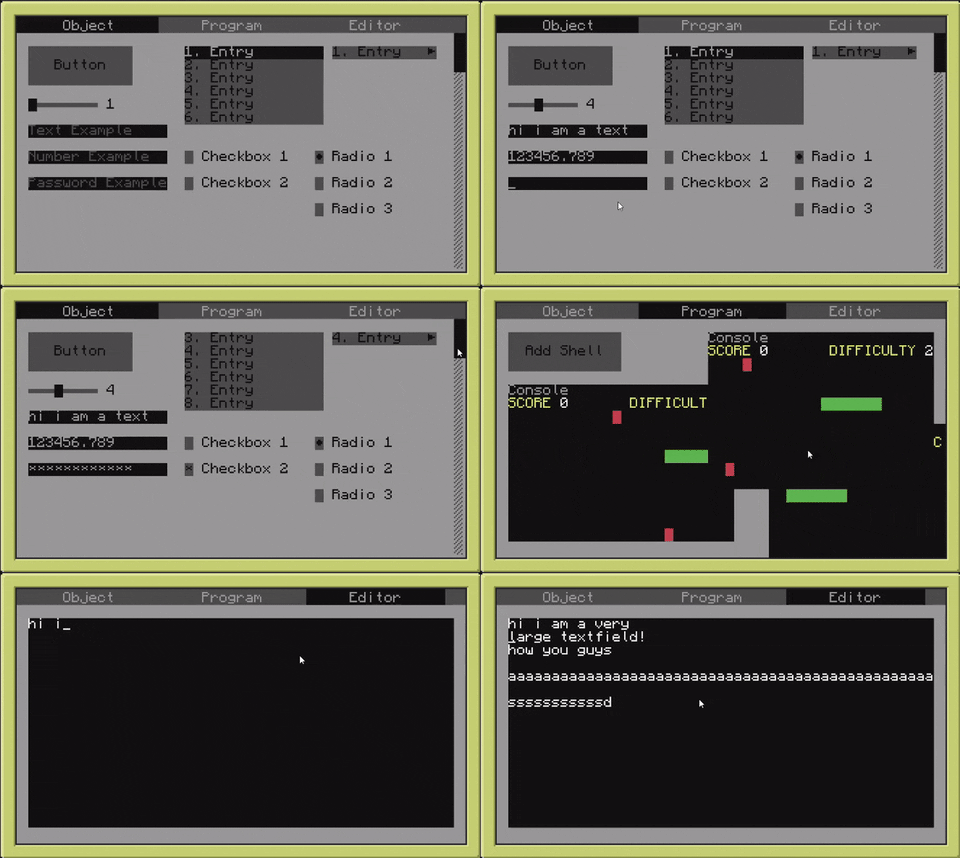
|
||||||
|
|
||||||
|
## Questions & Bugs
|
||||||
|
|
||||||
|
Obviously NyoriE has implemented some easter eggs, *some people* call them "bugs". If you happen to discover one of these just make a new <a href="https://github.com/Pyroxenium/Basalt/issues">issue</a>.
|
||||||
|
|
||||||
|
Additionally, if you have questions about Basalt or how to make use of it, feel free to create a new discussion on <a href="https://github.com/Pyroxenium/Basalt/discussions">Basalt's Discussion Board</a>, or ask in our [discord](https://discord.gg/yNNnmBVBpE).
|
||||||
|
|
||||||
|
---
|
||||||
|
|
||||||
|
Feel free to join our [discord](https://discord.gg/yNNnmBVBpE)!
|
||||||
|
|
||||||
|
<br><br>
|
||||||
1
docs/_Footer.md
Normal file
1
docs/_Footer.md
Normal file
@@ -0,0 +1 @@
|
|||||||
|
Thanks for checking out our wiki, join our discord for more help: [discord.gg/yM7kndJdJJ](discord.gg/yM7kndJdJJ)
|
||||||
BIN
docs/_media/installer.png
Normal file
BIN
docs/_media/installer.png
Normal file

Binary file not shown.
|
After Width: | Height: | Size: 4.6 KiB |
BIN
docs/_media/logo.png
Normal file
BIN
docs/_media/logo.png
Normal file

Binary file not shown.
|
After Width: | Height: | Size: 252 KiB |
4
docs/_navbar.md
Normal file
4
docs/_navbar.md
Normal file
@@ -0,0 +1,4 @@
|
|||||||
|
- Getting Started
|
||||||
|
- [Home](Home.md)
|
||||||
|
- [Quick Start](home/Quick-Start.md)
|
||||||
|
- [Installer](home/installer)
|
||||||
35
docs/_sidebar.md
Normal file
35
docs/_sidebar.md
Normal file
@@ -0,0 +1,35 @@
|
|||||||
|
- About
|
||||||
|
- [Home](Home.md)
|
||||||
|
- [Quick Start](home/Quick-Start.md)
|
||||||
|
- [Installer](home/installer)
|
||||||
|
- Objects
|
||||||
|
- [Basalt](objects/Basalt)
|
||||||
|
- [Object](objects/Object)
|
||||||
|
- [Button](objects/Button)
|
||||||
|
- [Checkbox](objects/Checkbox)
|
||||||
|
- [Dropdown](objects/Dropdown)
|
||||||
|
- [Frame](objects/Frame)
|
||||||
|
- [Image](objects/Image)
|
||||||
|
- [Input](objects/Input)
|
||||||
|
- [Label](objects/Label)
|
||||||
|
- [List](objects/List)
|
||||||
|
- [Menubar](objects/Menubar)
|
||||||
|
- [Pane](objects/Pane)
|
||||||
|
- [Program](objects/Program)
|
||||||
|
- [Progressbar](objects/Progressbar)
|
||||||
|
- [Radio](objects/Radio)
|
||||||
|
- [Scrollbar](objects/Scrollbar)
|
||||||
|
- [Slider](objects/Slider)
|
||||||
|
- [Text Field](objects/Textfield)
|
||||||
|
- [Animation](objects/Animation.md)
|
||||||
|
- [Thread](objects/Thread)
|
||||||
|
- [Timer](objects/Timer)
|
||||||
|
- Events
|
||||||
|
- [Mouse Events](events/mouseEvents.md)
|
||||||
|
- [Keyboard Events](events/keyEvents.md)
|
||||||
|
- [Other Events](events/otherEvents.md)
|
||||||
|
- Tips & Tricks
|
||||||
|
- [Component Logic](tips/logic)
|
||||||
|
- [Changing Button Color](tips/buttons)
|
||||||
|
- [Advanced usage of Events](tips/events.md)
|
||||||
|
- [Example Designs](tips/design.md)
|
||||||
39
docs/events/keyEvents.md
Normal file
39
docs/events/keyEvents.md
Normal file
@@ -0,0 +1,39 @@
|
|||||||
|
Here we will talk about keyboard events and how you can manipulate them. There are 2 possible key events you can add to almost every visual object.
|
||||||
|
|
||||||
|
# onKey
|
||||||
|
`onKey(self, event, key)`<br>
|
||||||
|
The computercraft event which triggers this method is `key`.
|
||||||
|
Any visual object can register onKey events.
|
||||||
|
|
||||||
|
Here is a example on how to add a onKey event to your frame:
|
||||||
|
|
||||||
|
```lua
|
||||||
|
local basalt = dofile("basalt.lua")
|
||||||
|
|
||||||
|
local mainFrame = basalt.createFrame("myMainFrame"):show()
|
||||||
|
local subFrame = mainFrame:addFrame("subFrame"):setPosition(3,3):setSize(18,6):setBar("Sub Frame",colors.black):showBar():show()
|
||||||
|
|
||||||
|
function openSubFrame()
|
||||||
|
subFrame:show()
|
||||||
|
end
|
||||||
|
mainFrame:onKey(openSubFrame)
|
||||||
|
```
|
||||||
|
|
||||||
|
# onKeyUp
|
||||||
|
`onKeyUp(self, event, key)`<br>
|
||||||
|
The computercraft event which triggers this method is `key_up`.
|
||||||
|
Any visual object can register onKeyUp events.
|
||||||
|
|
||||||
|
Here is a example on how to add a onKeyUp event to your frame:
|
||||||
|
|
||||||
|
```lua
|
||||||
|
local basalt = dofile("basalt.lua")
|
||||||
|
|
||||||
|
local mainFrame = basalt.createFrame("myMainFrame"):show()
|
||||||
|
local subFrame = mainFrame:addFrame("subFrame"):setPosition(3,3):setSize(18,6):setBar("Sub Frame",colors.black):showBar():show()
|
||||||
|
|
||||||
|
function openSubFrame()
|
||||||
|
subFrame:show()
|
||||||
|
end
|
||||||
|
mainFrame:onKeyUp(openSubFrame)
|
||||||
|
```
|
||||||
82
docs/events/mouseEvents.md
Normal file
82
docs/events/mouseEvents.md
Normal file
@@ -0,0 +1,82 @@
|
|||||||
|
Here we will talk about mouse events and how you can manipulate them. There are 2 possible mouse events you can add to almost every visual object.
|
||||||
|
|
||||||
|
# onClick
|
||||||
|
`onClick(self, button, x, y)`<br>
|
||||||
|
The computercraft event which triggers this method is `mouse_click` and `monitor_touch`.
|
||||||
|
Any visual object can register onClick events.
|
||||||
|
|
||||||
|
Here is a example on how to add a onClick event to your button:
|
||||||
|
|
||||||
|
```lua
|
||||||
|
local basalt = dofile("basalt.lua")
|
||||||
|
|
||||||
|
local mainFrame = basalt.createFrame("myMainFrame"):show()
|
||||||
|
local button = mainFrame:addButton("myButton"):setPosition(3,3):setSize(12,3):setText("Click"):show()
|
||||||
|
|
||||||
|
function buttonOnClick()
|
||||||
|
basalt.debug("Button got clicked!")
|
||||||
|
end
|
||||||
|
button:onClick(buttonOnClick())
|
||||||
|
```
|
||||||
|
|
||||||
|
# onClickUp
|
||||||
|
`onClickUp(self, button, x, y)`<br>
|
||||||
|
The computercraft event which triggers this method is `mouse_up`.
|
||||||
|
Any visual object can register onClickUp events.
|
||||||
|
|
||||||
|
Here is a example on how to add a onClickUp event to your button:
|
||||||
|
|
||||||
|
```lua
|
||||||
|
local basalt = dofile("basalt.lua")
|
||||||
|
|
||||||
|
local mainFrame = basalt.createFrame("myMainFrame"):show()
|
||||||
|
local button = mainFrame:addButton("myButton"):setPosition(3,3):setSize(12,3):setText("Click"):show()
|
||||||
|
|
||||||
|
function buttonOnClick(self, button, x, y)
|
||||||
|
basalt.debug("Button got clicked!")
|
||||||
|
end
|
||||||
|
button:onClick(buttonOnClick)
|
||||||
|
|
||||||
|
function buttonOnRelease(self, button, x, y)
|
||||||
|
basalt.debug("Button got released!")
|
||||||
|
end
|
||||||
|
button:onClickUp(buttonOnRelease)
|
||||||
|
```
|
||||||
|
|
||||||
|
# onScroll
|
||||||
|
`onScroll(self, direction, x, y)`<br>
|
||||||
|
The computercraft event which triggers this method is `mouse_scroll`.
|
||||||
|
Any visual object can register onScroll events.
|
||||||
|
|
||||||
|
Here is a example on how to add a onScroll event to your button:
|
||||||
|
|
||||||
|
```lua
|
||||||
|
local basalt = dofile("basalt.lua")
|
||||||
|
|
||||||
|
local mainFrame = basalt.createFrame("myMainFrame"):show()
|
||||||
|
local button = mainFrame:addButton("myButton"):setPosition(3,3):setSize(12,3):setText("Click"):show()
|
||||||
|
|
||||||
|
function buttonOnScroll(self, direction, x, y)
|
||||||
|
basalt.debug("Someone scrolls on me!")
|
||||||
|
end
|
||||||
|
button:onScroll(buttonOnScroll)
|
||||||
|
```
|
||||||
|
|
||||||
|
# onDrag
|
||||||
|
`onDrag(self, button, x, y)`<br>
|
||||||
|
The computercraft event which triggers this method is `mouse_drag`.
|
||||||
|
Any visual object can register onDrag events.
|
||||||
|
|
||||||
|
Here is a example on how to add a onDrag event to your button:
|
||||||
|
|
||||||
|
```lua
|
||||||
|
local basalt = dofile("basalt.lua")
|
||||||
|
|
||||||
|
local mainFrame = basalt.createFrame("myMainFrame"):show()
|
||||||
|
local button = mainFrame:addButton("myButton"):setPosition(3,3):setSize(12,3):setText("Click"):show()
|
||||||
|
|
||||||
|
function buttonOnDrag(self, button, x, y)
|
||||||
|
basalt.debug("Someone drags me (i know i wont reposition myself)!")
|
||||||
|
end
|
||||||
|
button:onDrag(buttonOnDrag)
|
||||||
|
```
|
||||||
75
docs/events/otherEvents.md
Normal file
75
docs/events/otherEvents.md
Normal file
@@ -0,0 +1,75 @@
|
|||||||
|
There are also other useful events you can listen to:
|
||||||
|
|
||||||
|
# onChange
|
||||||
|
`onChange(self)`<br>
|
||||||
|
This is a custom event which gets triggered as soon as the function :setValue() is called. This function is also called by basalt, for example if you change the input, textfield or checkbox (or all the different types of lists) objects.
|
||||||
|
|
||||||
|
Here is a example on how to add a onChange event to your input, and also another example for your checkbox:
|
||||||
|
|
||||||
|
```lua
|
||||||
|
local basalt = dofile("basalt.lua")
|
||||||
|
|
||||||
|
local mainFrame = basalt.createFrame("myMainFrame"):show()
|
||||||
|
local aInput = mainFrame:addInput("specialInput"):setPosition(3,3):show()
|
||||||
|
local aCheckbox = mainFrame:addCheckbox("specialCheckbox"):setPosition(3,5):show()
|
||||||
|
|
||||||
|
local function checkInput(input)
|
||||||
|
if(string.lower(input:getValue())=="hello")then
|
||||||
|
basalt.debug("Hello back!")
|
||||||
|
end
|
||||||
|
end
|
||||||
|
|
||||||
|
local function checkCheckbox(checkbox)
|
||||||
|
if(checkbox:getValue()==true)then -- or if(checkbox:getValue())then
|
||||||
|
basalt.debug("Checkbox is active, let us do something!")
|
||||||
|
end
|
||||||
|
end
|
||||||
|
|
||||||
|
aInput:onChange(checkInput)
|
||||||
|
aCheckbox:onChange(checkCheckbox)
|
||||||
|
```
|
||||||
|
|
||||||
|
# onResize
|
||||||
|
`onResize(self)`<br>
|
||||||
|
This is a custom event which gets triggered as soon as the parent frame gets resized.
|
||||||
|
|
||||||
|
Here is a example on how to add a onResize event to your button:
|
||||||
|
|
||||||
|
```lua
|
||||||
|
local basalt = dofile("basalt.lua")
|
||||||
|
|
||||||
|
local mainFrame = basalt.createFrame("myMainFrame"):show()
|
||||||
|
local aButton = mainFrame:addButton("myButton"):setPosition(3,3):show()
|
||||||
|
|
||||||
|
local function onButtonResize(button)
|
||||||
|
local width = mainFrame:getWidth()
|
||||||
|
button:setSize()
|
||||||
|
end
|
||||||
|
|
||||||
|
aButton:onResize(onButtonResize)
|
||||||
|
```
|
||||||
|
# onLoseFocus
|
||||||
|
`onLoseFocus(self)`<br>
|
||||||
|
This event gets triggered as soon as the object loses its focus.
|
||||||
|
|
||||||
|
```lua
|
||||||
|
local mainFrame = basalt.createFrame("myFirstFrame"):show()
|
||||||
|
local aButton = mainFrame:addButton("exampleButton"):setPosition(3,3):onLoseFocus(
|
||||||
|
function(self)
|
||||||
|
basalt.debug("Please come back... :(")
|
||||||
|
end
|
||||||
|
):show()
|
||||||
|
```
|
||||||
|
|
||||||
|
# onGetFocus
|
||||||
|
`onGetFocus(self)`<br>
|
||||||
|
This event gets triggered as soon as the object is the currently focused object.
|
||||||
|
|
||||||
|
```lua
|
||||||
|
local mainFrame = basalt.createFrame("myFirstFrame"):show()
|
||||||
|
local aButton = mainFrame:addButton("exampleButton"):setPosition(3,3):onGetFocus(
|
||||||
|
function(self)
|
||||||
|
basalt.debug("Welcome back!")
|
||||||
|
end
|
||||||
|
):show()
|
||||||
|
```
|
||||||
BIN
docs/favicon-16x16.png
Normal file
BIN
docs/favicon-16x16.png
Normal file

Binary file not shown.
|
After Width: | Height: | Size: 1.0 KiB |
BIN
docs/favicon-32x32.png
Normal file
BIN
docs/favicon-32x32.png
Normal file

Binary file not shown.
|
After Width: | Height: | Size: 2.2 KiB |
BIN
docs/favicon.ico
Normal file
BIN
docs/favicon.ico
Normal file
Binary file not shown.
|
After Width: | Height: | Size: 15 KiB |
70
docs/home/Quick-Start.md
Normal file
70
docs/home/Quick-Start.md
Normal file
@@ -0,0 +1,70 @@
|
|||||||
|
Basalt aims to be a relatively small, easy to use framework.
|
||||||
|
|
||||||
|
Accordingly, we have provided an installation script.
|
||||||
|
|
||||||
|
|
||||||
|
Just use the following command in any CC:Tweaked shell:
|
||||||
|
|
||||||
|
`pastebin run ESs1mg7P`
|
||||||
|
|
||||||
|
This will download `basalt.lua` to your local directory
|
||||||
|
|
||||||
|
To load the framework, make use of the following snippet
|
||||||
|
```lua
|
||||||
|
--> For those who are unfamiliar with lua, dofile executes the code in the referenced file
|
||||||
|
local basalt = dofile("basalt.lua")
|
||||||
|
```
|
||||||
|
|
||||||
|
|
||||||
|
|
||||||
|
Here is a fully functioning example of Basalt code
|
||||||
|
|
||||||
|
```lua
|
||||||
|
local basalt = dofile("basalt.lua") --> Load the Basalt framework
|
||||||
|
|
||||||
|
--> Create the first frame. Please note that Basalt needs at least one active "non-parent" frame to properly supply events
|
||||||
|
--> When Basalt#createFrame makes use of unique identifiers (commonly referred to as UIDs), meaning that the supplied value must be UNIQUE
|
||||||
|
--> If the supplied UID is ambiguous, Basalt#createFrame returns a nil value
|
||||||
|
local mainFrame = basalt.createFrame("mainFrame")
|
||||||
|
|
||||||
|
--> Show the frame to the user
|
||||||
|
mainFrame:show()
|
||||||
|
|
||||||
|
local button = mainFrame:addButton("clickableButton") --> Add a button to the mainFrame (With a unique identifier)
|
||||||
|
|
||||||
|
--> Set the position of the button, Button#setPosition follows an x, y pattern.
|
||||||
|
--> The x value is how far right the object should be from its anchor (negative values from an anchor will travel left)
|
||||||
|
--> The y value is how far down the object should be from its anchor (negative values from an anchor will travel up)
|
||||||
|
button:setPosition(4, 4)
|
||||||
|
|
||||||
|
button:setText("Click me!") --> Set the text of our button
|
||||||
|
|
||||||
|
local function buttonClick() --> This function serves as our click logic
|
||||||
|
basalt.debug("I got clicked!")
|
||||||
|
end
|
||||||
|
|
||||||
|
--> Remember! You cannot supply buttonClick(), that will only supply the result of the function
|
||||||
|
--> Make sure the button knows which function to call when it's clicked
|
||||||
|
button:onClick(buttonClick)
|
||||||
|
|
||||||
|
button:show() --> Make the button visible, so the user can click it
|
||||||
|
|
||||||
|
basalt.autoUpdate() --> Basalt#autoUpdate starts the event listener to detect user input
|
||||||
|
```
|
||||||
|
If you're like us and strive for succinct and beautiful code, here is a cleaner implementation of the code above:
|
||||||
|
```lua
|
||||||
|
local basalt = dofile("basalt.lua")
|
||||||
|
|
||||||
|
local mainFrame = basalt.createFrame("mainFrame"):show()
|
||||||
|
local button = mainFrame --> Basalt returns an instance of the object on most methods, to make use of "call-chaining"
|
||||||
|
:addButton("clickableButton") --> This is an example of call chaining
|
||||||
|
:setPosition(4,4)
|
||||||
|
:setText("Click me!")
|
||||||
|
:onClick(
|
||||||
|
function()
|
||||||
|
basalt.debug("I got clicked!")
|
||||||
|
end)
|
||||||
|
:show()
|
||||||
|
|
||||||
|
basalt.autoUpdate()
|
||||||
|
```
|
||||||
74
docs/home/installer.md
Normal file
74
docs/home/installer.md
Normal file
@@ -0,0 +1,74 @@
|
|||||||
|
# Installer
|
||||||
|
|
||||||
|
This is just a script which helps you to setup your program to automatically install the Basalt UI Framework, if it doesn't exists. Means, you create your program (which requires basalt) and add this on the top of your program. Now, everytime you execute your program it checks if basalt.lua (or your custom filepath) exists or not, if not it installs it, or if you are using the advanced installer, it asks the user if the program is allowed to install basalt for you.
|
||||||
|
|
||||||
|
## Basic Installer
|
||||||
|
Here is a very basic one which just installs basalt.lua if don't exist:
|
||||||
|
```lua
|
||||||
|
--Basalt configurated installer
|
||||||
|
local filePath = "basalt.lua" --here you can change the file path default: basalt.lua
|
||||||
|
if not(fs.exists(filePath))then
|
||||||
|
shell.run("pastebin run ESs1mg7P "..filePath) -- this is an alternative to the wget command
|
||||||
|
end
|
||||||
|
local basalt = dofile(filePath) -- here you can change the variablename in any variablename you want default: basalt
|
||||||
|
```
|
||||||
|
|
||||||
|
## Advanced Installer
|
||||||
|
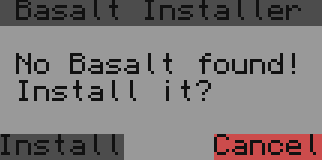
This is a visual version, it asks the user if he wants to install basalt.lua (if not found)<br>
|
||||||
|
|
||||||
|
```lua
|
||||||
|
--Basalt configurated installer
|
||||||
|
local filePath = "basalt.lua" --here you can change the file path default: basalt.lua
|
||||||
|
if not(fs.exists(filePath))then
|
||||||
|
local w,h = term.getSize()
|
||||||
|
term.clear()
|
||||||
|
local _installerWindow = window.create(term.current(),w/2-8,h/2-3,18,6)
|
||||||
|
_installerWindow.setBackgroundColor(colors.gray)
|
||||||
|
_installerWindow.setTextColor(colors.black)
|
||||||
|
_installerWindow.write(" Basalt Installer ")
|
||||||
|
_installerWindow.setBackgroundColor(colors.lightGray)
|
||||||
|
for line=2,6,1 do
|
||||||
|
_installerWindow.setCursorPos(1,line)
|
||||||
|
if(line==3)then
|
||||||
|
_installerWindow.write(" No Basalt found! ")
|
||||||
|
elseif(line==4)then
|
||||||
|
_installerWindow.write(" Install it? ")
|
||||||
|
elseif(line==6)then
|
||||||
|
_installerWindow.setTextColor(colors.black)
|
||||||
|
_installerWindow.setBackgroundColor(colors.gray)
|
||||||
|
_installerWindow.write("Install")
|
||||||
|
_installerWindow.setBackgroundColor(colors.lightGray)
|
||||||
|
_installerWindow.write(string.rep(" ",5))
|
||||||
|
_installerWindow.setBackgroundColor(colors.red)
|
||||||
|
_installerWindow.write("Cancel")
|
||||||
|
else
|
||||||
|
_installerWindow.write(string.rep(" ",18))
|
||||||
|
end
|
||||||
|
end
|
||||||
|
_installerWindow.setVisible(true)
|
||||||
|
_installerWindow.redraw()
|
||||||
|
while(not(fs.exists(filePath))) do
|
||||||
|
local event, p1,p2,p3,p4 = os.pullEvent()
|
||||||
|
if(event=="mouse_click")then
|
||||||
|
if(p3==math.floor(h/2+2))and(p2>=w/2-8)and(p2<=w/2-2)then
|
||||||
|
shell.run("pastebin run ESs1mg7P "..filePath)
|
||||||
|
_installerWindow.setVisible(false)
|
||||||
|
term.clear()
|
||||||
|
break
|
||||||
|
end
|
||||||
|
if(p3==math.floor(h/2+2))and(p2<=w/2+9)and(p2>=w/2+4)then
|
||||||
|
_installerWindow.clear()
|
||||||
|
_installerWindow.setVisible(false)
|
||||||
|
term.setCursorPos(1,1)
|
||||||
|
term.clear()
|
||||||
|
return
|
||||||
|
end
|
||||||
|
end
|
||||||
|
end
|
||||||
|
term.setCursorPos(1,1)
|
||||||
|
term.clear()
|
||||||
|
end
|
||||||
|
|
||||||
|
local basalt = dofile(filePath) -- here you can change the variablename in any variablename you want default: basalt
|
||||||
|
------------------------------
|
||||||
|
```
|
||||||
54
docs/index.html
Normal file
54
docs/index.html
Normal file
@@ -0,0 +1,54 @@
|
|||||||
|
<!DOCTYPE html>
|
||||||
|
<html lang="en">
|
||||||
|
<head>
|
||||||
|
<meta charset="UTF-8">
|
||||||
|
<title>Basalt Documentation</title>
|
||||||
|
<meta http-equiv="X-UA-Compatible" content="IE=edge,chrome=1" />
|
||||||
|
<meta name="description" content="Basalt is an easy-to-understand UI Framework designed for CC:Tweaked - a popular minecraft mod. ">
|
||||||
|
<meta name="viewport" content="width=device-width, initial-scale=1.0, minimum-scale=1.0">
|
||||||
|
<!-- <link rel="stylesheet" href="//cdn.jsdelivr.net/npm/docsify@4/lib/themes/vue.css">-->
|
||||||
|
<link rel="stylesheet" href="https://cdn.jsdelivr.net/npm/docsify-themeable@0/dist/css/theme-simple-dark.css">
|
||||||
|
<link rel="stylesheet" href="https://cdn.jsdelivr.net/npm/prismjs@1.28.0/themes/prism-tomorrow.min.css">
|
||||||
|
<link rel="icon" type="image/png" sizes="32x32" href="/favicon-32x32.png">
|
||||||
|
<link rel="icon" type="image/png" sizes="16x16" href="/favicon-16x16.png">
|
||||||
|
<style>
|
||||||
|
:root {
|
||||||
|
--theme-color: #16CC27;
|
||||||
|
--mono-hue: 120;
|
||||||
|
--mono-saturation: 1%;
|
||||||
|
--mono-shade3: hsl(var(--mono-hue), var(--mono-saturation), 5%);
|
||||||
|
--mono-shade2: hsl(var(--mono-hue), var(--mono-saturation), 6%);
|
||||||
|
--mono-shade1: hsl(var(--mono-hue), var(--mono-saturation), 7%);
|
||||||
|
--mono-base: hsl(var(--mono-hue), var(--mono-saturation), 20%);
|
||||||
|
--mono-tint1: hsl(var(--mono-hue), var(--mono-saturation), 25%);
|
||||||
|
--mono-tint2: hsl(var(--mono-hue), var(--mono-saturation), 30%);
|
||||||
|
--mono-tint3: hsl(var(--mono-hue), var(--mono-saturation), 35%);
|
||||||
|
--base-background-color: hsl(var(--mono-hue), var(--mono-saturation), 10%);
|
||||||
|
--sidebar-nav-pagelink-background-image: url("data:image/svg+xml,%3Csvg xmlns='http://www.w3.org/2000/svg' width='7' height='11.2' viewBox='0 0 7 11.2'%3E%3Cpath d='M1.5 1.5l4 4.1 -4 4.1' stroke-width='1.5' stroke='%23575d5e' fill='none' stroke-linecap='square' stroke-linejoin='miter' vector-effect='non-scaling-stroke'/%3E%3C/svg%3E");
|
||||||
|
--sidebar-nav-pagelink-background-image--active: url("data:image/svg+xml,%3Csvg xmlns='http://www.w3.org/2000/svg' width='11.2' height='7' viewBox='0 0 11.2 7'%3E%3Cpath d='M1.5 1.5l4.1 4 4.1-4' stroke-width='1.5' stroke='%23575d5e' fill='none' stroke-linecap='square' stroke-linejoin='miter' vector-effect='non-scaling-stroke'/%3E%3C/svg%3E");
|
||||||
|
--sidebar-nav-pagelink-background-image--collapse: url("data:image/svg+xml,%3Csvg xmlns='http://www.w3.org/2000/svg' width='7' height='11.2' viewBox='0 0 7 11.2'%3E%3Cpath d='M1.5 1.5l4 4.1 -4 4.1' stroke-width='1.5' stroke='%23575d5e' fill='none' stroke-linecap='square' stroke-linejoin='miter' vector-effect='non-scaling-stroke'/%3E%3C/svg%3E");
|
||||||
|
--sidebar-nav-pagelink-background-image--loaded: url("data:image/svg+xml,%3Csvg xmlns='http://www.w3.org/2000/svg' width='11.2' height='7' viewBox='0 0 11.2 7'%3E%3Cpath d='M1.5 1.5l4.1 4 4.1-4' stroke-width='1.5' stroke='%23575d5e' fill='none' stroke-linecap='square' stroke-linejoin='miter' vector-effect='non-scaling-stroke'/%3E%3C/svg%3E");
|
||||||
|
}
|
||||||
|
</style>
|
||||||
|
</head>
|
||||||
|
<body>
|
||||||
|
<div id="app">Did you know: Basalt is a Pyroxene?></div>
|
||||||
|
<script>
|
||||||
|
window.$docsify = {
|
||||||
|
logo: '/_media/logo.png',
|
||||||
|
loadNavbar: true,
|
||||||
|
loadSidebar: true,
|
||||||
|
autoHeader: true,
|
||||||
|
subMaxLevel: 2,
|
||||||
|
homepage: 'Home.md',
|
||||||
|
name: 'Basalt',
|
||||||
|
repo: 'https://github.com/Pyroxenium/Basalt',
|
||||||
|
auto2top: true
|
||||||
|
}
|
||||||
|
</script>
|
||||||
|
<!-- Docsify v4 -->
|
||||||
|
<script src="//cdn.jsdelivr.net/npm/docsify@4"></script>
|
||||||
|
<script src="https://cdn.jsdelivr.net/npm/docsify-themeable@0/dist/js/docsify-themeable.min.js"></script>
|
||||||
|
<script src="//cdn.jsdelivr.net/npm/prismjs@1.28.0/components/prism-lua.min.js"></script>
|
||||||
|
</body>
|
||||||
|
</html>
|
||||||
73
docs/objects/Animation.md
Normal file
73
docs/objects/Animation.md
Normal file
@@ -0,0 +1,73 @@
|
|||||||
|
With animations, you can create a beautiful experience for users while interacting with objects.<br>
|
||||||
|
For now the animation class is very basic, it will be expanded in the future, but we have to say you can already do almost everything you can imagine!
|
||||||
|
|
||||||
|
Right now animation is a class which makes use of the timer event.<br>
|
||||||
|
You can find more information below:
|
||||||
|
|
||||||
|
## add
|
||||||
|
Adds a new function to an animation
|
||||||
|
#### Parameters:
|
||||||
|
1. `function` The function containing animation logic
|
||||||
|
|
||||||
|
#### Returns:
|
||||||
|
1. `animation` Animation in use
|
||||||
|
|
||||||
|
|
||||||
|
#### Usage:
|
||||||
|
* This will set the button position to 3,3, waits 1 second, then sets position to 4,4, waits 2 seconds, and then sets the position to 5,5
|
||||||
|
```lua
|
||||||
|
local mainFrame = basalt.createFrame("myFirstFrame"):show()
|
||||||
|
local testButton = mainFrame:addButton("myTestButton"):show()
|
||||||
|
local aAnimation = mainFrame:addAnimation("anim1"):add(function() testButton:setPosition(3,3) end):wait(1):add(function() testButton:setPosition(1,1,"r") end):wait(2):add(function() testButton:setPosition(1,1,"r") end)
|
||||||
|
aAnimation:play()
|
||||||
|
```
|
||||||
|
|
||||||
|
## wait
|
||||||
|
Sets a wait timer for the next function after the previous function got executed, no wait timer calls the next function immediately
|
||||||
|
#### Parameters:
|
||||||
|
1. `number` The length of delay between the functions _(in seconds)_
|
||||||
|
|
||||||
|
#### Returns:
|
||||||
|
1. `animation` Animation in use
|
||||||
|
|
||||||
|
#### Usage:
|
||||||
|
```lua
|
||||||
|
local mainFrame = basalt.createFrame("myFirstFrame"):show()
|
||||||
|
local testButton = mainFrame:addButton("myTestButton"):show()
|
||||||
|
local aAnimation = mainFrame:addAnimation("anim1"):add(function() testButton:setPosition(3,3) end):wait(1):add(function() testButton:setPosition(1,1,"r") end):wait(2):add(function() testButton:setPosition(1,1,"r") end)
|
||||||
|
|
||||||
|
aAnimation:play()
|
||||||
|
```
|
||||||
|
|
||||||
|
## play
|
||||||
|
Plays the animation
|
||||||
|
#### Parameters:
|
||||||
|
1. `boolean` Whether it will loop forever, will most likely be replaced with a count in the future
|
||||||
|
|
||||||
|
#### Returns:
|
||||||
|
1. `animation` Animation in use
|
||||||
|
|
||||||
|
#### Usage:
|
||||||
|
```lua
|
||||||
|
local mainFrame = basalt.createFrame("myFirstFrame"):show()
|
||||||
|
local testButton = mainFrame:addButton("myTestButton"):show()
|
||||||
|
local aAnimation = mainFrame:addAnimation("anim1"):add(function() testButton:setBackground(colors.black) end):wait(1):add(function() testButton:setBackground(colors.gray) end):wait(1):add(function() testButton:setBackground(colors.lightGray) end)
|
||||||
|
|
||||||
|
aAnimation:play() -- changes the background color of that button from black to gray and then to lightGray
|
||||||
|
```
|
||||||
|
|
||||||
|
## cancel
|
||||||
|
Cancels the animation
|
||||||
|
|
||||||
|
#### Returns:
|
||||||
|
1. `animation` Animation in use
|
||||||
|
|
||||||
|
#### Usage:
|
||||||
|
|
||||||
|
```lua
|
||||||
|
local mainFrame = basalt.createFrame("myFirstFrame"):show()
|
||||||
|
local testButton = mainFrame:addButton("myTestButton"):show()
|
||||||
|
local aAnimation = mainFrame:addAnimation("anim1"):add(function() testButton:setBackground(colors.black) end):wait(1):add(function() aAnimation:cancel() end):wait(1):add(function() testButton:setBackground(colors.lightGray) end)
|
||||||
|
|
||||||
|
aAnimation:play()
|
||||||
|
```
|
||||||
128
docs/objects/Basalt.md
Normal file
128
docs/objects/Basalt.md
Normal file
@@ -0,0 +1,128 @@
|
|||||||
|
To start using Basalt you have to do the following line of code:
|
||||||
|
|
||||||
|
`local basalt = dofile("basalt.lua")`
|
||||||
|
|
||||||
|
remember you need the basalt.lua file on your computer!
|
||||||
|
|
||||||
|
Now you are able to use the following functions:
|
||||||
|
|
||||||
|
## basalt.createFrame
|
||||||
|
Create a base-frame (main frame)
|
||||||
|
#### Parameters:
|
||||||
|
1. `string` name
|
||||||
|
|
||||||
|
#### Returns:
|
||||||
|
1. `frame` object
|
||||||
|
|
||||||
|
#### Usage:
|
||||||
|
* Create and show a frame with id "myFirstFrame"
|
||||||
|
```lua
|
||||||
|
local mainFrame = basalt.createFrame("myFirstFrame"):show()
|
||||||
|
```
|
||||||
|
|
||||||
|
## basalt.removeFrame
|
||||||
|
Removes a base frame
|
||||||
|
|
||||||
|
#### Parameters:
|
||||||
|
1. `string` name
|
||||||
|
|
||||||
|
#### Usage:
|
||||||
|
* Removes the previously created frame with id "myFirstFrame"
|
||||||
|
```lua
|
||||||
|
local mainFrame = basalt.createFrame("myFirstFrame"):show()
|
||||||
|
basalt.removeFrame("myFirstFrame")
|
||||||
|
```
|
||||||
|
|
||||||
|
## basalt.getFrame
|
||||||
|
Returns a base frame with the given name
|
||||||
|
#### Parameters:
|
||||||
|
1. `string` name
|
||||||
|
|
||||||
|
#### Returns:
|
||||||
|
1. `frame` object
|
||||||
|
|
||||||
|
#### Usage:
|
||||||
|
* Creates, fetches and shows the "myFirstFrame" object
|
||||||
|
```lua
|
||||||
|
basalt.createFrame("myFirstFrame")
|
||||||
|
basalt.getFrame("myFirstFrame"):show()
|
||||||
|
```
|
||||||
|
|
||||||
|
|
||||||
|
## basalt.getActiveFrame
|
||||||
|
Returns the currently active base frame
|
||||||
|
|
||||||
|
#### Returns:
|
||||||
|
1. `frame` The current frame
|
||||||
|
|
||||||
|
#### Usage:
|
||||||
|
* Displays the active frame name in the debug console
|
||||||
|
```lua
|
||||||
|
basalt.createFrame("myFirstFrame"):show()
|
||||||
|
basalt.debug(basalt.getActiveFrame():getName()) -- returns myFirstFrame
|
||||||
|
```
|
||||||
|
|
||||||
|
## basalt.autoUpdate
|
||||||
|
Starts the draw and event handler until basalt.stopUpdate() is called
|
||||||
|
|
||||||
|
#### Usage:
|
||||||
|
* Enable the basalt updates, otherwise the screen will not continue to update
|
||||||
|
```lua
|
||||||
|
local mainFrame = basalt.createFrame("myFirstFrame"):show()
|
||||||
|
basalt.autoUpdate()
|
||||||
|
```
|
||||||
|
|
||||||
|
|
||||||
|
## basalt.update
|
||||||
|
Calls the draw and event handler once - this gives more flexibility about which events basalt should process. For example you could filter the terminate event.
|
||||||
|
|
||||||
|
#### Parameters:
|
||||||
|
1. `string` The event to be received
|
||||||
|
2. `...` Additional event variables to capture
|
||||||
|
|
||||||
|
#### Usage:
|
||||||
|
* Creates and starts a custom update cycle
|
||||||
|
```lua
|
||||||
|
local mainFrame = basalt.createFrame("myFirstFrame"):show()
|
||||||
|
local aButton = mainFrame:addButton("myButton"):setPosition(2,2):show()
|
||||||
|
|
||||||
|
while true do
|
||||||
|
basalt.update(os.pullEventRaw())
|
||||||
|
end
|
||||||
|
```
|
||||||
|
|
||||||
|
## basalt.stopUpdate
|
||||||
|
Stops the automatic draw and event handler which got started by basalt.autoUpdate()
|
||||||
|
|
||||||
|
#### Usage:
|
||||||
|
* When the quit button is clicked, the button stops basalt updates and clears the terminal
|
||||||
|
```lua
|
||||||
|
```lua
|
||||||
|
local mainFrame = basalt.createFrame("myFirstFrame"):show()
|
||||||
|
local aButton = mainFrame:addButton("myButton"):setPosition(2,2):setText("Stop Basalt!"):show()
|
||||||
|
|
||||||
|
aButton:onClick(function()
|
||||||
|
basalt.stopUpdate()
|
||||||
|
end)
|
||||||
|
|
||||||
|
basalt.autoUpdate()
|
||||||
|
```
|
||||||
|
|
||||||
|
|
||||||
|
## basalt.debug
|
||||||
|
creates a label with some information on the main frame on the bottom left, if you click on that label it will open a log view for you. See it as the new print for debugging
|
||||||
|
|
||||||
|
You can also edit the default debug Label (change position, change color or whatever you want) by accessing the variable basalt.debugLabel
|
||||||
|
which returns the debug Label.
|
||||||
|
|
||||||
|
Also basalt.debugFrame and basalt.debugList are available.
|
||||||
|
|
||||||
|
#### Parameters:
|
||||||
|
1. `...` (multiple parameters are possible, like print does)<br>
|
||||||
|
|
||||||
|
#### Usage:
|
||||||
|
* Prints "Hello! ^-^" to the debug console
|
||||||
|
```lua
|
||||||
|
basalt.debug("Hello! ", "^-^")
|
||||||
|
```
|
||||||
|
|
||||||
24
docs/objects/Button.md
Normal file
24
docs/objects/Button.md
Normal file
@@ -0,0 +1,24 @@
|
|||||||
|
Buttons are objects, which execute function by clicking on them
|
||||||
|
|
||||||
|
The following list is only available to buttons: <br>
|
||||||
|
Remember button also inherits from [Object](objects/Object.md)
|
||||||
|
|
||||||
|
## setText
|
||||||
|
Sets the displayed button text
|
||||||
|
```lua
|
||||||
|
local mainFrame = basalt.createFrame("myFirstFrame"):show()
|
||||||
|
local aButton = mainFrame:addButton("myFirstButton"):setText("Click"):show() -- you could also use :setValue() instead of :setText() - no difference
|
||||||
|
```
|
||||||
|
#### Parameters: string text<br>
|
||||||
|
#### Returns: self<br>
|
||||||
|
|
||||||
|
# Examples
|
||||||
|
Add a onClick event:
|
||||||
|
```lua
|
||||||
|
local mainFrame = basalt.createFrame("myFirstFrame"):show()
|
||||||
|
local aButton = mainFrame:addButton("myFirstButton"):setText("Click"):onClick(function(self,event,button,x,y)
|
||||||
|
if(event=="mouse_click")and(button==1)then
|
||||||
|
basalt.debug("Left mousebutton got clicked!")
|
||||||
|
end
|
||||||
|
end):show()
|
||||||
|
```
|
||||||
13
docs/objects/Checkbox.md
Normal file
13
docs/objects/Checkbox.md
Normal file
@@ -0,0 +1,13 @@
|
|||||||
|
With checkbox, the user can set a bool to true or false
|
||||||
|
|
||||||
|
Here are all possible functions available for checkbox:<be>
|
||||||
|
Remember button also inherits from [Object](objects/Object.md)
|
||||||
|
|
||||||
|
|
||||||
|
Create a onChange event:
|
||||||
|
```lua
|
||||||
|
local mainFrame = basalt.createFrame("myFirstFrame"):show()
|
||||||
|
local aCheckbox = mainFrame:addCheckbox("myFirstCheckbox"):onChange(function(self) basalt.debug("The value got changed into "..self:getValue()) end):show()
|
||||||
|
|
||||||
|
```
|
||||||
|
|
||||||
178
docs/objects/Dropdown.md
Normal file
178
docs/objects/Dropdown.md
Normal file
@@ -0,0 +1,178 @@
|
|||||||
|
Dropdowns are objects where you can create endless entrys the user can click on a button and it opens a "list" where the user can choose a entry
|
||||||
|
|
||||||
|
Here is a example of how to create a standard dropdown:
|
||||||
|
|
||||||
|
```lua
|
||||||
|
local mainFrame = basalt.createFrame("myFirstFrame"):show()
|
||||||
|
local aDropdown = mainFrame:addDropdown("myFirstDropdown"):show()
|
||||||
|
```
|
||||||
|
|
||||||
|
Here are all possible functions available for dropdowns: <br>
|
||||||
|
Remember Dropdown also inherits from [Object](objects/Object.md)
|
||||||
|
|
||||||
|
## addItem
|
||||||
|
Adds a item to the dropdown
|
||||||
|
|
||||||
|
```lua
|
||||||
|
local mainFrame = basalt.createFrame("myFirstFrame"):show()
|
||||||
|
local aDropdown = mainFrame:addDropdown("myFirstDropdown"):show()
|
||||||
|
aDropdown:addItem("1. Entry")
|
||||||
|
aDropdown:addItem("2. Entry",colors.yellow)
|
||||||
|
aDropdown:addItem("3. Entry",colors.yellow,colors.green)
|
||||||
|
```
|
||||||
|
#### Parameters: string text, number bgcolor, number fgcolor, any ... - (text is the displayed text, bgcolor and fgcolors the colors of background/text and args (...) is something dynamic, you wont see them but if you require some more information per item you can use that)<br>
|
||||||
|
#### Returns: self<br>
|
||||||
|
|
||||||
|
## removeItem
|
||||||
|
Removes a item from the dropdown
|
||||||
|
|
||||||
|
```lua
|
||||||
|
local mainFrame = basalt.createFrame("myFirstFrame"):show()
|
||||||
|
local aDropdown = mainFrame:addDropdown("myFirstDropdown"):show()
|
||||||
|
aDropdown:addItem("1. Entry")
|
||||||
|
aDropdown:addItem("2. Entry",colors.yellow)
|
||||||
|
aDropdown:addItem("3. Entry",colors.yellow,colors.green)
|
||||||
|
aDropdown:removeItem(2)
|
||||||
|
```
|
||||||
|
#### Parameters: number index<br>
|
||||||
|
#### Returns: self<br>
|
||||||
|
|
||||||
|
## editItem
|
||||||
|
Edits a item on the dropdown
|
||||||
|
|
||||||
|
```lua
|
||||||
|
local mainFrame = basalt.createFrame("myFirstFrame"):show()
|
||||||
|
local aDropdown = mainFrame:addDropdown("myFirstDropdown"):show()
|
||||||
|
aDropdown:addItem("1. Entry")
|
||||||
|
aDropdown:addItem("2. Entry",colors.yellow)
|
||||||
|
aDropdown:addItem("3. Entry",colors.yellow,colors.green)
|
||||||
|
aDropdown:editItem(3,"3. Edited Entry",colors.yellow,colors.green)
|
||||||
|
```
|
||||||
|
#### Parameters: number index, string text, number bgcolor, number fgcolor, any ...<br>
|
||||||
|
#### Returns: self<br>
|
||||||
|
|
||||||
|
## setScrollable
|
||||||
|
Makes the dropdown scrollable
|
||||||
|
|
||||||
|
```lua
|
||||||
|
local mainFrame = basalt.createFrame("myFirstFrame"):show()
|
||||||
|
local aDropdown = mainFrame:addDropdown("myFirstDropdown"):show()
|
||||||
|
aDropdown:addItem("1. Entry")
|
||||||
|
aDropdown:addItem("2. Entry",colors.yellow)
|
||||||
|
aDropdown:addItem("3. Entry",colors.yellow,colors.green)
|
||||||
|
aDropdown:setScrollable(true)
|
||||||
|
```
|
||||||
|
#### Parameters: boolean isScrollable<br>
|
||||||
|
#### Returns: self<br>
|
||||||
|
|
||||||
|
## selectItem
|
||||||
|
selects a item in the dropdown (same as a player would click on a item)
|
||||||
|
|
||||||
|
```lua
|
||||||
|
local mainFrame = basalt.createFrame("myFirstFrame"):show()
|
||||||
|
local aDropdown = mainFrame:addDropdown("myFirstDropdown"):show()
|
||||||
|
aDropdown:addItem("1. Entry")
|
||||||
|
aDropdown:addItem("2. Entry",colors.yellow)
|
||||||
|
aDropdown:addItem("3. Entry",colors.yellow,colors.green)
|
||||||
|
aDropdown:selectItem(1)
|
||||||
|
```
|
||||||
|
#### Parameters: number index<br>
|
||||||
|
#### Returns: self<br>
|
||||||
|
|
||||||
|
## clear
|
||||||
|
clears the entire list (dropdown)
|
||||||
|
|
||||||
|
```lua
|
||||||
|
local mainFrame = basalt.createFrame("myFirstFrame"):show()
|
||||||
|
local aDropdown = mainFrame:addDropdown("myFirstDropdown"):show()
|
||||||
|
aDropdown:addItem("1. Entry")
|
||||||
|
aDropdown:addItem("2. Entry",colors.yellow)
|
||||||
|
aDropdown:addItem("3. Entry",colors.yellow,colors.green)
|
||||||
|
aDropdown:clear()
|
||||||
|
```
|
||||||
|
#### Parameters: -<br>
|
||||||
|
#### Returns: self<br>
|
||||||
|
|
||||||
|
## getItemIndex
|
||||||
|
returns the item index of the currently selected item
|
||||||
|
|
||||||
|
```lua
|
||||||
|
local mainFrame = basalt.createFrame("myFirstFrame"):show()
|
||||||
|
local aDropdown = mainFrame:addDropdown("myFirstDropdown"):show()
|
||||||
|
aDropdown:addItem("1. Entry")
|
||||||
|
aDropdown:addItem("2. Entry",colors.yellow)
|
||||||
|
aDropdown:addItem("3. Entry",colors.yellow,colors.green)
|
||||||
|
aDropdown:getItemIndex()
|
||||||
|
```
|
||||||
|
#### Parameters: -<br>
|
||||||
|
#### Returns: number index<br>
|
||||||
|
|
||||||
|
## setSelectedItem
|
||||||
|
Sets the background of the item which is currently selected
|
||||||
|
|
||||||
|
```lua
|
||||||
|
local mainFrame = basalt.createFrame("myFirstFrame"):show()
|
||||||
|
local aDropdown = mainFrame:addDropdown("myFirstDropdown"):show()
|
||||||
|
aDropdown:addItem("1. Entry")
|
||||||
|
aDropdown:addItem("2. Entry",colors.yellow)
|
||||||
|
aDropdown:addItem("3. Entry",colors.yellow,colors.green)
|
||||||
|
aDropdown:setSelectedItem(colors.green, colors.blue)
|
||||||
|
```
|
||||||
|
#### Parameters: number bgcolor, number fgcolor, boolean isActive (isActive means if different colors for selected item should be used)<br>
|
||||||
|
#### Returns: self<br>
|
||||||
|
|
||||||
|
## setOffset
|
||||||
|
sets the dropdown offset (will automatically change if scrolling is active)
|
||||||
|
|
||||||
|
```lua
|
||||||
|
local mainFrame = basalt.createFrame("myFirstFrame"):show()
|
||||||
|
local aDropdown = mainFrame:addDropdown("myFirstDropdown"):show()
|
||||||
|
aDropdown:addItem("1. Entry")
|
||||||
|
aDropdown:addItem("2. Entry",colors.yellow)
|
||||||
|
aDropdown:addItem("3. Entry",colors.yellow,colors.green)
|
||||||
|
aDropdown:setOffset(3)
|
||||||
|
```
|
||||||
|
#### Parameters: number offsetValue<br>
|
||||||
|
#### Returns: self<br>
|
||||||
|
|
||||||
|
## getOffset
|
||||||
|
returns the current offset
|
||||||
|
|
||||||
|
```lua
|
||||||
|
local mainFrame = basalt.createFrame("myFirstFrame"):show()
|
||||||
|
local aDropdown = mainFrame:addDropdown("myFirstDropdown"):show()
|
||||||
|
aDropdown:addItem("1. Entry")
|
||||||
|
aDropdown:addItem("2. Entry",colors.yellow)
|
||||||
|
aDropdown:addItem("3. Entry",colors.yellow,colors.green)
|
||||||
|
aDropdown:getOffset()
|
||||||
|
```
|
||||||
|
#### Parameters: -<br>
|
||||||
|
#### Returns: number offsetValue<br>
|
||||||
|
|
||||||
|
## getOffset
|
||||||
|
returns the current offset
|
||||||
|
|
||||||
|
```lua
|
||||||
|
local mainFrame = basalt.createFrame("myFirstFrame"):show()
|
||||||
|
local aDropdown = mainFrame:addDropdown("myFirstDropdown"):show()
|
||||||
|
aDropdown:addItem("1. Entry")
|
||||||
|
aDropdown:addItem("2. Entry",colors.yellow)
|
||||||
|
aDropdown:addItem("3. Entry",colors.yellow,colors.green)
|
||||||
|
aDropdown:getOffset()
|
||||||
|
```
|
||||||
|
#### Parameters: -<br>
|
||||||
|
#### Returns: number offsetValue<br>
|
||||||
|
|
||||||
|
## setDropdownSize
|
||||||
|
sets the dropdown size (if you click on the button)
|
||||||
|
|
||||||
|
```lua
|
||||||
|
local mainFrame = basalt.createFrame("myFirstFrame"):show()
|
||||||
|
local aDropdown = mainFrame:addDropdown("myFirstDropdown"):show()
|
||||||
|
aDropdown:addItem("1. Entry")
|
||||||
|
aDropdown:addItem("2. Entry",colors.yellow)
|
||||||
|
aDropdown:addItem("3. Entry",colors.yellow,colors.green)
|
||||||
|
aDropdown:setDropdownSize(12, 4)
|
||||||
|
```
|
||||||
|
#### Parameters: number width, number height<br>
|
||||||
|
#### Returns: self<br>
|
||||||
222
docs/objects/Frame.md
Normal file
222
docs/objects/Frame.md
Normal file
@@ -0,0 +1,222 @@
|
|||||||
|
<a href="https://i.imgur.com/aikc0K1.png"><img src="https://i.imgur.com/aikc0K1.png" height="500" /></a>
|
||||||
|
|
||||||
|
Frames are like containers, but are also normal objects.
|
||||||
|
In other words, you can add other objects _(even frames)_ to a frame; if the frame itself is visible
|
||||||
|
all sub-objects _(if they are set as visible)_ are also visible. A better description will follow.
|
||||||
|
|
||||||
|
## basalt.createFrame
|
||||||
|
Creates a new non-parent frame - in most cases it is the first thing you'll need.
|
||||||
|
|
||||||
|
#### Parameters:
|
||||||
|
1. `string` name (should be unique)
|
||||||
|
|
||||||
|
#### Returns:
|
||||||
|
1. `frame | nil` The frame created by createFrame, or `nil` if there is already a frame with the given name.
|
||||||
|
|
||||||
|
#### Usage:
|
||||||
|
* Create a frame with an id "myFirstFrame", stored in a variable named frame
|
||||||
|
```lua
|
||||||
|
local myFrame = basalt.createFrame("myFirstFrame")
|
||||||
|
```
|
||||||
|
|
||||||
|
## addFrame
|
||||||
|
Creates a child frame on the frame, the same as [basalt.createFrame](https://github.com/Pyroxenium/Basalt/wiki/Frame#basaltcreateframe) except the frames are given a parent-child relationship automatically
|
||||||
|
|
||||||
|
#### Parameters:
|
||||||
|
1. `string` name (should be unique)
|
||||||
|
|
||||||
|
#### Returns:
|
||||||
|
1. `frame | nil` The frame created by addFrame, or `nil` if there is already a child frame with the given name.<br>
|
||||||
|
|
||||||
|
#### Usage:
|
||||||
|
* Create a frame with id "myFirstFrame" then create a child of that frame, named "myFirstSubFrame"
|
||||||
|
```lua
|
||||||
|
local mainFrame = basalt.createFrame("myFirstFrame")
|
||||||
|
local myFrame = mainFrame:addFrame("myFirstSubFrame")
|
||||||
|
```
|
||||||
|
|
||||||
|
## setBar
|
||||||
|
Sets the text, background, and foreground of the upper bar of the frame, accordingly.
|
||||||
|
|
||||||
|
#### Parameters:
|
||||||
|
1. `string` The title text to set the bar to
|
||||||
|
2. `number` The background color
|
||||||
|
2. `number` The foreground color
|
||||||
|
|
||||||
|
#### Returns:
|
||||||
|
1. `frame` The frame being used
|
||||||
|
|
||||||
|
#### Usage:
|
||||||
|
* Set the title to "My first frame!", with a background of black and a foreground of light gray.
|
||||||
|
```lua
|
||||||
|
frame:setBar("My first Frame!", colors.black, colors.lightGray)
|
||||||
|
```
|
||||||
|
* Store the frame, use the named frame variable after assigning.
|
||||||
|
```lua
|
||||||
|
local mainFrame = basalt.createFrame("myFirstFrame"):show()
|
||||||
|
local myFrame = MainFrame:addFrame("myFirstSubFrame")
|
||||||
|
myFrame:setBar("My first Frame!")
|
||||||
|
myFrame:show()
|
||||||
|
```
|
||||||
|
* This abuses the call-chaining that Basalt uses.
|
||||||
|
```lua
|
||||||
|
local mainFrame = basalt.createFrame("myFirstFrame"):show()
|
||||||
|
local myFrame = mainFrame:addFrame("myFirstSubFrame"):setBar("My first Frame!"):show()
|
||||||
|
```
|
||||||
|
|
||||||
|
## setBarTextAlign
|
||||||
|
Sets the frame's bar-text alignment
|
||||||
|
|
||||||
|
#### Parameters:
|
||||||
|
1. `string` Can be supplied with "left", "center", or "right"
|
||||||
|
|
||||||
|
#### Returns:
|
||||||
|
1. `frame` The frame being used
|
||||||
|
|
||||||
|
#### Usage:
|
||||||
|
* Set the title of myFrame to "My first frame!", and align it to the right.
|
||||||
|
```lua
|
||||||
|
local mainFrame = myFrame:setBar("My first Frame!"):setBarTextAlign("right")
|
||||||
|
```
|
||||||
|
|
||||||
|
## showBar
|
||||||
|
Toggles the frame's upper bar
|
||||||
|
|
||||||
|
#### Parameters:
|
||||||
|
1. `boolean | nil` Whether the frame's bar is visible or if supplied `nil`, is automatically visible
|
||||||
|
|
||||||
|
#### Returns:
|
||||||
|
1. `frame` The frame being used
|
||||||
|
|
||||||
|
#### Usage:
|
||||||
|
* Sets myFrame to have a bar titled "Hello World!" and subsequently displays it.
|
||||||
|
```lua
|
||||||
|
local mainFrame = myFrame:setBar("Hello World!"):showBar()
|
||||||
|
```
|
||||||
|
|
||||||
|
## setMonitor
|
||||||
|
Sets this frame as a monitor frame
|
||||||
|
|
||||||
|
#### Parameters:
|
||||||
|
1. `string` The monitor name ("right", "left",... "monitor_1", "monitor_2",...)
|
||||||
|
|
||||||
|
#### Returns:
|
||||||
|
1. `frame` The frame being used
|
||||||
|
|
||||||
|
#### Usage:
|
||||||
|
* Creates a new monitor frame, you can use to show objects on a monitor.
|
||||||
|
```lua
|
||||||
|
local mainFrame = basalt.createFrame("mainFrame"):show()
|
||||||
|
local monitorFrame = basalt.createFrame("mainFrame"):setMonitor("right"):show()
|
||||||
|
monitorFrame:setBar("Monitor 1"):showBar()
|
||||||
|
```
|
||||||
|
## getObject
|
||||||
|
Returns a child object of the frame
|
||||||
|
|
||||||
|
#### Parameters:
|
||||||
|
1. `string` The name of the child object
|
||||||
|
|
||||||
|
#### Returns:
|
||||||
|
1. `object | nil` The object with the supplied name, or `nil` if there is no object present with the given name
|
||||||
|
|
||||||
|
#### Usage:
|
||||||
|
* Adds a button with id "myFirstButton", then retrieves it again through the frame object
|
||||||
|
```lua
|
||||||
|
myFrame:addButton("myFirstButton")
|
||||||
|
local aButton = myFrame:getObject("myFirstButton")
|
||||||
|
```
|
||||||
|
|
||||||
|
## removeObject
|
||||||
|
Removes a child object from the frame
|
||||||
|
|
||||||
|
#### Parameters:
|
||||||
|
1. `string` The name of the child object
|
||||||
|
|
||||||
|
#### Returns:
|
||||||
|
1. `boolean` Whether the object with the given name was properly removed
|
||||||
|
|
||||||
|
#### Usage:
|
||||||
|
* Adds a button with the id "myFirstButton", then removes it with the aforementioned id
|
||||||
|
```lua
|
||||||
|
myFrame:addButton("myFirstButton")
|
||||||
|
myFrame:removeObject("myFirstButton")
|
||||||
|
```
|
||||||
|
|
||||||
|
## setFocusedObject
|
||||||
|
Sets the currently focused object
|
||||||
|
|
||||||
|
#### Parameters:
|
||||||
|
1. `object` The child object to focus on
|
||||||
|
|
||||||
|
#### Returns:
|
||||||
|
1. `frame` The frame being used
|
||||||
|
|
||||||
|
#### Usage:
|
||||||
|
* Creates button with id "myFirstButton", sets the focused object to the previously mentioned button
|
||||||
|
```lua
|
||||||
|
local aButton = myFrame:addButton("myFirstButton")
|
||||||
|
myFrame:setFocusedObject(aButton)
|
||||||
|
```
|
||||||
|
## removeFocusedObject
|
||||||
|
Removes the focus of the supplied object
|
||||||
|
|
||||||
|
#### Parameters:
|
||||||
|
1. `object` The child object to remove focus from
|
||||||
|
|
||||||
|
#### Returns:
|
||||||
|
1. `frame` The frame being used
|
||||||
|
|
||||||
|
#### Usage:
|
||||||
|
* Creates a button with id "myFirstButton", then removes the focus from that button
|
||||||
|
```lua
|
||||||
|
local aButton = myFrame:addButton("myFirstButton")
|
||||||
|
myFrame:removeFocusedObject(aButton)
|
||||||
|
```
|
||||||
|
|
||||||
|
## getFocusedObject
|
||||||
|
Gets the currently focused object
|
||||||
|
#### Returns:
|
||||||
|
1. `object` The currently focused object
|
||||||
|
|
||||||
|
#### Usage:
|
||||||
|
* Gets the currently focused object from the frame, storing it in a variable
|
||||||
|
```lua
|
||||||
|
local focusedObject = myFrame:getFocusedObject()
|
||||||
|
```
|
||||||
|
## setMovable
|
||||||
|
|
||||||
|
Sets whether the frame can be moved. _In order to move the frame click and drag the upper bar of the frame_
|
||||||
|
#### Parameters:
|
||||||
|
1. `boolean` Whether the object is movable
|
||||||
|
|
||||||
|
#### Returns:
|
||||||
|
1. `frame` The frame being used
|
||||||
|
|
||||||
|
#### Usage:
|
||||||
|
* Creates a frame with id "myFirstFrame" and makes it movable
|
||||||
|
```lua
|
||||||
|
local myFrame = basalt.createFrame("myFirstFrame"):setMovable(true)
|
||||||
|
```
|
||||||
|
|
||||||
|
## setOffset
|
||||||
|
Sets the frame's coordinate offset. The frame's child objects will receive the frame's coordinate offset. For example, when using a scrollbar, if you use its value to add an offset to a frame, you will get a scrollable frame.
|
||||||
|
Objects are also able to ignore the offset by using :ignoreOffset() (For example, you may want to ignore the offset on the scrollbar itself)
|
||||||
|
|
||||||
|
The function can be supplied negative offsets
|
||||||
|
|
||||||
|
#### Parameters:
|
||||||
|
1. `number` The x direction offset (+/-)
|
||||||
|
2. `number` The y direction offset (+/-)
|
||||||
|
|
||||||
|
#### Returns:
|
||||||
|
1. `frame` The frame being used
|
||||||
|
|
||||||
|
#### Usage:
|
||||||
|
* Creates "myFirstFrame" with an x offset of 5 and a y offset of 3
|
||||||
|
```lua
|
||||||
|
local myFrame = basalt.createFrame("myFirstFrame"):setOffset(5, 3)
|
||||||
|
```
|
||||||
|
* Creates "myFirstFrame" with an x offset of 5 and a y offset of -5 (Meaning if you added a button with y position 5, it would be at y position 0)
|
||||||
|
```lua
|
||||||
|
local myFrame = basalt.createFrame("myFirstFrame"):setOffset(5, -5)
|
||||||
|
```
|
||||||
36
docs/objects/Image.md
Normal file
36
docs/objects/Image.md
Normal file
@@ -0,0 +1,36 @@
|
|||||||
|
The image object is for adding more advanced backgrounds.
|
||||||
|
It also provides a :shrink() function, where you can shrink the images to smaller ones. This functionallity is fully provided by the blittle library created by Bomb Bloke. I did not ask for permission to add it into the framework. If the creator wants me to remove the blittle part, just text me on discord!
|
||||||
|
|
||||||
|
Here are all possible functions available for image:<be>
|
||||||
|
Remember Image inherits from [Object](objects/Object.md)
|
||||||
|
|
||||||
|
|
||||||
|
## loadImage
|
||||||
|
loads a image into the memory.
|
||||||
|
```lua
|
||||||
|
local mainFrame = basalt.createFrame("myFirstFrame"):show()
|
||||||
|
local aImage = mainFrame:addImage("myFirstImage"):loadImage("randomImage.nfp"):show()
|
||||||
|
```
|
||||||
|
#### Parameters: string path<br>
|
||||||
|
#### Returns: self<br>
|
||||||
|
|
||||||
|
|
||||||
|
## loadBlittleImage -- not finished yet
|
||||||
|
loads a blittle image into the memory.
|
||||||
|
```lua
|
||||||
|
local mainFrame = basalt.createFrame("myFirstFrame"):show()
|
||||||
|
local aImage = mainFrame:addImage("myFirstImage"):loadBlittleImage("blittleImage.blt"):show()
|
||||||
|
```
|
||||||
|
#### Parameters: string path<br>
|
||||||
|
#### Returns: self<br>
|
||||||
|
|
||||||
|
## shrink
|
||||||
|
If you were loading a normal (paint) image into the memory, this function would shrink it to a
|
||||||
|
blittle image and immediatly draws it (if it's visible)
|
||||||
|
```lua
|
||||||
|
local mainFrame = basalt.createFrame("myFirstFrame"):show()
|
||||||
|
local aImage = mainFrame:addImage("myFirstImage"):loadBlittleImage("randomImage.nfp"):shrink():show()
|
||||||
|
```
|
||||||
|
#### Parameters: -<br>
|
||||||
|
#### Returns: self<br>
|
||||||
|
|
||||||
13
docs/objects/Input.md
Normal file
13
docs/objects/Input.md
Normal file
@@ -0,0 +1,13 @@
|
|||||||
|
With input's you are able to create a object where the user can type something in.<br>
|
||||||
|
|
||||||
|
Here are all possible functions available for inputs:<br>
|
||||||
|
Remember Input inherits from [Object](objects/Object.md)
|
||||||
|
|
||||||
|
## setInputType
|
||||||
|
changes the input type
|
||||||
|
```lua
|
||||||
|
local mainFrame = basalt.createFrame("myFirstFrame"):show()
|
||||||
|
local aInput = mainFrame:addInput("myFirstInput"):setInputType("password"):show()
|
||||||
|
```
|
||||||
|
#### Parameters: string value ("text", "password", "number")<br>
|
||||||
|
#### Returns: self<br>
|
||||||
73
docs/objects/Installer.md
Normal file
73
docs/objects/Installer.md
Normal file
@@ -0,0 +1,73 @@
|
|||||||
|
This is just a script which helps you to install basalt.lua, if it's not already on the computer. Means, you create your program (which requires basalt) and add this on the top of your program. Now, everytime you execute your program it checks if basalt.lua exists or not. If not, it will download it first and then continue to execute your program.
|
||||||
|
|
||||||
|
## Visual Installer
|
||||||
|
This is a visual version, it asks the user if he wants to install basalt.lua (if not found)<br>
|
||||||
|

|
||||||
|
```lua
|
||||||
|
--Basalt configurated installer
|
||||||
|
local filePath = "basalt.lua" --here you can change the file path default: basalt.lua
|
||||||
|
if not(fs.exists(filePath))then
|
||||||
|
local w,h = term.getSize()
|
||||||
|
term.clear()
|
||||||
|
local _installerWindow = window.create(term.current(),w/2-8,h/2-3,18,6)
|
||||||
|
_installerWindow.setBackgroundColor(colors.gray)
|
||||||
|
_installerWindow.setTextColor(colors.black)
|
||||||
|
_installerWindow.write(" Basalt Installer ")
|
||||||
|
_installerWindow.setBackgroundColor(colors.lightGray)
|
||||||
|
for line=2,6,1 do
|
||||||
|
_installerWindow.setCursorPos(1,line)
|
||||||
|
if(line==3)then
|
||||||
|
_installerWindow.write(" No Basalt found! ")
|
||||||
|
elseif(line==4)then
|
||||||
|
_installerWindow.write(" Install it? ")
|
||||||
|
elseif(line==6)then
|
||||||
|
_installerWindow.setTextColor(colors.black)
|
||||||
|
_installerWindow.setBackgroundColor(colors.gray)
|
||||||
|
_installerWindow.write("Install")
|
||||||
|
_installerWindow.setBackgroundColor(colors.lightGray)
|
||||||
|
_installerWindow.write(string.rep(" ",5))
|
||||||
|
_installerWindow.setBackgroundColor(colors.red)
|
||||||
|
_installerWindow.write("Cancel")
|
||||||
|
else
|
||||||
|
_installerWindow.write(string.rep(" ",18))
|
||||||
|
end
|
||||||
|
end
|
||||||
|
_installerWindow.setVisible(true)
|
||||||
|
_installerWindow.redraw()
|
||||||
|
while(not(fs.exists(filePath))) do
|
||||||
|
local event, p1,p2,p3,p4 = os.pullEvent()
|
||||||
|
if(event=="mouse_click")then
|
||||||
|
if(p3==math.floor(h/2+2))and(p2>=w/2-8)and(p2<=w/2-2)then
|
||||||
|
shell.run("pastebin run ESs1mg7P")
|
||||||
|
_installerWindow.setVisible(false)
|
||||||
|
term.clear()
|
||||||
|
break
|
||||||
|
end
|
||||||
|
if(p3==h/2+2)and(p2<=w/2+9)and(p2>=w/2+4)then
|
||||||
|
_installerWindow.clear()
|
||||||
|
_installerWindow.setVisible(false)
|
||||||
|
term.setCursorPos(1,1)
|
||||||
|
term.clear()
|
||||||
|
return
|
||||||
|
end
|
||||||
|
end
|
||||||
|
end
|
||||||
|
term.setCursorPos(1,1)
|
||||||
|
term.clear()
|
||||||
|
end
|
||||||
|
|
||||||
|
local basalt = dofile(filePath) -- here you can change the variablename in any variablename you want default: basalt
|
||||||
|
------------------------------
|
||||||
|
```
|
||||||
|
|
||||||
|
## Basic Installer
|
||||||
|
Here is a very basic one which just installs basalt.lua if don't exist:
|
||||||
|
```lua
|
||||||
|
--Basalt configurated installer
|
||||||
|
local filePath = "basalt.lua" --here you can change the file path default: basalt.lua
|
||||||
|
if not(fs.exists(filePath))then
|
||||||
|
shell.run("pastebin run ESs1mg7P")
|
||||||
|
end
|
||||||
|
local basalt = dofile(filePath) -- here you can change the variablename in any variablename you want default: basalt
|
||||||
|
|
||||||
|
```
|
||||||
35
docs/objects/Label.md
Normal file
35
docs/objects/Label.md
Normal file
@@ -0,0 +1,35 @@
|
|||||||
|
With the Label object you are able to add some text.
|
||||||
|
|
||||||
|
By default label's width is auto sizing based on the length of the text. If you change the size with setSize it will automatically stop autosizing the width.
|
||||||
|
|
||||||
|
Here are all possible functions available for labels.<br>
|
||||||
|
Remember Label inherits from [Object](objects/Object.md)
|
||||||
|
|
||||||
|
## setText
|
||||||
|
sets the text which gets displayed.
|
||||||
|
```lua
|
||||||
|
local mainFrame = basalt.createFrame("myFirstFrame"):show()
|
||||||
|
local aInput = mainFrame:addLabel("myFirstLabel"):setText("Hello lovely basalt community!"):show()
|
||||||
|
```
|
||||||
|
#### Parameters: string text<br>
|
||||||
|
#### Returns: self<br>
|
||||||
|
|
||||||
|
## setFontSize
|
||||||
|
sets the font size of that text.
|
||||||
|
The font size is handled by bigfonts, if you're curious what bigfonts is, check out this page: http://www.computercraft.info/forums2/index.php?/topic/25367-bigfont-api-write-bigger-letters-v10/
|
||||||
|
```lua
|
||||||
|
local mainFrame = basalt.createFrame("myFirstFrame"):show()
|
||||||
|
local aInput = mainFrame:addLabel("myFirstLabel"):setText("Hello"):setFontSize(2):show()
|
||||||
|
```
|
||||||
|
#### Parameters: number size (1 = default, 2 = big, 3 = bigger, 4 = huge)<br>
|
||||||
|
#### Returns: self<br>
|
||||||
|
|
||||||
|
## getFontSize
|
||||||
|
returns the fontsize
|
||||||
|
```lua
|
||||||
|
local mainFrame = basalt.createFrame("myFirstFrame"):show()
|
||||||
|
local aInput = mainFrame:addLabel("myFirstLabel"):setText("Hello"):setFontSize(2):show()
|
||||||
|
basalt.debug(aInput:getFontSize()) -- returns 2
|
||||||
|
```
|
||||||
|
#### Parameters: <br>
|
||||||
|
#### Returns: number<br>
|
||||||
151
docs/objects/List.md
Normal file
151
docs/objects/List.md
Normal file
@@ -0,0 +1,151 @@
|
|||||||
|
Lists are objects where you can create endless entrys and the user can choose one of them
|
||||||
|
|
||||||
|
Here is a example of how to create a standard list:
|
||||||
|
|
||||||
|
```lua
|
||||||
|
local mainFrame = basalt.createFrame("myFirstFrame"):show()
|
||||||
|
local aList = mainFrame:addList("myFirstList"):show()
|
||||||
|
```
|
||||||
|
|
||||||
|
This will create a default list with the size 8 width and 5 height on position 1 1 (relative to its parent frame), the default background is colors.lightGray, the default text color is colors.black and the default zIndex is 5. The default horizontal text align is "center", default symbol is ">"
|
||||||
|
|
||||||
|
Here are all possible functions available for lists. Remember List inherits from [Object](objects/Object.md)
|
||||||
|
|
||||||
|
## addItem
|
||||||
|
Adds a item into the list
|
||||||
|
|
||||||
|
```lua
|
||||||
|
local mainFrame = basalt.createFrame("myFirstFrame"):show()
|
||||||
|
local aList = mainFrame:addList("myFirstList"):show()
|
||||||
|
aList:addItem("1. Entry")
|
||||||
|
aList:addItem("2. Entry",colors.yellow)
|
||||||
|
aList:addItem("3. Entry",colors.yellow,colors.green)
|
||||||
|
```
|
||||||
|
#### Parameters: string text, number bgcolor, number fgcolor, any ... - (text is the displayed text, bgcolor and fgcolors the colors of background/text and args (...) is something dynamic, you wont see them but if you require some more information per item you can use that)<br>
|
||||||
|
#### Returns: self<br>
|
||||||
|
|
||||||
|
## removeItem
|
||||||
|
Removes a item from the list
|
||||||
|
|
||||||
|
```lua
|
||||||
|
local mainFrame = basalt.createFrame("myFirstFrame"):show()
|
||||||
|
local aList = mainFrame:addList("myFirstList"):show()
|
||||||
|
aList:addItem("1. Entry")
|
||||||
|
aList:addItem("2. Entry",colors.yellow)
|
||||||
|
aList:addItem("3. Entry",colors.yellow,colors.green)
|
||||||
|
aList:removeItem(2)
|
||||||
|
```
|
||||||
|
#### Parameters: number index<br>
|
||||||
|
#### Returns: self<br>
|
||||||
|
|
||||||
|
## editItem
|
||||||
|
Edits a item on the list
|
||||||
|
|
||||||
|
```lua
|
||||||
|
local mainFrame = basalt.createFrame("myFirstFrame"):show()
|
||||||
|
local aList = mainFrame:addList("myFirstList"):show()
|
||||||
|
aList:addItem("1. Entry")
|
||||||
|
aList:addItem("2. Entry",colors.yellow)
|
||||||
|
aList:addItem("3. Entry",colors.yellow,colors.green)
|
||||||
|
aList:editItem(3,"3. Edited Entry",colors.yellow,colors.green)
|
||||||
|
```
|
||||||
|
#### Parameters: number index, string text, number bgcolor, number fgcolor, any ...<br>
|
||||||
|
#### Returns: self<br>
|
||||||
|
|
||||||
|
## setScrollable
|
||||||
|
Makes the list scrollable
|
||||||
|
|
||||||
|
```lua
|
||||||
|
local mainFrame = basalt.createFrame("myFirstFrame"):show()
|
||||||
|
local aList = mainFrame:addList("myFirstList"):show()
|
||||||
|
aList:addItem("1. Entry")
|
||||||
|
aList:addItem("2. Entry",colors.yellow)
|
||||||
|
aList:addItem("3. Entry",colors.yellow,colors.green)
|
||||||
|
aList:setScrollable(true)
|
||||||
|
```
|
||||||
|
#### Parameters: boolean isScrollable<br>
|
||||||
|
#### Returns: self<br>
|
||||||
|
|
||||||
|
## selectItem
|
||||||
|
selects a item in the list (same as a player would click on a item)
|
||||||
|
|
||||||
|
```lua
|
||||||
|
local mainFrame = basalt.createFrame("myFirstFrame"):show()
|
||||||
|
local aList = mainFrame:addList("myFirstList"):show()
|
||||||
|
aList:addItem("1. Entry")
|
||||||
|
aList:addItem("2. Entry",colors.yellow)
|
||||||
|
aList:addItem("3. Entry",colors.yellow,colors.green)
|
||||||
|
aList:selectItem(1)
|
||||||
|
```
|
||||||
|
#### Parameters: number index<br>
|
||||||
|
#### Returns: self<br>
|
||||||
|
|
||||||
|
## clear
|
||||||
|
clears the entire list
|
||||||
|
|
||||||
|
```lua
|
||||||
|
local mainFrame = basalt.createFrame("myFirstFrame"):show()
|
||||||
|
local aDropdown = mainFrame:addDropdown("myFirstDropdown"):show()
|
||||||
|
aDropdown:addItem("1. Entry")
|
||||||
|
aDropdown:addItem("2. Entry",colors.yellow)
|
||||||
|
aDropdown:addItem("3. Entry",colors.yellow,colors.green)
|
||||||
|
aDropdown:clear()
|
||||||
|
```
|
||||||
|
#### Parameters: -<br>
|
||||||
|
#### Returns: self<br>
|
||||||
|
|
||||||
|
## getItemIndex
|
||||||
|
returns the item index of the currently selected item
|
||||||
|
|
||||||
|
```lua
|
||||||
|
local mainFrame = basalt.createFrame("myFirstFrame"):show()
|
||||||
|
local aDropdown = mainFrame:addDropdown("myFirstDropdown"):show()
|
||||||
|
aDropdown:addItem("1. Entry")
|
||||||
|
aDropdown:addItem("2. Entry",colors.yellow)
|
||||||
|
aDropdown:addItem("3. Entry",colors.yellow,colors.green)
|
||||||
|
aDropdown:getItemIndex()
|
||||||
|
```
|
||||||
|
#### Parameters: -<br>
|
||||||
|
#### Returns: number index<br>
|
||||||
|
|
||||||
|
## setSelectedItem
|
||||||
|
Sets the background of the item which is currently selected
|
||||||
|
|
||||||
|
```lua
|
||||||
|
local mainFrame = basalt.createFrame("myFirstFrame"):show()
|
||||||
|
local aList = mainFrame:addList("myFirstList"):show()
|
||||||
|
aList:addItem("1. Entry")
|
||||||
|
aList:addItem("2. Entry",colors.yellow)
|
||||||
|
aList:addItem("3. Entry",colors.yellow,colors.green)
|
||||||
|
aList:setSelectedItem(colors.green, colors.blue)
|
||||||
|
```
|
||||||
|
#### Parameters: number bgcolor, number fgcolor, boolean isActive (isActive means if different colors for selected item should be used)<br>
|
||||||
|
#### Returns: self<br>
|
||||||
|
|
||||||
|
## setOffset
|
||||||
|
sets the list offset (will automatically change if scrolling is active)
|
||||||
|
|
||||||
|
```lua
|
||||||
|
local mainFrame = basalt.createFrame("myFirstFrame"):show()
|
||||||
|
local aList = mainFrame:addList("myFirstList"):show()
|
||||||
|
aList:addItem("1. Entry")
|
||||||
|
aList:addItem("2. Entry",colors.yellow)
|
||||||
|
aList:addItem("3. Entry",colors.yellow,colors.green)
|
||||||
|
aList:setOffset(3)
|
||||||
|
```
|
||||||
|
#### Parameters: number offsetValue<br>
|
||||||
|
#### Returns: self<br>
|
||||||
|
|
||||||
|
## getOffset
|
||||||
|
returns the current offset
|
||||||
|
|
||||||
|
```lua
|
||||||
|
local mainFrame = basalt.createFrame("myFirstFrame"):show()
|
||||||
|
local aList = mainFrame:addList("myFirstList"):show()
|
||||||
|
aList:addItem("1. Entry")
|
||||||
|
aList:addItem("2. Entry",colors.yellow)
|
||||||
|
aList:addItem("3. Entry",colors.yellow,colors.green)
|
||||||
|
aList:getOffset()
|
||||||
|
```
|
||||||
|
#### Parameters: -<br>
|
||||||
|
#### Returns: number offsetValue<br>
|
||||||
296
docs/objects/Menubar.md
Normal file
296
docs/objects/Menubar.md
Normal file
@@ -0,0 +1,296 @@
|
|||||||
|
Menubars are like lists but instead of being vertical, they are horizontal. Imagine you are creating a Operating System and you would like to add a taskbar, menubars would be exactly what you need, because they are also scrollable, which means they have endless entry possibility.
|
||||||
|
|
||||||
|
If you want to access values inside items this is how the table for single items is made (just a example):
|
||||||
|
|
||||||
|
```lua
|
||||||
|
item = {
|
||||||
|
text="1. Entry",
|
||||||
|
bgCol=colors.black,
|
||||||
|
fgCol=colors.white
|
||||||
|
args = {}
|
||||||
|
}
|
||||||
|
```
|
||||||
|
|
||||||
|
Here are all possible functions available for menubars. Remember menubar inherits from [Object](objects/Object.md)
|
||||||
|
|
||||||
|
## addItem
|
||||||
|
Adds a item into the menubar
|
||||||
|
|
||||||
|
#### Parameters:
|
||||||
|
1. `string` The entry name
|
||||||
|
2. `number|color` unique default background color
|
||||||
|
3. `number|color` unique default text color
|
||||||
|
4. `any` any value - you could access this later in a :onChange() event (you need to use :getValue()).
|
||||||
|
|
||||||
|
#### Returns:
|
||||||
|
1. `object` The object in use
|
||||||
|
|
||||||
|
#### Usage:
|
||||||
|
* Creates a default menubar with 3 entries
|
||||||
|
```lua
|
||||||
|
local mainFrame = basalt.createFrame("myFirstFrame"):show()
|
||||||
|
local aMenubar = mainFrame:addMenubar("myFirstMenubar"):show()
|
||||||
|
aMenubar:addItem("1. Entry")
|
||||||
|
aMenubar:addItem("2. Entry",colors.yellow)
|
||||||
|
aMenubar:addItem("3. Entry",colors.yellow,colors.green)
|
||||||
|
```
|
||||||
|
|
||||||
|
## removeItem
|
||||||
|
Removes a item from the menubar
|
||||||
|
|
||||||
|
#### Parameters:
|
||||||
|
1. `number` The index which should get removed
|
||||||
|
|
||||||
|
#### Returns:
|
||||||
|
1. `object` The object in use
|
||||||
|
|
||||||
|
#### Usage:
|
||||||
|
* Creates a default menubar with 3 entries and removes the second one.
|
||||||
|
```lua
|
||||||
|
local mainFrame = basalt.createFrame("myFirstFrame"):show()
|
||||||
|
local aMenubar = mainFrame:addMenubar("myFirstMenubar"):show()
|
||||||
|
aMenubar:addItem("1. Entry")
|
||||||
|
aMenubar:addItem("2. Entry",colors.yellow)
|
||||||
|
aMenubar:addItem("3. Entry",colors.yellow,colors.green)
|
||||||
|
aMenubar:removeItem(2)
|
||||||
|
```
|
||||||
|
|
||||||
|
## editItem
|
||||||
|
Edits item from the menubar
|
||||||
|
|
||||||
|
#### Parameters:
|
||||||
|
1. `number` The index which should be edited
|
||||||
|
2. `string` The new item name
|
||||||
|
3. `number` the new item background color
|
||||||
|
4. `number` The new item text color
|
||||||
|
5. `any` New additional information
|
||||||
|
|
||||||
|
#### Returns:
|
||||||
|
1. `object` The object in use
|
||||||
|
|
||||||
|
#### Usage:
|
||||||
|
* Creates a default menubar with 3 entries and edits the second one.
|
||||||
|
```lua
|
||||||
|
local mainFrame = basalt.createFrame("myFirstFrame"):show()
|
||||||
|
local aMenubar = mainFrame:addMenubar("myFirstMenubar"):show()
|
||||||
|
aMenubar:addItem("1. Entry")
|
||||||
|
aMenubar:addItem("2. Entry",colors.yellow)
|
||||||
|
aMenubar:addItem("3. Entry",colors.yellow,colors.green)
|
||||||
|
aMenubar:editItem(2, "Still 2. Entry", colors.red)
|
||||||
|
```
|
||||||
|
|
||||||
|
## getItem
|
||||||
|
Returns a item by index
|
||||||
|
|
||||||
|
#### Parameters:
|
||||||
|
1. `number` The index which should be returned
|
||||||
|
|
||||||
|
#### Returns:
|
||||||
|
1. `table` The item table example: {text="1. Entry", bgCol=colors.black, fgCol=colors.white}
|
||||||
|
|
||||||
|
#### Usage:
|
||||||
|
* Creates a default menubar with 3 entries and edits the second one.
|
||||||
|
```lua
|
||||||
|
local mainFrame = basalt.createFrame("myFirstFrame"):show()
|
||||||
|
local aMenubar = mainFrame:addMenubar("myFirstMenubar"):show()
|
||||||
|
aMenubar:addItem("1. Entry")
|
||||||
|
aMenubar:addItem("2. Entry",colors.yellow)
|
||||||
|
aMenubar:addItem("3. Entry",colors.yellow,colors.green)
|
||||||
|
aMenubar:editItem(2, "Still 2. Entry", colors.red)
|
||||||
|
```
|
||||||
|
|
||||||
|
## getItemCount
|
||||||
|
Returns the current item count
|
||||||
|
|
||||||
|
#### Returns:
|
||||||
|
1. `number` The item list count
|
||||||
|
|
||||||
|
#### Usage:
|
||||||
|
* Creates a default menubar with 3 entries and prints the current item count.
|
||||||
|
```lua
|
||||||
|
local mainFrame = basalt.createFrame("myFirstFrame"):show()
|
||||||
|
local aMenubar = mainFrame:addMenubar("myFirstMenubar"):show()
|
||||||
|
aMenubar:addItem("1. Entry")
|
||||||
|
aMenubar:addItem("2. Entry",colors.yellow)
|
||||||
|
aMenubar:addItem("3. Entry",colors.yellow,colors.green)
|
||||||
|
basalt.debug(aMenubar:getItemCount())
|
||||||
|
```
|
||||||
|
|
||||||
|
## getAll
|
||||||
|
Returns all items as table
|
||||||
|
|
||||||
|
#### Returns:
|
||||||
|
1. `table` All items
|
||||||
|
|
||||||
|
#### Usage:
|
||||||
|
* Creates a default menubar with 3 entries and prints a table.
|
||||||
|
```lua
|
||||||
|
local mainFrame = basalt.createFrame("myFirstFrame"):show()
|
||||||
|
local aMenubar = mainFrame:addMenubar("myFirstMenubar"):show()
|
||||||
|
aMenubar:addItem("1. Entry")
|
||||||
|
aMenubar:addItem("2. Entry",colors.yellow)
|
||||||
|
aMenubar:addItem("3. Entry",colors.yellow,colors.green)
|
||||||
|
basalt.debug(aMenubar:getAll())
|
||||||
|
```
|
||||||
|
|
||||||
|
## setSpace
|
||||||
|
Sets the space between entries
|
||||||
|
|
||||||
|
#### Parameters:
|
||||||
|
1. `number` The space between each entry
|
||||||
|
|
||||||
|
#### Returns:
|
||||||
|
1. `object` The object in use
|
||||||
|
|
||||||
|
#### Usage:
|
||||||
|
* Creates a default menubar with 3 entries and changes the space to 3.
|
||||||
|
```lua
|
||||||
|
local mainFrame = basalt.createFrame("myFirstFrame"):show()
|
||||||
|
local aMenubar = mainFrame:addMenubar("myFirstMenubar"):show()
|
||||||
|
aMenubar:addItem("1. Entry")
|
||||||
|
aMenubar:addItem("2. Entry",colors.yellow)
|
||||||
|
aMenubar:addItem("3. Entry",colors.yellow,colors.green)
|
||||||
|
aMenubar:setSpace(3)
|
||||||
|
```
|
||||||
|
|
||||||
|
|
||||||
|
|
||||||
|
## setScrollable
|
||||||
|
Makes the menubar scrollable. The menubar will be scrollable as soon as the menubar is to small for all the entries.
|
||||||
|
|
||||||
|
#### Parameters:
|
||||||
|
1. `boolean` if this menubar should be scrollable or not
|
||||||
|
|
||||||
|
#### Returns:
|
||||||
|
1. `object` The object in use
|
||||||
|
|
||||||
|
#### Usage:
|
||||||
|
* Creates a default menubar with 3 entries and makes it scrollable.
|
||||||
|
```lua
|
||||||
|
local mainFrame = basalt.createFrame("myFirstFrame"):show()
|
||||||
|
local aMenubar = mainFrame:addMenubar("myFirstMenubar"):show()
|
||||||
|
aMenubar:addItem("1. Entry")
|
||||||
|
aMenubar:addItem("2. Entry",colors.yellow)
|
||||||
|
aMenubar:addItem("3. Entry",colors.yellow,colors.green)
|
||||||
|
aMenubar:setScrollable(true)
|
||||||
|
```
|
||||||
|
|
||||||
|
## selectItem
|
||||||
|
selects a item in the list (same as a player would click on a item)
|
||||||
|
|
||||||
|
#### Parameters:
|
||||||
|
1. `number` The index which should get selected
|
||||||
|
|
||||||
|
#### Returns:
|
||||||
|
1. `object` The object in use
|
||||||
|
|
||||||
|
#### Usage:
|
||||||
|
* Creates a default menubar with 3 entries and selects the second entry.
|
||||||
|
```lua
|
||||||
|
local mainFrame = basalt.createFrame("myFirstFrame"):show()
|
||||||
|
local aMenubar = mainFrame:addMenubar("myFirstMenubar"):show()
|
||||||
|
aMenubar:addItem("1. Entry")
|
||||||
|
aMenubar:addItem("2. Entry",colors.yellow)
|
||||||
|
aMenubar:addItem("3. Entry",colors.yellow,colors.green)
|
||||||
|
aMenubar:selectItem(2)
|
||||||
|
```
|
||||||
|
## clear
|
||||||
|
Removes all items.
|
||||||
|
|
||||||
|
#### Returns:
|
||||||
|
1. `object` The object in use
|
||||||
|
|
||||||
|
#### Usage:
|
||||||
|
* Creates a default menubar with 3 entries and removes them immediatley. Which makes no sense.
|
||||||
|
```lua
|
||||||
|
local mainFrame = basalt.createFrame("myFirstFrame"):show()
|
||||||
|
local aMenubar = mainFrame:addMenubar("myFirstMenubar"):show()
|
||||||
|
aMenubar:addItem("1. Entry")
|
||||||
|
aMenubar:addItem("2. Entry",colors.yellow)
|
||||||
|
aMenubar:addItem("3. Entry",colors.yellow,colors.green)
|
||||||
|
aMenubar:clear()
|
||||||
|
```
|
||||||
|
|
||||||
|
## getItemIndex
|
||||||
|
returns the item index of the currently selected item
|
||||||
|
|
||||||
|
#### Returns:
|
||||||
|
1. `number` The current index
|
||||||
|
|
||||||
|
#### Usage:
|
||||||
|
* Creates a default menubar with 3 entries selects the second entry and prints the currently selected index.
|
||||||
|
```lua
|
||||||
|
local mainFrame = basalt.createFrame("myFirstFrame"):show()
|
||||||
|
local aMenubar = mainFrame:addMenubar("myFirstMenubar"):show()
|
||||||
|
aMenubar:addItem("1. Entry")
|
||||||
|
aMenubar:addItem("2. Entry",colors.yellow)
|
||||||
|
aMenubar:addItem("3. Entry",colors.yellow,colors.green)
|
||||||
|
aMenubar:selectItem(2)
|
||||||
|
basalt.debug(aMenubar:getItemIndex())
|
||||||
|
```
|
||||||
|
|
||||||
|
## setSelectedItem
|
||||||
|
Sets the background and the foreground of the item which is currently selected
|
||||||
|
|
||||||
|
#### Parameters:
|
||||||
|
1. `number|color` The background color which should be used
|
||||||
|
2. `number|color` The text color which should be used
|
||||||
|
|
||||||
|
#### Returns:
|
||||||
|
1. `object` The object in use
|
||||||
|
|
||||||
|
#### Usage:
|
||||||
|
* Creates a default menubar with 4 entries and sets the selection background color to green.
|
||||||
|
```lua
|
||||||
|
local mainFrame = basalt.createFrame("myFirstFrame"):show()
|
||||||
|
local aMenubar = mainFrame:addMenubar("myFirstMenubar"):show()
|
||||||
|
aMenubar:addItem("1. Entry")
|
||||||
|
aMenubar:addItem("2. Entry")
|
||||||
|
aMenubar:addItem("3. Entry")
|
||||||
|
aMenubar:addItem("4. Entry")
|
||||||
|
aMenubar:setSelectedItem(colors.green)
|
||||||
|
```
|
||||||
|
|
||||||
|
## setPositionOffset
|
||||||
|
Sets the offset of the menubar (the same as you would scroll) - default is 0
|
||||||
|
|
||||||
|
#### Parameters:
|
||||||
|
1. `number` The offset value
|
||||||
|
|
||||||
|
#### Returns:
|
||||||
|
1. `object` The object in use
|
||||||
|
|
||||||
|
#### Usage:
|
||||||
|
* Creates a default menubar with 6 entries and sets the offset to 3.
|
||||||
|
```lua
|
||||||
|
local mainFrame = basalt.createFrame("myFirstFrame"):show()
|
||||||
|
local aMenubar = mainFrame:addMenubar("myFirstMenubar"):show()
|
||||||
|
aMenubar:addItem("1. Entry")
|
||||||
|
aMenubar:addItem("2. Entry")
|
||||||
|
aMenubar:addItem("3. Entry")
|
||||||
|
aMenubar:addItem("4. Entry")
|
||||||
|
aMenubar:addItem("5. Entry")
|
||||||
|
aMenubar:addItem("6. Entry")
|
||||||
|
aMenubar:setPositionOffset(3)
|
||||||
|
```
|
||||||
|
|
||||||
|
## getPositionOffset
|
||||||
|
returns the current offset
|
||||||
|
|
||||||
|
#### Returns:
|
||||||
|
1. `number` Current offset
|
||||||
|
|
||||||
|
#### Usage:
|
||||||
|
* Creates a default menubar with 6 entries and sets the offset to 3.
|
||||||
|
```lua
|
||||||
|
local mainFrame = basalt.createFrame("myFirstFrame"):show()
|
||||||
|
local aMenubar = mainFrame:addMenubar("myFirstMenubar"):show()
|
||||||
|
aMenubar:addItem("1. Entry")
|
||||||
|
aMenubar:addItem("2. Entry")
|
||||||
|
aMenubar:addItem("3. Entry")
|
||||||
|
aMenubar:addItem("4. Entry")
|
||||||
|
aMenubar:addItem("5. Entry")
|
||||||
|
aMenubar:addItem("6. Entry")
|
||||||
|
aMenubar:setPositionOffset(3)
|
||||||
|
basalt.debug(aMenubar:getPositionOffset())
|
||||||
|
```
|
||||||
382
docs/objects/Object.md
Normal file
382
docs/objects/Object.md
Normal file
@@ -0,0 +1,382 @@
|
|||||||
|
This is the base class of all visual objects. This means, if you create a button, label, frame or something else visual (no timers, threads or animations) the following methods apply:
|
||||||
|
|
||||||
|
## show
|
||||||
|
Shows the object (only if the parent frame is already visible)
|
||||||
|
#### Returns:
|
||||||
|
1. `object` The object in use
|
||||||
|
|
||||||
|
#### Usage:
|
||||||
|
* Shows a frame named "myFirstFrame"
|
||||||
|
```lua
|
||||||
|
local mainFrame = basalt.createFrame("myFirstFrame"):show()
|
||||||
|
local button = mainFrame:addButton("myFirstButton")
|
||||||
|
button:show()
|
||||||
|
```
|
||||||
|
|
||||||
|
## hide
|
||||||
|
Hides the object
|
||||||
|
|
||||||
|
#### Returns:
|
||||||
|
1. `object` The object in use
|
||||||
|
|
||||||
|
#### Usage:
|
||||||
|
* Hides a frame named "myFirstFrame"
|
||||||
|
```lua
|
||||||
|
local mainFrame = basalt.createFrame("myFirstFrame"):show()
|
||||||
|
local button = mainFrame:addButton("myFirstButton"):setText("Close"):onClick(function() mainFrame:hide() end)
|
||||||
|
button:show()
|
||||||
|
```
|
||||||
|
|
||||||
|
## setPosition
|
||||||
|
Changes the position relative to its parent frame
|
||||||
|
#### Parameters:
|
||||||
|
1. `number` x coordinate
|
||||||
|
2. `number` y coordinate
|
||||||
|
3. `boolean` Whether it will add/remove to the current coordinates instead of setting them
|
||||||
|
|
||||||
|
#### Returns:
|
||||||
|
1. `object` The object in use
|
||||||
|
|
||||||
|
#### Usage:
|
||||||
|
* Sets the Buttons position to an x coordinate of 2 with a y coordinate of 3
|
||||||
|
```lua
|
||||||
|
local mainFrame = basalt.createFrame("myFirstFrame"):show()
|
||||||
|
mainFrame:addButton("myFirstButton"):setPosition(2,3)
|
||||||
|
```
|
||||||
|
|
||||||
|
## setBackground
|
||||||
|
Changes the object background color, if you set the value to false the background wont be visible. For example you could see trough a frame.
|
||||||
|
#### Parameters:
|
||||||
|
1. `number|color` Background color
|
||||||
|
|
||||||
|
#### Returns:
|
||||||
|
1. `object` The object in use
|
||||||
|
|
||||||
|
#### Usage:
|
||||||
|
* Creates a frame, and sets its background color to `colors.gray`
|
||||||
|
```lua
|
||||||
|
local mainFrame = basalt.createFrame("myFirstFrame"):setBackground(colors.gray)
|
||||||
|
```
|
||||||
|
|
||||||
|
## setForeground
|
||||||
|
Changes the object text color
|
||||||
|
#### Parameters:
|
||||||
|
1. `number|color` Foreground color
|
||||||
|
|
||||||
|
#### Returns:
|
||||||
|
1. `object` The object in use
|
||||||
|
|
||||||
|
#### Usage:
|
||||||
|
* Creates a frame, and sets its foreground color to `colors.green`
|
||||||
|
```lua
|
||||||
|
local mainFrame = basalt.createFrame("myFirstFrame"):setForeground(colors.green)
|
||||||
|
```
|
||||||
|
|
||||||
|
## setSize
|
||||||
|
Changes the object size
|
||||||
|
#### Parameters:
|
||||||
|
1. `number` width
|
||||||
|
2. `number` height
|
||||||
|
|
||||||
|
#### Returns:
|
||||||
|
1. `object` The object in use
|
||||||
|
|
||||||
|
#### Usage:
|
||||||
|
* Sets the frame to have a width of 15 and a height of 12
|
||||||
|
```lua
|
||||||
|
local mainFrame = basalt.createFrame("myFirstFrame"):show()
|
||||||
|
local subFrame = mainFrame:addFrame("myFirstSubFrame"):setSize(15,12):show()
|
||||||
|
```
|
||||||
|
|
||||||
|
## setFocus
|
||||||
|
Sets the object to be the focused object.
|
||||||
|
If you click on an object, it's normally automatically the focused object. For example, if you call :show() on a frame, and you want this particular frame to be in
|
||||||
|
the foreground, you should also use :setFocus()
|
||||||
|
#### Returns:
|
||||||
|
1. `object` The object in use
|
||||||
|
|
||||||
|
#### Usage:
|
||||||
|
* Sets the button to the focused object
|
||||||
|
```lua
|
||||||
|
local mainFrame = basalt.createFrame("myFirstFrame"):show()
|
||||||
|
local aButton = mainFrame:addButton("myFirstButton"):setFocus():show()
|
||||||
|
```
|
||||||
|
|
||||||
|
## setZIndex
|
||||||
|
Sets the z-index. Higher value means higher draw/event priority. You can also add multiple objects to the same z-index, if so the last added object will have the highest priority.
|
||||||
|
#### Parameters:
|
||||||
|
1. `number` z-index
|
||||||
|
|
||||||
|
#### Returns:
|
||||||
|
1. `object` The object in use
|
||||||
|
|
||||||
|
#### Usage:
|
||||||
|
* Sets the z-index of "myFirstButton" to `1` and the z-index of "myFirstLabel" to `1`
|
||||||
|
```lua
|
||||||
|
local mainFrame = basalt.createFrame("myFirstFrame"):show()
|
||||||
|
local aButton = mainFrame:addButton("myFirstButton"):setZIndex(1):setPosition(2,2):show()
|
||||||
|
local aLabel = mainFrame:addButton("myFirstLabel"):setZIndex(2):setPosition(2,2):setText("I am a label!"):show()
|
||||||
|
```
|
||||||
|
|
||||||
|
## setParent
|
||||||
|
Sets the parent frame of the object
|
||||||
|
#### Parameters:
|
||||||
|
1. `frame` The to-be parent frame
|
||||||
|
|
||||||
|
#### Returns:
|
||||||
|
1. `object` The object in use
|
||||||
|
|
||||||
|
#### Usage:
|
||||||
|
* Sets the parent frame of the random frame, adding it to the main frame when the button is clicked"
|
||||||
|
```lua
|
||||||
|
local mainFrame = basalt.createFrame("myFirstFrame"):show()
|
||||||
|
local aRandomFrame = basalt.createFrame("aRandomFrame"):show()
|
||||||
|
local aButton = mainFrame:addButton("myFirstButton"):onClick(
|
||||||
|
function()
|
||||||
|
aRandomFrame:setParent(mainFrame)
|
||||||
|
end
|
||||||
|
):show()
|
||||||
|
```
|
||||||
|
|
||||||
|
## isFocused
|
||||||
|
Returns if the object is currently the focused object of the parent frame
|
||||||
|
|
||||||
|
#### Returns:
|
||||||
|
1. `boolean` Whether the object is focused
|
||||||
|
|
||||||
|
#### Usage:
|
||||||
|
* Prints whether the button is focused to the debug console
|
||||||
|
```lua
|
||||||
|
local mainFrame = basalt.createFrame("myFirstFrame"):show()
|
||||||
|
local aButton = mainFrame:addButton("myFirstButton"):show()
|
||||||
|
basalt.debug(aButton:isFocused()) -- shows true or false as a debug message
|
||||||
|
```
|
||||||
|
|
||||||
|
## getAnchorPosition
|
||||||
|
Converts the x and y coordinates into the anchor coordinates of the object
|
||||||
|
|
||||||
|
#### Parameters:
|
||||||
|
1. `number|nil` x
|
||||||
|
2. `number|nil` y, if nothing it uses the object's x, y
|
||||||
|
|
||||||
|
#### Returns:
|
||||||
|
1. `number` x
|
||||||
|
2. `number` y
|
||||||
|
|
||||||
|
#### Usage:
|
||||||
|
* Prints the anchor position to the debug console
|
||||||
|
```lua
|
||||||
|
local mainFrame = basalt.createFrame("myFirstFrame"):setSize(15,15):show()
|
||||||
|
local aButton = mainFrame:addButton("myFirstButton")
|
||||||
|
:setAnchor("bottomRight")
|
||||||
|
:setSize(8,1)
|
||||||
|
:setPosition(1,1)
|
||||||
|
:show()
|
||||||
|
basalt.debug(aButton:getAnchorPosition()) -- returns 7,14 (framesize - own size) instead of 1,1
|
||||||
|
```
|
||||||
|
|
||||||
|
## setAnchor
|
||||||
|
Sets the anchor of the object
|
||||||
|
|
||||||
|
#### Parameters:
|
||||||
|
1. `string` Anchor sides `("topLeft" "top", "topRight", "right", "bottomRight", "bottom", "bottomLeft", "left", "center")`
|
||||||
|
|
||||||
|
#### Returns:
|
||||||
|
1. `object` The object in use
|
||||||
|
|
||||||
|
#### Usage:
|
||||||
|
* Sets the button to have an anchor of `bottomRight`
|
||||||
|
```lua
|
||||||
|
local mainFrame = basalt.createFrame("myFirstFrame"):show()
|
||||||
|
local aButton = mainFrame:addButton("myFirstButton")
|
||||||
|
:setAnchor("bottomRight")
|
||||||
|
:setSize(8,1)
|
||||||
|
:setPosition(-8,1)
|
||||||
|
:show()
|
||||||
|
```
|
||||||
|
|
||||||
|
## getAbsolutePosition
|
||||||
|
Converts the relative coordinates into absolute coordinates
|
||||||
|
#### Parameters:
|
||||||
|
1. `number|nil` x
|
||||||
|
2. `number|nil` y
|
||||||
|
|
||||||
|
#### Returns:
|
||||||
|
1. `object` The object in use
|
||||||
|
|
||||||
|
#### Usage:
|
||||||
|
* Creates a frame and a button and prints the button's absolute position to the debug console
|
||||||
|
```lua
|
||||||
|
local mainFrame = basalt.createFrame("myFirstFrame"):setPosition(3,3):show()
|
||||||
|
local aButton = mainFrame:addButton("myFirstButton"):setSize(8,1):setPosition(4,2):show()
|
||||||
|
basalt.debug(aButton:getAbsolutePosition()) -- returns 7,5 (frame coords + own coords) instead of 4,2
|
||||||
|
```
|
||||||
|
|
||||||
|
## setTextAlign
|
||||||
|
Sets the text align of the object (for example buttons)
|
||||||
|
#### Parameters:
|
||||||
|
1. `string` horizontal
|
||||||
|
2. `string` vertical ("left", "center", "right")
|
||||||
|
|
||||||
|
#### Returns:
|
||||||
|
1. `object` The object in use
|
||||||
|
|
||||||
|
#### Usage:
|
||||||
|
* Creates a button with text aligned to `right, center`
|
||||||
|
```lua
|
||||||
|
local mainFrame = basalt.createFrame("myFirstFrame"):show()
|
||||||
|
local aButton = mainFrame:addButton("myFirstButton")
|
||||||
|
:setSize(12,3)
|
||||||
|
:setTextAlign("right", "center")
|
||||||
|
:setText("Don't...")
|
||||||
|
:show()
|
||||||
|
```
|
||||||
|
|
||||||
|
## setValue
|
||||||
|
Sets the value of that object (input, label, checkbox, textfield, scrollbar,...)
|
||||||
|
#### Parameters:
|
||||||
|
1. `any` Value to set the object to
|
||||||
|
|
||||||
|
#### Returns:
|
||||||
|
1. `object` The object in use
|
||||||
|
|
||||||
|
#### Usage:
|
||||||
|
* Creates a checkbox and ticks it
|
||||||
|
```lua
|
||||||
|
local mainFrame = basalt.createFrame("myFirstFrame"):show()
|
||||||
|
local aCheckbox = mainFrame:addCheckbox("myFirstCheckbox"):setValue(true):show()
|
||||||
|
```
|
||||||
|
|
||||||
|
## getValue
|
||||||
|
Returns the currently saved value
|
||||||
|
#### Returns:
|
||||||
|
1. `any` Object's value
|
||||||
|
|
||||||
|
#### Usage:
|
||||||
|
* Prints the value of the checkbox to the debug console
|
||||||
|
```lua
|
||||||
|
local mainFrame = basalt.createFrame("myFirstFrame"):show()
|
||||||
|
local aCheckbox = mainFrame:addCheckbox("myFirstCheckbox"):setValue(true):show()
|
||||||
|
basalt.debug(aCheckbox:getValue()) -- returns true
|
||||||
|
```
|
||||||
|
|
||||||
|
## getHeight/getWidth
|
||||||
|
Returns the respective height/width of the object
|
||||||
|
#### Returns:
|
||||||
|
1. `number` height/width
|
||||||
|
|
||||||
|
#### Usage:
|
||||||
|
* Prints the height of the object to the debug console
|
||||||
|
```lua
|
||||||
|
local mainFrame = basalt.createFrame("myFirstFrame"):show()
|
||||||
|
local aButton = mainFrame:addButton("myFirstButton"):setSize(5,8):show()
|
||||||
|
basalt.debug(aButton:getHeight()) -- returns 8
|
||||||
|
```
|
||||||
|
|
||||||
|
## isVisible
|
||||||
|
Returns if the object is currently visible
|
||||||
|
#### Returns:
|
||||||
|
1. `boolean`
|
||||||
|
|
||||||
|
#### Usage:
|
||||||
|
* Prints boolean visibility of object to debug console
|
||||||
|
```lua
|
||||||
|
local mainFrame = basalt.createFrame("myFirstFrame"):show()
|
||||||
|
local aButton = mainFrame:addButton("myFirstButton"):setSize(5,8):show()
|
||||||
|
basalt.debug(aButton:isVisible()) -- returns true
|
||||||
|
```
|
||||||
|
|
||||||
|
## getName
|
||||||
|
Returns the given name of the object
|
||||||
|
|
||||||
|
#### Returns:
|
||||||
|
1. `string` name
|
||||||
|
|
||||||
|
#### Usage:
|
||||||
|
* Prints name of object to debug window
|
||||||
|
```lua
|
||||||
|
local mainFrame = basalt.createFrame("myFirstFrame"):show()
|
||||||
|
basalt.debug(mainFrame:getName()) -- returns myFirstFrame
|
||||||
|
```
|
||||||
|
|
||||||
|
## setShadow
|
||||||
|
Sets the shadow color - default: colors.black
|
||||||
|
|
||||||
|
#### Parameters:
|
||||||
|
1. `number|color` Shadow color
|
||||||
|
|
||||||
|
#### Returns:
|
||||||
|
1. `object` The object in use
|
||||||
|
|
||||||
|
#### Usage:
|
||||||
|
* Sets the shadow to green and shows it:
|
||||||
|
```lua
|
||||||
|
local mainFrame = basalt.createFrame("myFirstFrame"):show()
|
||||||
|
local subFrame = mainFrame:addFrame("mySubFrame")
|
||||||
|
:setMoveable()
|
||||||
|
:setSize(18,6)
|
||||||
|
:setShadow(colors.green)
|
||||||
|
:showShadow(true)
|
||||||
|
:show()
|
||||||
|
```
|
||||||
|
|
||||||
|
## showShadow
|
||||||
|
Shows or hides the shadow
|
||||||
|
|
||||||
|
#### Parameters:
|
||||||
|
1. `boolean` Whether it should show or hide the shadow
|
||||||
|
|
||||||
|
#### Returns:
|
||||||
|
1. `object` The object in use
|
||||||
|
|
||||||
|
#### Usage:
|
||||||
|
* Shows the shadow:
|
||||||
|
```lua
|
||||||
|
local mainFrame = basalt.createFrame("myFirstFrame"):show()
|
||||||
|
local subFrame = mainFrame:addFrame("mySubFrame")
|
||||||
|
:setMoveable()
|
||||||
|
:setSize(18,6)
|
||||||
|
:showShadow(true)
|
||||||
|
:show()
|
||||||
|
```
|
||||||
|
|
||||||
|
## setBorder
|
||||||
|
Sets the border color - default: colors.black
|
||||||
|
|
||||||
|
#### Parameters:
|
||||||
|
1. `number|color` Border color
|
||||||
|
|
||||||
|
#### Returns:
|
||||||
|
1. `object` The object in use
|
||||||
|
|
||||||
|
#### Usage:
|
||||||
|
* Sets the border to green and shows it:
|
||||||
|
```lua
|
||||||
|
local mainFrame = basalt.createFrame("myFirstFrame"):show()
|
||||||
|
local subFrame = mainFrame:addFrame("mySubFrame")
|
||||||
|
:setMoveable()
|
||||||
|
:setSize(18,6)
|
||||||
|
:setBorder(colors.green)
|
||||||
|
:showBorder("left", "top", "right", "bottom")
|
||||||
|
:show()
|
||||||
|
```
|
||||||
|
|
||||||
|
## showBorder
|
||||||
|
Shows or hides the border
|
||||||
|
|
||||||
|
#### Parameters:
|
||||||
|
1. `strings` Whether it should show or hide the border on the specific sides ("left", "top", "right", "bottom")
|
||||||
|
|
||||||
|
#### Returns:
|
||||||
|
1. `object` The object in use
|
||||||
|
|
||||||
|
#### Usage:
|
||||||
|
* Shows the border:
|
||||||
|
```lua
|
||||||
|
local mainFrame = basalt.createFrame("myFirstFrame"):show()
|
||||||
|
local subFrame = mainFrame:addFrame("mySubFrame")
|
||||||
|
:setMoveable()
|
||||||
|
:setSize(18,6)
|
||||||
|
:showBorder("left", "top", "right", "bottom")
|
||||||
|
:show()
|
||||||
|
```
|
||||||
16
docs/objects/Pane.md
Normal file
16
docs/objects/Pane.md
Normal file
@@ -0,0 +1,16 @@
|
|||||||
|
Panes are very simple sizeable background objects.
|
||||||
|
|
||||||
|
The following list is only available to panes: <br>
|
||||||
|
Remember Pane also inherits from [Object](objects/Object.md)
|
||||||
|
|
||||||
|
Pane doesn't have any custom functionallity. If you want to change the color/position or size, just check out the [object](https://github.com/NoryiE/basalt/wiki/Object) wikipage.
|
||||||
|
|
||||||
|
## Example:
|
||||||
|
|
||||||
|
```lua
|
||||||
|
local mainFrame = basalt.createFrame("myFirstFrame"):show()
|
||||||
|
local aPane = mainFrame:addPane("myFirstBackground")
|
||||||
|
aPane:setSize(30, 10)
|
||||||
|
aPane:setBackground(colors.yellow)
|
||||||
|
aPane:show()
|
||||||
|
```
|
||||||
103
docs/objects/Program.md
Normal file
103
docs/objects/Program.md
Normal file
@@ -0,0 +1,103 @@
|
|||||||
|
With a program object you are able to open programs like shell or worm or any custom program you've made. There is only 1 thing you have to remember: the program needs at least one os.sleep() or coroutine.yield() somewhere.
|
||||||
|
<br>
|
||||||
|
Here is a list of all available functions for programs: <br>
|
||||||
|
Remember Program inherits from [Object](objects/Object.md)
|
||||||
|
|
||||||
|
## getStatus
|
||||||
|
returns the current status
|
||||||
|
```lua
|
||||||
|
local mainFrame = basalt.createFrame("myFirstFrame"):show()
|
||||||
|
local aProgram = mainFrame:addProgram("myFirstProgram"):show()
|
||||||
|
basalt.debug(aProgram:getStatus()) -- returns "running", "normal", "suspended" or "dead"
|
||||||
|
```
|
||||||
|
#### Parameters:-<br>
|
||||||
|
#### Returns: string "running" - if its running, "normal" - is active but not running (waiting for a event), "suspended" - is suspended or not started, "dead" - has finished or stopped with an error<br>
|
||||||
|
|
||||||
|
## execute
|
||||||
|
executes the given path (-program)
|
||||||
|
```lua
|
||||||
|
local mainFrame = basalt.createFrame("myFirstFrame"):show()
|
||||||
|
local aProgram = mainFrame:addProgram("myFirstProgram"):show()
|
||||||
|
aProgram:execute("rom/programs/fun/worm.lua") -- executes worm
|
||||||
|
```
|
||||||
|
#### Parameters: string filepath - (the path to the program you want to execute)<br>
|
||||||
|
#### Returns: self<br>
|
||||||
|
|
||||||
|
## stop
|
||||||
|
gives a terminate event to the program, which means if you are running a shell, and the shell executes a program by itself you have to call stop 2 times to entirely close the running program
|
||||||
|
```lua
|
||||||
|
local mainFrame = basalt.createFrame("myFirstFrame"):show()
|
||||||
|
local aProgram = mainFrame:addProgram("myFirstProgram"):execute("rom/programs/shell.lua"):show()
|
||||||
|
mainFrame:addButton("myFirstButton"):setText("close"):onClick(function() aProgram:stop() end):show()
|
||||||
|
|
||||||
|
```
|
||||||
|
#### Parameters:-<br>
|
||||||
|
#### Returns: self<br>
|
||||||
|
|
||||||
|
## pause
|
||||||
|
pauses the program (prevents the program from receiving events)
|
||||||
|
```lua
|
||||||
|
local mainFrame = basalt.createFrame("myFirstFrame"):show()
|
||||||
|
local aProgram = mainFrame:addProgram("myFirstProgram"):execute("rom/programs/shell.lua"):show()
|
||||||
|
mainFrame:addButton("myFirstButton"):setText("close"):onClick(function() aProgram:pause(true) end):show()
|
||||||
|
|
||||||
|
```
|
||||||
|
#### Parameters: boolean pause<br>
|
||||||
|
#### Returns: self<br>
|
||||||
|
|
||||||
|
## isPaused
|
||||||
|
returns if the program is currently paused
|
||||||
|
```lua
|
||||||
|
local mainFrame = basalt.createFrame("myFirstFrame"):show()
|
||||||
|
local aProgram = mainFrame:addProgram("myFirstProgram"):execute("rom/programs/shell.lua"):show()
|
||||||
|
mainFrame:addButton("myFirstButton"):setText("pause"):onClick(function() basalt.debug(aProgram:isPaused()) end):show()
|
||||||
|
|
||||||
|
```
|
||||||
|
#### Parameters: -<br>
|
||||||
|
#### Returns: boolean isPaused<br>
|
||||||
|
|
||||||
|
## injectEvent
|
||||||
|
injects a event into the program manually
|
||||||
|
```lua
|
||||||
|
local mainFrame = basalt.createFrame("myFirstFrame"):show()
|
||||||
|
local aProgram = mainFrame:addProgram("myFirstProgram"):execute("rom/programs/shell.lua"):show()
|
||||||
|
mainFrame:addButton("myFirstButton"):setText("inject"):onClick(function() aProgram:injectEvent("char", "w") end):show()
|
||||||
|
|
||||||
|
```
|
||||||
|
#### Parameters: string event, any parameter, any parameter, any parameter, any parameter, boolean ignorePause<br>
|
||||||
|
#### Returns: self<br>
|
||||||
|
|
||||||
|
## injectEvents
|
||||||
|
injects a event table into the program manually
|
||||||
|
```lua
|
||||||
|
local mainFrame = basalt.createFrame("myFirstFrame"):show()
|
||||||
|
local aProgram = mainFrame:addProgram("myFirstProgram"):execute("rom/programs/shell.lua"):show()
|
||||||
|
--example will follow
|
||||||
|
|
||||||
|
```
|
||||||
|
#### Parameters: string event, any parameter, any parameter, any parameter, any parameter, boolean ignorePause<br>
|
||||||
|
#### Returns: self<br>
|
||||||
|
|
||||||
|
## getQueuedEvents
|
||||||
|
returns a table of all currently queued events (while pause is active incomming events will go into a queueEvents table) as soon as the program gets unpaused
|
||||||
|
it will inject these events
|
||||||
|
```lua
|
||||||
|
local mainFrame = basalt.createFrame("myFirstFrame"):show()
|
||||||
|
local aProgram = mainFrame:addProgram("myFirstProgram"):execute("rom/programs/shell.lua"):show()
|
||||||
|
mainFrame:addButton("myFirstButton"):setText("inject"):onClick(function() basalt.debug(aProgram:getQueuedEvents()) end):show()
|
||||||
|
|
||||||
|
```
|
||||||
|
#### Parameters: -<br>
|
||||||
|
#### Returns: table queuedEvents<br>
|
||||||
|
|
||||||
|
## updateQueuedEvents
|
||||||
|
here you can manipulate the queuedEvents table with your own events table
|
||||||
|
```lua
|
||||||
|
local mainFrame = basalt.createFrame("myFirstFrame"):show()
|
||||||
|
local aProgram = mainFrame:addProgram("myFirstProgram"):execute("rom/programs/shell.lua"):show()
|
||||||
|
--example will follow
|
||||||
|
|
||||||
|
```
|
||||||
|
#### Parameters: table queuedEvents<br>
|
||||||
|
#### Returns: self<br>
|
||||||
|
|
||||||
110
docs/objects/Progressbar.md
Normal file
110
docs/objects/Progressbar.md
Normal file
@@ -0,0 +1,110 @@
|
|||||||
|
Progressbars are objects to visually display the current state of your progression. They always go from 0 to 100 (%) - no matter how big they are. which means if you
|
||||||
|
want to add some energy progress you have to do simple maths: currentValue / maxValue * 100
|
||||||
|
|
||||||
|
Here are all possible functions available for progessbars. Remember progressbar inherits from [Object](objects/Object.md)
|
||||||
|
|
||||||
|
## setDirection
|
||||||
|
Sets the direction in which the bar should be expanding.
|
||||||
|
|
||||||
|
#### Parameters:
|
||||||
|
1. `number` x direction (0 = left to right, 1 = top to bottom, 2 = right to left and 3 = bottom to top)
|
||||||
|
|
||||||
|
#### Returns:
|
||||||
|
1. `object` The object in use
|
||||||
|
|
||||||
|
#### Usage:
|
||||||
|
* Creates a progressbar and sets the direction from bottom to top
|
||||||
|
```lua
|
||||||
|
local mainFrame = basalt.createFrame("myFirstFrame"):show()
|
||||||
|
local aProgressbar = mainFrame:addProgressbar("myFirstProgressbar"):show()
|
||||||
|
aProgressbar:setDirection(3)
|
||||||
|
```
|
||||||
|
|
||||||
|
## setProgress
|
||||||
|
This is the function you need to call if you want the progression to change.
|
||||||
|
|
||||||
|
#### Parameters:
|
||||||
|
1. `number` a number from 0 to 100
|
||||||
|
|
||||||
|
#### Returns:
|
||||||
|
1. `object` The object in use
|
||||||
|
|
||||||
|
#### Usage:
|
||||||
|
* Creates a progressbar and sets the current progress to 50
|
||||||
|
```lua
|
||||||
|
local mainFrame = basalt.createFrame("myFirstFrame"):show()
|
||||||
|
local aProgressbar = mainFrame:addProgressbar("myFirstProgressbar"):show()
|
||||||
|
aProgressbar:setProgress(50)
|
||||||
|
```
|
||||||
|
|
||||||
|
## getProgress
|
||||||
|
Returns the current progress status
|
||||||
|
|
||||||
|
|
||||||
|
#### Returns:
|
||||||
|
1. `number` progress (0-100)
|
||||||
|
|
||||||
|
#### Usage:
|
||||||
|
* Creates a progressbar, sets the current progress to 50 and prints the current progress
|
||||||
|
```lua
|
||||||
|
local mainFrame = basalt.createFrame("myFirstFrame"):show()
|
||||||
|
local aProgressbar = mainFrame:addProgressbar("myFirstProgressbar"):show()
|
||||||
|
aProgressbar:setProgress(50)
|
||||||
|
basalt.debug(aProgressbar:getProgress())
|
||||||
|
```
|
||||||
|
|
||||||
|
## setProgressBar
|
||||||
|
This function will change the visual display of your progress bar
|
||||||
|
|
||||||
|
#### Parameters:
|
||||||
|
1. `number|color` the expanding progress bar color
|
||||||
|
2. `char` optional - the bar symbol - default is " " (space)
|
||||||
|
3. `number|color` optional - the bar symbol color
|
||||||
|
|
||||||
|
#### Returns:
|
||||||
|
1. `object` The object in use
|
||||||
|
|
||||||
|
#### Usage:
|
||||||
|
* Creates a progressbar and sets the progressbar color to green
|
||||||
|
```lua
|
||||||
|
local mainFrame = basalt.createFrame("myFirstFrame"):show()
|
||||||
|
local aProgressbar = mainFrame:addProgressbar("myFirstProgressbar"):show()
|
||||||
|
aProgressbar:setProgressBar(colors.green)
|
||||||
|
```
|
||||||
|
|
||||||
|
## setBackgroundSymbol
|
||||||
|
Will change the default background symbol (default is " " - space)
|
||||||
|
|
||||||
|
#### Parameters:
|
||||||
|
1. `char` the background symbol
|
||||||
|
|
||||||
|
#### Returns:
|
||||||
|
1. `object` The object in use
|
||||||
|
|
||||||
|
#### Usage:
|
||||||
|
* Creates a progressbar and sets the progressbar background symbol to X
|
||||||
|
```lua
|
||||||
|
local mainFrame = basalt.createFrame("myFirstFrame"):show()
|
||||||
|
local aProgressbar = mainFrame:addProgressbar("myFirstProgressbar"):show()
|
||||||
|
aProgressbar:setBackgroundSymbol("X")
|
||||||
|
```
|
||||||
|
|
||||||
|
# Events
|
||||||
|
|
||||||
|
# onProgressDone
|
||||||
|
`onProgressDone(self)`<br>
|
||||||
|
A custom event which gets triggered as soon as the progress reaches 100.
|
||||||
|
|
||||||
|
Here is a example on how to add a onProgressDone event to your progressbar:
|
||||||
|
|
||||||
|
```lua
|
||||||
|
local basalt = dofile("basalt.lua")
|
||||||
|
|
||||||
|
local mainFrame = basalt.createFrame("myMainFrame"):show()
|
||||||
|
local aProgressbar = mainFrame:addProgressbar("myFirstProgressbar"):show()
|
||||||
|
|
||||||
|
function progressDone()
|
||||||
|
basalt.debug("The Progressbar reached 100%!")
|
||||||
|
end
|
||||||
|
aProgressbar:onProgressDone(progressDone)
|
||||||
|
```
|
||||||
122
docs/objects/Radio.md
Normal file
122
docs/objects/Radio.md
Normal file
@@ -0,0 +1,122 @@
|
|||||||
|
Radios are objects where you can create endless entrys the user can click on a button and it opens a "list" where the user can choose a entry
|
||||||
|
|
||||||
|
Here is an example of how to create a standard radio:
|
||||||
|
|
||||||
|
```lua
|
||||||
|
local mainFrame = basalt.createFrame("myFirstFrame"):show()
|
||||||
|
local aRadio = mainFrame:addRadio("myFirstRadio"):show()
|
||||||
|
```
|
||||||
|
|
||||||
|
Here are all possible functions available for radios: <br>
|
||||||
|
Remember Radio inherits from [Object](objects/Object.md)
|
||||||
|
|
||||||
|
## addItem
|
||||||
|
Adds a item to the radio
|
||||||
|
|
||||||
|
```lua
|
||||||
|
local mainFrame = basalt.createFrame("myFirstFrame"):show()
|
||||||
|
local aRadio = mainFrame:addRadio("myFirstRadio"):show()
|
||||||
|
aRadio:addItem("1. Entry",3,4)
|
||||||
|
aRadio:addItem("2. Entry",3,5,colors.yellow)
|
||||||
|
aRadio:addItem("3. Entry",3,6,colors.yellow,colors.green)
|
||||||
|
```
|
||||||
|
#### Parameters: string text, number x, number y, number bgcolor, number fgcolor, any ... - (text is the displayed text, bgcolor and fgcolors the colors of background/text and args (...) is something dynamic, you wont see them but if you require some more information per item you can use that)<br>
|
||||||
|
#### Returns: self<br>
|
||||||
|
|
||||||
|
## removeItem
|
||||||
|
Removes a item from the radio
|
||||||
|
|
||||||
|
```lua
|
||||||
|
local mainFrame = basalt.createFrame("myFirstFrame"):show()
|
||||||
|
local aRadio = mainFrame:addRadio("myFirstRadio"):show()
|
||||||
|
aRadio:addItem("1. Entry",3,4)
|
||||||
|
aRadio:addItem("2. Entry",3,5,colors.yellow)
|
||||||
|
aRadio:addItem("3. Entry",3,6,colors.yellow,colors.green)
|
||||||
|
aRadio:removeItem(2)
|
||||||
|
```
|
||||||
|
#### Parameters: number index<br>
|
||||||
|
#### Returns: self<br>
|
||||||
|
|
||||||
|
## editItem
|
||||||
|
Edits a item on the radio
|
||||||
|
|
||||||
|
```lua
|
||||||
|
local mainFrame = basalt.createFrame("myFirstFrame"):show()
|
||||||
|
local aRadio = mainFrame:addRadio("myFirstRadio"):show()
|
||||||
|
aRadio:addItem("1. Entry",3,4)
|
||||||
|
aRadio:addItem("2. Entry",3,5,colors.yellow)
|
||||||
|
aRadio:addItem("3. Entry",3,6,colors.yellow,colors.green)
|
||||||
|
aRadio:editItem(3,"3. Edited Entry",3,6,colors.yellow,colors.green)
|
||||||
|
```
|
||||||
|
#### Parameters: number index, string text, number x, number y, number bgcolor, number fgcolor, any ...<br>
|
||||||
|
#### Returns: self<br>
|
||||||
|
|
||||||
|
## setScrollable
|
||||||
|
Makes the radio scrollable
|
||||||
|
|
||||||
|
```lua
|
||||||
|
local mainFrame = basalt.createFrame("myFirstFrame"):show()
|
||||||
|
local aRadio = mainFrame:addRadio("myFirstRadio"):show()
|
||||||
|
aRadio:addItem("1. Entry",3,4)
|
||||||
|
aRadio:addItem("2. Entry",3,5,colors.yellow)
|
||||||
|
aRadio:addItem("3. Entry",3,6,colors.yellow,colors.green)
|
||||||
|
aRadio:setScrollable(true)
|
||||||
|
```
|
||||||
|
#### Parameters: boolean isScrollable<br>
|
||||||
|
#### Returns: self<br>
|
||||||
|
|
||||||
|
## selectItem
|
||||||
|
selects a item in the radio (same as a player would click on a item)
|
||||||
|
|
||||||
|
```lua
|
||||||
|
local mainFrame = basalt.createFrame("myFirstFrame"):show()
|
||||||
|
local aRadio = mainFrame:addRadio("myFirstRadio"):show()
|
||||||
|
aRadio:addItem("1. Entry",3,4)
|
||||||
|
aRadio:addItem("2. Entry",3,5,colors.yellow)
|
||||||
|
aRadio:addItem("3. Entry",3,6,colors.yellow,colors.green)
|
||||||
|
aRadio:selectItem(1)
|
||||||
|
```
|
||||||
|
#### Parameters: number index<br>
|
||||||
|
#### Returns: self<br>
|
||||||
|
|
||||||
|
## clear
|
||||||
|
clears the entire list (radio)
|
||||||
|
|
||||||
|
```lua
|
||||||
|
local mainFrame = basalt.createFrame("myFirstFrame"):show()
|
||||||
|
local aRadio = mainFrame:addRadio("myFirstRadio"):show()
|
||||||
|
aRadio:addItem("1. Entry",3,4)
|
||||||
|
aRadio:addItem("2. Entry",3,5,colors.yellow)
|
||||||
|
aRadio:addItem("3. Entry",3,6,colors.yellow,colors.green)
|
||||||
|
aRadio:clear()
|
||||||
|
```
|
||||||
|
#### Parameters: -<br>
|
||||||
|
#### Returns: self<br>
|
||||||
|
|
||||||
|
## getItemIndex
|
||||||
|
returns the item index of the currently selected item
|
||||||
|
|
||||||
|
```lua
|
||||||
|
local mainFrame = basalt.createFrame("myFirstFrame"):show()
|
||||||
|
local aRadio = mainFrame:addRadio("myFirstRadio"):show()
|
||||||
|
aRadio:addItem("1. Entry",3,4)
|
||||||
|
aRadio:addItem("2. Entry",3,5,colors.yellow)
|
||||||
|
aRadio:addItem("3. Entry",3,6,colors.yellow,colors.green)
|
||||||
|
aRadio:getItemIndex()
|
||||||
|
```
|
||||||
|
#### Parameters: -<br>
|
||||||
|
#### Returns: number index<br>
|
||||||
|
|
||||||
|
## setSelectedItem
|
||||||
|
Sets the background of the item which is currently selected
|
||||||
|
|
||||||
|
```lua
|
||||||
|
local mainFrame = basalt.createFrame("myFirstFrame"):show()
|
||||||
|
local aRadio = mainFrame:addRadio("myFirstRadio"):show()
|
||||||
|
aRadio:addItem("1. Entry",3,4)
|
||||||
|
aRadio:addItem("2. Entry",3,5,colors.yellow)
|
||||||
|
aRadio:addItem("3. Entry",3,6,colors.yellow,colors.green)
|
||||||
|
aRadio:setSelectedItem(colors.green, colors.blue)
|
||||||
|
```
|
||||||
|
#### Parameters: number bgcolor, number fgcolor, boolean isActive (isActive means if different colors for selected item should be used)<br>
|
||||||
|
#### Returns: self<br>
|
||||||
48
docs/objects/Scrollbar.md
Normal file
48
docs/objects/Scrollbar.md
Normal file
@@ -0,0 +1,48 @@
|
|||||||
|
Scrollbars are objects, the user can scroll vertically or horizontally, this can change the value.<br>
|
||||||
|
Here is a example of how to create a standard scrollbar:
|
||||||
|
|
||||||
|
```lua
|
||||||
|
local mainFrame = basalt.createFrame("myFirstFrame"):show()
|
||||||
|
local aScrollbar = mainFrame:addScrollbar("myFirstScrollbar"):show()
|
||||||
|
```
|
||||||
|
Here are all possible functions available for scrollbars. Remember Scrollbar inherits from [Object](objects/Object.md)
|
||||||
|
|
||||||
|
## setSymbol
|
||||||
|
Changes the symbol
|
||||||
|
|
||||||
|
```lua
|
||||||
|
local mainFrame = basalt.createFrame("myFirstFrame"):show()
|
||||||
|
local aScrollbar = mainFrame:addScrollbar("myFirstScrollbar"):setSymbol("X"):show()
|
||||||
|
```
|
||||||
|
#### Parameters: char symbol<br>
|
||||||
|
#### Returns: self<br>
|
||||||
|
|
||||||
|
## setBackgroundSymbol
|
||||||
|
Changes the background symbol color
|
||||||
|
|
||||||
|
```lua
|
||||||
|
local mainFrame = basalt.createFrame("myFirstFrame"):show()
|
||||||
|
local aScrollbar = mainFrame:addScrollbar("myFirstScrollbar"):setSymbol("X"):setBackgroundSymbol(colors.green):show()
|
||||||
|
```
|
||||||
|
#### Parameters: number symbolcolor<br>
|
||||||
|
#### Returns: self<br>
|
||||||
|
|
||||||
|
## setBarType
|
||||||
|
If the bar goes vertically or horizontally
|
||||||
|
|
||||||
|
```lua
|
||||||
|
local mainFrame = basalt.createFrame("myFirstFrame"):show()
|
||||||
|
local aScrollbar = mainFrame:addScrollbar("myFirstScrollbar"):setBarType("horizontal"):show()
|
||||||
|
```
|
||||||
|
#### Parameters: string value ("vertical" or "horizontal")<br>
|
||||||
|
#### Returns: self<br>
|
||||||
|
|
||||||
|
## setMaxValue
|
||||||
|
the default max value is always the width (if horizontal) or height (if vertical), if you change the max value the bar will always calculate the value based on its width or height - example: you set the max value to 100, the height is 10 and it is a vertical bar, this means if the bar is on top, the value is 10, if the bar goes one below, it is 20 and so on.
|
||||||
|
|
||||||
|
```lua
|
||||||
|
local mainFrame = basalt.createFrame("myFirstFrame"):show()
|
||||||
|
local aScrollbar = mainFrame:addScrollbar("myFirstScrollbar"):setMaxValue(123):show()
|
||||||
|
```
|
||||||
|
#### Parameters: any number<br>
|
||||||
|
#### Returns: self<br>
|
||||||
42
docs/objects/Slider.md
Normal file
42
docs/objects/Slider.md
Normal file
@@ -0,0 +1,42 @@
|
|||||||
|
With sliders you can add a object where the user can change a number value.<br><br>
|
||||||
|
|
||||||
|
Here are all possible functions available for sliders: <br>
|
||||||
|
Remember slider also inherits from [object](https://github.com/NoryiE/Basalt/wiki/Object)
|
||||||
|
|
||||||
|
## setSymbol
|
||||||
|
this will change the foreground symbol
|
||||||
|
```lua
|
||||||
|
local mainFrame = basalt.createFrame("myFirstFrame"):show()
|
||||||
|
local aSlider = mainFrame:addSlider("myFirstSlider"):setSymbol("X"):show()
|
||||||
|
```
|
||||||
|
#### Parameters: char symbol<br>
|
||||||
|
#### Returns: self<br>
|
||||||
|
|
||||||
|
## setBackgroundSymbol
|
||||||
|
this will change the symbol background color
|
||||||
|
```lua
|
||||||
|
local mainFrame = basalt.createFrame("myFirstFrame"):show()
|
||||||
|
local aSlider = mainFrame:addSlider("myFirstSlider"):setBackgroundSymbol(colors.yellow):show()
|
||||||
|
```
|
||||||
|
#### Parameters: number color<br>
|
||||||
|
#### Returns: self<br>
|
||||||
|
|
||||||
|
## setSymbolColor
|
||||||
|
this will change the symbol color
|
||||||
|
```lua
|
||||||
|
local mainFrame = basalt.createFrame("myFirstFrame"):show()
|
||||||
|
local aSlider = mainFrame:addSlider("myFirstSlider"):setSymbolColor(colors.red):show()
|
||||||
|
```
|
||||||
|
#### Parameters: number color<br>
|
||||||
|
#### Returns: self<br>
|
||||||
|
|
||||||
|
## setBarType
|
||||||
|
this will change the bar to vertical/horizontal (default is horizontal)
|
||||||
|
```lua
|
||||||
|
local mainFrame = basalt.createFrame("myFirstFrame"):show()
|
||||||
|
local aSlider = mainFrame:addSlider("myFirstSlider"):setBarType("vertical"):show()
|
||||||
|
```
|
||||||
|
#### Parameters: string value ("vertical", "horizontal"<br>
|
||||||
|
#### Returns: self<br>
|
||||||
|
|
||||||
|
|
||||||
72
docs/objects/Textfield.md
Normal file
72
docs/objects/Textfield.md
Normal file
@@ -0,0 +1,72 @@
|
|||||||
|
Textfields are objects, where the user can write something on multiple lines. it act's like the default edit script (without coloring)<br>
|
||||||
|
Here is a example of how to create a default textfield:
|
||||||
|
|
||||||
|
```lua
|
||||||
|
local mainFrame = basalt.createFrame("myFirstFrame"):show()
|
||||||
|
local aTextfield = mainFrame:addTextfield("myFirstTextfield"):show()
|
||||||
|
```
|
||||||
|
|
||||||
|
This will create a default textfield with the size 10 width and 4 height on position 1 1 (relative to its parent frame), the default background is colors.gray, the default text color is colors.black and the default zIndex is 5.
|
||||||
|
|
||||||
|
A list of all possible functions available for textfields. Remember Textfield inherits from [Object](objects/Object.md)
|
||||||
|
|
||||||
|
|
||||||
|
## getLines
|
||||||
|
returns all lines
|
||||||
|
```lua
|
||||||
|
local mainFrame = basalt.createFrame("myFirstFrame"):show()
|
||||||
|
local aTextfield = mainFrame:addTextfield("myFirstTextfield"):show()
|
||||||
|
basalt.debug(aTextfield:getLines())
|
||||||
|
```
|
||||||
|
#### Parameters: -<br>
|
||||||
|
#### Returns: table lines<br>
|
||||||
|
|
||||||
|
## getLine
|
||||||
|
returns the line on index position
|
||||||
|
```lua
|
||||||
|
local mainFrame = basalt.createFrame("myFirstFrame"):show()
|
||||||
|
local aTextfield = mainFrame:addTextfield("myFirstTextfield"):show()
|
||||||
|
basalt.debug(aTextfield:getLine(2))
|
||||||
|
```
|
||||||
|
#### Parameters: number index<br>
|
||||||
|
#### Returns: string line<br>
|
||||||
|
|
||||||
|
## editLine
|
||||||
|
edits line on index position
|
||||||
|
```lua
|
||||||
|
local mainFrame = basalt.createFrame("myFirstFrame"):show()
|
||||||
|
local aTextfield = mainFrame:addTextfield("myFirstTextfield"):show()
|
||||||
|
aTextfield:editLine(2, "hellow")
|
||||||
|
```
|
||||||
|
#### Parameters: number index, string text<br>
|
||||||
|
#### Returns: self<br>
|
||||||
|
|
||||||
|
## addLine
|
||||||
|
adds a line on index position (if index is nil it just adds the line on the bottom)
|
||||||
|
```lua
|
||||||
|
local mainFrame = basalt.createFrame("myFirstFrame"):show()
|
||||||
|
local aTextfield = mainFrame:addTextfield("myFirstTextfield"):show()
|
||||||
|
aTextfield:addLine("hellow")
|
||||||
|
```
|
||||||
|
#### Parameters: string text, number index<br>
|
||||||
|
#### Returns: self<br>
|
||||||
|
|
||||||
|
## removeLine
|
||||||
|
removes the line on index position
|
||||||
|
```lua
|
||||||
|
local mainFrame = basalt.createFrame("myFirstFrame"):show()
|
||||||
|
local aTextfield = mainFrame:addTextfield("myFirstTextfield"):show()
|
||||||
|
aTextfield:removeLine(1)
|
||||||
|
```
|
||||||
|
#### Parameters: number index<br>
|
||||||
|
#### Returns: self<br>
|
||||||
|
|
||||||
|
## getTextCursor
|
||||||
|
returns the cursor position
|
||||||
|
```lua
|
||||||
|
local mainFrame = basalt.createFrame("myFirstFrame"):show()
|
||||||
|
local aTextfield = mainFrame:addTextfield("myFirstTextfield"):show()
|
||||||
|
basalt.debug(aTextfield:getTextCursor())
|
||||||
|
```
|
||||||
|
#### Parameters: -<br>
|
||||||
|
#### Returns: number x, number y<br>
|
||||||
47
docs/objects/Thread.md
Normal file
47
docs/objects/Thread.md
Normal file
@@ -0,0 +1,47 @@
|
|||||||
|
Threads are "functions" you can execute simultaneously. Ofc the reality is, i am just using coroutine for that. But it works pretty good AND is very easy to use.
|
||||||
|
<br>
|
||||||
|
Here is a list of all available functions for threads: <br>
|
||||||
|
|
||||||
|
## start
|
||||||
|
starts a new thread and executes the function
|
||||||
|
```lua
|
||||||
|
local mainFrame = basalt.createFrame("myFirstFrame"):show()
|
||||||
|
local aThread = mainFrame:addThread("myFirstThread"):show()
|
||||||
|
local function randomThreadFunction()
|
||||||
|
while true do
|
||||||
|
basalt.debug("Thread is active")
|
||||||
|
os.sleep(1) -- a sleep/coroutine.yield() or pullEvent is required otherwise we will never come back to the main program (error)
|
||||||
|
end
|
||||||
|
end
|
||||||
|
aThread:start(randomThreadfunction)
|
||||||
|
```
|
||||||
|
#### Parameters:function func<br>
|
||||||
|
#### Returns: self<br>
|
||||||
|
|
||||||
|
## getStatus
|
||||||
|
gets the thread status
|
||||||
|
```lua
|
||||||
|
local mainFrame = basalt.createFrame("myFirstFrame"):show()
|
||||||
|
local aThread = mainFrame:addThread("myFirstThread"):show()
|
||||||
|
basalt.debug(aThread:getStatus()) -- returns "running", "normal", "suspended" or "dead"
|
||||||
|
```
|
||||||
|
#### Parameters: -<br>
|
||||||
|
#### Returns: string "running" - if its running, "normal" - is active but not running (waiting for a event), "suspended" - is suspended<br>
|
||||||
|
|
||||||
|
## stop
|
||||||
|
stops the thread
|
||||||
|
```lua
|
||||||
|
local mainFrame = basalt.createFrame("myFirstFrame"):show()
|
||||||
|
local aThread = mainFrame:addThread("myFirstThread"):show()
|
||||||
|
local function randomThreadFunction()
|
||||||
|
while true do
|
||||||
|
basalt.debug("Thread is active")
|
||||||
|
os.sleep(1) -- a sleep/coroutine.yield() or pullEvent is required otherwise we will never come back to the main program (error)
|
||||||
|
end
|
||||||
|
end
|
||||||
|
aThread:start(randomThreadfunction)
|
||||||
|
local aButton = mainFrame:addButton("myFirstButton"):setText("Stop Thread"):onClick(function() aThread:stop() end):show()
|
||||||
|
|
||||||
|
```
|
||||||
|
#### Parameters: -<br>
|
||||||
|
#### Returns: self<br>
|
||||||
49
docs/objects/Timer.md
Normal file
49
docs/objects/Timer.md
Normal file
@@ -0,0 +1,49 @@
|
|||||||
|
With timers you can call delayed functions.
|
||||||
|
<br>
|
||||||
|
Here is a list of all available functions for timers: <br>
|
||||||
|
|
||||||
|
## setTime
|
||||||
|
sets the time the timer should wait after calling your function
|
||||||
|
```lua
|
||||||
|
local mainFrame = basalt.createFrame("myFirstFrame"):show()
|
||||||
|
local aTimer = mainFrame:addTimer("myFirstTimer")
|
||||||
|
aTimer:setTime(5)
|
||||||
|
```
|
||||||
|
#### Parameters:number time[, number repeats] - (time in seconds, if repeats is -1 it will call the function infinitly (every x seconds)<br>
|
||||||
|
#### Returns: self<br>
|
||||||
|
|
||||||
|
## start
|
||||||
|
starts the timer
|
||||||
|
```lua
|
||||||
|
local mainFrame = basalt.createFrame("myFirstFrame"):show()
|
||||||
|
local aTimer = mainFrame:addTimer("myFirstTimer")
|
||||||
|
aTimer:setTime(5):start()
|
||||||
|
```
|
||||||
|
#### Parameters: -<br>
|
||||||
|
#### Returns: self<br>
|
||||||
|
|
||||||
|
## cancel
|
||||||
|
stops/cancels the timer
|
||||||
|
```lua
|
||||||
|
local mainFrame = basalt.createFrame("myFirstFrame"):show()
|
||||||
|
local aTimer = mainFrame:addTimer("myFirstTimer")
|
||||||
|
aTimer:setTime(5):start()
|
||||||
|
aTimer:cancel()
|
||||||
|
```
|
||||||
|
#### Parameters: -<br>
|
||||||
|
#### Returns: self<br>
|
||||||
|
|
||||||
|
|
||||||
|
## onCall
|
||||||
|
adds a function to the timer
|
||||||
|
```lua
|
||||||
|
local function timerCall(self)
|
||||||
|
basalt.debug("i got called!")
|
||||||
|
end
|
||||||
|
local mainFrame = basalt.createFrame("myFirstFrame"):show()
|
||||||
|
local aTimer = mainFrame:addTimer("myFirstTimer")
|
||||||
|
aTimer:setTime(5):onCall(timerCall):start()
|
||||||
|
|
||||||
|
```
|
||||||
|
#### Parameters: function func<br>
|
||||||
|
#### Returns: self<br>
|
||||||
41
docs/tips/buttons.md
Normal file
41
docs/tips/buttons.md
Normal file
@@ -0,0 +1,41 @@
|
|||||||
|
Here I want to explain to you how you would create a button with the default color gray, and as long as the user is clicking on the button it will change its color to black (the default frame-background is lightGray).
|
||||||
|
|
||||||
|
To make this possible the button needs 1 onClick event, 1 onClickUp event and 1 onLoseFocus event.
|
||||||
|
|
||||||
|
Very interesting sidetip: events can hold multiple functions!<br>
|
||||||
|
**Example snippet:**
|
||||||
|
```lua
|
||||||
|
local function buttonColoring()
|
||||||
|
-- here you can add some coloring for your button
|
||||||
|
end
|
||||||
|
local function buttonLogic()
|
||||||
|
-- here you can add some logic for your button
|
||||||
|
end
|
||||||
|
local button = mainFrame:addButton("ExampleButton"):show()
|
||||||
|
button:onClick(buttonColoring):onClick(buttonLogic) -- yes this would work, if not its a bug!
|
||||||
|
```
|
||||||
|
|
||||||
|
This means you can create a function wich handles only the coloring side of your button, and if your button also needs some logic you just create your own unique function for that and add it to your button.
|
||||||
|
|
||||||
|
With this knowledge we create now a function where we pass a button-object as parameter and this will setup the coloring of our button:
|
||||||
|
|
||||||
|
**Example snippet:**
|
||||||
|
```lua
|
||||||
|
local basalt = dofile("basalt.lua")
|
||||||
|
local mainFrame = basalt.createFrame("mainFrame"):show()
|
||||||
|
local button = mainFrame:addButton("firstButton"):setPosition(3,3):setSize(12,3):setText("Click me"):setBackground(colors.gray):setForeground(colors.black):show()
|
||||||
|
|
||||||
|
local button2 = mainFrame:addButton("secondButton"):setPosition(25,3):setSize(16,3):setText("Another Btn"):setBackground(colors.gray):setForeground(colors.black):show()
|
||||||
|
|
||||||
|
local function setupButtonColoring(btn)
|
||||||
|
btn:onClick(function() btn:setBackground(colors.black) btn:setForeground(colors.lightGray) end)
|
||||||
|
btn:onClickUp(function() btn:setBackground(colors.gray) btn:setForeground(colors.black) end)
|
||||||
|
btn:onLoseFocus(function() btn:setBackground(colors.gray) btn:setForeground(colors.black) end)
|
||||||
|
end
|
||||||
|
setupButtonColoring(button)
|
||||||
|
setupButtonColoring(button2)
|
||||||
|
|
||||||
|
basalt.autoUpdate()
|
||||||
|
```
|
||||||
|
|
||||||
|
Now you've got a function which sets your buttons up.
|
||||||
54
docs/tips/design.md
Normal file
54
docs/tips/design.md
Normal file
@@ -0,0 +1,54 @@
|
|||||||
|
Hello! This page contains some tips on how to create cool designs with Basalt
|
||||||
|
|
||||||
|
To understand this page, it is recommended to familiarize yourself with [Animations](../objects/Animation.md) as animations are important for creating complex designs
|
||||||
|
|
||||||
|
Let us begin with simple things:
|
||||||
|
|
||||||
|
## Recolor objects
|
||||||
|
|
||||||
|
Let's create a Button:
|
||||||
|
|
||||||
|
```lua
|
||||||
|
local basalt = dofile("basalt.lua")
|
||||||
|
local mainFrame = basalt.createFrame("myFirstFrame"):setBackground(colors.black):show()
|
||||||
|
local aButton = mainFrame:addButton("myFirstButton"):setSize(10, 3):setText("Beautiful"):setBackground(colors.gray):show()
|
||||||
|
```
|
||||||
|
|
||||||
|
Here lets make use of the event system:<br>
|
||||||
|
```lua
|
||||||
|
local function changeButtonColor(self,event,typ,x,y)
|
||||||
|
if(event=="mouse_click")then
|
||||||
|
self:setBackground(colors.lightGray)
|
||||||
|
end
|
||||||
|
if(event=="mouse_up")then
|
||||||
|
self:setBackground(colors.gray)
|
||||||
|
end
|
||||||
|
end
|
||||||
|
|
||||||
|
local function buttonLogic()
|
||||||
|
-- here you can do some logic when button gets the mouse_up event
|
||||||
|
end
|
||||||
|
|
||||||
|
aButton:onClick(changeButtonColor) -- button color change on click
|
||||||
|
aButton:onClickUp(changeButtonColor) -- button color change on click up
|
||||||
|
aButton:onClickUp(buttonLogic) -- button logic on click up
|
||||||
|
aButton:onLoseFocus(function(self) self:setBackground(colors.gray) end) -- if user is clicking on the button and dragging out of button size this event will change the bg color back to gray
|
||||||
|
```
|
||||||
|
|
||||||
|
## Fade In/Out Objects
|
||||||
|
instead of recoloring we are also able to slowly reposition the button, something like fade in:<br>
|
||||||
|
```lua
|
||||||
|
local buttonAnimation = mainFrame:addAnimation("buttonFadeAnim")
|
||||||
|
local function fadeButtonIn(btn)
|
||||||
|
if(btn.x < 5)then
|
||||||
|
btn:setPosition(1,0,"r")
|
||||||
|
else
|
||||||
|
buttonAnimation:cancel() -- here you cancel the loop
|
||||||
|
end
|
||||||
|
end
|
||||||
|
|
||||||
|
buttonAnimation:wait(0.1):add(function() fadeButtonIn(aButton) end):play(true) -- with play(true) you will create a infinite loop
|
||||||
|
```
|
||||||
|
This is also possible with entire frames and its children objects. So keep that in mind if you want to create something like a bigger panel to the right or a menu bar
|
||||||
|
|
||||||
|
WIP
|
||||||
34
docs/tips/events.md
Normal file
34
docs/tips/events.md
Normal file
@@ -0,0 +1,34 @@
|
|||||||
|
|
||||||
|
## Short way of adding functions to events
|
||||||
|
Not everyone knows that a function (or in other words a method) does not need to have a name. Instead of a function name you are also able to add the function itself as a argument.
|
||||||
|
|
||||||
|
Both do the exact same thing:
|
||||||
|
```lua
|
||||||
|
local function clickButton()
|
||||||
|
basalt.debug("I got clicked!")
|
||||||
|
end
|
||||||
|
button:onClick(clickButton)
|
||||||
|
```
|
||||||
|
|
||||||
|
```lua
|
||||||
|
button:onClick(function()
|
||||||
|
basalt.debug("I got clicked!")
|
||||||
|
end)
|
||||||
|
```
|
||||||
|
|
||||||
|
## Using isKeyDown for shortcuts
|
||||||
|
there is also a function with which you can check if the user is holding a key down, it is called `basalt.isKeyDown()`. It's especially useful for click events.
|
||||||
|
Let us say you want a button to execute something, but if you are holding ctrl down, something in the execution should get changed. This is how you would
|
||||||
|
achieve that:
|
||||||
|
|
||||||
|
```lua
|
||||||
|
button:onClick(function()
|
||||||
|
if(basalt.isKeyDown(keys.leftCtrl)then
|
||||||
|
basalt.debug("Ctrl is down!")
|
||||||
|
else
|
||||||
|
basalt.debug("Ctrl is up!")
|
||||||
|
end
|
||||||
|
end)
|
||||||
|
```
|
||||||
|
|
||||||
|
Make sure to always use the available `keys` table: https://computercraft.info/wiki/Keys_(API)
|
||||||
56
docs/tips/logic.md
Normal file
56
docs/tips/logic.md
Normal file
@@ -0,0 +1,56 @@
|
|||||||
|
You question yourself how you can execute your own logic while basalt is also active? There are multiple ways of doing that:
|
||||||
|
|
||||||
|
## Method 1:
|
||||||
|
Using parallel.waitForAll
|
||||||
|
|
||||||
|
```lua
|
||||||
|
local basalt = dofile("basalt.lua")
|
||||||
|
|
||||||
|
local mainFrame = basalt.createFrame("mainFrame"):show()-- lets create a frame and a button without functionality
|
||||||
|
mainFrame:addButton("aButton"):onClick(function() end):show()
|
||||||
|
|
||||||
|
local function yourCustomHandler()
|
||||||
|
while true do
|
||||||
|
-- add your logic here
|
||||||
|
os.sleep(1) -- you need something which calls coroutine.yield(), yes os.sleep does that os.pullEvent() aswell
|
||||||
|
end
|
||||||
|
end
|
||||||
|
|
||||||
|
parallel.waitForAll(basalt.autoUpdate, yourCustomHandler) -- here it will handle your function (yourCustomHandler) and basalts handlers at the time
|
||||||
|
```
|
||||||
|
You can read [here (tweaked.cc)](https://tweaked.cc/module/parallel.html) what exactly parallel.waitForAll() does
|
||||||
|
|
||||||
|
## Method 2:
|
||||||
|
Using threads
|
||||||
|
|
||||||
|
```lua
|
||||||
|
local basalt = dofile("basalt.lua")
|
||||||
|
|
||||||
|
local mainFrame = basalt.createFrame("mainFrame"):show()-- lets create a frame, a button without functionality and a thread
|
||||||
|
mainFrame:addButton("aButton"):onClick(function() end):show()
|
||||||
|
local thread = mainFrame:addThread("customHandlerExecutingThread")
|
||||||
|
|
||||||
|
local function yourCustomHandler()
|
||||||
|
while true do
|
||||||
|
-- add your logic here
|
||||||
|
os.sleep(1) -- you need something which calls coroutine.yield(), yes os.sleep does that os.pullEvent() aswell
|
||||||
|
end
|
||||||
|
end
|
||||||
|
thread:start(yourCustomHandler) -- this will create a coroutine and starts the coroutine, os.sleep does the rest, so you just have to call start once.
|
||||||
|
```
|
||||||
|
|
||||||
|
## Method 3:
|
||||||
|
Using timers
|
||||||
|
|
||||||
|
```lua
|
||||||
|
local basalt = dofile("basalt.lua")
|
||||||
|
|
||||||
|
local mainFrame = basalt.createFrame("mainFrame"):show()-- lets create a frame, a button without functionality and a timer
|
||||||
|
mainFrame:addButton("aButton"):onClick(function() end):show()
|
||||||
|
local timer = mainFrame:addTimer("customHandlerExecutingTimer")
|
||||||
|
|
||||||
|
local function yourCustomHandler()
|
||||||
|
-- add your logic here
|
||||||
|
end
|
||||||
|
timer:onCall(yourCustomHandler):setTime(1, -1):start() -- this will call your function every second until you :cancel() the timer
|
||||||
|
```
|
||||||
79
examples/basaltPreview.lua
Normal file
79
examples/basaltPreview.lua
Normal file
@@ -0,0 +1,79 @@
|
|||||||
|
--Basalt configurated installer
|
||||||
|
local filePath = "basalt.lua" --here you can change the file path default: basalt.lua
|
||||||
|
if not(fs.exists(filePath))then
|
||||||
|
shell.run("pastebin run ESs1mg7P "..filePath) -- this is an alternative to the wget command
|
||||||
|
end
|
||||||
|
local basalt = dofile(filePath) -- here you can change the variablename in any variablename you want default: basalt
|
||||||
|
|
||||||
|
local w, h = term.getSize()
|
||||||
|
|
||||||
|
|
||||||
|
local main = basalt.createFrame("mainFrame"):show()
|
||||||
|
local objFrame = main:addFrame("objectFrame"):setPosition(1,2):setBackground(colors.lightGray):setSize(w, h-1):show()
|
||||||
|
local programFrame = main:addFrame("programFrame"):setPosition(1,2):setBackground(colors.lightGray):setSize(w, h-1)
|
||||||
|
local editorFrame = main:addFrame("editorFrame"):setPosition(1,2):setBackground(colors.lightGray):setSize(w, h-1)
|
||||||
|
|
||||||
|
local menuBar = main:addMenubar("mainMenuBar"):addItem("Object"):addItem("Program"):addItem("Editor"):setBackground(colors.gray):setSize(w, 1):setSpace(5):setScrollable():show()
|
||||||
|
menuBar:onChange(function(self)
|
||||||
|
objFrame:hide()
|
||||||
|
programFrame:hide()
|
||||||
|
editorFrame:hide()
|
||||||
|
if(self:getValue().text=="Object")then
|
||||||
|
objFrame:show()
|
||||||
|
elseif(self:getValue().text=="Program")then
|
||||||
|
programFrame:show()
|
||||||
|
elseif(self:getValue().text=="Editor")then
|
||||||
|
editorFrame:show()
|
||||||
|
end
|
||||||
|
end)
|
||||||
|
|
||||||
|
local function visualButton(btn)
|
||||||
|
btn:onClick(function(self) btn:setBackground(colors.black) btn:setForeground(colors.lightGray) end)
|
||||||
|
btn:onClickUp(function(self) btn:setBackground(colors.gray) btn:setForeground(colors.black) end)
|
||||||
|
btn:onLoseFocus(function(self) btn:setBackground(colors.gray) btn:setForeground(colors.black) end)
|
||||||
|
end
|
||||||
|
|
||||||
|
--Object Frame:
|
||||||
|
|
||||||
|
visualButton(objFrame:addButton("exampleButton"):setText("Button"):setSize(12,3):setPosition(2,2):onClick(function() end):show())
|
||||||
|
local sliderValue = objFrame:addLabel("sliderValueLabel"):setPosition(11,6):setText("1"):show()
|
||||||
|
objFrame:addSlider("exampleSlider"):setPosition(2,6):onChange(function(self) sliderValue:setText(self:getValue()) end):show()
|
||||||
|
objFrame:addInput("exampleText"):setPosition(2,8):setSize(16,1):setBackground(colors.black):setForeground(colors.lightGray):setDefaultText("Text Example", colors.gray):show()
|
||||||
|
objFrame:addInput("exampleNumber"):setPosition(2,10):setSize(16,1):setBackground(colors.black):setForeground(colors.lightGray):setDefaultText("Number Example", colors.gray):setInputType("number"):show()
|
||||||
|
objFrame:addInput("examplePassword"):setPosition(2,12):setSize(16,1):setBackground(colors.black):setForeground(colors.lightGray):setDefaultText("Password Example", colors.gray):setInputType("password"):show()
|
||||||
|
|
||||||
|
objFrame:addList("exampleList"):setPosition(20,2):addItem("1. Entry"):addItem("2. Entry"):addItem("3. Entry"):addItem("4. Entry"):addItem("5. Entry"):addItem("6. Entry"):addItem("7. Entry"):addItem("8. Entry"):show()
|
||||||
|
objFrame:addDropdown("exampleDropdown"):setPosition(37,2):addItem("1. Entry"):addItem("2. Entry"):addItem("3. Entry"):addItem("4. Entry"):addItem("5. Entry"):addItem("6. Entry"):addItem("7. Entry"):addItem("8. Entry"):show()
|
||||||
|
objFrame:addCheckbox("exampleCheckbox1"):setPosition(20,10):show()
|
||||||
|
objFrame:addLabel("checkbox1Label"):setPosition(22,10):setText("Checkbox 1"):show()
|
||||||
|
objFrame:addCheckbox("exampleCheckbox2"):setPosition(20,12):show()
|
||||||
|
objFrame:addLabel("checkbox2Label"):setPosition(22,12):setText("Checkbox 2"):show()
|
||||||
|
|
||||||
|
objFrame:addRadio("exampleRadio"):setPosition(35,10):addItem("", 1, 1):addItem("", 1, 3):addItem("", 1, 5):setSelectedItem(colors.gray, colors.black):show()
|
||||||
|
objFrame:addLabel("radio1Label"):setPosition(37,10):setText("Radio 1"):show()
|
||||||
|
objFrame:addLabel("radio2Label"):setPosition(37,12):setText("Radio 2"):show()
|
||||||
|
objFrame:addLabel("radio3Label"):setPosition(37,14):setText("Radio 3"):show()
|
||||||
|
|
||||||
|
objFrame:addScrollbar("exampleScrollbar"):setPosition(objFrame:getWidth(),1):setMaxValue(objFrame:getHeight()):setSize(1,objFrame:getHeight()):setSymbolSize(3):ignoreOffset():onChange(function(self) objFrame:setOffset(0, (self:getValue()-1)) end):setAnchor("topRight"):show():setZIndex(15)
|
||||||
|
local prog = objFrame:addProgressbar("exampleProgressbar"):setAnchor("bottomLeft"):setSize(30, 3):setBackground(colors.gray):setPosition(2,3):onProgressDone(function()
|
||||||
|
basalt.debug("Progress done!")
|
||||||
|
end):show()
|
||||||
|
|
||||||
|
|
||||||
|
local timer = objFrame:addTimer("exampleTimer"):setTime(1, -1):onCall(function()
|
||||||
|
prog:setProgress(prog:getProgress()+2)
|
||||||
|
end):start()
|
||||||
|
|
||||||
|
--Program Frame:
|
||||||
|
local programCount = 1
|
||||||
|
visualButton(programFrame:addButton("exampleButton"):setText("Add Shell"):setSize(13,3):setPosition(2,2):onClick(function()
|
||||||
|
local newProgramWindow = programFrame:addFrame("programFrame"..programCount):setMoveable(true):setBar("Console", colors.black, colors.lightGray):showBar():setPosition(3,3):setSize(26,12):show()
|
||||||
|
local program = newProgramWindow:addProgram("exampleProgram"..programCount):setSize(26,11):setPosition(1,2):setBackground(colors.black):show()
|
||||||
|
program:execute("rom/programs/shell.lua")
|
||||||
|
programCount = programCount + 1
|
||||||
|
end):show())
|
||||||
|
|
||||||
|
-- Editor Frame:
|
||||||
|
editorFrame:addTextfield("exampleTextfield"):setPosition(2,2):setBackground(colors.black):setSize(w-2,h-3):setForeground(colors.white):show()
|
||||||
|
|
||||||
|
basalt.autoUpdate()
|
||||||
52
examples/progressBarEnergyExample.lua
Normal file
52
examples/progressBarEnergyExample.lua
Normal file
@@ -0,0 +1,52 @@
|
|||||||
|
-- This is a example on how to use progressbars for energy. I used the Mekanism Ultimate Energy Cube.
|
||||||
|
|
||||||
|
|
||||||
|
local filePath = "basalt.lua" --here you can change the file path default: basalt.lua
|
||||||
|
if not(fs.exists(filePath))then
|
||||||
|
shell.run("pastebin run ESs1mg7P "..filePath) -- this is an alternative to the wget command
|
||||||
|
end
|
||||||
|
local basalt = dofile(filePath) -- here you can change the variablename in any variablename you want default: basalt
|
||||||
|
|
||||||
|
local energyCube = peripheral.find("ultimateEnergyCube")
|
||||||
|
|
||||||
|
local main = basalt.createFrame("main"):show()
|
||||||
|
|
||||||
|
local progressText = main:addLabel("currentEnergyValue")
|
||||||
|
:setText(0)
|
||||||
|
:setForeground(colors.gray)
|
||||||
|
:setBackground(false)
|
||||||
|
:setPosition(10, 3)
|
||||||
|
:setZIndex(6)
|
||||||
|
:show()
|
||||||
|
|
||||||
|
local energyProgress = main:addProgressbar("mainEnergyCube")
|
||||||
|
:setSize(20,3)
|
||||||
|
:setPosition(2,2)
|
||||||
|
:setBackground(colors.black)
|
||||||
|
:setProgressBar(colors.green)
|
||||||
|
:show()
|
||||||
|
|
||||||
|
energyProgress:onChange(function()
|
||||||
|
local energy = tostring(energyCube.getEnergy())
|
||||||
|
progressText:setText(energy)
|
||||||
|
progressText:setPosition(energyProgress:getWidth()/2+1 - math.floor(energy:len()/2), 3)
|
||||||
|
end)
|
||||||
|
|
||||||
|
|
||||||
|
local function checkCurrentEnergy()
|
||||||
|
while true do
|
||||||
|
energyCube = peripheral.find("ultimateEnergyCube")
|
||||||
|
if(energyCube~=nil)then
|
||||||
|
local energyCalculation = energyCube.getEnergy() / energyCube.getMaxEnergy() * 100
|
||||||
|
energyProgress:setProgress(energyCalculation)
|
||||||
|
else
|
||||||
|
energyProgress:setProgress(0)
|
||||||
|
os.sleep(3)
|
||||||
|
end
|
||||||
|
os.sleep(1)
|
||||||
|
end
|
||||||
|
end
|
||||||
|
|
||||||
|
main:addThread("energyThread"):start(checkCurrentEnergy)
|
||||||
|
|
||||||
|
basalt.autoUpdate()
|
||||||
1
oldVersions/basalt.lua
Normal file
1
oldVersions/basalt.lua
Normal file
File diff suppressed because one or more lines are too long
4246
oldVersions/v1.0/basalt.lua
Normal file
4246
oldVersions/v1.0/basalt.lua
Normal file
File diff suppressed because it is too large
Load Diff
1
oldVersions/v1.1/basalt.lua
Normal file
1
oldVersions/v1.1/basalt.lua
Normal file
File diff suppressed because one or more lines are too long
7
source/compiler.lua
Normal file
7
source/compiler.lua
Normal file
@@ -0,0 +1,7 @@
|
|||||||
|
local basaltFileName = "basalt-source.lua"
|
||||||
|
local absolutePath = "source"
|
||||||
|
local basalt = dofile(fs.combine(absolutePath, "packager.lua")) -- path to packager
|
||||||
|
|
||||||
|
local b = fs.open(fs.combine(absolutePath, basaltFileName), "w")
|
||||||
|
b.write(basalt)
|
||||||
|
b.close()
|
||||||
4
source/loader.lua
Normal file
4
source/loader.lua
Normal file
@@ -0,0 +1,4 @@
|
|||||||
|
local absolutePath = "source"
|
||||||
|
local basalt = dofile(fs.combine(absolutePath, "packager.lua"))
|
||||||
|
|
||||||
|
return (load(basalt, "t")())
|
||||||
68
source/packager.lua
Normal file
68
source/packager.lua
Normal file
@@ -0,0 +1,68 @@
|
|||||||
|
local basaltFileName = "basalt.lua"
|
||||||
|
local absoluteFilePath = "source/project"
|
||||||
|
|
||||||
|
local requiredFiles = {
|
||||||
|
"mainTop.lua",
|
||||||
|
"mainBottom.lua",
|
||||||
|
"Frame.lua",
|
||||||
|
"Object.lua",
|
||||||
|
"defaultTheme.lua",
|
||||||
|
"lib/drawHelper.lua",
|
||||||
|
"lib/eventSystem.lua",
|
||||||
|
"lib/process.lua",
|
||||||
|
"lib/utils.lua",
|
||||||
|
}
|
||||||
|
|
||||||
|
local basalt = ""
|
||||||
|
|
||||||
|
for k,v in pairs(requiredFiles)do
|
||||||
|
assert(fs.exists(fs.combine(absoluteFilePath, v)), "File "..v.." doesn't exists!")
|
||||||
|
end
|
||||||
|
|
||||||
|
local lib = fs.list(fs.combine(absoluteFilePath, "lib"))
|
||||||
|
local objects = fs.list(fs.combine(absoluteFilePath, "objects"))
|
||||||
|
|
||||||
|
local file = fs.open(fs.combine(absoluteFilePath, "mainTop.lua"), "r")
|
||||||
|
basalt = basalt..file.readAll().."\n"
|
||||||
|
file.close()
|
||||||
|
|
||||||
|
local file = fs.open(fs.combine(absoluteFilePath, "defaultTheme.lua"), "r")
|
||||||
|
basalt = basalt..file.readAll().."\n"
|
||||||
|
file.close()
|
||||||
|
|
||||||
|
for _,v in pairs(lib)do
|
||||||
|
local path = fs.combine(fs.combine(absoluteFilePath, "lib"), v)
|
||||||
|
if not(fs.isDir(path))then
|
||||||
|
local file = fs.open(path, "r")
|
||||||
|
basalt = basalt..file.readAll().."\n"
|
||||||
|
file.close()
|
||||||
|
end
|
||||||
|
end
|
||||||
|
|
||||||
|
local file = fs.open(fs.combine(absoluteFilePath, "Object.lua"), "r")
|
||||||
|
basalt = basalt..file.readAll().."\n"
|
||||||
|
file.close()
|
||||||
|
|
||||||
|
for _,v in pairs(objects)do
|
||||||
|
if(v~="example.lua")then
|
||||||
|
local path = fs.combine(fs.combine(absoluteFilePath, "objects"), v)
|
||||||
|
if not(fs.isDir(path))then
|
||||||
|
local file = fs.open(path, "r")
|
||||||
|
basalt = basalt..file.readAll().."\n"
|
||||||
|
file.close()
|
||||||
|
end
|
||||||
|
end
|
||||||
|
end
|
||||||
|
|
||||||
|
local file = fs.open(fs.combine(absoluteFilePath, "Frame.lua"), "r")
|
||||||
|
basalt = basalt..file.readAll().."\n"
|
||||||
|
file.close()
|
||||||
|
|
||||||
|
local file = fs.open(fs.combine(absoluteFilePath, "mainBottom.lua"), "r")
|
||||||
|
basalt = basalt..file.readAll().."\n"
|
||||||
|
file.close()
|
||||||
|
|
||||||
|
--local b = fs.open(fs.combine(absoluteFilePath, "basalt.lua"), "w")
|
||||||
|
--b.write(basalt)
|
||||||
|
--b.close()
|
||||||
|
return basalt
|
||||||
657
source/project/Frame.lua
Normal file
657
source/project/Frame.lua
Normal file
@@ -0,0 +1,657 @@
|
|||||||
|
local function Frame(name, parent)
|
||||||
|
-- Frame
|
||||||
|
local base = Object(name)
|
||||||
|
local objectType = "Frame"
|
||||||
|
local objects = {}
|
||||||
|
local objZIndex = {}
|
||||||
|
local object = {}
|
||||||
|
local termObject = parentTerminal
|
||||||
|
|
||||||
|
local monSide = ""
|
||||||
|
local isMonitor = false
|
||||||
|
local monitorAttached = false
|
||||||
|
local dragXOffset = 0
|
||||||
|
local dragYOffset = 0
|
||||||
|
|
||||||
|
base:setZIndex(10)
|
||||||
|
|
||||||
|
local drawHelper = basaltDrawHelper(termObject)
|
||||||
|
|
||||||
|
local cursorBlink = false
|
||||||
|
local xCursor = 1
|
||||||
|
local yCursor = 1
|
||||||
|
local cursorColor = colors.white
|
||||||
|
|
||||||
|
local xOffset, yOffset = 0, 0
|
||||||
|
|
||||||
|
if (parent ~= nil) then
|
||||||
|
base.parent = parent
|
||||||
|
base.width, base.height = parent:getSize()
|
||||||
|
base.bgColor = theme.FrameBG
|
||||||
|
base.fgColor = theme.FrameFG
|
||||||
|
else
|
||||||
|
base.width, base.height = termObject.getSize()
|
||||||
|
base.bgColor = theme.basaltBG
|
||||||
|
base.fgColor = theme.basaltFG
|
||||||
|
end
|
||||||
|
|
||||||
|
local function getObject(name)
|
||||||
|
for _, value in pairs(objects) do
|
||||||
|
for _, b in pairs(value) do
|
||||||
|
if (b.name == name) then
|
||||||
|
return value
|
||||||
|
end
|
||||||
|
end
|
||||||
|
end
|
||||||
|
end
|
||||||
|
|
||||||
|
local function addObject(obj)
|
||||||
|
local zIndex = obj:getZIndex()
|
||||||
|
if (getObject(obj.name) ~= nil) then
|
||||||
|
return nil
|
||||||
|
end
|
||||||
|
if (objects[zIndex] == nil) then
|
||||||
|
for x = 1, #objZIndex + 1 do
|
||||||
|
if (objZIndex[x] ~= nil) then
|
||||||
|
if (zIndex == objZIndex[x]) then
|
||||||
|
break
|
||||||
|
end
|
||||||
|
if (zIndex > objZIndex[x]) then
|
||||||
|
table.insert(objZIndex, x, zIndex)
|
||||||
|
break
|
||||||
|
end
|
||||||
|
else
|
||||||
|
table.insert(objZIndex, zIndex)
|
||||||
|
end
|
||||||
|
end
|
||||||
|
if (#objZIndex <= 0) then
|
||||||
|
table.insert(objZIndex, zIndex)
|
||||||
|
end
|
||||||
|
objects[zIndex] = {}
|
||||||
|
end
|
||||||
|
obj.parent = object
|
||||||
|
table.insert(objects[zIndex], obj)
|
||||||
|
return obj
|
||||||
|
end
|
||||||
|
|
||||||
|
local function removeObject(obj)
|
||||||
|
for a, b in pairs(objects) do
|
||||||
|
for key, value in pairs(b) do
|
||||||
|
if (value == obj) then
|
||||||
|
table.remove(objects[a], key)
|
||||||
|
return true;
|
||||||
|
end
|
||||||
|
end
|
||||||
|
end
|
||||||
|
return false
|
||||||
|
end
|
||||||
|
|
||||||
|
object = {
|
||||||
|
barActive = false,
|
||||||
|
barBackground = colors.gray,
|
||||||
|
barTextcolor = colors.black,
|
||||||
|
barText = "New Frame",
|
||||||
|
barTextAlign = "left",
|
||||||
|
isMoveable = false,
|
||||||
|
|
||||||
|
getType = function(self)
|
||||||
|
return objectType
|
||||||
|
end;
|
||||||
|
|
||||||
|
setFocusedObject = function(self, obj)
|
||||||
|
if (focusedObject ~= nil) then
|
||||||
|
focusedObject:loseFocusHandler()
|
||||||
|
focusedObject = nil
|
||||||
|
end
|
||||||
|
if(obj~=nil)then
|
||||||
|
focusedObject = obj
|
||||||
|
obj:getFocusHandler()
|
||||||
|
end
|
||||||
|
return self
|
||||||
|
end;
|
||||||
|
|
||||||
|
setSize = function(self, w, h)
|
||||||
|
base.setSize(self, w, h)
|
||||||
|
for _, index in pairs(objZIndex) do
|
||||||
|
if (objects[index] ~= nil) then
|
||||||
|
for _, value in pairs(objects[index]) do
|
||||||
|
if (value.eventHandler ~= nil) then
|
||||||
|
value:sendEvent("basalt_resize", value, self)
|
||||||
|
end
|
||||||
|
end
|
||||||
|
end
|
||||||
|
end
|
||||||
|
return self
|
||||||
|
end;
|
||||||
|
|
||||||
|
setOffset = function(self, xO, yO)
|
||||||
|
xOffset = xO ~= nil and math.floor(xO < 0 and math.abs(xO) or -xO) or xOffset
|
||||||
|
yOffset = yO ~= nil and math.floor(yO < 0 and math.abs(yO) or -yO) or yOffset
|
||||||
|
return self
|
||||||
|
end;
|
||||||
|
|
||||||
|
getFrameOffset = function(self) -- internal
|
||||||
|
return xOffset, yOffset
|
||||||
|
end;
|
||||||
|
|
||||||
|
removeFocusedObject = function(self)
|
||||||
|
if (focusedObject ~= nil) then
|
||||||
|
focusedObject:loseFocusHandler()
|
||||||
|
end
|
||||||
|
focusedObject = nil
|
||||||
|
return self
|
||||||
|
end;
|
||||||
|
|
||||||
|
getFocusedObject = function(self)
|
||||||
|
return focusedObject
|
||||||
|
end;
|
||||||
|
|
||||||
|
setCursor = function(self, _blink, _xCursor, _yCursor, color)
|
||||||
|
if(self.parent~=nil)then
|
||||||
|
local obx, oby = self:getAnchorPosition()
|
||||||
|
self.parent:setCursor(_blink or false, (_xCursor or 0)+obx-1, (_yCursor or 0)+oby-1, color or cursorColor)
|
||||||
|
else
|
||||||
|
local obx, oby = self:getAbsolutePosition(self:getAnchorPosition())
|
||||||
|
cursorBlink = _blink or false
|
||||||
|
if (_xCursor ~= nil) then
|
||||||
|
xCursor = obx + _xCursor - 1
|
||||||
|
end
|
||||||
|
if (_yCursor ~= nil) then
|
||||||
|
yCursor = oby + _yCursor - 1
|
||||||
|
end
|
||||||
|
cursorColor = color or cursorColor
|
||||||
|
self:setVisualChanged()
|
||||||
|
end
|
||||||
|
return self
|
||||||
|
end;
|
||||||
|
|
||||||
|
setMoveable = function(self, moveable)
|
||||||
|
self.isMoveable = moveable or not self.isMoveable
|
||||||
|
self:setVisualChanged()
|
||||||
|
return self;
|
||||||
|
end;
|
||||||
|
|
||||||
|
show = function(self)
|
||||||
|
base.show(self)
|
||||||
|
if(self.parent==nil)then
|
||||||
|
activeFrame = self;
|
||||||
|
if(isMonitor)then
|
||||||
|
monFrames[monSide] = self;
|
||||||
|
else
|
||||||
|
mainFrame = self;
|
||||||
|
end
|
||||||
|
end
|
||||||
|
return self;
|
||||||
|
end;
|
||||||
|
|
||||||
|
hide = function (self)
|
||||||
|
base.hide(self)
|
||||||
|
if(self.parent==nil)then
|
||||||
|
if(activeFrame == self)then activeFrame = nil end
|
||||||
|
if(isMonitor)then
|
||||||
|
if(monFrames[monSide] == self)then
|
||||||
|
monFrames[monSide] = nil;
|
||||||
|
end
|
||||||
|
else
|
||||||
|
if(mainFrame == self)then
|
||||||
|
mainFrame = nil;
|
||||||
|
end
|
||||||
|
end
|
||||||
|
end
|
||||||
|
return self
|
||||||
|
end;
|
||||||
|
|
||||||
|
|
||||||
|
showBar = function(self, showIt)
|
||||||
|
self.barActive = showIt or not self.barActive
|
||||||
|
self:setVisualChanged()
|
||||||
|
return self
|
||||||
|
end;
|
||||||
|
|
||||||
|
setBar = function(self, text, bgCol, fgCol)
|
||||||
|
self.barText = text or ""
|
||||||
|
self.barBackground = bgCol or self.barBackground
|
||||||
|
self.barTextcolor = fgCol or self.barTextcolor
|
||||||
|
self:setVisualChanged()
|
||||||
|
return self
|
||||||
|
end;
|
||||||
|
|
||||||
|
setBarTextAlign = function(self, align)
|
||||||
|
self.barTextAlign = align or "left"
|
||||||
|
self:setVisualChanged()
|
||||||
|
return self
|
||||||
|
end;
|
||||||
|
|
||||||
|
setMonitor = function(self, side)
|
||||||
|
if(side~=nil)and(side~=false)then
|
||||||
|
if(peripheral.getType(side)=="monitor")then
|
||||||
|
termObject = peripheral.wrap(side)
|
||||||
|
monitorAttached = true
|
||||||
|
end
|
||||||
|
isMonitor = true
|
||||||
|
else
|
||||||
|
termObject = parentTerminal
|
||||||
|
isMonitor = false
|
||||||
|
if(monFrames[monSide]==self)then
|
||||||
|
monFrames[monSide] = nil
|
||||||
|
end
|
||||||
|
end
|
||||||
|
drawHelper = basaltDrawHelper(termObject)
|
||||||
|
monSide = side or nil
|
||||||
|
return self;
|
||||||
|
end;
|
||||||
|
|
||||||
|
getVisualChanged = function(self)
|
||||||
|
local changed = base.getVisualChanged(self)
|
||||||
|
for _, index in pairs(objZIndex) do
|
||||||
|
if (objects[index] ~= nil) then
|
||||||
|
for _, value in pairs(objects[index]) do
|
||||||
|
if (value.getVisualChanged ~= nil and value:getVisualChanged()) then
|
||||||
|
changed = true
|
||||||
|
end
|
||||||
|
end
|
||||||
|
end
|
||||||
|
end
|
||||||
|
return changed
|
||||||
|
end;
|
||||||
|
|
||||||
|
loseFocusHandler = function(self)
|
||||||
|
base.loseFocusHandler(self)
|
||||||
|
end;
|
||||||
|
|
||||||
|
getFocusHandler = function(self)
|
||||||
|
base.getFocusHandler(self)
|
||||||
|
if (self.parent ~= nil) then
|
||||||
|
self.parent:removeObject(self)
|
||||||
|
self.parent:addObject(self)
|
||||||
|
end
|
||||||
|
end;
|
||||||
|
|
||||||
|
keyHandler = function(self, event, key)
|
||||||
|
if (focusedObject ~= nil) then
|
||||||
|
if(focusedObject~=self)then
|
||||||
|
if (focusedObject.keyHandler ~= nil) then
|
||||||
|
if (focusedObject:keyHandler(event, key)) then
|
||||||
|
return true
|
||||||
|
end
|
||||||
|
end
|
||||||
|
else
|
||||||
|
base.keyHandler(self, event, key)
|
||||||
|
end
|
||||||
|
end
|
||||||
|
return false
|
||||||
|
end;
|
||||||
|
|
||||||
|
backgroundKeyHandler = function(self, event, key)
|
||||||
|
base.backgroundKeyHandler(self, event, key)
|
||||||
|
for _, index in pairs(objZIndex) do
|
||||||
|
if (objects[index] ~= nil) then
|
||||||
|
for _, value in pairs(objects[index]) do
|
||||||
|
if (value.backgroundKeyHandler ~= nil) then
|
||||||
|
value:backgroundKeyHandler(event, key)
|
||||||
|
end
|
||||||
|
end
|
||||||
|
end
|
||||||
|
end
|
||||||
|
end;
|
||||||
|
|
||||||
|
eventHandler = function(self, event, p1, p2, p3, p4)
|
||||||
|
base.eventHandler(self, event, p1, p2, p3, p4)
|
||||||
|
for _, index in pairs(objZIndex) do
|
||||||
|
if (objects[index] ~= nil) then
|
||||||
|
for _, value in pairs(objects[index]) do
|
||||||
|
if (value.eventHandler ~= nil) then
|
||||||
|
value:eventHandler(event, p1, p2, p3, p4)
|
||||||
|
end
|
||||||
|
end
|
||||||
|
end
|
||||||
|
end
|
||||||
|
if(isMonitor)then
|
||||||
|
if(event == "peripheral")and(p1==monSide)then
|
||||||
|
if(peripheral.getType(monSide)=="monitor")then
|
||||||
|
monitorAttached = true
|
||||||
|
termObject = peripheral.wrap(monSide)
|
||||||
|
drawHelper = basaltDrawHelper(termObject)
|
||||||
|
end
|
||||||
|
end
|
||||||
|
if(event == "peripheral_detach")and(p1==monSide)then
|
||||||
|
monitorAttached = false
|
||||||
|
end
|
||||||
|
end
|
||||||
|
if (event == "terminate") then
|
||||||
|
termObject.clear()
|
||||||
|
termObject.setCursorPos(1, 1)
|
||||||
|
basalt.stop()
|
||||||
|
end
|
||||||
|
end;
|
||||||
|
|
||||||
|
mouseHandler = function(self, event, button, x, y)
|
||||||
|
local xO, yO = self:getOffset()
|
||||||
|
xO = xO < 0 and math.abs(xO) or -xO
|
||||||
|
yO = yO < 0 and math.abs(yO) or -yO
|
||||||
|
if (self.drag) then
|
||||||
|
if (event == "mouse_drag") then
|
||||||
|
local parentX = 1;
|
||||||
|
local parentY = 1
|
||||||
|
if (self.parent ~= nil) then
|
||||||
|
parentX, parentY = self.parent:getAbsolutePosition(self.parent:getAnchorPosition())
|
||||||
|
end
|
||||||
|
self:setPosition(x + dragXOffset - (parentX - 1) + xO, y + dragYOffset - (parentY - 1) + yO)
|
||||||
|
end
|
||||||
|
if (event == "mouse_up") then
|
||||||
|
self.drag = false
|
||||||
|
end
|
||||||
|
return true
|
||||||
|
end
|
||||||
|
|
||||||
|
local objX, objY = self:getAbsolutePosition(self:getAnchorPosition())
|
||||||
|
local yOff = false
|
||||||
|
if(objY-1 == y)and(self:getBorder("top"))then
|
||||||
|
y = y+1
|
||||||
|
yOff = true
|
||||||
|
end
|
||||||
|
|
||||||
|
if (base.mouseHandler(self, event, button, x, y)) then
|
||||||
|
local fx, fy = self:getAbsolutePosition(self:getAnchorPosition())
|
||||||
|
fx = fx + xOffset;fy = fy + yOffset;
|
||||||
|
for _, index in pairs(objZIndex) do
|
||||||
|
if (objects[index] ~= nil) then
|
||||||
|
for _, value in rpairs(objects[index]) do
|
||||||
|
if (value.mouseHandler ~= nil) then
|
||||||
|
if (value:mouseHandler(event, button, x, y)) then
|
||||||
|
return true
|
||||||
|
end
|
||||||
|
end
|
||||||
|
end
|
||||||
|
end
|
||||||
|
end
|
||||||
|
if (self.isMoveable) then
|
||||||
|
local fx, fy = self:getAbsolutePosition(self:getAnchorPosition())
|
||||||
|
if (x >= fx) and (x <= fx + self.width - 1) and (y == fy) and (event == "mouse_click") then
|
||||||
|
self.drag = true
|
||||||
|
dragXOffset = fx - x
|
||||||
|
dragYOffset = yOff and 1 or 0
|
||||||
|
end
|
||||||
|
end
|
||||||
|
if (focusedObject ~= nil) then
|
||||||
|
focusedObject:loseFocusHandler()
|
||||||
|
focusedObject = nil
|
||||||
|
end
|
||||||
|
return true
|
||||||
|
end
|
||||||
|
return false
|
||||||
|
end;
|
||||||
|
|
||||||
|
setText = function(self, x, y, text)
|
||||||
|
local obx, oby = self:getAbsolutePosition(self:getAnchorPosition())
|
||||||
|
if (y >= 1) and (y <= self.height) then
|
||||||
|
if (self.parent ~= nil) then
|
||||||
|
local parentX, parentY = self.parent:getAnchorPosition()
|
||||||
|
self.parent:setText(math.max(x + (obx - 1), obx) - (parentX - 1), oby + y - 1 - (parentY - 1), sub(text, math.max(1 - x + 1, 1), math.max(self.width - x + 1,1)))
|
||||||
|
else
|
||||||
|
drawHelper.setText(math.max(x + (obx - 1), obx), oby + y - 1, sub(text, math.max(1 - x + 1, 1), math.max(self.width - x + 1,1))) -- math.max(self.width - x + 1,1) now, before: self.width - x + 1
|
||||||
|
end
|
||||||
|
end
|
||||||
|
end;
|
||||||
|
|
||||||
|
setBG = function(self, x, y, bgCol)
|
||||||
|
local obx, oby = self:getAbsolutePosition(self:getAnchorPosition())
|
||||||
|
if (y >= 1) and (y <= self.height) then
|
||||||
|
if (self.parent ~= nil) then
|
||||||
|
local parentX, parentY = self.parent:getAnchorPosition()
|
||||||
|
self.parent:setBG(math.max(x + (obx - 1), obx) - (parentX - 1), oby + y - 1 - (parentY - 1), sub(bgCol, math.max(1 - x + 1, 1), math.max(self.width - x + 1,1)))
|
||||||
|
else
|
||||||
|
drawHelper.setBG(math.max(x + (obx - 1), obx), oby + y - 1, sub(bgCol, math.max(1 - x + 1, 1), math.max(self.width - x + 1,1)))
|
||||||
|
end
|
||||||
|
end
|
||||||
|
end;
|
||||||
|
|
||||||
|
setFG = function(self, x, y, fgCol)
|
||||||
|
local obx, oby = self:getAbsolutePosition(self:getAnchorPosition())
|
||||||
|
if (y >= 1) and (y <= self.height) then
|
||||||
|
if (self.parent ~= nil) then
|
||||||
|
local parentX, parentY = self.parent:getAnchorPosition()
|
||||||
|
self.parent:setFG(math.max(x + (obx - 1), obx) - (parentX - 1), oby + y - 1 - (parentY - 1), sub(fgCol, math.max(1 - x + 1, 1), math.max(self.width - x + 1,1)))
|
||||||
|
else
|
||||||
|
drawHelper.setFG(math.max(x + (obx - 1), obx), oby + y - 1, sub(fgCol, math.max(1 - x + 1, 1), math.max(self.width - x + 1,1)))
|
||||||
|
end
|
||||||
|
end
|
||||||
|
end;
|
||||||
|
|
||||||
|
writeText = function(self, x, y, text, bgCol, fgCol)
|
||||||
|
local obx, oby = self:getAbsolutePosition(self:getAnchorPosition())
|
||||||
|
if (y >= 1) and (y <= self.height) then
|
||||||
|
if (self.parent ~= nil) then
|
||||||
|
local parentX, parentY = self.parent:getAnchorPosition()
|
||||||
|
self.parent:writeText(math.max(x + (obx - 1), obx) - (parentX - 1), oby + y - 1 - (parentY - 1), sub(text, math.max(1 - x + 1, 1), self.width - x + 1), bgCol, fgCol)
|
||||||
|
else
|
||||||
|
drawHelper.writeText(math.max(x + (obx - 1), obx), oby + y - 1, sub(text, math.max(1 - x + 1, 1), math.max(self.width - x + 1,1)), bgCol, fgCol)
|
||||||
|
end
|
||||||
|
end
|
||||||
|
end;
|
||||||
|
|
||||||
|
drawBackgroundBox = function(self, x, y, width, height, bgCol)
|
||||||
|
local obx, oby = self:getAbsolutePosition(self:getAnchorPosition())
|
||||||
|
height = (y < 1 and (height + y > self.height and self.height or height + y - 1) or (height + y > self.height and self.height - y + 1 or height))
|
||||||
|
width = (x < 1 and (width + x > self.width and self.width or width + x - 1) or (width + x > self.width and self.width - x + 1 or width))
|
||||||
|
if (self.parent ~= nil) then
|
||||||
|
local parentX, parentY = self.parent:getAnchorPosition()
|
||||||
|
self.parent:drawBackgroundBox(math.max(x + (obx - 1), obx) - (parentX - 1), math.max(y + (oby - 1), oby) - (parentY - 1), width, height, bgCol)
|
||||||
|
else
|
||||||
|
drawHelper.drawBackgroundBox(math.max(x + (obx - 1), obx), math.max(y + (oby - 1), oby), width, height, bgCol)
|
||||||
|
end
|
||||||
|
end;
|
||||||
|
|
||||||
|
drawTextBox = function(self, x, y, width, height, symbol)
|
||||||
|
local obx, oby = self:getAbsolutePosition(self:getAnchorPosition())
|
||||||
|
height = (y < 1 and (height + y > self.height and self.height or height + y - 1) or (height + y > self.height and self.height - y + 1 or height))
|
||||||
|
width = (x < 1 and (width + x > self.width and self.width or width + x - 1) or (width + x > self.width and self.width - x + 1 or width))
|
||||||
|
if (self.parent ~= nil) then
|
||||||
|
local parentX, parentY = self.parent:getAnchorPosition()
|
||||||
|
self.parent:drawTextBox(math.max(x + (obx - 1), obx) - (parentX - 1), math.max(y + (oby - 1), oby) - (parentY - 1), width, height, symbol:sub(1, 1))
|
||||||
|
else
|
||||||
|
drawHelper.drawTextBox(math.max(x + (obx - 1), obx), math.max(y + (oby - 1), oby), width, height, symbol:sub(1, 1))
|
||||||
|
end
|
||||||
|
end;
|
||||||
|
|
||||||
|
drawForegroundBox = function(self, x, y, width, height, fgCol)
|
||||||
|
local obx, oby = self:getAbsolutePosition(self:getAnchorPosition())
|
||||||
|
height = (y < 1 and (height + y > self.height and self.height or height + y - 1) or (height + y > self.height and self.height - y + 1 or height))
|
||||||
|
width = (x < 1 and (width + x > self.width and self.width or width + x - 1) or (width + x > self.width and self.width - x + 1 or width))
|
||||||
|
if (self.parent ~= nil) then
|
||||||
|
local parentX, parentY = self.parent:getAnchorPosition()
|
||||||
|
self.parent:drawForegroundBox(math.max(x + (obx - 1), obx) - (parentX - 1), math.max(y + (oby - 1), oby) - (parentY - 1), width, height, fgCol)
|
||||||
|
else
|
||||||
|
drawHelper.drawForegroundBox(math.max(x + (obx - 1), obx), math.max(y + (oby - 1), oby), width, height, fgCol)
|
||||||
|
end
|
||||||
|
end;
|
||||||
|
|
||||||
|
draw = function(self)
|
||||||
|
if(isMonitor)and not(monitorAttached)then return false end;
|
||||||
|
if (self:getVisualChanged()) then
|
||||||
|
if (base.draw(self)) then
|
||||||
|
local obx, oby = self:getAbsolutePosition(self:getAnchorPosition())
|
||||||
|
local anchx, anchy = self:getAnchorPosition()
|
||||||
|
if (self.parent ~= nil) then
|
||||||
|
if(self.bgColor~=false)then
|
||||||
|
self.parent:drawBackgroundBox(anchx, anchy, self.width, self.height, self.bgColor)
|
||||||
|
self.parent:drawTextBox(anchx, anchy, self.width, self.height, " ")
|
||||||
|
end
|
||||||
|
if(self.bgColor~=false)then self.parent:drawForegroundBox(anchx, anchy, self.width, self.height, self.fgColor) end
|
||||||
|
else
|
||||||
|
if(self.bgColor~=false)then
|
||||||
|
drawHelper.drawBackgroundBox(obx, oby, self.width, self.height, self.bgColor)
|
||||||
|
drawHelper.drawTextBox(obx, oby, self.width, self.height, " ")
|
||||||
|
end
|
||||||
|
if(self.fgColor~=false)then drawHelper.drawForegroundBox(obx, oby, self.width, self.height, self.fgColor) end
|
||||||
|
end
|
||||||
|
termObject.setCursorBlink(false)
|
||||||
|
if (self.barActive) then
|
||||||
|
if (self.parent ~= nil) then
|
||||||
|
self.parent:writeText(anchx, anchy, getTextHorizontalAlign(self.barText, self.width, self.barTextAlign), self.barBackground, self.barTextcolor)
|
||||||
|
else
|
||||||
|
drawHelper.writeText(obx, oby, getTextHorizontalAlign(self.barText, self.width, self.barTextAlign), self.barBackground, self.barTextcolor)
|
||||||
|
end
|
||||||
|
if(self:getBorder("left"))then
|
||||||
|
if (self.parent ~= nil) then
|
||||||
|
self.parent:drawBackgroundBox(anchx-1, anchy, 1, 1, self.barBackground)
|
||||||
|
if(self.bgColor~=false)then
|
||||||
|
self.parent:drawBackgroundBox(anchx-1, anchy+1, 1, self.height-1, self.bgColor)
|
||||||
|
end
|
||||||
|
end
|
||||||
|
end
|
||||||
|
if(self:getBorder("top"))then
|
||||||
|
if (self.parent ~= nil) then
|
||||||
|
self.parent:drawBackgroundBox(anchx-1, anchy-1, self.width+1, 1, self.barBackground)
|
||||||
|
end
|
||||||
|
end
|
||||||
|
end
|
||||||
|
|
||||||
|
for _, index in rpairs(objZIndex) do
|
||||||
|
if (objects[index] ~= nil) then
|
||||||
|
for _, value in pairs(objects[index]) do
|
||||||
|
if (value.draw ~= nil) then
|
||||||
|
value:draw()
|
||||||
|
end
|
||||||
|
end
|
||||||
|
end
|
||||||
|
end
|
||||||
|
|
||||||
|
if (cursorBlink) then
|
||||||
|
termObject.setTextColor(cursorColor)
|
||||||
|
termObject.setCursorPos(xCursor, yCursor)
|
||||||
|
if (self.parent ~= nil) then
|
||||||
|
termObject.setCursorBlink(self:isFocused())
|
||||||
|
else
|
||||||
|
termObject.setCursorBlink(cursorBlink)
|
||||||
|
end
|
||||||
|
end
|
||||||
|
self:setVisualChanged(false)
|
||||||
|
end
|
||||||
|
end
|
||||||
|
end;
|
||||||
|
|
||||||
|
drawUpdate = function(self)
|
||||||
|
if(isMonitor)and not(monitorAttached)then return false end;
|
||||||
|
drawHelper.update()
|
||||||
|
end;
|
||||||
|
|
||||||
|
addObject = function(self, obj)
|
||||||
|
return addObject(obj)
|
||||||
|
end;
|
||||||
|
|
||||||
|
removeObject = function(self, obj)
|
||||||
|
return removeObject(obj)
|
||||||
|
end;
|
||||||
|
|
||||||
|
getObject = function(self, obj)
|
||||||
|
return getObject(obj)
|
||||||
|
end;
|
||||||
|
|
||||||
|
addButton = function(self, name)
|
||||||
|
local obj = Button(name)
|
||||||
|
obj.name = name
|
||||||
|
return addObject(obj)
|
||||||
|
end;
|
||||||
|
|
||||||
|
addLabel = function(self, name)
|
||||||
|
local obj = Label(name)
|
||||||
|
obj.bgColor = self.bgColor
|
||||||
|
obj.fgColor = self.fgColor
|
||||||
|
return addObject(obj)
|
||||||
|
end;
|
||||||
|
|
||||||
|
addCheckbox = function(self, name)
|
||||||
|
local obj = Checkbox(name)
|
||||||
|
return addObject(obj)
|
||||||
|
end;
|
||||||
|
|
||||||
|
addInput = function(self, name)
|
||||||
|
local obj = Input(name)
|
||||||
|
return addObject(obj)
|
||||||
|
end;
|
||||||
|
|
||||||
|
addProgram = function(self, name)
|
||||||
|
local obj = Program(name)
|
||||||
|
return addObject(obj)
|
||||||
|
end;
|
||||||
|
|
||||||
|
addTextfield = function(self, name)
|
||||||
|
local obj = Textfield(name)
|
||||||
|
return addObject(obj)
|
||||||
|
end;
|
||||||
|
|
||||||
|
addList = function(self, name)
|
||||||
|
local obj = List(name)
|
||||||
|
obj.name = nam
|
||||||
|
return addObject(obj)
|
||||||
|
end;
|
||||||
|
|
||||||
|
addDropdown = function(self, name)
|
||||||
|
local obj = Dropdown(name)
|
||||||
|
return addObject(obj)
|
||||||
|
end;
|
||||||
|
|
||||||
|
addRadio = function(self, name)
|
||||||
|
local obj = Radio(name)
|
||||||
|
return addObject(obj)
|
||||||
|
end;
|
||||||
|
|
||||||
|
addTimer = function(self, name)
|
||||||
|
local obj = Timer(name)
|
||||||
|
return addObject(obj)
|
||||||
|
end;
|
||||||
|
|
||||||
|
addAnimation = function(self, name)
|
||||||
|
local obj = Animation(name)
|
||||||
|
return addObject(obj)
|
||||||
|
end;
|
||||||
|
|
||||||
|
addSlider = function(self, name)
|
||||||
|
local obj = Slider(name)
|
||||||
|
return addObject(obj)
|
||||||
|
end;
|
||||||
|
|
||||||
|
addScrollbar = function(self, name)
|
||||||
|
local obj = Scrollbar(name)
|
||||||
|
return addObject(obj)
|
||||||
|
end;
|
||||||
|
|
||||||
|
addMenubar = function(self, name)
|
||||||
|
local obj = Menubar(name)
|
||||||
|
return addObject(obj)
|
||||||
|
end;
|
||||||
|
|
||||||
|
addThread = function(self, name)
|
||||||
|
local obj = Thread(name)
|
||||||
|
return addObject(obj)
|
||||||
|
end;
|
||||||
|
|
||||||
|
addPane = function(self, name)
|
||||||
|
local obj = Pane(name)
|
||||||
|
return addObject(obj)
|
||||||
|
end;
|
||||||
|
|
||||||
|
addImage = function(self, name)
|
||||||
|
local obj = Image(name)
|
||||||
|
return addObject(obj)
|
||||||
|
end;
|
||||||
|
|
||||||
|
addProgressbar = function(self, name)
|
||||||
|
local obj = Progressbar(name)
|
||||||
|
return addObject(obj)
|
||||||
|
end;
|
||||||
|
|
||||||
|
addSwitch = function(self, name)
|
||||||
|
local obj = Switch(name)
|
||||||
|
return addObject(obj)
|
||||||
|
end;
|
||||||
|
|
||||||
|
addFrame = function(self, name)
|
||||||
|
local obj = Frame(name, self)
|
||||||
|
return addObject(obj)
|
||||||
|
end;
|
||||||
|
}
|
||||||
|
setmetatable(object, base)
|
||||||
|
return object
|
||||||
|
end
|
||||||
573
source/project/Object.lua
Normal file
573
source/project/Object.lua
Normal file
@@ -0,0 +1,573 @@
|
|||||||
|
local function Object(name)
|
||||||
|
-- Base object
|
||||||
|
local objectType = "Object" -- not changeable
|
||||||
|
local value
|
||||||
|
local zIndex = 1
|
||||||
|
local anchor = "topLeft"
|
||||||
|
local ignOffset = false
|
||||||
|
local isVisible = false
|
||||||
|
|
||||||
|
local shadow = false
|
||||||
|
local borderLeft = false
|
||||||
|
local borderTop = false
|
||||||
|
local borderRight = false
|
||||||
|
local borderBottom = false
|
||||||
|
|
||||||
|
local shadowColor = colors.black
|
||||||
|
local borderColor = colors.black
|
||||||
|
|
||||||
|
local visualsChanged = true
|
||||||
|
|
||||||
|
local eventSystem = BasaltEvents()
|
||||||
|
|
||||||
|
local object = {
|
||||||
|
x = 1,
|
||||||
|
y = 1,
|
||||||
|
width = 1,
|
||||||
|
height = 1,
|
||||||
|
bgColor = colors.black,
|
||||||
|
fgColor = colors.white,
|
||||||
|
name = name or "Object",
|
||||||
|
parent = nil,
|
||||||
|
|
||||||
|
show = function(self)
|
||||||
|
isVisible = true
|
||||||
|
visualsChanged = true
|
||||||
|
return self
|
||||||
|
end;
|
||||||
|
|
||||||
|
hide = function(self)
|
||||||
|
isVisible = false
|
||||||
|
visualsChanged = true
|
||||||
|
return self
|
||||||
|
end;
|
||||||
|
|
||||||
|
isVisible = function(self)
|
||||||
|
return isVisible
|
||||||
|
end;
|
||||||
|
|
||||||
|
setFocus = function(self)
|
||||||
|
if (self.parent ~= nil) then
|
||||||
|
self.parent:setFocusedObject(self)
|
||||||
|
end
|
||||||
|
return self
|
||||||
|
end;
|
||||||
|
|
||||||
|
setZIndex = function(self, index)
|
||||||
|
zIndex = index
|
||||||
|
if (self.parent ~= nil) then
|
||||||
|
self.parent:removeObject(self)
|
||||||
|
self.parent:addObject(self)
|
||||||
|
end
|
||||||
|
return self
|
||||||
|
end;
|
||||||
|
|
||||||
|
getZIndex = function(self)
|
||||||
|
return zIndex;
|
||||||
|
end;
|
||||||
|
|
||||||
|
getType = function(self)
|
||||||
|
return objectType
|
||||||
|
end;
|
||||||
|
|
||||||
|
getName = function(self)
|
||||||
|
return self.name
|
||||||
|
end;
|
||||||
|
|
||||||
|
remove = function(self)
|
||||||
|
if (self.parent ~= nil) then
|
||||||
|
self.parent:removeObject(self)
|
||||||
|
end
|
||||||
|
return self
|
||||||
|
end;
|
||||||
|
|
||||||
|
setParent = function(self, frame)
|
||||||
|
if (frame.getType ~= nil and frame:getType() == "Frame") then
|
||||||
|
self:remove()
|
||||||
|
frame:addObject(self)
|
||||||
|
if (self.draw) then
|
||||||
|
self:show()
|
||||||
|
end
|
||||||
|
end
|
||||||
|
return self
|
||||||
|
end;
|
||||||
|
|
||||||
|
setValue = function(self, _value)
|
||||||
|
if (value ~= _value) then
|
||||||
|
value = _value
|
||||||
|
visualsChanged = true
|
||||||
|
self:valueChangedHandler()
|
||||||
|
end
|
||||||
|
return self
|
||||||
|
end;
|
||||||
|
|
||||||
|
getValue = function(self)
|
||||||
|
return value
|
||||||
|
end;
|
||||||
|
|
||||||
|
getVisualChanged = function(self)
|
||||||
|
return visualsChanged
|
||||||
|
end;
|
||||||
|
|
||||||
|
setVisualChanged = function(self, change)
|
||||||
|
visualsChanged = change or true
|
||||||
|
if(change == nil)then visualsChanged = true end
|
||||||
|
return self
|
||||||
|
end;
|
||||||
|
|
||||||
|
|
||||||
|
getEventSystem = function(self)
|
||||||
|
return eventSystem
|
||||||
|
end;
|
||||||
|
|
||||||
|
|
||||||
|
getParent = function(self)
|
||||||
|
return self.parent
|
||||||
|
end;
|
||||||
|
|
||||||
|
setPosition = function(self, xPos, yPos, rel)
|
||||||
|
if (rel) then
|
||||||
|
self.x, self.y = math.floor(self.x + xPos), math.floor(self.y + yPos)
|
||||||
|
else
|
||||||
|
self.x, self.y = math.floor(xPos), math.floor(yPos)
|
||||||
|
end
|
||||||
|
visualsChanged = true
|
||||||
|
return self
|
||||||
|
end;
|
||||||
|
|
||||||
|
getPosition = function(self)
|
||||||
|
return self.x, self.y
|
||||||
|
end;
|
||||||
|
|
||||||
|
getVisibility = function(self)
|
||||||
|
return isVisible
|
||||||
|
end;
|
||||||
|
|
||||||
|
setVisibility = function(self, _isVisible)
|
||||||
|
isVisible = _isVisible or not isVisible
|
||||||
|
visualsChanged = true
|
||||||
|
return self
|
||||||
|
end;
|
||||||
|
|
||||||
|
setSize = function(self, width, height)
|
||||||
|
self.width, self.height = width, height
|
||||||
|
eventSystem:sendEvent("basalt_resize", self)
|
||||||
|
visualsChanged = true
|
||||||
|
return self
|
||||||
|
end;
|
||||||
|
|
||||||
|
getHeight = function(self)
|
||||||
|
return self.height
|
||||||
|
end;
|
||||||
|
|
||||||
|
getWidth = function(self)
|
||||||
|
return self.width
|
||||||
|
end;
|
||||||
|
|
||||||
|
getSize = function(self)
|
||||||
|
return self.width, self.height
|
||||||
|
end;
|
||||||
|
|
||||||
|
setBackground = function(self, color)
|
||||||
|
self.bgColor = color
|
||||||
|
visualsChanged = true
|
||||||
|
return self
|
||||||
|
end;
|
||||||
|
|
||||||
|
getBackground = function(self)
|
||||||
|
return self.bgColor
|
||||||
|
end;
|
||||||
|
|
||||||
|
setForeground = function(self, color)
|
||||||
|
self.fgColor = color
|
||||||
|
visualsChanged = true
|
||||||
|
return self
|
||||||
|
end;
|
||||||
|
|
||||||
|
getForeground = function(self)
|
||||||
|
return self.fgColor
|
||||||
|
end;
|
||||||
|
|
||||||
|
showShadow = function(self, show)
|
||||||
|
shadow = show or (not shadow)
|
||||||
|
return self
|
||||||
|
end;
|
||||||
|
|
||||||
|
setShadow = function(self, color)
|
||||||
|
shadowColor = color
|
||||||
|
return self
|
||||||
|
end;
|
||||||
|
|
||||||
|
isShadowActive = function(self)
|
||||||
|
return shadow;
|
||||||
|
end;
|
||||||
|
|
||||||
|
showBorder = function(self, ...)
|
||||||
|
for _,v in pairs(table.pack(...))do
|
||||||
|
if(v=="left")then
|
||||||
|
borderLeft = true
|
||||||
|
end
|
||||||
|
if(v=="top")then
|
||||||
|
borderTop = true
|
||||||
|
end
|
||||||
|
if(v=="right")then
|
||||||
|
borderRight = true
|
||||||
|
end
|
||||||
|
if(v=="bottom")then
|
||||||
|
borderBottom = true
|
||||||
|
end
|
||||||
|
end
|
||||||
|
return self
|
||||||
|
end;
|
||||||
|
|
||||||
|
setBorder = function(self, color)
|
||||||
|
shadowColor = color
|
||||||
|
return self
|
||||||
|
end;
|
||||||
|
|
||||||
|
getBorder = function(self, side)
|
||||||
|
if(side=="left")then
|
||||||
|
return borderLeft;
|
||||||
|
end
|
||||||
|
if(side=="top")then
|
||||||
|
return borderTop;
|
||||||
|
end
|
||||||
|
if(side=="right")then
|
||||||
|
return borderRight;
|
||||||
|
end
|
||||||
|
if(side=="bottom")then
|
||||||
|
return borderBottom;
|
||||||
|
end
|
||||||
|
end;
|
||||||
|
|
||||||
|
draw = function(self)
|
||||||
|
if (isVisible) then
|
||||||
|
if(self.parent~=nil)then
|
||||||
|
local x, y = self:getAnchorPosition()
|
||||||
|
if(shadow)then
|
||||||
|
self.parent:drawBackgroundBox(x+1, y+self.height, self.width, 1, shadowColor)
|
||||||
|
self.parent:drawBackgroundBox(x+self.width, y+1, 1, self.height, shadowColor)
|
||||||
|
self.parent:drawForegroundBox(x+1, y+self.height, self.width, 1, shadowColor)
|
||||||
|
self.parent:drawForegroundBox(x+self.width, y+1, 1, self.height, shadowColor)
|
||||||
|
end
|
||||||
|
if(borderLeft)then
|
||||||
|
self.parent:drawTextBox(x-1, y, 1, self.height, "\149")
|
||||||
|
self.parent:drawForegroundBox(x-1, y, 1, self.height, borderColor)
|
||||||
|
if(self.bgColor~=false)then self.parent:drawBackgroundBox(x-1, y, 1, self.height, self.bgColor) end
|
||||||
|
end
|
||||||
|
if(borderLeft)and(borderTop)then
|
||||||
|
self.parent:drawTextBox(x-1, y-1, 1, 1, "\151")
|
||||||
|
self.parent:drawForegroundBox(x-1, y-1, 1, 1, borderColor)
|
||||||
|
if(self.bgColor~=false)then self.parent:drawBackgroundBox(x-1, y-1, 1, 1, self.bgColor) end
|
||||||
|
end
|
||||||
|
if(borderTop)then
|
||||||
|
self.parent:drawTextBox(x, y-1, self.width, 1, "\131")
|
||||||
|
self.parent:drawForegroundBox(x, y-1, self.width, 1, borderColor)
|
||||||
|
if(self.bgColor~=false)then self.parent:drawBackgroundBox(x, y-1, self.width, 1, self.bgColor) end
|
||||||
|
end
|
||||||
|
if(borderTop)and(borderRight)then
|
||||||
|
self.parent:drawTextBox(x+self.width, y-1, 1, 1, "\149")
|
||||||
|
self.parent:drawForegroundBox(x+self.width, y-1, 1, 1, borderColor)
|
||||||
|
end
|
||||||
|
if(borderRight)then
|
||||||
|
self.parent:drawTextBox(x+self.width, y, 1, self.height, "\149")
|
||||||
|
self.parent:drawForegroundBox(x+self.width, y, 1, self.height, borderColor)
|
||||||
|
end
|
||||||
|
if(borderRight)and(borderBottom)then
|
||||||
|
self.parent:drawTextBox(x+self.width, y+self.height, 1, 1, "\129")
|
||||||
|
self.parent:drawForegroundBox(x+self.width, y+self.height, 1, 1, borderColor)
|
||||||
|
end
|
||||||
|
if(borderBottom)then
|
||||||
|
self.parent:drawTextBox(x, y+self.height, self.width, 1, "\131")
|
||||||
|
self.parent:drawForegroundBox(x, y+self.height, self.width, 1, borderColor)
|
||||||
|
end
|
||||||
|
if(borderBottom)and(borderLeft)then
|
||||||
|
self.parent:drawTextBox(x-1, y+self.height, 1, 1, "\131")
|
||||||
|
self.parent:drawForegroundBox(x-1, y+self.height, 1, 1, borderColor)
|
||||||
|
end
|
||||||
|
end
|
||||||
|
return true
|
||||||
|
end
|
||||||
|
return false
|
||||||
|
end;
|
||||||
|
|
||||||
|
|
||||||
|
getAbsolutePosition = function(self, x, y)
|
||||||
|
-- relative position to absolute position
|
||||||
|
if (x == nil) or (y == nil) then
|
||||||
|
x, y = self:getAnchorPosition()
|
||||||
|
end
|
||||||
|
|
||||||
|
if (self.parent ~= nil) then
|
||||||
|
local fx, fy = self.parent:getAbsolutePosition(self.parent:getAnchorPosition())
|
||||||
|
x = fx + x - 1
|
||||||
|
y = fy + y - 1
|
||||||
|
end
|
||||||
|
return x, y
|
||||||
|
end;
|
||||||
|
|
||||||
|
getAnchorPosition = function(self, x, y, ignOff)
|
||||||
|
if (x == nil) then
|
||||||
|
x = self.x
|
||||||
|
end
|
||||||
|
if (y == nil) then
|
||||||
|
y = self.y
|
||||||
|
end
|
||||||
|
if (anchor == "top") then
|
||||||
|
x = math.floor(self.parent.width/2) + x - 1
|
||||||
|
elseif(anchor == "topRight") then
|
||||||
|
x = self.parent.width + x - 1
|
||||||
|
elseif(anchor == "right") then
|
||||||
|
x = self.parent.width + x - 1
|
||||||
|
y = math.floor(self.parent.height/2) + y - 1
|
||||||
|
elseif(anchor == "bottomRight") then
|
||||||
|
x = self.parent.width + x - 1
|
||||||
|
y = self.parent.height + y - 1
|
||||||
|
elseif(anchor == "bottom") then
|
||||||
|
x = math.floor(self.parent.width/2) + x - 1
|
||||||
|
y = self.parent.height + y - 1
|
||||||
|
elseif(anchor == "bottomLeft") then
|
||||||
|
y = self.parent.height + y - 1
|
||||||
|
elseif(anchor == "left") then
|
||||||
|
y = math.floor(self.parent.height/2) + y - 1
|
||||||
|
elseif(anchor == "center") then
|
||||||
|
x = math.floor(self.parent.width/2) + x - 1
|
||||||
|
y = math.floor(self.parent.height/2) + y - 1
|
||||||
|
end
|
||||||
|
local xO, yO = self:getOffset()
|
||||||
|
if not(ignOffset or ignOff) then
|
||||||
|
return x+xO, y+yO
|
||||||
|
end
|
||||||
|
return x, y
|
||||||
|
end;
|
||||||
|
|
||||||
|
getOffset = function(self)
|
||||||
|
if (self.parent ~= nil) then
|
||||||
|
return self.parent:getFrameOffset()
|
||||||
|
end
|
||||||
|
return 0, 0
|
||||||
|
end;
|
||||||
|
|
||||||
|
ignoreOffset = function(self, ignore)
|
||||||
|
ignOffset = ignore
|
||||||
|
if(ignore==nil)then ignOffset = true end
|
||||||
|
return self
|
||||||
|
end;
|
||||||
|
|
||||||
|
getBaseFrame = function(self)
|
||||||
|
if(self.parent~=nil)then
|
||||||
|
return self.parent:getBaseFrame()
|
||||||
|
end
|
||||||
|
return self
|
||||||
|
end;
|
||||||
|
|
||||||
|
setAnchor = function(self, newAnchor)
|
||||||
|
anchor = newAnchor
|
||||||
|
visualsChanged = true
|
||||||
|
return self
|
||||||
|
end;
|
||||||
|
|
||||||
|
getAnchor = function(self)
|
||||||
|
return anchor
|
||||||
|
end;
|
||||||
|
|
||||||
|
onChange = function(self, ...)
|
||||||
|
for _,v in pairs(table.pack(...))do
|
||||||
|
if(type(v)=="function")then
|
||||||
|
self:registerEvent("value_changed", v)
|
||||||
|
end
|
||||||
|
end
|
||||||
|
return self
|
||||||
|
end;
|
||||||
|
|
||||||
|
onClick = function(self, ...)
|
||||||
|
for _,v in pairs(table.pack(...))do
|
||||||
|
if(type(v)=="function")then
|
||||||
|
self:registerEvent("mouse_click", v)
|
||||||
|
self:registerEvent("monitor_touch", v)
|
||||||
|
end
|
||||||
|
end
|
||||||
|
return self
|
||||||
|
end;
|
||||||
|
|
||||||
|
onClickUp = function(self, ...)
|
||||||
|
for _,v in pairs(table.pack(...))do
|
||||||
|
if(type(v)=="function")then
|
||||||
|
self:registerEvent("mouse_up", v)
|
||||||
|
end
|
||||||
|
end
|
||||||
|
return self
|
||||||
|
end;
|
||||||
|
|
||||||
|
|
||||||
|
onScroll = function(self, ...)
|
||||||
|
for _,v in pairs(table.pack(...))do
|
||||||
|
if(type(v)=="function")then
|
||||||
|
self:registerEvent("mouse_scroll", v)
|
||||||
|
end
|
||||||
|
end
|
||||||
|
return self
|
||||||
|
end;
|
||||||
|
|
||||||
|
onDrag = function(self, ...)
|
||||||
|
for _,v in pairs(table.pack(...))do
|
||||||
|
if(type(v)=="function")then
|
||||||
|
self:registerEvent("mouse_drag", v)
|
||||||
|
end
|
||||||
|
end
|
||||||
|
return self
|
||||||
|
end;
|
||||||
|
|
||||||
|
onEvent = function(self, ...)
|
||||||
|
for _,v in pairs(table.pack(...))do
|
||||||
|
if(type(v)=="function")then
|
||||||
|
self:registerEvent("custom_event_handler", v)
|
||||||
|
end
|
||||||
|
end
|
||||||
|
return self
|
||||||
|
end;
|
||||||
|
|
||||||
|
onKey = function(self, ...)
|
||||||
|
for _,v in pairs(table.pack(...))do
|
||||||
|
if(type(v)=="function")then
|
||||||
|
self:registerEvent("key", v)
|
||||||
|
self:registerEvent("char", v)
|
||||||
|
end
|
||||||
|
end
|
||||||
|
return self
|
||||||
|
end;
|
||||||
|
|
||||||
|
onResize = function(self, ...)
|
||||||
|
for _,v in pairs(table.pack(...))do
|
||||||
|
if(type(v)=="function")then
|
||||||
|
self:registerEvent("basalt_resize", v)
|
||||||
|
end
|
||||||
|
end
|
||||||
|
return self
|
||||||
|
end;
|
||||||
|
|
||||||
|
onKeyUp = function(self, ...)
|
||||||
|
for _,v in pairs(table.pack(...))do
|
||||||
|
if(type(v)=="function")then
|
||||||
|
self:registerEvent("key_up", v)
|
||||||
|
end
|
||||||
|
end
|
||||||
|
return self
|
||||||
|
end;
|
||||||
|
|
||||||
|
onBackgroundKey = function(self, ...)
|
||||||
|
for _,v in pairs(table.pack(...))do
|
||||||
|
if(type(v)=="function")then
|
||||||
|
self:registerEvent("background_key", v)
|
||||||
|
self:registerEvent("background_char", v)
|
||||||
|
end
|
||||||
|
end
|
||||||
|
return self
|
||||||
|
end;
|
||||||
|
|
||||||
|
onBackgroundKeyUp = function(self, ...)
|
||||||
|
for _,v in pairs(table.pack(...))do
|
||||||
|
if(type(v)=="function")then
|
||||||
|
self:registerEvent("background_key_up", v)
|
||||||
|
end
|
||||||
|
end
|
||||||
|
return self
|
||||||
|
end;
|
||||||
|
|
||||||
|
isFocused = function(self)
|
||||||
|
if (self.parent ~= nil) then
|
||||||
|
return self.parent:getFocusedObject() == self
|
||||||
|
end
|
||||||
|
return false
|
||||||
|
end;
|
||||||
|
|
||||||
|
onGetFocus = function(self, ...)
|
||||||
|
for _,v in pairs(table.pack(...))do
|
||||||
|
if(type(v)=="function")then
|
||||||
|
self:registerEvent("get_focus", v)
|
||||||
|
end
|
||||||
|
end
|
||||||
|
return self
|
||||||
|
end;
|
||||||
|
|
||||||
|
onLoseFocus = function(self, ...)
|
||||||
|
for _,v in pairs(table.pack(...))do
|
||||||
|
if(type(v)=="function")then
|
||||||
|
self:registerEvent("lose_focus", v)
|
||||||
|
end
|
||||||
|
end
|
||||||
|
return self
|
||||||
|
end;
|
||||||
|
|
||||||
|
registerEvent = function(self, event, func)
|
||||||
|
return eventSystem:registerEvent(event, func)
|
||||||
|
end;
|
||||||
|
|
||||||
|
removeEvent = function(self, event, index)
|
||||||
|
return eventSystem:removeEvent(event, index)
|
||||||
|
end;
|
||||||
|
|
||||||
|
sendEvent = function(self, event, ...)
|
||||||
|
return eventSystem:sendEvent(event, self, ...)
|
||||||
|
end;
|
||||||
|
|
||||||
|
mouseHandler = function(self, event, button, x, y)
|
||||||
|
local objX, objY = self:getAbsolutePosition(self:getAnchorPosition())
|
||||||
|
local yOff = false
|
||||||
|
if(objY-1 == y)and(self:getBorder("top"))then
|
||||||
|
y = y+1
|
||||||
|
yOff = true
|
||||||
|
end
|
||||||
|
|
||||||
|
if (objX <= x) and (objX + self.width > x) and (objY <= y) and (objY + self.height > y) and (isVisible) then
|
||||||
|
if (self.parent ~= nil) then
|
||||||
|
self.parent:setFocusedObject(self)
|
||||||
|
end
|
||||||
|
local val = eventSystem:sendEvent(event, self, event, button, x, y)
|
||||||
|
if(val~=nil)then return val end
|
||||||
|
return true
|
||||||
|
end
|
||||||
|
return false
|
||||||
|
end;
|
||||||
|
|
||||||
|
keyHandler = function(self, event, key)
|
||||||
|
if (self:isFocused()) then
|
||||||
|
local val = eventSystem:sendEvent(event, self, event, key)
|
||||||
|
if(val~=nil)then return val end
|
||||||
|
return true
|
||||||
|
end
|
||||||
|
return false
|
||||||
|
end;
|
||||||
|
|
||||||
|
backgroundKeyHandler = function(self, event, key)
|
||||||
|
local val = eventSystem:sendEvent("background_"..event, self, event, key)
|
||||||
|
if(val~=nil)then return val end
|
||||||
|
return true
|
||||||
|
end;
|
||||||
|
|
||||||
|
valueChangedHandler = function(self)
|
||||||
|
eventSystem:sendEvent("value_changed", self)
|
||||||
|
end;
|
||||||
|
|
||||||
|
eventHandler = function(self, event, p1, p2, p3, p4)
|
||||||
|
eventSystem:sendEvent("custom_event_handler", self, event, p1, p2, p3, p4)
|
||||||
|
end;
|
||||||
|
|
||||||
|
getFocusHandler = function(self)
|
||||||
|
local val = eventSystem:sendEvent("get_focus", self)
|
||||||
|
if(val~=nil)then return val end
|
||||||
|
return true
|
||||||
|
end;
|
||||||
|
|
||||||
|
loseFocusHandler = function(self)
|
||||||
|
local val = eventSystem:sendEvent("lose_focus", self)
|
||||||
|
if(val~=nil)then return val end
|
||||||
|
return true
|
||||||
|
end;
|
||||||
|
|
||||||
|
|
||||||
|
}
|
||||||
|
|
||||||
|
object.__index = object
|
||||||
|
return object
|
||||||
|
end
|
||||||
23
source/project/defaultTheme.lua
Normal file
23
source/project/defaultTheme.lua
Normal file
@@ -0,0 +1,23 @@
|
|||||||
|
-- current version 1
|
||||||
|
local theme = {
|
||||||
|
basaltBG = colors.lightGray,
|
||||||
|
basaltFG = colors.black,
|
||||||
|
FrameBG = colors.gray,
|
||||||
|
FrameFG = colors.black,
|
||||||
|
ButtonBG = colors.gray,
|
||||||
|
ButtonFG = colors.black,
|
||||||
|
CheckboxBG = colors.gray,
|
||||||
|
CheckboxFG = colors.black,
|
||||||
|
InputBG = colors.gray,
|
||||||
|
InputFG = colors.black,
|
||||||
|
textfieldBG = colors.gray,
|
||||||
|
textfieldFG = colors.black,
|
||||||
|
listBG = colors.gray,
|
||||||
|
listFG = colors.black,
|
||||||
|
dropdownBG = colors.gray,
|
||||||
|
dropdownFG = colors.black,
|
||||||
|
radioBG = colors.gray,
|
||||||
|
radioFG = colors.black,
|
||||||
|
selectionBG = colors.black,
|
||||||
|
selectionFG = colors.lightGray,
|
||||||
|
}
|
||||||
135
source/project/lib/bigfont.lua
Normal file
135
source/project/lib/bigfont.lua
Normal file
File diff suppressed because one or more lines are too long
181
source/project/lib/drawHelper.lua
Normal file
181
source/project/lib/drawHelper.lua
Normal file
@@ -0,0 +1,181 @@
|
|||||||
|
local function basaltDrawHelper(drawTerm)
|
||||||
|
local terminal = drawTerm
|
||||||
|
local width, height = terminal.getSize()
|
||||||
|
local cacheT = {}
|
||||||
|
local cacheBG = {}
|
||||||
|
local cacheFG = {}
|
||||||
|
|
||||||
|
local _cacheT = {}
|
||||||
|
local _cacheBG = {}
|
||||||
|
local _cacheFG = {}
|
||||||
|
|
||||||
|
local emptySpaceLine
|
||||||
|
local emptyColorLines = {}
|
||||||
|
|
||||||
|
local function createEmptyLines()
|
||||||
|
emptySpaceLine = (" "):rep(width)
|
||||||
|
for n = 0, 15 do
|
||||||
|
local nColor = 2 ^ n
|
||||||
|
local sHex = tHex[nColor]
|
||||||
|
emptyColorLines[nColor] = sHex:rep(width)
|
||||||
|
end
|
||||||
|
end
|
||||||
|
----
|
||||||
|
createEmptyLines()
|
||||||
|
|
||||||
|
local function recreateWindowArray()
|
||||||
|
local emptyText = emptySpaceLine
|
||||||
|
local emptyFG = emptyColorLines[colors.white]
|
||||||
|
local emptyBG = emptyColorLines[colors.black]
|
||||||
|
for currentY = 1, height do
|
||||||
|
cacheT[currentY] = sub(cacheT[currentY] == nil and emptyText or cacheT[currentY] .. emptyText:sub(1, width - cacheT[currentY]:len()), 1, width)
|
||||||
|
cacheFG[currentY] = sub(cacheFG[currentY] == nil and emptyFG or cacheFG[currentY] .. emptyFG:sub(1, width - cacheFG[currentY]:len()), 1, width)
|
||||||
|
cacheBG[currentY] = sub(cacheBG[currentY] == nil and emptyBG or cacheBG[currentY] .. emptyBG:sub(1, width - cacheBG[currentY]:len()), 1, width)
|
||||||
|
end
|
||||||
|
end
|
||||||
|
recreateWindowArray()
|
||||||
|
|
||||||
|
local function setText(x, y, text)
|
||||||
|
if (y >= 1) and (y <= height) then
|
||||||
|
if (x + text:len() > 0) and (x <= width) then
|
||||||
|
local oldCache = cacheT[y]
|
||||||
|
local newCache
|
||||||
|
local nEnd = x + #text - 1
|
||||||
|
|
||||||
|
if (x < 1) then
|
||||||
|
local startN = 1 - x + 1
|
||||||
|
local endN = width - x + 1
|
||||||
|
text = sub(text, startN, endN)
|
||||||
|
elseif (nEnd > width) then
|
||||||
|
local endN = width - x + 1
|
||||||
|
text = sub(text, 1, endN)
|
||||||
|
end
|
||||||
|
|
||||||
|
if (x > 1) then
|
||||||
|
local endN = x - 1
|
||||||
|
newCache = sub(oldCache, 1, endN) .. text
|
||||||
|
else
|
||||||
|
newCache = text
|
||||||
|
end
|
||||||
|
if nEnd < width then
|
||||||
|
newCache = newCache .. sub(oldCache, nEnd + 1, width)
|
||||||
|
end
|
||||||
|
cacheT[y] = newCache
|
||||||
|
end
|
||||||
|
end
|
||||||
|
end
|
||||||
|
|
||||||
|
local function setBG(x, y, colorStr)
|
||||||
|
if (y >= 1) and (y <= height) then
|
||||||
|
if (x + colorStr:len() > 0) and (x <= width) then
|
||||||
|
local oldCache = cacheBG[y]
|
||||||
|
local newCache
|
||||||
|
local nEnd = x + #colorStr - 1
|
||||||
|
|
||||||
|
if (x < 1) then
|
||||||
|
colorStr = sub(colorStr, 1 - x + 1, width - x + 1)
|
||||||
|
elseif (nEnd > width) then
|
||||||
|
colorStr = sub(colorStr, 1, width - x + 1)
|
||||||
|
end
|
||||||
|
|
||||||
|
if (x > 1) then
|
||||||
|
newCache = sub(oldCache, 1, x - 1) .. colorStr
|
||||||
|
else
|
||||||
|
newCache = colorStr
|
||||||
|
end
|
||||||
|
if nEnd < width then
|
||||||
|
newCache = newCache .. sub(oldCache, nEnd + 1, width)
|
||||||
|
end
|
||||||
|
cacheBG[y] = newCache
|
||||||
|
end
|
||||||
|
end
|
||||||
|
end
|
||||||
|
|
||||||
|
local function setFG(x, y, colorStr)
|
||||||
|
if (y >= 1) and (y <= height) then
|
||||||
|
if (x + colorStr:len() > 0) and (x <= width) then
|
||||||
|
local oldCache = cacheFG[y]
|
||||||
|
local newCache
|
||||||
|
local nEnd = x + #colorStr - 1
|
||||||
|
|
||||||
|
if (x < 1) then
|
||||||
|
local startN = 1 - x + 1
|
||||||
|
local endN = width - x + 1
|
||||||
|
colorStr = sub(colorStr, startN, endN)
|
||||||
|
elseif (nEnd > width) then
|
||||||
|
local endN = width - x + 1
|
||||||
|
colorStr = sub(colorStr, 1, endN)
|
||||||
|
end
|
||||||
|
|
||||||
|
if (x > 1) then
|
||||||
|
local endN = x - 1
|
||||||
|
newCache = sub(oldCache, 1, endN) .. colorStr
|
||||||
|
else
|
||||||
|
newCache = colorStr
|
||||||
|
end
|
||||||
|
if nEnd < width then
|
||||||
|
newCache = newCache .. sub(oldCache, nEnd + 1, width)
|
||||||
|
end
|
||||||
|
cacheFG[y] = newCache
|
||||||
|
end
|
||||||
|
end
|
||||||
|
end
|
||||||
|
|
||||||
|
local drawHelper = {
|
||||||
|
setBG = function(x, y, colorStr)
|
||||||
|
setBG(x, y, colorStr)
|
||||||
|
end;
|
||||||
|
|
||||||
|
setText = function(x, y, text)
|
||||||
|
setText(x, y, text)
|
||||||
|
end;
|
||||||
|
|
||||||
|
setFG = function(x, y, colorStr)
|
||||||
|
setFG(x, y, colorStr)
|
||||||
|
end;
|
||||||
|
|
||||||
|
drawBackgroundBox = function(x, y, width, height, bgCol)
|
||||||
|
for n = 1, height do
|
||||||
|
setBG(x, y + (n - 1), tHex[bgCol]:rep(width))
|
||||||
|
end
|
||||||
|
end;
|
||||||
|
drawForegroundBox = function(x, y, width, height, fgCol)
|
||||||
|
for n = 1, height do
|
||||||
|
setFG(x, y + (n - 1), tHex[fgCol]:rep(width))
|
||||||
|
end
|
||||||
|
end;
|
||||||
|
drawTextBox = function(x, y, width, height, symbol)
|
||||||
|
for n = 1, height do
|
||||||
|
setText(x, y + (n - 1), symbol:rep(width))
|
||||||
|
end
|
||||||
|
end;
|
||||||
|
writeText = function(x, y, text, bgCol, fgCol)
|
||||||
|
bgCol = bgCol or terminal.getBackgroundColor()
|
||||||
|
fgCol = fgCol or terminal.getTextColor()
|
||||||
|
setText(x, y, text)
|
||||||
|
setBG(x, y, tHex[bgCol]:rep(text:len()))
|
||||||
|
setFG(x, y, tHex[fgCol]:rep(text:len()))
|
||||||
|
end;
|
||||||
|
|
||||||
|
update = function()
|
||||||
|
local xC, yC = terminal.getCursorPos()
|
||||||
|
local isBlinking = false
|
||||||
|
if (terminal.getCursorBlink ~= nil) then
|
||||||
|
isBlinking = terminal.getCursorBlink()
|
||||||
|
end
|
||||||
|
terminal.setCursorBlink(false)
|
||||||
|
for n = 1, height do
|
||||||
|
terminal.setCursorPos(1, n)
|
||||||
|
terminal.blit(cacheT[n], cacheFG[n], cacheBG[n])
|
||||||
|
end
|
||||||
|
terminal.setBackgroundColor(colors.black)
|
||||||
|
terminal.setCursorBlink(isBlinking)
|
||||||
|
terminal.setCursorPos(xC, yC)
|
||||||
|
end;
|
||||||
|
|
||||||
|
setTerm = function(newTerm)
|
||||||
|
terminal = newTerm;
|
||||||
|
end;
|
||||||
|
}
|
||||||
|
return drawHelper
|
||||||
|
end
|
||||||
37
source/project/lib/eventSystem.lua
Normal file
37
source/project/lib/eventSystem.lua
Normal file
@@ -0,0 +1,37 @@
|
|||||||
|
local function BasaltEvents()
|
||||||
|
|
||||||
|
local events = {}
|
||||||
|
local index = {}
|
||||||
|
|
||||||
|
local event = {
|
||||||
|
registerEvent = function(self, _event, func)
|
||||||
|
if (events[_event] == nil) then
|
||||||
|
events[_event] = {}
|
||||||
|
index[_event] = 1
|
||||||
|
end
|
||||||
|
events[_event][index[_event]] = func
|
||||||
|
index[_event] = index[_event] + 1
|
||||||
|
return index[_event] - 1
|
||||||
|
end;
|
||||||
|
|
||||||
|
removeEvent = function(self, _event, index)
|
||||||
|
events[_event][index[_event]] = nil
|
||||||
|
end;
|
||||||
|
|
||||||
|
sendEvent = function(self, _event, ...)
|
||||||
|
local returnValue
|
||||||
|
if (events[_event] ~= nil) then
|
||||||
|
for _, value in pairs(events[_event]) do
|
||||||
|
local val = value(...)
|
||||||
|
if(val==false)then
|
||||||
|
returnValue = val
|
||||||
|
end
|
||||||
|
end
|
||||||
|
end
|
||||||
|
return returnValue
|
||||||
|
end;
|
||||||
|
}
|
||||||
|
event.__index = event
|
||||||
|
return event
|
||||||
|
end
|
||||||
|
local eventSystem = BasaltEvents()
|
||||||
50
source/project/lib/process.lua
Normal file
50
source/project/lib/process.lua
Normal file
@@ -0,0 +1,50 @@
|
|||||||
|
local processes = {}
|
||||||
|
local process = {}
|
||||||
|
local processId = 0
|
||||||
|
|
||||||
|
function process:new(path, window, ...)
|
||||||
|
local args = table.pack(...)
|
||||||
|
local newP = setmetatable({ path = path }, { __index = self })
|
||||||
|
newP.window = window
|
||||||
|
newP.processId = processId
|
||||||
|
newP.coroutine = coroutine.create(function()
|
||||||
|
os.run({ }, path, table.unpack(args))
|
||||||
|
end)
|
||||||
|
processes[processId] = newP
|
||||||
|
processId = processId + 1
|
||||||
|
return newP
|
||||||
|
end
|
||||||
|
|
||||||
|
function process:resume(event, ...)
|
||||||
|
term.redirect(self.window)
|
||||||
|
local ok, result = coroutine.resume(self.coroutine, event, ...)
|
||||||
|
self.window = term.current()
|
||||||
|
if ok then
|
||||||
|
self.filter = result
|
||||||
|
else
|
||||||
|
basalt.debug(result)
|
||||||
|
end
|
||||||
|
end
|
||||||
|
|
||||||
|
function process:isDead()
|
||||||
|
if (self.coroutine ~= nil) then
|
||||||
|
if (coroutine.status(self.coroutine) == "dead") then
|
||||||
|
table.remove(processes, self.processId)
|
||||||
|
return true
|
||||||
|
end
|
||||||
|
else
|
||||||
|
return true
|
||||||
|
end
|
||||||
|
return false
|
||||||
|
end
|
||||||
|
|
||||||
|
function process:getStatus()
|
||||||
|
if (self.coroutine ~= nil) then
|
||||||
|
return coroutine.status(self.coroutine)
|
||||||
|
end
|
||||||
|
return nil
|
||||||
|
end
|
||||||
|
|
||||||
|
function process:start()
|
||||||
|
coroutine.resume(self.coroutine)
|
||||||
|
end
|
||||||
158
source/project/lib/utils.lua
Normal file
158
source/project/lib/utils.lua
Normal file
@@ -0,0 +1,158 @@
|
|||||||
|
local function getTextHorizontalAlign(text, width, textAlign, replaceChar)
|
||||||
|
text = string.sub(text, 1, width)
|
||||||
|
local offset = width - string.len(text)
|
||||||
|
if (textAlign == "right") then
|
||||||
|
text = string.rep(replaceChar or " ", offset) .. text
|
||||||
|
elseif (textAlign == "center") then
|
||||||
|
text = string.rep(replaceChar or " ", math.floor(offset / 2)) .. text .. string.rep(replaceChar or " ", math.floor(offset / 2))
|
||||||
|
text = text .. (string.len(text) < width and (replaceChar or " ") or "")
|
||||||
|
else
|
||||||
|
text = text .. string.rep(replaceChar or " ", offset)
|
||||||
|
end
|
||||||
|
return text
|
||||||
|
end
|
||||||
|
|
||||||
|
local function getTextVerticalAlign(h, textAlign)
|
||||||
|
local offset = 0
|
||||||
|
if (textAlign == "center") then
|
||||||
|
offset = math.ceil(h / 2)
|
||||||
|
if (offset < 1) then
|
||||||
|
offset = 1
|
||||||
|
end
|
||||||
|
end
|
||||||
|
if (textAlign == "bottom") then
|
||||||
|
offset = h
|
||||||
|
end
|
||||||
|
if(offset<1)then offset=1 end
|
||||||
|
return offset
|
||||||
|
end
|
||||||
|
|
||||||
|
local function rpairs(t)
|
||||||
|
return function(t, i)
|
||||||
|
i = i - 1
|
||||||
|
if i ~= 0 then
|
||||||
|
return i, t[i]
|
||||||
|
end
|
||||||
|
end, t, #t + 1
|
||||||
|
end
|
||||||
|
|
||||||
|
-- shrink system is copy pasted (and slightly changed) from blittle by Bomb Bloke: http://www.computercraft.info/forums2/index.php?/topic/25354-cc-176-blittle-api/
|
||||||
|
local function shrink(bLittleData, bgColor)
|
||||||
|
local relations = { [0] = { 8, 4, 3, 6, 5 }, { 4, 14, 8, 7 }, { 6, 10, 8, 7 }, { 9, 11, 8, 0 }, { 1, 14, 8, 0 }, { 13, 12, 8, 0 }, { 2, 10, 8, 0 }, { 15, 8, 10, 11, 12, 14 },
|
||||||
|
{ 0, 7, 1, 9, 2, 13 }, { 3, 11, 8, 7 }, { 2, 6, 7, 15 }, { 9, 3, 7, 15 }, { 13, 5, 7, 15 }, { 5, 12, 8, 7 }, { 1, 4, 7, 15 }, { 7, 10, 11, 12, 14 } }
|
||||||
|
|
||||||
|
local colourNum, exponents, colourChar = {}, {}, {}
|
||||||
|
for i = 0, 15 do
|
||||||
|
exponents[2 ^ i] = i
|
||||||
|
end
|
||||||
|
do
|
||||||
|
local hex = "0123456789abcdef"
|
||||||
|
for i = 1, 16 do
|
||||||
|
colourNum[hex:sub(i, i)] = i - 1
|
||||||
|
colourNum[i - 1] = hex:sub(i, i)
|
||||||
|
colourChar[hex:sub(i, i)] = 2 ^ (i - 1)
|
||||||
|
colourChar[2 ^ (i - 1)] = hex:sub(i, i)
|
||||||
|
|
||||||
|
local thisRel = relations[i - 1]
|
||||||
|
for i = 1, #thisRel do
|
||||||
|
thisRel[i] = 2 ^ thisRel[i]
|
||||||
|
end
|
||||||
|
end
|
||||||
|
end
|
||||||
|
|
||||||
|
local function getBestColourMatch(usage)
|
||||||
|
local lastCol = relations[exponents[usage[#usage][1]]]
|
||||||
|
if(lastCol~=nil)then
|
||||||
|
for j = 1, #lastCol do
|
||||||
|
local thisRelation = lastCol[j]
|
||||||
|
for i = 1, #usage - 1 do
|
||||||
|
if usage[i][1] == thisRelation then
|
||||||
|
return i
|
||||||
|
end
|
||||||
|
end
|
||||||
|
end
|
||||||
|
end
|
||||||
|
return 1
|
||||||
|
end
|
||||||
|
|
||||||
|
local function colsToChar(pattern, totals)
|
||||||
|
if not totals then
|
||||||
|
local newPattern = {}
|
||||||
|
totals = {}
|
||||||
|
for i = 1, 6 do
|
||||||
|
local thisVal = pattern[i]
|
||||||
|
local thisTot = totals[thisVal]
|
||||||
|
totals[thisVal], newPattern[i] = thisTot and (thisTot + 1) or 1, thisVal
|
||||||
|
end
|
||||||
|
pattern = newPattern
|
||||||
|
end
|
||||||
|
|
||||||
|
local usage = {}
|
||||||
|
for key, value in pairs(totals) do
|
||||||
|
usage[#usage + 1] = { key, value }
|
||||||
|
end
|
||||||
|
|
||||||
|
if #usage > 1 then
|
||||||
|
-- Reduce the chunk to two colours:
|
||||||
|
while #usage > 2 do
|
||||||
|
table.sort(usage, function(a, b)
|
||||||
|
return a[2] > b[2]
|
||||||
|
end)
|
||||||
|
local matchToInd, usageLen = getBestColourMatch(usage), #usage
|
||||||
|
local matchFrom, matchTo = usage[usageLen][1], usage[matchToInd][1]
|
||||||
|
for i = 1, 6 do
|
||||||
|
if pattern[i] == matchFrom then
|
||||||
|
pattern[i] = matchTo
|
||||||
|
usage[matchToInd][2] = usage[matchToInd][2] + 1
|
||||||
|
end
|
||||||
|
end
|
||||||
|
usage[usageLen] = nil
|
||||||
|
end
|
||||||
|
|
||||||
|
-- Convert to character. Adapted from oli414's function:
|
||||||
|
-- http://www.computercraft.info/forums2/index.php?/topic/25340-cc-176-easy-drawing-characters/
|
||||||
|
local data = 128
|
||||||
|
for i = 1, #pattern - 1 do
|
||||||
|
if pattern[i] ~= pattern[6] then
|
||||||
|
data = data + 2 ^ (i - 1)
|
||||||
|
end
|
||||||
|
end
|
||||||
|
return string.char(data), colourChar[usage[1][1] == pattern[6] and usage[2][1] or usage[1][1]], colourChar[pattern[6]]
|
||||||
|
else
|
||||||
|
-- Solid colour character:
|
||||||
|
return "\128", colourChar[pattern[1]], colourChar[pattern[1]]
|
||||||
|
end
|
||||||
|
end
|
||||||
|
|
||||||
|
local results, width, height, bgCol = { {}, {}, {} }, 0, #bLittleData + #bLittleData % 3, bgColor or colors.black
|
||||||
|
for i = 1, #bLittleData do
|
||||||
|
if #bLittleData[i] > width then
|
||||||
|
width = #bLittleData[i]
|
||||||
|
end
|
||||||
|
end
|
||||||
|
|
||||||
|
for y = 0, height - 1, 3 do
|
||||||
|
local cRow, tRow, bRow, counter = {}, {}, {}, 1
|
||||||
|
|
||||||
|
for x = 0, width - 1, 2 do
|
||||||
|
-- Grab a 2x3 chunk:
|
||||||
|
local pattern, totals = {}, {}
|
||||||
|
|
||||||
|
for yy = 1, 3 do
|
||||||
|
for xx = 1, 2 do
|
||||||
|
pattern[#pattern + 1] = (bLittleData[y + yy] and bLittleData[y + yy][x + xx]) and (bLittleData[y + yy][x + xx] == 0 and bgCol or bLittleData[y + yy][x + xx]) or bgCol
|
||||||
|
totals[pattern[#pattern]] = totals[pattern[#pattern]] and (totals[pattern[#pattern]] + 1) or 1
|
||||||
|
end
|
||||||
|
end
|
||||||
|
|
||||||
|
cRow[counter], tRow[counter], bRow[counter] = colsToChar(pattern, totals)
|
||||||
|
counter = counter + 1
|
||||||
|
end
|
||||||
|
|
||||||
|
results[1][#results[1] + 1], results[2][#results[2] + 1], results[3][#results[3] + 1] = table.concat(cRow), table.concat(tRow), table.concat(bRow)
|
||||||
|
end
|
||||||
|
|
||||||
|
results.width, results.height = #results[1][1], #results[1]
|
||||||
|
|
||||||
|
return results
|
||||||
|
end
|
||||||
154
source/project/mainBottom.lua
Normal file
154
source/project/mainBottom.lua
Normal file
@@ -0,0 +1,154 @@
|
|||||||
|
local function drawFrames()
|
||||||
|
mainFrame:draw()
|
||||||
|
mainFrame:drawUpdate()
|
||||||
|
for _,v in pairs(monFrames)do
|
||||||
|
v:draw()
|
||||||
|
v:drawUpdate()
|
||||||
|
end
|
||||||
|
end
|
||||||
|
|
||||||
|
local updaterActive = false
|
||||||
|
local function basaltUpdateEvent(event, p1, p2, p3, p4)
|
||||||
|
if(eventSystem:sendEvent("basaltEventCycle", event, p1, p2, p3, p4)==false)then return end
|
||||||
|
if(mainFrame~=nil)then
|
||||||
|
if (event == "mouse_click") then
|
||||||
|
mainFrame:mouseHandler(event, p1, p2, p3, p4)
|
||||||
|
activeFrame = mainFrame
|
||||||
|
elseif (event == "mouse_drag") then
|
||||||
|
mainFrame:mouseHandler(event, p1, p2, p3, p4)
|
||||||
|
activeFrame = mainFrame
|
||||||
|
elseif (event == "mouse_up") then
|
||||||
|
mainFrame:mouseHandler(event, p1, p2, p3, p4)
|
||||||
|
activeFrame = mainFrame
|
||||||
|
elseif (event == "mouse_scroll") then
|
||||||
|
mainFrame:mouseHandler(event, p1, p2, p3, p4)
|
||||||
|
activeFrame = mainFrame
|
||||||
|
elseif (event == "monitor_touch") then
|
||||||
|
if(monFrames[p1]~=nil)then
|
||||||
|
monFrames[p1]:mouseHandler(event, p1, p2, p3, p4)
|
||||||
|
activeFrame = monFrames[p1]
|
||||||
|
end
|
||||||
|
end
|
||||||
|
end
|
||||||
|
|
||||||
|
if(event == "key") or (event == "char") then
|
||||||
|
activeFrame:keyHandler(event, p1)
|
||||||
|
activeFrame:backgroundKeyHandler(event, p1)
|
||||||
|
end
|
||||||
|
|
||||||
|
if(event == "key")then
|
||||||
|
keyActive[p1] = true
|
||||||
|
end
|
||||||
|
|
||||||
|
if(event == "key_up")then
|
||||||
|
keyActive[p1] = false
|
||||||
|
end
|
||||||
|
|
||||||
|
for _, v in pairs(frames) do
|
||||||
|
v:eventHandler(event, p1, p2, p3, p4)
|
||||||
|
end
|
||||||
|
drawFrames()
|
||||||
|
end
|
||||||
|
|
||||||
|
function basalt.autoUpdate(isActive)
|
||||||
|
updaterActive = isActive
|
||||||
|
if(isActive==nil)then updaterActive = true end
|
||||||
|
drawFrames()
|
||||||
|
while updaterActive do
|
||||||
|
local event, p1, p2, p3, p4 = os.pullEventRaw() -- change to raw later
|
||||||
|
basaltUpdateEvent(event, p1, p2, p3, p4)
|
||||||
|
end
|
||||||
|
end
|
||||||
|
|
||||||
|
function basalt.update(event, p1, p2, p3, p4)
|
||||||
|
if (event ~= nil) then
|
||||||
|
basaltUpdateEvent(event, p1, p2, p3, p4)
|
||||||
|
end
|
||||||
|
end
|
||||||
|
|
||||||
|
function basalt.stop()
|
||||||
|
updaterActive = false
|
||||||
|
end
|
||||||
|
|
||||||
|
function basalt.isKeyDown(key)
|
||||||
|
if(keyActive[key]==nil)then return false end
|
||||||
|
return keyActive[key];
|
||||||
|
end
|
||||||
|
|
||||||
|
function basalt.getFrame(name)
|
||||||
|
for _, value in pairs(frames) do
|
||||||
|
if (value.name == name) then
|
||||||
|
return value
|
||||||
|
end
|
||||||
|
end
|
||||||
|
end
|
||||||
|
|
||||||
|
function basalt.getActiveFrame()
|
||||||
|
return activeFrame
|
||||||
|
end
|
||||||
|
|
||||||
|
function basalt.setActiveFrame(frame)
|
||||||
|
if (frame:getType() == "Frame") then
|
||||||
|
activeFrame = frame
|
||||||
|
return true
|
||||||
|
end
|
||||||
|
return false
|
||||||
|
end
|
||||||
|
|
||||||
|
function basalt.onEvent(...)
|
||||||
|
for _,v in pairs(table.pack(...))do
|
||||||
|
if(type(v)=="function")then
|
||||||
|
eventSystem:registerEvent("basaltEventCycle", v)
|
||||||
|
end
|
||||||
|
end
|
||||||
|
end
|
||||||
|
|
||||||
|
function basalt.createFrame(name)
|
||||||
|
for _, v in pairs(frames) do
|
||||||
|
if (v.name == name) then
|
||||||
|
return nil
|
||||||
|
end
|
||||||
|
end
|
||||||
|
local newFrame = Frame(name)
|
||||||
|
table.insert(frames, newFrame)
|
||||||
|
return newFrame
|
||||||
|
end
|
||||||
|
|
||||||
|
function basalt.removeFrame(name)
|
||||||
|
frames[name] = nil
|
||||||
|
end
|
||||||
|
|
||||||
|
|
||||||
|
if (basalt.debugger) then
|
||||||
|
basalt.debugFrame = basalt.createFrame("basaltDebuggingFrame"):showBar():setBackground(colors.lightGray):setBar("Debug", colors.black, colors.gray)
|
||||||
|
basalt.debugList = basalt.debugFrame:addList("debugList"):setSize(basalt.debugFrame.width - 2, basalt.debugFrame.height - 3):setPosition(2, 3):setScrollable(true):show()
|
||||||
|
basalt.debugFrame:addButton("back"):setAnchor("topRight"):setSize(1, 1):setText("\22"):onClick(function() basalt.oldFrame:show() end):setBackground(colors.red):show()
|
||||||
|
basalt.debugLabel = basalt.debugFrame:addLabel("debugLabel"):onClick(function() basalt.oldFrame = mainFrame basalt.debugFrame:show() end):setBackground(colors.black):setForeground(colors.white):setAnchor("bottomLeft"):ignoreOffset():setZIndex(20):show()
|
||||||
|
end
|
||||||
|
|
||||||
|
if (basalt.debugger) then
|
||||||
|
function basalt.debug(...)
|
||||||
|
local args = { ... }
|
||||||
|
if (mainFrame.name ~= "basaltDebuggingFrame") then
|
||||||
|
if (mainFrame ~= basalt.debugFrame) then
|
||||||
|
basalt.debugLabel:setParent(mainFrame)
|
||||||
|
end
|
||||||
|
end
|
||||||
|
local str = ""
|
||||||
|
for key, value in pairs(args) do
|
||||||
|
str = str .. tostring(value) .. (#args ~= key and ", " or "")
|
||||||
|
end
|
||||||
|
basalt.debugLabel:setText("[Debug] " .. str)
|
||||||
|
basalt.debugList:addItem(str)
|
||||||
|
if (basalt.debugList:getItemCount() > 50) then
|
||||||
|
basalt.debugList:removeItem(1)
|
||||||
|
end
|
||||||
|
basalt.debugList:setValue(basalt.debugList:getItem(basalt.debugList:getItemCount()))
|
||||||
|
if(basalt.debugList.getItemCount() > basalt.debugList:getHeight())then
|
||||||
|
basalt.debugList:setIndexOffset(basalt.debugList:getItemCount() - basalt.debugList:getHeight())
|
||||||
|
end
|
||||||
|
basalt.debugLabel:show()
|
||||||
|
end
|
||||||
|
end
|
||||||
|
|
||||||
|
return basalt
|
||||||
31
source/project/mainTop.lua
Normal file
31
source/project/mainTop.lua
Normal file
@@ -0,0 +1,31 @@
|
|||||||
|
local basalt = { debugger = true, version = 1 }
|
||||||
|
local keyActive = {}
|
||||||
|
local focusedObject
|
||||||
|
local frames = {}
|
||||||
|
local activeFrame
|
||||||
|
|
||||||
|
local mainFrame
|
||||||
|
local monFrames = {}
|
||||||
|
|
||||||
|
local parentTerminal = term.current()
|
||||||
|
|
||||||
|
local sub = string.sub
|
||||||
|
|
||||||
|
local tHex = { -- copy paste is a very important feature
|
||||||
|
[colors.white] = "0",
|
||||||
|
[colors.orange] = "1",
|
||||||
|
[colors.magenta] = "2",
|
||||||
|
[colors.lightBlue] = "3",
|
||||||
|
[colors.yellow] = "4",
|
||||||
|
[colors.lime] = "5",
|
||||||
|
[colors.pink] = "6",
|
||||||
|
[colors.gray] = "7",
|
||||||
|
[colors.lightGray] = "8",
|
||||||
|
[colors.cyan] = "9",
|
||||||
|
[colors.purple] = "a",
|
||||||
|
[colors.blue] = "b",
|
||||||
|
[colors.brown] = "c",
|
||||||
|
[colors.green] = "d",
|
||||||
|
[colors.red] = "e",
|
||||||
|
[colors.black] = "f",
|
||||||
|
}
|
||||||
95
source/project/objects/Animation.lua
Normal file
95
source/project/objects/Animation.lua
Normal file
@@ -0,0 +1,95 @@
|
|||||||
|
local function Animation(name)
|
||||||
|
local object = {}
|
||||||
|
local objectType = "Animation"
|
||||||
|
|
||||||
|
local timerObj
|
||||||
|
|
||||||
|
local animations = {}
|
||||||
|
local index = 1
|
||||||
|
|
||||||
|
local nextWaitTimer = 0
|
||||||
|
local lastFunc
|
||||||
|
|
||||||
|
local function onPlay()
|
||||||
|
if (animations[index] ~= nil) then
|
||||||
|
animations[index].f(object, index)
|
||||||
|
end
|
||||||
|
index = index + 1
|
||||||
|
if (animations[index] ~= nil) then
|
||||||
|
if (animations[index].t > 0) then
|
||||||
|
timerObj = os.startTimer(animations[index].t)
|
||||||
|
else
|
||||||
|
onPlay()
|
||||||
|
end
|
||||||
|
end
|
||||||
|
end
|
||||||
|
|
||||||
|
object = {
|
||||||
|
name = name,
|
||||||
|
getType = function(self)
|
||||||
|
return objectType
|
||||||
|
end;
|
||||||
|
|
||||||
|
getZIndex = function(self)
|
||||||
|
return 1
|
||||||
|
end;
|
||||||
|
|
||||||
|
getName = function(self)
|
||||||
|
return self.name
|
||||||
|
end;
|
||||||
|
|
||||||
|
add = function(self, func, wait)
|
||||||
|
lastFunc = func
|
||||||
|
table.insert(animations, { f = func, t = wait or nextWaitTimer })
|
||||||
|
return self
|
||||||
|
end;
|
||||||
|
|
||||||
|
wait = function(self, wait)
|
||||||
|
nextWaitTimer = wait
|
||||||
|
return self
|
||||||
|
end;
|
||||||
|
|
||||||
|
rep = function(self, reps)
|
||||||
|
for x = 1, reps do
|
||||||
|
table.insert(animations, { f = lastFunc, t = nextWaitTimer })
|
||||||
|
end
|
||||||
|
return self
|
||||||
|
end;
|
||||||
|
|
||||||
|
clear = function(self)
|
||||||
|
animations = {}
|
||||||
|
lastFunc = nil
|
||||||
|
nextWaitTimer = 0
|
||||||
|
index = 1
|
||||||
|
return self
|
||||||
|
end;
|
||||||
|
|
||||||
|
play = function(self)
|
||||||
|
index = 1
|
||||||
|
if (animations[index] ~= nil) then
|
||||||
|
if (animations[index].t > 0) then
|
||||||
|
timerObj = os.startTimer(animations[index].t)
|
||||||
|
else
|
||||||
|
onPlay()
|
||||||
|
end
|
||||||
|
end
|
||||||
|
return self
|
||||||
|
end;
|
||||||
|
|
||||||
|
cancel = function(self)
|
||||||
|
os.cancelTimer(timerObj)
|
||||||
|
return self
|
||||||
|
end;
|
||||||
|
|
||||||
|
eventHandler = function(self, event, tObj)
|
||||||
|
if (event == "timer") and (tObj == timerObj) then
|
||||||
|
if (animations[index] ~= nil) then
|
||||||
|
onPlay()
|
||||||
|
end
|
||||||
|
end
|
||||||
|
end;
|
||||||
|
}
|
||||||
|
object.__index = object
|
||||||
|
|
||||||
|
return object
|
||||||
|
end
|
||||||
55
source/project/objects/Button.lua
Normal file
55
source/project/objects/Button.lua
Normal file
@@ -0,0 +1,55 @@
|
|||||||
|
local function Button(name)
|
||||||
|
-- Button
|
||||||
|
local base = Object(name)
|
||||||
|
local objectType = "Button"
|
||||||
|
|
||||||
|
base:setValue("Button")
|
||||||
|
base:setZIndex(5)
|
||||||
|
base.width = 8
|
||||||
|
base.bgColor = theme.ButtonBG
|
||||||
|
base.fgColor = theme.ButtonFG
|
||||||
|
|
||||||
|
local textHorizontalAlign = "center"
|
||||||
|
local textVerticalAlign = "center"
|
||||||
|
|
||||||
|
local object = {
|
||||||
|
getType = function(self)
|
||||||
|
return objectType
|
||||||
|
end;
|
||||||
|
setHorizontalAlign = function(self, pos)
|
||||||
|
textHorizontalAlign = pos
|
||||||
|
end;
|
||||||
|
|
||||||
|
setVerticalAlign = function(self, pos)
|
||||||
|
textVerticalAlign = pos
|
||||||
|
end;
|
||||||
|
|
||||||
|
setText = function(self, text)
|
||||||
|
base:setValue(text)
|
||||||
|
return self
|
||||||
|
end;
|
||||||
|
|
||||||
|
draw = function(self)
|
||||||
|
if (base.draw(self)) then
|
||||||
|
if (self.parent ~= nil) then
|
||||||
|
local obx, oby = self:getAnchorPosition()
|
||||||
|
local verticalAlign = getTextVerticalAlign(self.height, textVerticalAlign)
|
||||||
|
|
||||||
|
if(self.bgColor~=false)then
|
||||||
|
self.parent:drawBackgroundBox(obx, oby, self.width, self.height, self.bgColor)
|
||||||
|
self.parent:drawTextBox(obx, oby, self.width, self.height, " ")
|
||||||
|
end
|
||||||
|
if(self.fgColor~=false)then self.parent:drawForegroundBox(obx, oby, self.width, self.height, self.fgColor) end
|
||||||
|
for n = 1, self.height do
|
||||||
|
if (n == verticalAlign) then
|
||||||
|
self.parent:setText(obx, oby + (n - 1), getTextHorizontalAlign(self:getValue(), self.width, textHorizontalAlign))
|
||||||
|
end
|
||||||
|
end
|
||||||
|
end
|
||||||
|
self:setVisualChanged(false)
|
||||||
|
end
|
||||||
|
end;
|
||||||
|
|
||||||
|
}
|
||||||
|
return setmetatable(object, base)
|
||||||
|
end
|
||||||
58
source/project/objects/Checkbox.lua
Normal file
58
source/project/objects/Checkbox.lua
Normal file
@@ -0,0 +1,58 @@
|
|||||||
|
local function Checkbox(name)
|
||||||
|
-- Checkbox
|
||||||
|
local base = Object(name)
|
||||||
|
local objectType = "Checkbox"
|
||||||
|
|
||||||
|
base:setZIndex(5)
|
||||||
|
base:setValue(false)
|
||||||
|
base.width = 1
|
||||||
|
base.height = 1
|
||||||
|
base.bgColor = theme.CheckboxBG
|
||||||
|
base.fgColor = theme.CheckboxFG
|
||||||
|
|
||||||
|
local object = {
|
||||||
|
symbol = "\42",
|
||||||
|
|
||||||
|
getType = function(self)
|
||||||
|
return objectType
|
||||||
|
end;
|
||||||
|
|
||||||
|
mouseHandler = function(self, event, button, x, y)
|
||||||
|
if (base.mouseHandler(self, event, button, x, y)) then
|
||||||
|
if ((event == "mouse_click") and (button == 1)) or (event == "monitor_touch") then
|
||||||
|
if (self:getValue() ~= true) and (self:getValue() ~= false) then
|
||||||
|
self:setValue(false)
|
||||||
|
else
|
||||||
|
self:setValue(not self:getValue())
|
||||||
|
end
|
||||||
|
end
|
||||||
|
return true
|
||||||
|
end
|
||||||
|
return false
|
||||||
|
end;
|
||||||
|
|
||||||
|
draw = function(self)
|
||||||
|
if (base.draw(self)) then
|
||||||
|
if (self.parent ~= nil) then
|
||||||
|
local obx, oby = self:getAnchorPosition()
|
||||||
|
local verticalAlign = getTextVerticalAlign(self.height, "center")
|
||||||
|
|
||||||
|
if(self.bgColor~=false)then self.parent:drawBackgroundBox(obx, oby, self.width, self.height, self.bgColor) end
|
||||||
|
for n = 1, self.height do
|
||||||
|
if (n == verticalAlign) then
|
||||||
|
if (self:getValue() == true) then
|
||||||
|
self.parent:writeText(obx, oby + (n - 1), getTextHorizontalAlign(self.symbol, self.width, "center"), self.bgColor, self.fgColor)
|
||||||
|
else
|
||||||
|
self.parent:writeText(obx, oby + (n - 1), getTextHorizontalAlign(" ", self.width, "center"), self.bgColor, self.fgColor)
|
||||||
|
end
|
||||||
|
end
|
||||||
|
end
|
||||||
|
end
|
||||||
|
self:setVisualChanged(false)
|
||||||
|
end
|
||||||
|
end;
|
||||||
|
|
||||||
|
}
|
||||||
|
|
||||||
|
return setmetatable(object, base)
|
||||||
|
end
|
||||||
170
source/project/objects/Dropdown.lua
Normal file
170
source/project/objects/Dropdown.lua
Normal file
@@ -0,0 +1,170 @@
|
|||||||
|
local function Dropdown(name)
|
||||||
|
local base = Object(name)
|
||||||
|
local objectType = "Dropdown"
|
||||||
|
base.width = 12
|
||||||
|
base.height = 1
|
||||||
|
base.bgColor = theme.dropdownBG
|
||||||
|
base.fgColor = theme.dropdownFG
|
||||||
|
base:setZIndex(6)
|
||||||
|
|
||||||
|
local list = {}
|
||||||
|
local itemSelectedBG = theme.selectionBG
|
||||||
|
local itemSelectedFG = theme.selectionFG
|
||||||
|
local selectionColorActive = true
|
||||||
|
local align = "left"
|
||||||
|
local yOffset = 0
|
||||||
|
|
||||||
|
local dropdownW = 16
|
||||||
|
local dropdownH = 6
|
||||||
|
local closedSymbol = "\16"
|
||||||
|
local openedSymbol = "\31"
|
||||||
|
local isOpened = false
|
||||||
|
|
||||||
|
local object = {
|
||||||
|
getType = function(self)
|
||||||
|
return objectType
|
||||||
|
end;
|
||||||
|
|
||||||
|
setIndexOffset = function(self, yOff)
|
||||||
|
yOffset = yOff
|
||||||
|
return self
|
||||||
|
end;
|
||||||
|
|
||||||
|
getIndexOffset = function(self)
|
||||||
|
return yOffset
|
||||||
|
end;
|
||||||
|
|
||||||
|
addItem = function(self, text, bgCol, fgCol, ...)
|
||||||
|
table.insert(list, { text = text, bgCol = bgCol or self.bgColor, fgCol = fgCol or self.fgColor, args = { ... } })
|
||||||
|
return self
|
||||||
|
end;
|
||||||
|
|
||||||
|
getAll = function(self)
|
||||||
|
return list
|
||||||
|
end;
|
||||||
|
|
||||||
|
removeItem = function(self, index)
|
||||||
|
table.remove(list, index)
|
||||||
|
return self
|
||||||
|
end;
|
||||||
|
|
||||||
|
getItem = function(self, index)
|
||||||
|
return list[index]
|
||||||
|
end;
|
||||||
|
|
||||||
|
getItemIndex = function(self)
|
||||||
|
local selected = self:getValue()
|
||||||
|
for key, value in pairs(list) do
|
||||||
|
if (value == selected) then
|
||||||
|
return key
|
||||||
|
end
|
||||||
|
end
|
||||||
|
end;
|
||||||
|
|
||||||
|
clear = function(self)
|
||||||
|
list = {}
|
||||||
|
self:setValue({})
|
||||||
|
return self
|
||||||
|
end;
|
||||||
|
|
||||||
|
getItemCount = function(self)
|
||||||
|
return #list
|
||||||
|
end;
|
||||||
|
|
||||||
|
editItem = function(self, index, text, bgCol, fgCol, ...)
|
||||||
|
table.remove(list, index)
|
||||||
|
table.insert(list, index, { text = text, bgCol = bgCol or self.bgColor, fgCol = fgCol or self.fgColor, args = { ... } })
|
||||||
|
return self
|
||||||
|
end;
|
||||||
|
|
||||||
|
selectItem = function(self, index)
|
||||||
|
self:setValue(list[index] or {})
|
||||||
|
return self
|
||||||
|
end;
|
||||||
|
|
||||||
|
setSelectedItem = function(self, bgCol, fgCol, active)
|
||||||
|
itemSelectedBG = bgCol or self.bgColor
|
||||||
|
itemSelectedFG = fgCol or self.fgColor
|
||||||
|
selectionColorActive = active
|
||||||
|
return self
|
||||||
|
end;
|
||||||
|
|
||||||
|
setDropdownSize = function(self, width, height)
|
||||||
|
dropdownW, dropdownH = width, height
|
||||||
|
return self
|
||||||
|
end;
|
||||||
|
|
||||||
|
mouseHandler = function(self, event, button, x, y)
|
||||||
|
if (isOpened) then
|
||||||
|
local obx, oby = self:getAbsolutePosition(self:getAnchorPosition())
|
||||||
|
if ((event == "mouse_click") and (button == 1)) or (event == "monitor_touch") then
|
||||||
|
|
||||||
|
if (#list > 0) then
|
||||||
|
for n = 1, dropdownH do
|
||||||
|
if (list[n + yOffset] ~= nil) then
|
||||||
|
if (obx <= x) and (obx + dropdownW > x) and (oby + n == y) then
|
||||||
|
self:setValue(list[n + yOffset])
|
||||||
|
return true
|
||||||
|
end
|
||||||
|
end
|
||||||
|
end
|
||||||
|
end
|
||||||
|
end
|
||||||
|
|
||||||
|
if (event == "mouse_scroll") then
|
||||||
|
yOffset = yOffset + button
|
||||||
|
if (yOffset < 0) then
|
||||||
|
yOffset = 0
|
||||||
|
end
|
||||||
|
if (button == 1) then
|
||||||
|
if (#list > dropdownH) then
|
||||||
|
if (yOffset > #list - dropdownH) then
|
||||||
|
yOffset = #list - dropdownH
|
||||||
|
end
|
||||||
|
else
|
||||||
|
yOffset = list - 1
|
||||||
|
end
|
||||||
|
end
|
||||||
|
return true
|
||||||
|
end
|
||||||
|
self:setVisualChanged()
|
||||||
|
end
|
||||||
|
if (base.mouseHandler(self, event, button, x, y)) then
|
||||||
|
isOpened = true
|
||||||
|
else
|
||||||
|
isOpened = false
|
||||||
|
end
|
||||||
|
end;
|
||||||
|
|
||||||
|
draw = function(self)
|
||||||
|
if (base.draw(self)) then
|
||||||
|
local obx, oby = self:getAnchorPosition()
|
||||||
|
if (self.parent ~= nil) then
|
||||||
|
if(self.bgColor~=false)then self.parent:drawBackgroundBox(obx, oby, self.width, self.height, self.bgColor) end
|
||||||
|
local val = self:getValue()
|
||||||
|
local text = getTextHorizontalAlign((val~=nil and val.text or ""), self.width, align):sub(1, self.width - 1) .. (isOpened and openedSymbol or closedSymbol)
|
||||||
|
self.parent:writeText(obx, oby, text, self.bgColor, self.fgColor)
|
||||||
|
|
||||||
|
if (isOpened) then
|
||||||
|
for n = 1, dropdownH do
|
||||||
|
if (list[n + yOffset] ~= nil) then
|
||||||
|
if (list[n + yOffset] == val) then
|
||||||
|
if (selectionColorActive) then
|
||||||
|
self.parent:writeText(obx, oby + n, getTextHorizontalAlign(list[n + yOffset].text, dropdownW, align), itemSelectedBG, itemSelectedFG)
|
||||||
|
else
|
||||||
|
self.parent:writeText(obx, oby + n, getTextHorizontalAlign(list[n + yOffset].text, dropdownW, align), list[n + yOffset].bgCol, list[n + yOffset].fgCol)
|
||||||
|
end
|
||||||
|
else
|
||||||
|
self.parent:writeText(obx, oby + n, getTextHorizontalAlign(list[n + yOffset].text, dropdownW, align), list[n + yOffset].bgCol, list[n + yOffset].fgCol)
|
||||||
|
end
|
||||||
|
end
|
||||||
|
end
|
||||||
|
end
|
||||||
|
end
|
||||||
|
self:setVisualChanged(false)
|
||||||
|
end
|
||||||
|
end;
|
||||||
|
}
|
||||||
|
|
||||||
|
return setmetatable(object, base)
|
||||||
|
end
|
||||||
193
source/project/objects/Image.lua
Normal file
193
source/project/objects/Image.lua
Normal file
@@ -0,0 +1,193 @@
|
|||||||
|
local function Image(name)
|
||||||
|
-- Pane
|
||||||
|
local base = Object(name)
|
||||||
|
local objectType = "Image"
|
||||||
|
base:setZIndex(2)
|
||||||
|
local image
|
||||||
|
local shrinkedImage
|
||||||
|
local imageGotShrinked = false
|
||||||
|
|
||||||
|
local function shrink()
|
||||||
|
|
||||||
|
-- shrinkSystem is copy pasted (and slightly changed) from blittle by Bomb Bloke: http://www.computercraft.info/forums2/index.php?/topic/25354-cc-176-blittle-api/
|
||||||
|
local relations = { [0] = { 8, 4, 3, 6, 5 }, { 4, 14, 8, 7 }, { 6, 10, 8, 7 }, { 9, 11, 8, 0 }, { 1, 14, 8, 0 }, { 13, 12, 8, 0 }, { 2, 10, 8, 0 }, { 15, 8, 10, 11, 12, 14 },
|
||||||
|
{ 0, 7, 1, 9, 2, 13 }, { 3, 11, 8, 7 }, { 2, 6, 7, 15 }, { 9, 3, 7, 15 }, { 13, 5, 7, 15 }, { 5, 12, 8, 7 }, { 1, 4, 7, 15 }, { 7, 10, 11, 12, 14 } }
|
||||||
|
|
||||||
|
local colourNum, exponents, colourChar = {}, {}, {}
|
||||||
|
for i = 0, 15 do
|
||||||
|
exponents[2 ^ i] = i
|
||||||
|
end
|
||||||
|
do
|
||||||
|
local hex = "0123456789abcdef"
|
||||||
|
for i = 1, 16 do
|
||||||
|
colourNum[hex:sub(i, i)] = i - 1
|
||||||
|
colourNum[i - 1] = hex:sub(i, i)
|
||||||
|
colourChar[hex:sub(i, i)] = 2 ^ (i - 1)
|
||||||
|
colourChar[2 ^ (i - 1)] = hex:sub(i, i)
|
||||||
|
|
||||||
|
local thisRel = relations[i - 1]
|
||||||
|
for i = 1, #thisRel do
|
||||||
|
thisRel[i] = 2 ^ thisRel[i]
|
||||||
|
end
|
||||||
|
end
|
||||||
|
end
|
||||||
|
|
||||||
|
local function getBestColourMatch(usage)
|
||||||
|
local lastCol = relations[exponents[usage[#usage][1]]]
|
||||||
|
|
||||||
|
for j = 1, #lastCol do
|
||||||
|
local thisRelation = lastCol[j]
|
||||||
|
for i = 1, #usage - 1 do
|
||||||
|
if usage[i][1] == thisRelation then
|
||||||
|
return i
|
||||||
|
end
|
||||||
|
end
|
||||||
|
end
|
||||||
|
|
||||||
|
return 1
|
||||||
|
end
|
||||||
|
|
||||||
|
local function colsToChar(pattern, totals)
|
||||||
|
if not totals then
|
||||||
|
local newPattern = {}
|
||||||
|
totals = {}
|
||||||
|
for i = 1, 6 do
|
||||||
|
local thisVal = pattern[i]
|
||||||
|
local thisTot = totals[thisVal]
|
||||||
|
totals[thisVal], newPattern[i] = thisTot and (thisTot + 1) or 1, thisVal
|
||||||
|
end
|
||||||
|
pattern = newPattern
|
||||||
|
end
|
||||||
|
|
||||||
|
local usage = {}
|
||||||
|
for key, value in pairs(totals) do
|
||||||
|
usage[#usage + 1] = { key, value }
|
||||||
|
end
|
||||||
|
|
||||||
|
if #usage > 1 then
|
||||||
|
-- Reduce the chunk to two colours:
|
||||||
|
while #usage > 2 do
|
||||||
|
table.sort(usage, function(a, b)
|
||||||
|
return a[2] > b[2]
|
||||||
|
end)
|
||||||
|
local matchToInd, usageLen = getBestColourMatch(usage), #usage
|
||||||
|
local matchFrom, matchTo = usage[usageLen][1], usage[matchToInd][1]
|
||||||
|
for i = 1, 6 do
|
||||||
|
if pattern[i] == matchFrom then
|
||||||
|
pattern[i] = matchTo
|
||||||
|
usage[matchToInd][2] = usage[matchToInd][2] + 1
|
||||||
|
end
|
||||||
|
end
|
||||||
|
usage[usageLen] = nil
|
||||||
|
end
|
||||||
|
|
||||||
|
-- Convert to character. Adapted from oli414's function:
|
||||||
|
-- http://www.computercraft.info/forums2/index.php?/topic/25340-cc-176-easy-drawing-characters/
|
||||||
|
local data = 128
|
||||||
|
for i = 1, #pattern - 1 do
|
||||||
|
if pattern[i] ~= pattern[6] then
|
||||||
|
data = data + 2 ^ (i - 1)
|
||||||
|
end
|
||||||
|
end
|
||||||
|
return string.char(data), colourChar[usage[1][1] == pattern[6] and usage[2][1] or usage[1][1]], colourChar[pattern[6]]
|
||||||
|
else
|
||||||
|
-- Solid colour character:
|
||||||
|
return "\128", colourChar[pattern[1]], colourChar[pattern[1]]
|
||||||
|
end
|
||||||
|
end
|
||||||
|
|
||||||
|
local results, width, height, bgCol = { {}, {}, {} }, 0, #image + #image % 3, base.bgColor or colors.black
|
||||||
|
for i = 1, #image do
|
||||||
|
if #image[i] > width then
|
||||||
|
width = #image[i]
|
||||||
|
end
|
||||||
|
end
|
||||||
|
|
||||||
|
for y = 0, height - 1, 3 do
|
||||||
|
local cRow, tRow, bRow, counter = {}, {}, {}, 1
|
||||||
|
|
||||||
|
for x = 0, width - 1, 2 do
|
||||||
|
-- Grab a 2x3 chunk:
|
||||||
|
local pattern, totals = {}, {}
|
||||||
|
|
||||||
|
for yy = 1, 3 do
|
||||||
|
for xx = 1, 2 do
|
||||||
|
pattern[#pattern + 1] = (image[y + yy] and image[y + yy][x + xx]) and (image[y + yy][x + xx] == 0 and bgCol or image[y + yy][x + xx]) or bgCol
|
||||||
|
totals[pattern[#pattern]] = totals[pattern[#pattern]] and (totals[pattern[#pattern]] + 1) or 1
|
||||||
|
end
|
||||||
|
end
|
||||||
|
|
||||||
|
cRow[counter], tRow[counter], bRow[counter] = colsToChar(pattern, totals)
|
||||||
|
counter = counter + 1
|
||||||
|
end
|
||||||
|
|
||||||
|
results[1][#results[1] + 1], results[2][#results[2] + 1], results[3][#results[3] + 1] = table.concat(cRow), table.concat(tRow), table.concat(bRow)
|
||||||
|
end
|
||||||
|
|
||||||
|
results.width, results.height = #results[1][1], #results[1]
|
||||||
|
|
||||||
|
shrinkedImage = results
|
||||||
|
end
|
||||||
|
|
||||||
|
local object = {
|
||||||
|
getType = function(self)
|
||||||
|
return objectType
|
||||||
|
end;
|
||||||
|
|
||||||
|
loadImage = function(self, path)
|
||||||
|
image = paintutils.loadImage(path)
|
||||||
|
imageGotShrinked = false
|
||||||
|
return self
|
||||||
|
end;
|
||||||
|
|
||||||
|
loadBlittleImage = function(self, path) -- not done yet
|
||||||
|
--image = paintutils.loadImage(path)
|
||||||
|
--imageGotShrinked = true
|
||||||
|
return self
|
||||||
|
end;
|
||||||
|
|
||||||
|
shrink = function(self)
|
||||||
|
shrink()
|
||||||
|
imageGotShrinked = true
|
||||||
|
return self
|
||||||
|
end;
|
||||||
|
|
||||||
|
draw = function(self)
|
||||||
|
if (base.draw(self)) then
|
||||||
|
if (self.parent ~= nil) then
|
||||||
|
if (image ~= nil) then
|
||||||
|
local obx, oby = self:getAnchorPosition()
|
||||||
|
if (imageGotShrinked) then
|
||||||
|
-- this is copy pasted (and slightly changed) from blittle by Bomb Bloke: http://www.computercraft.info/forums2/index.php?/topic/25354-cc-176-blittle-api/
|
||||||
|
local t, tC, bC = shrinkedImage[1], shrinkedImage[2], shrinkedImage[3]
|
||||||
|
for i = 1, shrinkedImage.height do
|
||||||
|
local tI = t[i]
|
||||||
|
if type(tI) == "string" then
|
||||||
|
self.parent:setText(obx, oby + i - 1, tI)
|
||||||
|
self.parent:setFG(obx, oby + i - 1, tC[i])
|
||||||
|
self.parent:setBG(obx, oby + i - 1, bC[i])
|
||||||
|
elseif type(tI) == "table" then
|
||||||
|
self.parent:setText(obx, oby + i - 1, tI[2])
|
||||||
|
self.parent:setFG(obx, oby + i - 1, tC[i])
|
||||||
|
self.parent:setBG(obx, oby + i - 1, bC[i])
|
||||||
|
end
|
||||||
|
end
|
||||||
|
else
|
||||||
|
for yPos = 1, math.min(#image, self.height) do
|
||||||
|
local line = image[yPos]
|
||||||
|
for xPos = 1, math.min(#line, self.width) do
|
||||||
|
if line[xPos] > 0 then
|
||||||
|
self.parent:drawBackgroundBox(obx + xPos - 1, oby + yPos - 1, 1, 1, line[xPos])
|
||||||
|
end
|
||||||
|
end
|
||||||
|
end
|
||||||
|
end
|
||||||
|
end
|
||||||
|
end
|
||||||
|
self:setVisualChanged(false)
|
||||||
|
end
|
||||||
|
end;
|
||||||
|
}
|
||||||
|
|
||||||
|
return setmetatable(object, base)
|
||||||
|
end
|
||||||
242
source/project/objects/Input.lua
Normal file
242
source/project/objects/Input.lua
Normal file
@@ -0,0 +1,242 @@
|
|||||||
|
local function Input(name)
|
||||||
|
-- Input
|
||||||
|
local base = Object(name)
|
||||||
|
local objectType = "Input"
|
||||||
|
|
||||||
|
local inputType = "text"
|
||||||
|
local inputLimit = 0
|
||||||
|
base:setZIndex(5)
|
||||||
|
base:setValue("")
|
||||||
|
base.width = 10
|
||||||
|
base.height = 1
|
||||||
|
base.bgColor = theme.InputBG
|
||||||
|
base.fgColor = theme.InputFG
|
||||||
|
|
||||||
|
local textX = 1
|
||||||
|
local wIndex = 1
|
||||||
|
|
||||||
|
local defaultText = ""
|
||||||
|
local defaultBGCol
|
||||||
|
local defaultFGCol
|
||||||
|
local showingText = defaultText
|
||||||
|
local internalValueChange = false
|
||||||
|
|
||||||
|
local object = {
|
||||||
|
|
||||||
|
getType = function(self)
|
||||||
|
return objectType
|
||||||
|
end;
|
||||||
|
|
||||||
|
setInputType = function(self, iType)
|
||||||
|
if (iType == "password") or (iType == "number") or (iType == "text") then
|
||||||
|
inputType = iType
|
||||||
|
end
|
||||||
|
return self
|
||||||
|
end;
|
||||||
|
|
||||||
|
setDefaultText = function(self, text, fCol, bCol)
|
||||||
|
defaultText = text
|
||||||
|
defaultBGCol = bCol or defaultBGCol
|
||||||
|
defaultFGCol = fCol or defaultFGCol
|
||||||
|
if (self:isFocused()) then
|
||||||
|
showingText = ""
|
||||||
|
else
|
||||||
|
showingText = defaultText
|
||||||
|
end
|
||||||
|
return self
|
||||||
|
end;
|
||||||
|
|
||||||
|
getInputType = function(self)
|
||||||
|
return inputType
|
||||||
|
end;
|
||||||
|
|
||||||
|
setValue = function(self, val)
|
||||||
|
base.setValue(self, tostring(val))
|
||||||
|
if not (internalValueChange) then
|
||||||
|
textX = tostring(val):len() + 1
|
||||||
|
end
|
||||||
|
return self
|
||||||
|
end;
|
||||||
|
|
||||||
|
getValue = function(self)
|
||||||
|
local val = base.getValue(self)
|
||||||
|
return inputType == "number" and tonumber(val) or val
|
||||||
|
end;
|
||||||
|
|
||||||
|
setInputLimit = function(self, limit)
|
||||||
|
inputLimit = tonumber(limit) or inputLimit
|
||||||
|
return self
|
||||||
|
end;
|
||||||
|
|
||||||
|
getInputLimit = function(self)
|
||||||
|
return inputLimit
|
||||||
|
end;
|
||||||
|
|
||||||
|
getFocusHandler = function(self)
|
||||||
|
base.getFocusHandler(self)
|
||||||
|
if (self.parent ~= nil) then
|
||||||
|
local obx, oby = self:getAnchorPosition()
|
||||||
|
showingText = ""
|
||||||
|
if (self.parent ~= nil) then
|
||||||
|
self.parent:setCursor(true, obx + textX - wIndex, oby+math.floor(self.height/2), self.fgColor)
|
||||||
|
end
|
||||||
|
end
|
||||||
|
end;
|
||||||
|
|
||||||
|
loseFocusHandler = function(self)
|
||||||
|
base.loseFocusHandler(self)
|
||||||
|
if (self.parent ~= nil) then
|
||||||
|
self.parent:setCursor(false)
|
||||||
|
showingText = defaultText
|
||||||
|
end
|
||||||
|
end;
|
||||||
|
|
||||||
|
keyHandler = function(self, event, key)
|
||||||
|
if (base.keyHandler(self, event, key)) then
|
||||||
|
internalValueChange = true
|
||||||
|
if (event == "key") then
|
||||||
|
if (key == keys.backspace) then
|
||||||
|
-- on backspace
|
||||||
|
local text = tostring(base.getValue())
|
||||||
|
if (textX > 1) then
|
||||||
|
self:setValue(text:sub(1, textX - 2) .. text:sub(textX, text:len()))
|
||||||
|
if (textX > 1) then
|
||||||
|
textX = textX - 1
|
||||||
|
end
|
||||||
|
if (wIndex > 1) then
|
||||||
|
if (textX < wIndex) then
|
||||||
|
wIndex = wIndex - 1
|
||||||
|
end
|
||||||
|
end
|
||||||
|
end
|
||||||
|
end
|
||||||
|
if (key == keys.enter) then
|
||||||
|
-- on enter
|
||||||
|
if (self.parent ~= nil) then
|
||||||
|
--self.parent:removeFocusedObject(self)
|
||||||
|
end
|
||||||
|
end
|
||||||
|
if (key == keys.right) then
|
||||||
|
-- right arrow
|
||||||
|
local tLength = tostring(base.getValue()):len()
|
||||||
|
textX = textX + 1
|
||||||
|
|
||||||
|
if (textX > tLength) then
|
||||||
|
textX = tLength + 1
|
||||||
|
end
|
||||||
|
if (textX < 1) then
|
||||||
|
textX = 1
|
||||||
|
end
|
||||||
|
if (textX < wIndex) or (textX >= self.width + wIndex) then
|
||||||
|
wIndex = textX - self.width + 1
|
||||||
|
end
|
||||||
|
if (wIndex < 1) then
|
||||||
|
wIndex = 1
|
||||||
|
end
|
||||||
|
end
|
||||||
|
|
||||||
|
if (key == keys.left) then
|
||||||
|
-- left arrow
|
||||||
|
textX = textX - 1
|
||||||
|
if (textX >= 1) then
|
||||||
|
if (textX < wIndex) or (textX >= self.width + wIndex) then
|
||||||
|
wIndex = textX
|
||||||
|
end
|
||||||
|
end
|
||||||
|
if (textX < 1) then
|
||||||
|
textX = 1
|
||||||
|
end
|
||||||
|
if (wIndex < 1) then
|
||||||
|
wIndex = 1
|
||||||
|
end
|
||||||
|
end
|
||||||
|
end
|
||||||
|
|
||||||
|
if (event == "char") then
|
||||||
|
local text = base.getValue()
|
||||||
|
if (text:len() < inputLimit or inputLimit <= 0) then
|
||||||
|
if (inputType == "number") then
|
||||||
|
local cache = text
|
||||||
|
if (key == ".") or (tonumber(key) ~= nil) then
|
||||||
|
self:setValue(text:sub(1, textX - 1) .. key .. text:sub(textX, text:len()))
|
||||||
|
textX = textX + 1
|
||||||
|
end
|
||||||
|
if (tonumber(base.getValue()) == nil) then
|
||||||
|
self:setValue(cache)
|
||||||
|
end
|
||||||
|
else
|
||||||
|
self:setValue(text:sub(1, textX - 1) .. key .. text:sub(textX, text:len()))
|
||||||
|
textX = textX + 1
|
||||||
|
end
|
||||||
|
if (textX >= self.width + wIndex) then
|
||||||
|
wIndex = wIndex + 1
|
||||||
|
end
|
||||||
|
end
|
||||||
|
end
|
||||||
|
local obx, oby = self:getAnchorPosition()
|
||||||
|
local val = tostring(base.getValue())
|
||||||
|
local cursorX = (textX <= val:len() and textX - 1 or val:len()) - (wIndex - 1)
|
||||||
|
|
||||||
|
if (cursorX > self.x + self.width - 1) then
|
||||||
|
cursorX = self.x + self.width - 1
|
||||||
|
end
|
||||||
|
if (self.parent ~= nil) then
|
||||||
|
self.parent:setCursor(true, obx + cursorX, oby+math.floor(self.height/2), self.fgColor)
|
||||||
|
end
|
||||||
|
internalValueChange = false
|
||||||
|
end
|
||||||
|
end;
|
||||||
|
|
||||||
|
mouseHandler = function(self, event, button, x, y)
|
||||||
|
if (base.mouseHandler(self, event, button, x, y)) then
|
||||||
|
if (event == "mouse_click") and (button == 1) then
|
||||||
|
|
||||||
|
end
|
||||||
|
return true
|
||||||
|
end
|
||||||
|
return false
|
||||||
|
end;
|
||||||
|
|
||||||
|
draw = function(self)
|
||||||
|
if (base.draw(self)) then
|
||||||
|
if (self.parent ~= nil) then
|
||||||
|
local obx, oby = self:getAnchorPosition()
|
||||||
|
local verticalAlign = getTextVerticalAlign(self.height, "center")
|
||||||
|
|
||||||
|
if(self.bgColor~=false)then self.parent:drawBackgroundBox(obx, oby, self.width, self.height, self.bgColor) end
|
||||||
|
for n = 1, self.height do
|
||||||
|
if (n == verticalAlign) then
|
||||||
|
local val = tostring(base.getValue())
|
||||||
|
local bCol = self.bgColor
|
||||||
|
local fCol = self.fgColor
|
||||||
|
local text
|
||||||
|
if (val:len() <= 0) then
|
||||||
|
text = showingText
|
||||||
|
bCol = defaultBGCol or bCol
|
||||||
|
fCol = defaultFGCol or fCol
|
||||||
|
end
|
||||||
|
|
||||||
|
text = showingText
|
||||||
|
if (val ~= "") then
|
||||||
|
text = val
|
||||||
|
end
|
||||||
|
text = text:sub(wIndex, self.width + wIndex - 1)
|
||||||
|
local space = self.width - text:len()
|
||||||
|
if (space < 0) then
|
||||||
|
space = 0
|
||||||
|
end
|
||||||
|
if (inputType == "password") and (val ~= "") then
|
||||||
|
text = string.rep("*", text:len())
|
||||||
|
end
|
||||||
|
text = text .. string.rep(" ", space)
|
||||||
|
self.parent:writeText(obx, oby + (n - 1), text, bCol, fCol)
|
||||||
|
end
|
||||||
|
end
|
||||||
|
end
|
||||||
|
self:setVisualChanged(false)
|
||||||
|
end
|
||||||
|
end;
|
||||||
|
}
|
||||||
|
|
||||||
|
return setmetatable(object, base)
|
||||||
|
end
|
||||||
99
source/project/objects/Label.lua
Normal file
99
source/project/objects/Label.lua
Normal file
@@ -0,0 +1,99 @@
|
|||||||
|
local function Label(name)
|
||||||
|
-- Label
|
||||||
|
local base = Object(name)
|
||||||
|
local objectType = "Label"
|
||||||
|
|
||||||
|
base:setZIndex(3)
|
||||||
|
base.fgColor = colors.white
|
||||||
|
base.bgcolor = colors.black
|
||||||
|
|
||||||
|
local autoSize = true
|
||||||
|
base:setValue("")
|
||||||
|
|
||||||
|
local textHorizontalAlign = "left"
|
||||||
|
local textVerticalAlign = "top"
|
||||||
|
local fontsize = 0
|
||||||
|
|
||||||
|
local object = {
|
||||||
|
getType = function(self)
|
||||||
|
return objectType
|
||||||
|
end;
|
||||||
|
setText = function(self, text)
|
||||||
|
text = tostring(text)
|
||||||
|
base:setValue(text)
|
||||||
|
if (autoSize) then
|
||||||
|
self.width = text:len()
|
||||||
|
end
|
||||||
|
return self
|
||||||
|
end;
|
||||||
|
|
||||||
|
setTextAlign = function(self, hor, vert)
|
||||||
|
textHorizontalAlign = hor or textHorizontalAlign
|
||||||
|
textVerticalAlign = vert or textVerticalAlign
|
||||||
|
self:setVisualChanged()
|
||||||
|
return self
|
||||||
|
end;
|
||||||
|
|
||||||
|
setFontSize = function(self, size)
|
||||||
|
if(size>0)and(size<=4)then
|
||||||
|
fontsize = size-1 or 0
|
||||||
|
end
|
||||||
|
return self
|
||||||
|
end;
|
||||||
|
|
||||||
|
getFontSize = function(self)
|
||||||
|
return fontsize+1
|
||||||
|
end;
|
||||||
|
|
||||||
|
setSize = function(self, width, height)
|
||||||
|
base.setSize(self, width, height)
|
||||||
|
autoSize = false
|
||||||
|
self:setVisualChanged()
|
||||||
|
return self
|
||||||
|
end;
|
||||||
|
|
||||||
|
draw = function(self)
|
||||||
|
if (base.draw(self)) then
|
||||||
|
if (self.parent ~= nil) then
|
||||||
|
local obx, oby = self:getAnchorPosition()
|
||||||
|
local verticalAlign = getTextVerticalAlign(self.height, textVerticalAlign)
|
||||||
|
if(self.bgColor~=false)then
|
||||||
|
self.parent:drawBackgroundBox(obx, oby, self.width, self.height, self.bgColor)
|
||||||
|
self.parent:drawTextBox(obx, oby, self.width, self.height, " ") end
|
||||||
|
if(self.fgColor~=false)then self.parent:drawForegroundBox(obx, oby, self.width, self.height, self.fgColor) end
|
||||||
|
if(fontsize==0)then
|
||||||
|
for n = 1, self.height do
|
||||||
|
if (n == verticalAlign) then
|
||||||
|
self.parent:setText(obx, oby + (n - 1), getTextHorizontalAlign(self:getValue(), self.width, textHorizontalAlign))
|
||||||
|
end
|
||||||
|
end
|
||||||
|
else
|
||||||
|
local tData = makeText(fontsize, self:getValue(), self.fgColor, self.bgColor or colors.black)
|
||||||
|
if(autoSize)then
|
||||||
|
self.height = #tData[1]-1
|
||||||
|
self.width = #tData[1][1]
|
||||||
|
end
|
||||||
|
for n = 1, self.height do
|
||||||
|
if (n == verticalAlign) then
|
||||||
|
local oX, oY = self.parent:getSize()
|
||||||
|
local cX, cY = #tData[1][1], #tData[1]
|
||||||
|
obx = obx or math.floor((oX - cX) / 2) + 1
|
||||||
|
oby = oby or math.floor((oY - cY) / 2) + 1
|
||||||
|
|
||||||
|
for i = 1, cY do
|
||||||
|
self.parent:setFG(obx, oby + i + n - 2, getTextHorizontalAlign(tData[2][i], self.width, textHorizontalAlign))
|
||||||
|
self.parent:setBG(obx, oby + i + n - 2, getTextHorizontalAlign(tData[3][i], self.width, textHorizontalAlign, tHex[self.bgColor or colors.black]))
|
||||||
|
self.parent:setText(obx, oby + i + n - 2, getTextHorizontalAlign(tData[1][i], self.width, textHorizontalAlign))
|
||||||
|
end
|
||||||
|
end
|
||||||
|
end
|
||||||
|
end
|
||||||
|
end
|
||||||
|
self:setVisualChanged(false)
|
||||||
|
end
|
||||||
|
end;
|
||||||
|
|
||||||
|
}
|
||||||
|
|
||||||
|
return setmetatable(object, base)
|
||||||
|
end
|
||||||
161
source/project/objects/List.lua
Normal file
161
source/project/objects/List.lua
Normal file
@@ -0,0 +1,161 @@
|
|||||||
|
local function List(name)
|
||||||
|
local base = Object(name)
|
||||||
|
local objectType = "List"
|
||||||
|
base.width = 16
|
||||||
|
base.height = 6
|
||||||
|
base.bgColor = theme.listBG
|
||||||
|
base.fgColor = theme.listFG
|
||||||
|
base:setZIndex(5)
|
||||||
|
|
||||||
|
local list = {}
|
||||||
|
local itemSelectedBG = theme.selectionBG
|
||||||
|
local itemSelectedFG = theme.selectionFG
|
||||||
|
local selectionColorActive = true
|
||||||
|
local align = "left"
|
||||||
|
local yOffset = 0
|
||||||
|
local scrollable = true
|
||||||
|
|
||||||
|
local object = {
|
||||||
|
getType = function(self)
|
||||||
|
return objectType
|
||||||
|
end;
|
||||||
|
|
||||||
|
addItem = function(self, text, bgCol, fgCol, ...)
|
||||||
|
table.insert(list, { text = text, bgCol = bgCol or self.bgColor, fgCol = fgCol or self.fgColor, args = { ... } })
|
||||||
|
if (#list == 1) then
|
||||||
|
self:setValue(list[1])
|
||||||
|
end
|
||||||
|
return self
|
||||||
|
end;
|
||||||
|
|
||||||
|
setIndexOffset = function(self, yOff)
|
||||||
|
yOffset = yOff
|
||||||
|
return self
|
||||||
|
end;
|
||||||
|
|
||||||
|
getIndexOffset = function(self)
|
||||||
|
return yOffset
|
||||||
|
end;
|
||||||
|
|
||||||
|
removeItem = function(self, index)
|
||||||
|
table.remove(list, index)
|
||||||
|
return self
|
||||||
|
end;
|
||||||
|
|
||||||
|
getItem = function(self, index)
|
||||||
|
return list[index]
|
||||||
|
end;
|
||||||
|
|
||||||
|
getAll = function(self)
|
||||||
|
return list
|
||||||
|
end;
|
||||||
|
|
||||||
|
getItemIndex = function(self)
|
||||||
|
local selected = self:getValue()
|
||||||
|
for key, value in pairs(list) do
|
||||||
|
if (value == selected) then
|
||||||
|
return key
|
||||||
|
end
|
||||||
|
end
|
||||||
|
end;
|
||||||
|
|
||||||
|
clear = function(self)
|
||||||
|
list = {}
|
||||||
|
self:setValue({})
|
||||||
|
return self
|
||||||
|
end;
|
||||||
|
|
||||||
|
getItemCount = function(self)
|
||||||
|
return #list
|
||||||
|
end;
|
||||||
|
|
||||||
|
editItem = function(self, index, text, bgCol, fgCol, ...)
|
||||||
|
table.remove(list, index)
|
||||||
|
table.insert(list, index, { text = text, bgCol = bgCol or self.bgColor, fgCol = fgCol or self.fgColor, args = { ... } })
|
||||||
|
return self
|
||||||
|
end;
|
||||||
|
|
||||||
|
selectItem = function(self, index)
|
||||||
|
self:setValue(list[index] or {})
|
||||||
|
return self
|
||||||
|
end;
|
||||||
|
|
||||||
|
setSelectedItem = function(self, bgCol, fgCol, active)
|
||||||
|
itemSelectedBG = bgCol or self.bgColor
|
||||||
|
itemSelectedFG = fgCol or self.fgColor
|
||||||
|
selectionColorActive = active
|
||||||
|
return self
|
||||||
|
end;
|
||||||
|
|
||||||
|
setScrollable = function(self, scroll)
|
||||||
|
scrollable = scroll
|
||||||
|
return self
|
||||||
|
end;
|
||||||
|
|
||||||
|
mouseHandler = function(self, event, button, x, y)
|
||||||
|
local obx, oby = self:getAbsolutePosition(self:getAnchorPosition())
|
||||||
|
if (obx <= x) and (obx + self.width > x) and (oby <= y) and (oby + self.height > y) and (self:isVisible()) then
|
||||||
|
if (((event == "mouse_click") or (event == "mouse_drag"))and(button==1))or(event=="monitor_touch") then
|
||||||
|
if (#list > 0) then
|
||||||
|
for n = 1, self.height do
|
||||||
|
if (list[n + yOffset] ~= nil) then
|
||||||
|
if (obx <= x) and (obx + self.width > x) and (oby + n - 1 == y) then
|
||||||
|
self:setValue(list[n + yOffset])
|
||||||
|
self:getEventSystem():sendEvent("mouse_click", self, "mouse_click", 0, x, y, list[n + yOffset])
|
||||||
|
end
|
||||||
|
end
|
||||||
|
end
|
||||||
|
end
|
||||||
|
end
|
||||||
|
|
||||||
|
if (event == "mouse_scroll") and (scrollable) then
|
||||||
|
yOffset = yOffset + button
|
||||||
|
if (yOffset < 0) then
|
||||||
|
yOffset = 0
|
||||||
|
end
|
||||||
|
if (button >= 1) then
|
||||||
|
if (#list > self.height) then
|
||||||
|
if (yOffset > #list - self.height) then
|
||||||
|
yOffset = #list - self.height
|
||||||
|
end
|
||||||
|
if (yOffset >= #list) then
|
||||||
|
yOffset = #list - 1
|
||||||
|
end
|
||||||
|
else
|
||||||
|
yOffset = yOffset - 1
|
||||||
|
end
|
||||||
|
end
|
||||||
|
end
|
||||||
|
self:setVisualChanged()
|
||||||
|
return true
|
||||||
|
end
|
||||||
|
end;
|
||||||
|
|
||||||
|
draw = function(self)
|
||||||
|
if (base.draw(self)) then
|
||||||
|
if (self.parent ~= nil) then
|
||||||
|
local obx, oby = self:getAnchorPosition()
|
||||||
|
if(self.bgColor~=false)then
|
||||||
|
self.parent:drawBackgroundBox(obx, oby, self.width, self.height, self.bgColor)
|
||||||
|
end
|
||||||
|
for n = 1, self.height do
|
||||||
|
if (list[n + yOffset] ~= nil) then
|
||||||
|
if (list[n + yOffset] == self:getValue()) then
|
||||||
|
if (selectionColorActive) then
|
||||||
|
self.parent:writeText(obx, oby + n - 1, getTextHorizontalAlign(list[n + yOffset].text, self.width, align), itemSelectedBG, itemSelectedFG)
|
||||||
|
else
|
||||||
|
self.parent:writeText(obx, oby + n - 1, getTextHorizontalAlign(list[n + yOffset].text, self.width, align), list[n + yOffset].bgCol, list[n + yOffset].fgCol)
|
||||||
|
end
|
||||||
|
else
|
||||||
|
self.parent:writeText(obx, oby + n - 1, getTextHorizontalAlign(list[n + yOffset].text, self.width, align), list[n + yOffset].bgCol, list[n + yOffset].fgCol)
|
||||||
|
end
|
||||||
|
end
|
||||||
|
end
|
||||||
|
end
|
||||||
|
self:setVisualChanged(false)
|
||||||
|
end
|
||||||
|
end;
|
||||||
|
}
|
||||||
|
|
||||||
|
return setmetatable(object, base)
|
||||||
|
end
|
||||||
201
source/project/objects/Menubar.lua
Normal file
201
source/project/objects/Menubar.lua
Normal file
@@ -0,0 +1,201 @@
|
|||||||
|
local function Menubar(name)
|
||||||
|
local base = Object(name)
|
||||||
|
local objectType = "Menubar"
|
||||||
|
local object = {}
|
||||||
|
|
||||||
|
base.width = 30
|
||||||
|
base.height = 1
|
||||||
|
base.bgColor = colors.gray
|
||||||
|
base.fgColor = colors.lightGray
|
||||||
|
base:setZIndex(5)
|
||||||
|
|
||||||
|
local list = {}
|
||||||
|
local itemSelectedBG = theme.selectionBG
|
||||||
|
local itemSelectedFG = theme.selectionFG
|
||||||
|
local selectionColorActive = true
|
||||||
|
local align = "left"
|
||||||
|
local itemOffset = 0
|
||||||
|
local space = 1
|
||||||
|
local scrollable = false
|
||||||
|
|
||||||
|
local function maxScroll()
|
||||||
|
local mScroll = 0
|
||||||
|
local xPos = 0
|
||||||
|
for n = 1, #list do
|
||||||
|
if (xPos + list[n].text:len() + space * 2 > object.width) then
|
||||||
|
if(xPos < object.width)then
|
||||||
|
mScroll = mScroll + (list[n].text:len() + space * 2-(object.width - xPos))
|
||||||
|
else
|
||||||
|
mScroll = mScroll + list[n].text:len() + space * 2
|
||||||
|
end
|
||||||
|
end
|
||||||
|
xPos = xPos + list[n].text:len() + space * 2
|
||||||
|
|
||||||
|
end
|
||||||
|
return mScroll
|
||||||
|
end
|
||||||
|
|
||||||
|
object = {
|
||||||
|
getType = function(self)
|
||||||
|
return objectType
|
||||||
|
end;
|
||||||
|
|
||||||
|
addItem = function(self, text, bgCol, fgCol, ...)
|
||||||
|
table.insert(list, { text = text, bgCol = bgCol or self.bgColor, fgCol = fgCol or self.fgColor, args = { ... } })
|
||||||
|
if (#list == 1) then
|
||||||
|
self:setValue(list[1])
|
||||||
|
end
|
||||||
|
return self
|
||||||
|
end;
|
||||||
|
|
||||||
|
getAll = function(self)
|
||||||
|
return list
|
||||||
|
end;
|
||||||
|
|
||||||
|
getItemIndex = function(self)
|
||||||
|
local selected = self:getValue()
|
||||||
|
for key, value in pairs(list) do
|
||||||
|
if (value == selected) then
|
||||||
|
return key
|
||||||
|
end
|
||||||
|
end
|
||||||
|
end;
|
||||||
|
|
||||||
|
clear = function(self)
|
||||||
|
list = {}
|
||||||
|
self:setValue({})
|
||||||
|
return self
|
||||||
|
end;
|
||||||
|
|
||||||
|
setSpace = function(self, _space)
|
||||||
|
space = _space or space
|
||||||
|
return self
|
||||||
|
end;
|
||||||
|
|
||||||
|
setPositionOffset = function(self, offset)
|
||||||
|
itemOffset = offset or 0
|
||||||
|
if (itemOffset < 0) then
|
||||||
|
itemOffset = 0
|
||||||
|
end
|
||||||
|
|
||||||
|
local mScroll = maxScroll()
|
||||||
|
if (itemOffset > mScroll) then
|
||||||
|
itemOffset = mScroll
|
||||||
|
end
|
||||||
|
return self
|
||||||
|
end;
|
||||||
|
|
||||||
|
getPositionOffset = function(self)
|
||||||
|
return itemOffset
|
||||||
|
end;
|
||||||
|
|
||||||
|
setScrollable = function(self, scroll)
|
||||||
|
scrollable = scroll
|
||||||
|
if(scroll==nil)then scrollable = true end
|
||||||
|
return self
|
||||||
|
end;
|
||||||
|
|
||||||
|
removeItem = function(self, index)
|
||||||
|
table.remove(list, index)
|
||||||
|
return self
|
||||||
|
end;
|
||||||
|
|
||||||
|
getItem = function(self, index)
|
||||||
|
return list[index]
|
||||||
|
end;
|
||||||
|
|
||||||
|
getItemCount = function(self)
|
||||||
|
return #list
|
||||||
|
end;
|
||||||
|
|
||||||
|
editItem = function(self, index, text, bgCol, fgCol, ...)
|
||||||
|
table.remove(list, index)
|
||||||
|
table.insert(list, index, { text = text, bgCol = bgCol or self.bgColor, fgCol = fgCol or self.fgColor, args = { ... } })
|
||||||
|
return self
|
||||||
|
end;
|
||||||
|
|
||||||
|
selectItem = function(self, index)
|
||||||
|
self:setValue(list[index] or {})
|
||||||
|
return self
|
||||||
|
end;
|
||||||
|
|
||||||
|
setSelectedItem = function(self, bgCol, fgCol, active)
|
||||||
|
itemSelectedBG = bgCol or self.bgColor
|
||||||
|
itemSelectedFG = fgCol or self.fgColor
|
||||||
|
selectionColorActive = active
|
||||||
|
return self
|
||||||
|
end;
|
||||||
|
|
||||||
|
mouseHandler = function(self, event, button, x, y)
|
||||||
|
if(base.mouseHandler(self, event, button, x, y))then
|
||||||
|
local objX, objY = self:getAbsolutePosition(self:getAnchorPosition())
|
||||||
|
if (objX <= x) and (objX + self.width > x) and (objY <= y) and (objY + self.height > y) and (self:isVisible()) then
|
||||||
|
if (self.parent ~= nil) then
|
||||||
|
self.parent:setFocusedObject(self)
|
||||||
|
end
|
||||||
|
if (event == "mouse_click") or (event == "monitor_touch") then
|
||||||
|
local xPos = 0
|
||||||
|
for n = 1, #list do
|
||||||
|
if (list[n] ~= nil) then
|
||||||
|
--if (xPos-1 + list[n].text:len() + space * 2 <= self.width) then
|
||||||
|
if (objX + xPos <= x + itemOffset) and (objX + xPos + list[n].text:len() + (space*2) > x + itemOffset) and (objY == y) then
|
||||||
|
self:setValue(list[n])
|
||||||
|
self:getEventSystem():sendEvent(event, self, event, 0, x, y, list[n])
|
||||||
|
end
|
||||||
|
xPos = xPos + list[n].text:len() + space * 2
|
||||||
|
end
|
||||||
|
end
|
||||||
|
|
||||||
|
end
|
||||||
|
if (event == "mouse_scroll") and (scrollable) then
|
||||||
|
itemOffset = itemOffset + button
|
||||||
|
if (itemOffset < 0) then
|
||||||
|
itemOffset = 0
|
||||||
|
end
|
||||||
|
|
||||||
|
local mScroll = maxScroll()
|
||||||
|
|
||||||
|
if (itemOffset > mScroll) then
|
||||||
|
itemOffset = mScroll
|
||||||
|
end
|
||||||
|
end
|
||||||
|
self:setVisualChanged(true)
|
||||||
|
return true
|
||||||
|
end
|
||||||
|
end
|
||||||
|
return false
|
||||||
|
end;
|
||||||
|
|
||||||
|
draw = function(self)
|
||||||
|
if (base.draw(self)) then
|
||||||
|
if (self.parent ~= nil) then
|
||||||
|
local obx, oby = self:getAnchorPosition()
|
||||||
|
if(self.bgColor~=false)then
|
||||||
|
self.parent:drawBackgroundBox(obx, oby, self.width, self.height, self.bgColor)
|
||||||
|
end
|
||||||
|
local text = ""
|
||||||
|
local textBGCol = ""
|
||||||
|
local textFGCol = ""
|
||||||
|
for _, v in pairs(list) do
|
||||||
|
local newItem = (" "):rep(space) .. v.text .. (" "):rep(space)
|
||||||
|
text = text .. newItem
|
||||||
|
if(v == self:getValue())then
|
||||||
|
textBGCol = textBGCol .. tHex[itemSelectedBG or v.bgCol or self.bgColor]:rep(newItem:len())
|
||||||
|
textFGCol = textFGCol .. tHex[itemSelectedFG or v.FgCol or self.fgColor]:rep(newItem:len())
|
||||||
|
else
|
||||||
|
textBGCol = textBGCol .. tHex[v.bgCol or self.bgColor]:rep(newItem:len())
|
||||||
|
textFGCol = textFGCol .. tHex[v.FgCol or self.fgColor]:rep(newItem:len())
|
||||||
|
end
|
||||||
|
end
|
||||||
|
|
||||||
|
self.parent:setText(obx, oby, text:sub(itemOffset+1, self.width+itemOffset))
|
||||||
|
self.parent:setBG(obx, oby, textBGCol:sub(itemOffset+1, self.width+itemOffset))
|
||||||
|
self.parent:setFG(obx, oby, textFGCol:sub(itemOffset+1, self.width+itemOffset))
|
||||||
|
end
|
||||||
|
self:setVisualChanged(false)
|
||||||
|
end
|
||||||
|
end;
|
||||||
|
}
|
||||||
|
|
||||||
|
return setmetatable(object, base)
|
||||||
|
end
|
||||||
25
source/project/objects/Pane.lua
Normal file
25
source/project/objects/Pane.lua
Normal file
@@ -0,0 +1,25 @@
|
|||||||
|
local function Pane(name)
|
||||||
|
-- Pane
|
||||||
|
local base = Object(name)
|
||||||
|
local objectType = "Pane"
|
||||||
|
|
||||||
|
local object = {
|
||||||
|
getType = function(self)
|
||||||
|
return objectType
|
||||||
|
end;
|
||||||
|
|
||||||
|
draw = function(self)
|
||||||
|
if (base.draw(self)) then
|
||||||
|
if (self.parent ~= nil) then
|
||||||
|
local obx, oby = self:getAnchorPosition()
|
||||||
|
self.parent:drawBackgroundBox(obx, oby, self.width, self.height, self.bgColor)
|
||||||
|
self.parent:drawForegroundBox(obx, oby, self.width, self.height, self.bgColor)
|
||||||
|
end
|
||||||
|
self:setVisualChanged(false)
|
||||||
|
end
|
||||||
|
end;
|
||||||
|
|
||||||
|
}
|
||||||
|
|
||||||
|
return setmetatable(object, base)
|
||||||
|
end
|
||||||
646
source/project/objects/Program.lua
Normal file
646
source/project/objects/Program.lua
Normal file
@@ -0,0 +1,646 @@
|
|||||||
|
local function Program(name)
|
||||||
|
local base = Object(name)
|
||||||
|
local objectType = "Program"
|
||||||
|
base:setZIndex(5)
|
||||||
|
local object
|
||||||
|
|
||||||
|
local function createBasaltWindow(x, y, width, height)
|
||||||
|
local xCursor, yCursor = 1, 1
|
||||||
|
local bgColor, fgColor = colors.black, colors.white
|
||||||
|
local cursorBlink = false
|
||||||
|
local visible = false
|
||||||
|
|
||||||
|
local cacheT = {}
|
||||||
|
local cacheBG = {}
|
||||||
|
local cacheFG = {}
|
||||||
|
|
||||||
|
local tPalette = {}
|
||||||
|
|
||||||
|
local emptySpaceLine
|
||||||
|
local emptyColorLines = {}
|
||||||
|
|
||||||
|
for i = 0, 15 do
|
||||||
|
local c = 2 ^ i
|
||||||
|
tPalette[c] = { parentTerminal.getPaletteColour(c) }
|
||||||
|
end
|
||||||
|
|
||||||
|
local function createEmptyLines()
|
||||||
|
emptySpaceLine = (" "):rep(width)
|
||||||
|
for n = 0, 15 do
|
||||||
|
local nColor = 2 ^ n
|
||||||
|
local sHex = tHex[nColor]
|
||||||
|
emptyColorLines[nColor] = sHex:rep(width)
|
||||||
|
end
|
||||||
|
end
|
||||||
|
|
||||||
|
local function recreateWindowArray()
|
||||||
|
createEmptyLines()
|
||||||
|
local emptyText = emptySpaceLine
|
||||||
|
local emptyFG = emptyColorLines[colors.white]
|
||||||
|
local emptyBG = emptyColorLines[colors.black]
|
||||||
|
for n = 1, height do
|
||||||
|
cacheT[n] = sub(cacheT[n] == nil and emptyText or cacheT[n] .. emptyText:sub(1, width - cacheT[n]:len()), 1, width)
|
||||||
|
cacheFG[n] = sub(cacheFG[n] == nil and emptyFG or cacheFG[n] .. emptyFG:sub(1, width - cacheFG[n]:len()), 1, width)
|
||||||
|
cacheBG[n] = sub(cacheBG[n] == nil and emptyBG or cacheBG[n] .. emptyBG:sub(1, width - cacheBG[n]:len()), 1, width)
|
||||||
|
end
|
||||||
|
end
|
||||||
|
recreateWindowArray()
|
||||||
|
|
||||||
|
local function updateCursor()
|
||||||
|
if xCursor >= 1 and yCursor >= 1 and xCursor <= width and yCursor <= height then
|
||||||
|
--parentTerminal.setCursorPos(xCursor + x - 1, yCursor + y - 1)
|
||||||
|
else
|
||||||
|
--parentTerminal.setCursorPos(0, 0)
|
||||||
|
end
|
||||||
|
--parentTerminal.setTextColor(fgColor)
|
||||||
|
end
|
||||||
|
|
||||||
|
local function internalBlit(sText, sTextColor, sBackgroundColor)
|
||||||
|
-- copy pasti strikes again (cc: window.lua)
|
||||||
|
local nStart = xCursor
|
||||||
|
local nEnd = nStart + #sText - 1
|
||||||
|
if yCursor >= 1 and yCursor <= height then
|
||||||
|
if nStart <= width and nEnd >= 1 then
|
||||||
|
-- Modify line
|
||||||
|
if nStart == 1 and nEnd == width then
|
||||||
|
cacheT[yCursor] = sText
|
||||||
|
cacheFG[yCursor] = sTextColor
|
||||||
|
cacheBG[yCursor] = sBackgroundColor
|
||||||
|
else
|
||||||
|
local sClippedText, sClippedTextColor, sClippedBackgroundColor
|
||||||
|
if nStart < 1 then
|
||||||
|
local nClipStart = 1 - nStart + 1
|
||||||
|
local nClipEnd = width - nStart + 1
|
||||||
|
sClippedText = sub(sText, nClipStart, nClipEnd)
|
||||||
|
sClippedTextColor = sub(sTextColor, nClipStart, nClipEnd)
|
||||||
|
sClippedBackgroundColor = sub(sBackgroundColor, nClipStart, nClipEnd)
|
||||||
|
elseif nEnd > width then
|
||||||
|
local nClipEnd = width - nStart + 1
|
||||||
|
sClippedText = sub(sText, 1, nClipEnd)
|
||||||
|
sClippedTextColor = sub(sTextColor, 1, nClipEnd)
|
||||||
|
sClippedBackgroundColor = sub(sBackgroundColor, 1, nClipEnd)
|
||||||
|
else
|
||||||
|
sClippedText = sText
|
||||||
|
sClippedTextColor = sTextColor
|
||||||
|
sClippedBackgroundColor = sBackgroundColor
|
||||||
|
end
|
||||||
|
|
||||||
|
local sOldText = cacheT[yCursor]
|
||||||
|
local sOldTextColor = cacheFG[yCursor]
|
||||||
|
local sOldBackgroundColor = cacheBG[yCursor]
|
||||||
|
local sNewText, sNewTextColor, sNewBackgroundColor
|
||||||
|
if nStart > 1 then
|
||||||
|
local nOldEnd = nStart - 1
|
||||||
|
sNewText = sub(sOldText, 1, nOldEnd) .. sClippedText
|
||||||
|
sNewTextColor = sub(sOldTextColor, 1, nOldEnd) .. sClippedTextColor
|
||||||
|
sNewBackgroundColor = sub(sOldBackgroundColor, 1, nOldEnd) .. sClippedBackgroundColor
|
||||||
|
else
|
||||||
|
sNewText = sClippedText
|
||||||
|
sNewTextColor = sClippedTextColor
|
||||||
|
sNewBackgroundColor = sClippedBackgroundColor
|
||||||
|
end
|
||||||
|
if nEnd < width then
|
||||||
|
local nOldStart = nEnd + 1
|
||||||
|
sNewText = sNewText .. sub(sOldText, nOldStart, width)
|
||||||
|
sNewTextColor = sNewTextColor .. sub(sOldTextColor, nOldStart, width)
|
||||||
|
sNewBackgroundColor = sNewBackgroundColor .. sub(sOldBackgroundColor, nOldStart, width)
|
||||||
|
end
|
||||||
|
|
||||||
|
cacheT[yCursor] = sNewText
|
||||||
|
cacheFG[yCursor] = sNewTextColor
|
||||||
|
cacheBG[yCursor] = sNewBackgroundColor
|
||||||
|
end
|
||||||
|
end
|
||||||
|
xCursor = nEnd + 1
|
||||||
|
if (visible) then
|
||||||
|
updateCursor()
|
||||||
|
end
|
||||||
|
end
|
||||||
|
end
|
||||||
|
|
||||||
|
local function setText(_x, _y, text)
|
||||||
|
if (text ~= nil) then
|
||||||
|
local gText = cacheT[_y]
|
||||||
|
if (gText ~= nil) then
|
||||||
|
cacheT[_y] = sub(gText:sub(1, _x - 1) .. text .. gText:sub(_x + (text:len()), width), 1, width)
|
||||||
|
end
|
||||||
|
end
|
||||||
|
end
|
||||||
|
|
||||||
|
local function setBG(_x, _y, colorStr)
|
||||||
|
if (colorStr ~= nil) then
|
||||||
|
local gBG = cacheBG[_y]
|
||||||
|
if (gBG ~= nil) then
|
||||||
|
cacheBG[_y] = sub(gBG:sub(1, _x - 1) .. colorStr .. gBG:sub(_x + (colorStr:len()), width), 1, width)
|
||||||
|
end
|
||||||
|
end
|
||||||
|
end
|
||||||
|
|
||||||
|
local function setFG(_x, _y, colorStr)
|
||||||
|
if (colorStr ~= nil) then
|
||||||
|
local gFG = cacheFG[_y]
|
||||||
|
if (gFG ~= nil) then
|
||||||
|
cacheFG[_y] = sub(gFG:sub(1, _x - 1) .. colorStr .. gFG:sub(_x + (colorStr:len()), width), 1, width)
|
||||||
|
end
|
||||||
|
end
|
||||||
|
end
|
||||||
|
|
||||||
|
local setTextColor = function(color)
|
||||||
|
if type(color) ~= "number" then
|
||||||
|
error("bad argument #1 (expected number, got " .. type(color) .. ")", 2)
|
||||||
|
elseif tHex[color] == nil then
|
||||||
|
error("Invalid color (got " .. color .. ")", 2)
|
||||||
|
end
|
||||||
|
fgColor = color
|
||||||
|
end
|
||||||
|
|
||||||
|
local setBackgroundColor = function(color)
|
||||||
|
if type(color) ~= "number" then
|
||||||
|
error("bad argument #1 (expected number, got " .. type(color) .. ")", 2)
|
||||||
|
elseif tHex[color] == nil then
|
||||||
|
error("Invalid color (got " .. color .. ")", 2)
|
||||||
|
end
|
||||||
|
bgColor = color
|
||||||
|
end
|
||||||
|
|
||||||
|
local setPaletteColor = function(colour, r, g, b)
|
||||||
|
-- have to work on
|
||||||
|
if type(colour) ~= "number" then
|
||||||
|
error("bad argument #1 (expected number, got " .. type(colour) .. ")", 2)
|
||||||
|
end
|
||||||
|
|
||||||
|
if tHex[colour] == nil then
|
||||||
|
error("Invalid color (got " .. colour .. ")", 2)
|
||||||
|
end
|
||||||
|
|
||||||
|
local tCol
|
||||||
|
if type(r) == "number" and g == nil and b == nil then
|
||||||
|
tCol = { colours.rgb8(r) }
|
||||||
|
tPalette[colour] = tCol
|
||||||
|
else
|
||||||
|
if type(r) ~= "number" then
|
||||||
|
error("bad argument #2 (expected number, got " .. type(r) .. ")", 2)
|
||||||
|
end
|
||||||
|
if type(g) ~= "number" then
|
||||||
|
error("bad argument #3 (expected number, got " .. type(g) .. ")", 2)
|
||||||
|
end
|
||||||
|
if type(b) ~= "number" then
|
||||||
|
error("bad argument #4 (expected number, got " .. type(b) .. ")", 2)
|
||||||
|
end
|
||||||
|
|
||||||
|
tCol = tPalette[colour]
|
||||||
|
tCol[1] = r
|
||||||
|
tCol[2] = g
|
||||||
|
tCol[3] = b
|
||||||
|
end
|
||||||
|
end
|
||||||
|
|
||||||
|
local getPaletteColor = function(colour)
|
||||||
|
if type(colour) ~= "number" then
|
||||||
|
error("bad argument #1 (expected number, got " .. type(colour) .. ")", 2)
|
||||||
|
end
|
||||||
|
if tHex[colour] == nil then
|
||||||
|
error("Invalid color (got " .. colour .. ")", 2)
|
||||||
|
end
|
||||||
|
local tCol = tPalette[colour]
|
||||||
|
return tCol[1], tCol[2], tCol[3]
|
||||||
|
end
|
||||||
|
|
||||||
|
local basaltwindow = {
|
||||||
|
setCursorPos = function(_x, _y)
|
||||||
|
if type(_x) ~= "number" then
|
||||||
|
error("bad argument #1 (expected number, got " .. type(_x) .. ")", 2)
|
||||||
|
end
|
||||||
|
if type(_y) ~= "number" then
|
||||||
|
error("bad argument #2 (expected number, got " .. type(_y) .. ")", 2)
|
||||||
|
end
|
||||||
|
xCursor = math.floor(_x)
|
||||||
|
yCursor = math.floor(_y)
|
||||||
|
if (visible) then
|
||||||
|
updateCursor()
|
||||||
|
end
|
||||||
|
end;
|
||||||
|
|
||||||
|
getCursorPos = function()
|
||||||
|
return xCursor, yCursor
|
||||||
|
end;
|
||||||
|
|
||||||
|
setCursorBlink = function(blink)
|
||||||
|
if type(blink) ~= "boolean" then
|
||||||
|
error("bad argument #1 (expected boolean, got " .. type(blink) .. ")", 2)
|
||||||
|
end
|
||||||
|
cursorBlink = blink
|
||||||
|
end;
|
||||||
|
|
||||||
|
getCursorBlink = function()
|
||||||
|
return cursorBlink
|
||||||
|
end;
|
||||||
|
|
||||||
|
|
||||||
|
getPaletteColor = getPaletteColor,
|
||||||
|
getPaletteColour = getPaletteColor,
|
||||||
|
|
||||||
|
setBackgroundColor = setBackgroundColor,
|
||||||
|
setBackgroundColour = setBackgroundColor,
|
||||||
|
|
||||||
|
setTextColor = setTextColor,
|
||||||
|
setTextColour = setTextColor,
|
||||||
|
|
||||||
|
setPaletteColor = setPaletteColor,
|
||||||
|
setPaletteColour = setPaletteColor,
|
||||||
|
|
||||||
|
getBackgroundColor = function()
|
||||||
|
return bgColor
|
||||||
|
end;
|
||||||
|
getBackgroundColour = function()
|
||||||
|
return bgColor
|
||||||
|
end;
|
||||||
|
|
||||||
|
getSize = function()
|
||||||
|
return width, height
|
||||||
|
end;
|
||||||
|
|
||||||
|
getTextColor = function()
|
||||||
|
return fgColor
|
||||||
|
end;
|
||||||
|
getTextColour = function()
|
||||||
|
return fgColor
|
||||||
|
end;
|
||||||
|
|
||||||
|
basalt_resize = function(_width, _height)
|
||||||
|
width, height = _width, _height
|
||||||
|
recreateWindowArray()
|
||||||
|
end;
|
||||||
|
|
||||||
|
basalt_reposition = function(_x, _y)
|
||||||
|
x, y = _x, _y
|
||||||
|
end;
|
||||||
|
|
||||||
|
basalt_setVisible = function(vis)
|
||||||
|
visible = vis
|
||||||
|
end;
|
||||||
|
|
||||||
|
drawBackgroundBox = function(_x, _y, _width, _height, bgCol)
|
||||||
|
for n = 1, _height do
|
||||||
|
setBG(_x, _y + (n - 1), tHex[bgCol]:rep(_width))
|
||||||
|
end
|
||||||
|
end;
|
||||||
|
drawForegroundBox = function(_x, _y, _width, _height, fgCol)
|
||||||
|
for n = 1, _height do
|
||||||
|
setFG(_x, _y + (n - 1), tHex[fgCol]:rep(_width))
|
||||||
|
end
|
||||||
|
end;
|
||||||
|
drawTextBox = function(_x, _y, _width, _height, symbol)
|
||||||
|
for n = 1, _height do
|
||||||
|
setText(_x, _y + (n - 1), symbol:rep(_width))
|
||||||
|
end
|
||||||
|
end;
|
||||||
|
|
||||||
|
writeText = function(_x, _y, text, bgCol, fgCol)
|
||||||
|
bgCol = bgCol or bgColor
|
||||||
|
fgCol = fgCol or fgColor
|
||||||
|
setText(x, _y, text)
|
||||||
|
setBG(_x, _y, tHex[bgCol]:rep(text:len()))
|
||||||
|
setFG(_x, _y, tHex[fgCol]:rep(text:len()))
|
||||||
|
end;
|
||||||
|
|
||||||
|
basalt_update = function()
|
||||||
|
if (object.parent ~= nil) then
|
||||||
|
for n = 1, height do
|
||||||
|
object.parent:setText(x, y + (n - 1), cacheT[n])
|
||||||
|
object.parent:setBG(x, y + (n - 1), cacheBG[n])
|
||||||
|
object.parent:setFG(x, y + (n - 1), cacheFG[n])
|
||||||
|
end
|
||||||
|
end
|
||||||
|
end;
|
||||||
|
|
||||||
|
scroll = function(offset)
|
||||||
|
if type(offset) ~= "number" then
|
||||||
|
error("bad argument #1 (expected number, got " .. type(offset) .. ")", 2)
|
||||||
|
end
|
||||||
|
if offset ~= 0 then
|
||||||
|
local sEmptyText = emptySpaceLine
|
||||||
|
local sEmptyTextColor = emptyColorLines[fgColor]
|
||||||
|
local sEmptyBackgroundColor = emptyColorLines[bgColor]
|
||||||
|
for newY = 1, height do
|
||||||
|
local y = newY + offset
|
||||||
|
if y >= 1 and y <= height then
|
||||||
|
cacheT[newY] = cacheT[y]
|
||||||
|
cacheBG[newY] = cacheBG[y]
|
||||||
|
cacheFG[newY] = cacheFG[y]
|
||||||
|
else
|
||||||
|
cacheT[newY] = sEmptyText
|
||||||
|
cacheFG[newY] = sEmptyTextColor
|
||||||
|
cacheBG[newY] = sEmptyBackgroundColor
|
||||||
|
end
|
||||||
|
end
|
||||||
|
end
|
||||||
|
if (visible) then
|
||||||
|
updateCursor()
|
||||||
|
end
|
||||||
|
end;
|
||||||
|
|
||||||
|
|
||||||
|
isColor = function()
|
||||||
|
return parentTerminal.isColor()
|
||||||
|
end;
|
||||||
|
|
||||||
|
isColour = function()
|
||||||
|
return parentTerminal.isColor()
|
||||||
|
end;
|
||||||
|
|
||||||
|
write = function(text)
|
||||||
|
text = tostring(text)
|
||||||
|
if (visible) then
|
||||||
|
internalBlit(text, tHex[fgColor]:rep(text:len()), tHex[bgColor]:rep(text:len()))
|
||||||
|
end
|
||||||
|
end;
|
||||||
|
|
||||||
|
clearLine = function()
|
||||||
|
if (visible) then
|
||||||
|
setText(1, yCursor, (" "):rep(width))
|
||||||
|
setBG(1, yCursor, tHex[bgColor]:rep(width))
|
||||||
|
setFG(1, yCursor, tHex[fgColor]:rep(width))
|
||||||
|
end
|
||||||
|
if (visible) then
|
||||||
|
updateCursor()
|
||||||
|
end
|
||||||
|
end;
|
||||||
|
|
||||||
|
clear = function()
|
||||||
|
for n = 1, height do
|
||||||
|
setText(1, n, (" "):rep(width))
|
||||||
|
setBG(1, n, tHex[bgColor]:rep(width))
|
||||||
|
setFG(1, n, tHex[fgColor]:rep(width))
|
||||||
|
end
|
||||||
|
if (visible) then
|
||||||
|
updateCursor()
|
||||||
|
end
|
||||||
|
end;
|
||||||
|
|
||||||
|
blit = function(text, fgcol, bgcol)
|
||||||
|
if type(text) ~= "string" then
|
||||||
|
error("bad argument #1 (expected string, got " .. type(text) .. ")", 2)
|
||||||
|
end
|
||||||
|
if type(fgcol) ~= "string" then
|
||||||
|
error("bad argument #2 (expected string, got " .. type(fgcol) .. ")", 2)
|
||||||
|
end
|
||||||
|
if type(bgcol) ~= "string" then
|
||||||
|
error("bad argument #3 (expected string, got " .. type(bgcol) .. ")", 2)
|
||||||
|
end
|
||||||
|
if #fgcol ~= #text or #bgcol ~= #text then
|
||||||
|
error("Arguments must be the same length", 2)
|
||||||
|
end
|
||||||
|
if (visible) then
|
||||||
|
--setText(xCursor, yCursor, text)
|
||||||
|
--setBG(xCursor, yCursor, bgcol)
|
||||||
|
--setFG(xCursor, yCursor, fgcol)
|
||||||
|
--xCursor = xCursor+text:len()
|
||||||
|
internalBlit(text, fgcol, bgcol)
|
||||||
|
end
|
||||||
|
end
|
||||||
|
|
||||||
|
|
||||||
|
}
|
||||||
|
|
||||||
|
return basaltwindow
|
||||||
|
end
|
||||||
|
|
||||||
|
base.width = 30
|
||||||
|
base.height = 12
|
||||||
|
local pWindow = createBasaltWindow(1, 1, base.width, base.height)
|
||||||
|
local curProcess
|
||||||
|
local paused = false
|
||||||
|
local queuedEvent = {}
|
||||||
|
|
||||||
|
object = {
|
||||||
|
getType = function(self)
|
||||||
|
return objectType
|
||||||
|
end;
|
||||||
|
|
||||||
|
show = function(self)
|
||||||
|
base.show(self)
|
||||||
|
pWindow.setBackgroundColor(self.bgColor)
|
||||||
|
pWindow.setTextColor(self.fgColor)
|
||||||
|
pWindow.basalt_setVisible(true)
|
||||||
|
return self
|
||||||
|
end;
|
||||||
|
|
||||||
|
hide = function(self)
|
||||||
|
base.hide(self)
|
||||||
|
pWindow.basalt_setVisible(false)
|
||||||
|
return self
|
||||||
|
end;
|
||||||
|
|
||||||
|
setPosition = function(self, x, y, rel)
|
||||||
|
base.setPosition(self, x, y, rel)
|
||||||
|
pWindow.basalt_reposition(self:getAnchorPosition())
|
||||||
|
return self
|
||||||
|
end;
|
||||||
|
|
||||||
|
getBasaltWindow = function()
|
||||||
|
return pWindow
|
||||||
|
end;
|
||||||
|
|
||||||
|
getBasaltProcess = function()
|
||||||
|
return curProcess
|
||||||
|
end;
|
||||||
|
|
||||||
|
setSize = function(self, width, height)
|
||||||
|
base.setSize(self, width, height)
|
||||||
|
pWindow.basalt_resize(self.width, self.height)
|
||||||
|
return self
|
||||||
|
end;
|
||||||
|
|
||||||
|
getStatus = function(self)
|
||||||
|
if (curProcess ~= nil) then
|
||||||
|
return curProcess:getStatus()
|
||||||
|
end
|
||||||
|
return "inactive"
|
||||||
|
end;
|
||||||
|
|
||||||
|
execute = function(self, path, ...)
|
||||||
|
curProcess = process:new(path, pWindow, ...)
|
||||||
|
pWindow.setBackgroundColor(colors.black)
|
||||||
|
pWindow.setTextColor(colors.white)
|
||||||
|
pWindow.clear()
|
||||||
|
pWindow.setCursorPos(1, 1)
|
||||||
|
curProcess:resume()
|
||||||
|
paused = false
|
||||||
|
return self
|
||||||
|
end;
|
||||||
|
|
||||||
|
stop = function(self)
|
||||||
|
if (curProcess ~= nil) then
|
||||||
|
if not (curProcess:isDead()) then
|
||||||
|
curProcess:resume("terminate")
|
||||||
|
if (curProcess:isDead()) then
|
||||||
|
if (self.parent ~= nil) then
|
||||||
|
self.parent:setCursor(false)
|
||||||
|
end
|
||||||
|
end
|
||||||
|
end
|
||||||
|
end
|
||||||
|
return self
|
||||||
|
end;
|
||||||
|
|
||||||
|
pause = function(self, p)
|
||||||
|
paused = p or (not paused)
|
||||||
|
if (curProcess ~= nil) then
|
||||||
|
if not (curProcess:isDead()) then
|
||||||
|
if not (paused) then
|
||||||
|
self:injectEvents(queuedEvent)
|
||||||
|
queuedEvent = {}
|
||||||
|
end
|
||||||
|
end
|
||||||
|
end
|
||||||
|
return self
|
||||||
|
end;
|
||||||
|
|
||||||
|
isPaused = function(self)
|
||||||
|
return paused
|
||||||
|
end;
|
||||||
|
|
||||||
|
injectEvent = function(self, event, p1, p2, p3, p4, ign)
|
||||||
|
if (curProcess ~= nil) then
|
||||||
|
if not (curProcess:isDead()) then
|
||||||
|
if (paused == false) or (ign) then
|
||||||
|
curProcess:resume(event, p1, p2, p3, p4)
|
||||||
|
else
|
||||||
|
table.insert(queuedEvent, { event = event, args = { p1, p2, p3, p4 } })
|
||||||
|
end
|
||||||
|
end
|
||||||
|
end
|
||||||
|
return self
|
||||||
|
end;
|
||||||
|
|
||||||
|
getQueuedEvents = function(self)
|
||||||
|
return queuedEvent
|
||||||
|
end;
|
||||||
|
|
||||||
|
updateQueuedEvents = function(self, events)
|
||||||
|
queuedEvent = events or queuedEvent
|
||||||
|
return self
|
||||||
|
end;
|
||||||
|
|
||||||
|
injectEvents = function(self, events)
|
||||||
|
if (curProcess ~= nil) then
|
||||||
|
if not (curProcess:isDead()) then
|
||||||
|
for _, value in pairs(events) do
|
||||||
|
curProcess:resume(value.event, table.unpack(value.args))
|
||||||
|
end
|
||||||
|
end
|
||||||
|
end
|
||||||
|
return self
|
||||||
|
end;
|
||||||
|
|
||||||
|
mouseHandler = function(self, event, button, x, y)
|
||||||
|
if (base.mouseHandler(self, event, button, x, y)) then
|
||||||
|
if (curProcess == nil) then
|
||||||
|
return false
|
||||||
|
end
|
||||||
|
if not (curProcess:isDead()) then
|
||||||
|
if not (paused) then
|
||||||
|
local absX, absY = self:getAbsolutePosition(self:getAnchorPosition(nil, nil, true))
|
||||||
|
curProcess:resume(event, button, x - (absX - 1), y - (absY - 1))
|
||||||
|
basalt.debug(event, button, x - (absX - 1), y - (absY - 1))
|
||||||
|
end
|
||||||
|
end
|
||||||
|
return true
|
||||||
|
end
|
||||||
|
end;
|
||||||
|
|
||||||
|
keyHandler = function(self, event, key)
|
||||||
|
base.keyHandler(self, event, key)
|
||||||
|
if (self:isFocused()) then
|
||||||
|
if (curProcess == nil) then
|
||||||
|
return false
|
||||||
|
end
|
||||||
|
if not (curProcess:isDead()) then
|
||||||
|
if not (paused) then
|
||||||
|
if (self.draw) then
|
||||||
|
curProcess:resume(event, key)
|
||||||
|
end
|
||||||
|
end
|
||||||
|
end
|
||||||
|
end
|
||||||
|
end;
|
||||||
|
|
||||||
|
getFocusHandler = function(self)
|
||||||
|
base.getFocusHandler(self)
|
||||||
|
if (curProcess ~= nil) then
|
||||||
|
if not (curProcess:isDead()) then
|
||||||
|
if not (paused) then
|
||||||
|
if (self.parent ~= nil) then
|
||||||
|
local xCur, yCur = pWindow.getCursorPos()
|
||||||
|
local obx, oby = self:getAnchorPosition()
|
||||||
|
if (self.parent ~= nil) then
|
||||||
|
if (obx + xCur - 1 >= 1 and obx + xCur - 1 <= obx + self.width - 1 and yCur + oby - 1 >= 1 and yCur + oby - 1 <= oby + self.height - 1) then
|
||||||
|
self.parent:setCursor(pWindow.getCursorBlink(), obx + xCur - 1, yCur + oby - 1, pWindow.getTextColor())
|
||||||
|
end
|
||||||
|
end
|
||||||
|
end
|
||||||
|
end
|
||||||
|
end
|
||||||
|
end
|
||||||
|
end;
|
||||||
|
|
||||||
|
loseFocusHandler = function(self)
|
||||||
|
base.loseFocusHandler(self)
|
||||||
|
if (curProcess ~= nil) then
|
||||||
|
if not (curProcess:isDead()) then
|
||||||
|
if (self.parent ~= nil) then
|
||||||
|
self.parent:setCursor(false)
|
||||||
|
end
|
||||||
|
end
|
||||||
|
end
|
||||||
|
end;
|
||||||
|
|
||||||
|
eventHandler = function(self, event, p1, p2, p3, p4)
|
||||||
|
if (curProcess == nil) then
|
||||||
|
return
|
||||||
|
end
|
||||||
|
if not (curProcess:isDead()) then
|
||||||
|
if not (paused) then
|
||||||
|
if (event ~= "mouse_click") and (event ~= "monitor_touch") and (event ~= "mouse_up") and (event ~= "mouse_scroll") and (event ~= "mouse_drag") and (event ~= "key_up") and (event ~= "key") and (event ~= "char") and (event ~= "terminate") then
|
||||||
|
curProcess:resume(event, p1, p2, p3, p4)
|
||||||
|
end
|
||||||
|
if (self:isFocused()) then
|
||||||
|
local obx, oby = self:getAnchorPosition()
|
||||||
|
local xCur, yCur = pWindow.getCursorPos()
|
||||||
|
if (self.parent ~= nil) then
|
||||||
|
if (obx + xCur - 1 >= 1 and obx + xCur - 1 <= obx + self.width - 1 and yCur + oby - 1 >= 1 and yCur + oby - 1 <= oby + self.height - 1) then
|
||||||
|
self.parent:setCursor(pWindow.getCursorBlink(), obx + xCur - 1, yCur + oby - 1, pWindow.getTextColor())
|
||||||
|
end
|
||||||
|
end
|
||||||
|
|
||||||
|
if (event == "terminate") and (self:isFocused()) then
|
||||||
|
self:stop()
|
||||||
|
end
|
||||||
|
end
|
||||||
|
else
|
||||||
|
if (event ~= "mouse_click") and (event ~= "monitor_touch") and (event ~= "mouse_up") and (event ~= "mouse_scroll") and (event ~= "mouse_drag") and (event ~= "key_up") and (event ~= "key") and (event ~= "char") and (event ~= "terminate") then
|
||||||
|
table.insert(queuedEvent, { event = event, args = { p1, p2, p3, p4 } })
|
||||||
|
end
|
||||||
|
end
|
||||||
|
end
|
||||||
|
end;
|
||||||
|
|
||||||
|
draw = function(self)
|
||||||
|
if (base.draw(self)) then
|
||||||
|
if (self.parent ~= nil) then
|
||||||
|
local obx, oby = self:getAnchorPosition()
|
||||||
|
pWindow.basalt_reposition(obx, oby)
|
||||||
|
if(self.bgColor~=false)then
|
||||||
|
self.parent:drawBackgroundBox(obx, oby, self.width, self.height, self.bgColor)
|
||||||
|
end
|
||||||
|
pWindow.basalt_update()
|
||||||
|
end
|
||||||
|
self:setVisualChanged(false)
|
||||||
|
end
|
||||||
|
end;
|
||||||
|
|
||||||
|
}
|
||||||
|
|
||||||
|
return setmetatable(object, base)
|
||||||
|
end
|
||||||
100
source/project/objects/Progressbar.lua
Normal file
100
source/project/objects/Progressbar.lua
Normal file
@@ -0,0 +1,100 @@
|
|||||||
|
local function Progressbar(name)
|
||||||
|
-- Checkbox
|
||||||
|
local base = Object(name)
|
||||||
|
local objectType = "Progressbar"
|
||||||
|
|
||||||
|
local progress = 0
|
||||||
|
|
||||||
|
base:setZIndex(5)
|
||||||
|
base:setValue(false)
|
||||||
|
base.width = 25
|
||||||
|
base.height = 1
|
||||||
|
base.bgColor = theme.CheckboxBG
|
||||||
|
base.fgColor = theme.CheckboxFG
|
||||||
|
|
||||||
|
local activeBarColor = colors.black
|
||||||
|
local activeBarSymbol = ""
|
||||||
|
local activeBarSymbolCol = colors.white
|
||||||
|
local bgBarSymbol = ""
|
||||||
|
local direction = 0
|
||||||
|
|
||||||
|
local object = {
|
||||||
|
|
||||||
|
getType = function(self)
|
||||||
|
return objectType
|
||||||
|
end;
|
||||||
|
|
||||||
|
setDirection = function(self, dir)
|
||||||
|
direction = dir
|
||||||
|
return self
|
||||||
|
end;
|
||||||
|
|
||||||
|
setProgressBar = function(self, color, symbol, symbolcolor)
|
||||||
|
activeBarColor = color or activeBarColor
|
||||||
|
activeBarSymbol = symbol or activeBarSymbol
|
||||||
|
activeBarSymbolCol = symbolcolor or activeBarSymbolCol
|
||||||
|
return self
|
||||||
|
end;
|
||||||
|
|
||||||
|
setBackgroundSymbol = function(self, symbol)
|
||||||
|
bgBarSymbol = symbol:sub(1, 1)
|
||||||
|
return self
|
||||||
|
end;
|
||||||
|
|
||||||
|
setProgress = function(self, value)
|
||||||
|
if (value >= 0) and (value <= 100) and (progress ~= value) then
|
||||||
|
progress = value
|
||||||
|
self:setValue(progress)
|
||||||
|
if (progress == 100) then
|
||||||
|
self:progressDoneHandler()
|
||||||
|
end
|
||||||
|
end
|
||||||
|
return self
|
||||||
|
end;
|
||||||
|
|
||||||
|
getProgress = function(self)
|
||||||
|
return progress
|
||||||
|
end;
|
||||||
|
|
||||||
|
onProgressDone = function(self, f)
|
||||||
|
self:registerEvent("progress_done", f)
|
||||||
|
return self
|
||||||
|
end;
|
||||||
|
|
||||||
|
progressDoneHandler = function(self)
|
||||||
|
self:sendEvent("progress_done", self)
|
||||||
|
end;
|
||||||
|
|
||||||
|
draw = function(self)
|
||||||
|
if (base.draw(self)) then
|
||||||
|
if (self.parent ~= nil) then
|
||||||
|
local obx, oby = self:getAnchorPosition()
|
||||||
|
self.parent:drawBackgroundBox(obx, oby, self.width, self.height, self.bgColor)
|
||||||
|
self.parent:drawForegroundBox(obx, oby, self.width, self.height, self.fgColor)
|
||||||
|
self.parent:drawTextBox(obx, oby, self.width, self.height, bgBarSymbol)
|
||||||
|
if (direction == 1) then
|
||||||
|
self.parent:drawBackgroundBox(obx, oby, self.width, self.height / 100 * progress, activeBarColor)
|
||||||
|
self.parent:drawForegroundBox(obx, oby, self.width, self.height / 100 * progress, activeBarSymbolCol)
|
||||||
|
self.parent:drawTextBox(obx, oby, self.width, self.height / 100 * progress, activeBarSymbol)
|
||||||
|
elseif (direction == 2) then
|
||||||
|
self.parent:drawBackgroundBox(obx, oby + math.ceil(self.height - self.height / 100 * progress), self.width, self.height / 100 * progress, activeBarColor)
|
||||||
|
self.parent:drawForegroundBox(obx, oby + math.ceil(self.height - self.height / 100 * progress), self.width, self.height / 100 * progress, activeBarSymbolCol)
|
||||||
|
self.parent:drawTextBox(obx, oby + math.ceil(self.height - self.height / 100 * progress), self.width, self.height / 100 * progress, activeBarSymbol)
|
||||||
|
elseif (direction == 3) then
|
||||||
|
self.parent:drawBackgroundBox(obx + math.ceil(self.width - self.width / 100 * progress), oby, self.width / 100 * progress, self.height, activeBarColor)
|
||||||
|
self.parent:drawForegroundBox(obx + math.ceil(self.width - self.width / 100 * progress), oby, self.width / 100 * progress, self.height, activeBarSymbolCol)
|
||||||
|
self.parent:drawTextBox(obx + math.ceil(self.width - self.width / 100 * progress), oby, self.width / 100 * progress, self.height, activeBarSymbol)
|
||||||
|
else
|
||||||
|
self.parent:drawBackgroundBox(obx, oby, self.width / 100 * progress, self.height, activeBarColor)
|
||||||
|
self.parent:drawForegroundBox(obx, oby, self.width / 100 * progress, self.height, activeBarSymbolCol)
|
||||||
|
self.parent:drawTextBox(obx, oby, self.width / 100 * progress, self.height, activeBarSymbol)
|
||||||
|
end
|
||||||
|
end
|
||||||
|
self:setVisualChanged(false)
|
||||||
|
end
|
||||||
|
end;
|
||||||
|
|
||||||
|
}
|
||||||
|
|
||||||
|
return setmetatable(object, base)
|
||||||
|
end
|
||||||
125
source/project/objects/Radio.lua
Normal file
125
source/project/objects/Radio.lua
Normal file
@@ -0,0 +1,125 @@
|
|||||||
|
local function Radio(name)
|
||||||
|
local base = Object(name)
|
||||||
|
local objectType = "Radio"
|
||||||
|
base.width = 8
|
||||||
|
base.bgColor = theme.listBG
|
||||||
|
base.fgColor = theme.listFG
|
||||||
|
base:setZIndex(5)
|
||||||
|
|
||||||
|
local list = {}
|
||||||
|
local itemSelectedBG = theme.selectionBG
|
||||||
|
local itemSelectedFG = theme.selectionFG
|
||||||
|
local boxSelectedBG = base.bgColor
|
||||||
|
local boxSelectedFG = base.fgColor
|
||||||
|
local selectionColorActive = true
|
||||||
|
local symbol = "\7"
|
||||||
|
local align = "left"
|
||||||
|
|
||||||
|
local object = {
|
||||||
|
getType = function(self)
|
||||||
|
return objectType
|
||||||
|
end;
|
||||||
|
|
||||||
|
addItem = function(self, text, x, y, bgCol, fgCol, ...)
|
||||||
|
table.insert(list, { x = x or 1, y = y or 1, text = text, bgCol = bgCol or self.bgColor, fgCol = fgCol or self.fgColor, args = { ... } })
|
||||||
|
if (#list == 1) then
|
||||||
|
self:setValue(list[1])
|
||||||
|
end
|
||||||
|
return self
|
||||||
|
end;
|
||||||
|
|
||||||
|
getAll = function(self)
|
||||||
|
return list
|
||||||
|
end;
|
||||||
|
|
||||||
|
removeItem = function(self, index)
|
||||||
|
table.remove(list, index)
|
||||||
|
return self
|
||||||
|
end;
|
||||||
|
|
||||||
|
getItem = function(self, index)
|
||||||
|
return list[index]
|
||||||
|
end;
|
||||||
|
|
||||||
|
getItemIndex = function(self)
|
||||||
|
local selected = self:getValue()
|
||||||
|
for key, value in pairs(list) do
|
||||||
|
if (value == selected) then
|
||||||
|
return key
|
||||||
|
end
|
||||||
|
end
|
||||||
|
end;
|
||||||
|
|
||||||
|
clear = function(self)
|
||||||
|
list = {}
|
||||||
|
self:setValue({})
|
||||||
|
return self
|
||||||
|
end;
|
||||||
|
|
||||||
|
getItemCount = function(self)
|
||||||
|
return #list
|
||||||
|
end;
|
||||||
|
|
||||||
|
editItem = function(self, index, text, x, y, bgCol, fgCol, ...)
|
||||||
|
table.remove(list, index)
|
||||||
|
table.insert(list, index, { x = x or 1, y = y or 1, text = text, bgCol = bgCol or self.bgColor, fgCol = fgCol or self.fgColor, args = { ... } })
|
||||||
|
return self
|
||||||
|
end;
|
||||||
|
|
||||||
|
selectItem = function(self, index)
|
||||||
|
self:setValue(list[index] or {})
|
||||||
|
return self
|
||||||
|
end;
|
||||||
|
|
||||||
|
setSelectedItem = function(self, bgCol, fgCol, boxBG, boxFG, active)
|
||||||
|
itemSelectedBG = bgCol or itemSelectedBG
|
||||||
|
itemSelectedFG = fgCol or itemSelectedFG
|
||||||
|
boxSelectedBG = boxBG or boxSelectedBG
|
||||||
|
boxSelectedFG = boxFG or boxSelectedFG
|
||||||
|
selectionColorActive = active
|
||||||
|
return self
|
||||||
|
end;
|
||||||
|
|
||||||
|
mouseHandler = function(self, event, button, x, y)
|
||||||
|
local obx, oby = self:getAbsolutePosition(self:getAnchorPosition())
|
||||||
|
if ((event == "mouse_click")and(button==1))or(event=="monitor_touch") then
|
||||||
|
if (#list > 0) then
|
||||||
|
for _, value in pairs(list) do
|
||||||
|
if (obx + value.x - 1 <= x) and (obx + value.x - 1 + value.text:len() + 2 >= x) and (oby + value.y - 1 == y) then
|
||||||
|
self:setValue(value)
|
||||||
|
if (self.parent ~= nil) then
|
||||||
|
self.parent:setFocusedObject(self)
|
||||||
|
end
|
||||||
|
--eventSystem:sendEvent(event, self, event, button, x, y)
|
||||||
|
self:setVisualChanged()
|
||||||
|
return true
|
||||||
|
end
|
||||||
|
end
|
||||||
|
end
|
||||||
|
end
|
||||||
|
return false
|
||||||
|
end;
|
||||||
|
|
||||||
|
draw = function(self)
|
||||||
|
if (base.draw(self)) then
|
||||||
|
if (self.parent ~= nil) then
|
||||||
|
local obx, oby = self:getAnchorPosition()
|
||||||
|
for _, value in pairs(list) do
|
||||||
|
if (value == self:getValue()) then
|
||||||
|
if (align == "left") then
|
||||||
|
self.parent:writeText(value.x + obx - 1, value.y + oby - 1, symbol, boxSelectedBG, boxSelectedFG)
|
||||||
|
self.parent:writeText(value.x + 2 + obx - 1, value.y + oby - 1, value.text, itemSelectedBG, itemSelectedFG)
|
||||||
|
end
|
||||||
|
else
|
||||||
|
self.parent:drawBackgroundBox(value.x + obx - 1, value.y + oby - 1, 1, 1, self.bgColor)
|
||||||
|
self.parent:writeText(value.x + 2 + obx - 1, value.y + oby - 1, value.text, value.bgCol, value.fgCol)
|
||||||
|
end
|
||||||
|
end
|
||||||
|
end
|
||||||
|
self:setVisualChanged(false)
|
||||||
|
end
|
||||||
|
end;
|
||||||
|
}
|
||||||
|
|
||||||
|
return setmetatable(object, base)
|
||||||
|
end
|
||||||
130
source/project/objects/Scrollbar.lua
Normal file
130
source/project/objects/Scrollbar.lua
Normal file
@@ -0,0 +1,130 @@
|
|||||||
|
local function Scrollbar(name)
|
||||||
|
local base = Object(name)
|
||||||
|
local objectType = "Scrollbar"
|
||||||
|
|
||||||
|
base.width = 1
|
||||||
|
base.height = 8
|
||||||
|
base.bgColor = colors.lightGray
|
||||||
|
base.fgColor = colors.gray
|
||||||
|
base:setValue(1)
|
||||||
|
base:setZIndex(2)
|
||||||
|
|
||||||
|
local barType = "vertical"
|
||||||
|
local symbol = " "
|
||||||
|
local symbolColor = colors.black
|
||||||
|
local bgSymbol = "\127"
|
||||||
|
local maxValue = base.height
|
||||||
|
local index = 1
|
||||||
|
local symbolSize = 1
|
||||||
|
|
||||||
|
local object = {
|
||||||
|
getType = function(self)
|
||||||
|
return objectType
|
||||||
|
end;
|
||||||
|
|
||||||
|
setSymbol = function(self, _symbol)
|
||||||
|
symbol = _symbol:sub(1, 1)
|
||||||
|
self:setVisualChanged()
|
||||||
|
return self
|
||||||
|
end;
|
||||||
|
|
||||||
|
setSymbolSize = function(self, size)
|
||||||
|
symbolSize = tonumber(size) or 1
|
||||||
|
if (barType == "vertical") then
|
||||||
|
self:setValue(index - 1 * (maxValue / (self.height - (symbolSize - 1))) - (maxValue / (self.height - (symbolSize - 1))))
|
||||||
|
elseif (barType == "horizontal") then
|
||||||
|
self:setValue(index - 1 * (maxValue / (self.width - (symbolSize - 1))) - (maxValue / (self.width - (symbolSize - 1))))
|
||||||
|
end
|
||||||
|
self:setVisualChanged()
|
||||||
|
return self
|
||||||
|
end;
|
||||||
|
|
||||||
|
setMaxValue = function(self, val)
|
||||||
|
maxValue = val
|
||||||
|
return self
|
||||||
|
end;
|
||||||
|
|
||||||
|
setBackgroundSymbol = function(self, _bgSymbol)
|
||||||
|
bgSymbol = string.sub(_bgSymbol, 1, 1)
|
||||||
|
self:setVisualChanged()
|
||||||
|
return self
|
||||||
|
end;
|
||||||
|
|
||||||
|
setSymbolColor = function(self, col)
|
||||||
|
symbolColor = col
|
||||||
|
self:setVisualChanged()
|
||||||
|
return self
|
||||||
|
end;
|
||||||
|
|
||||||
|
setBarType = function(self, _typ)
|
||||||
|
barType = _typ:lower()
|
||||||
|
return self
|
||||||
|
end;
|
||||||
|
|
||||||
|
mouseHandler = function(self, event, button, x, y)
|
||||||
|
if (base.mouseHandler(self, event, button, x, y)) then
|
||||||
|
local obx, oby = self:getAbsolutePosition(self:getAnchorPosition())
|
||||||
|
if (((event == "mouse_click") or (event == "mouse_drag")) and (button == 1))or(event=="monitor_touch") then
|
||||||
|
if (barType == "horizontal") then
|
||||||
|
for _index = 0, self.width do
|
||||||
|
if (obx + _index == x) and (oby <= y) and (oby + self.height > y) then
|
||||||
|
index = math.min(_index + 1, self.width - (symbolSize - 1))
|
||||||
|
self:setValue(maxValue / self.width * (index))
|
||||||
|
self:setVisualChanged()
|
||||||
|
end
|
||||||
|
end
|
||||||
|
end
|
||||||
|
if (barType == "vertical") then
|
||||||
|
for _index = 0, self.height do
|
||||||
|
if (oby + _index == y) and (obx <= x) and (obx + self.width > x) then
|
||||||
|
index = math.min(_index + 1, self.height - (symbolSize - 1))
|
||||||
|
self:setValue(maxValue / self.height * (index))
|
||||||
|
self:setVisualChanged()
|
||||||
|
end
|
||||||
|
end
|
||||||
|
end
|
||||||
|
end
|
||||||
|
if (event == "mouse_scroll") then
|
||||||
|
index = index + button
|
||||||
|
if (index < 1) then
|
||||||
|
index = 1
|
||||||
|
end
|
||||||
|
index = math.min(index, (barType == "vertical" and self.height or self.width) - (symbolSize - 1))
|
||||||
|
self:setValue(maxValue / (barType == "vertical" and self.height or self.width) * index)
|
||||||
|
end
|
||||||
|
return true
|
||||||
|
end
|
||||||
|
end;
|
||||||
|
|
||||||
|
draw = function(self)
|
||||||
|
if (base.draw(self)) then
|
||||||
|
if (self.parent ~= nil) then
|
||||||
|
local obx, oby = self:getAnchorPosition()
|
||||||
|
if (barType == "horizontal") then
|
||||||
|
self.parent:writeText(obx, oby, bgSymbol:rep(index - 1), self.bgColor, self.fgColor)
|
||||||
|
self.parent:writeText(obx + index - 1, oby, symbol:rep(symbolSize), symbolColor, symbolColor)
|
||||||
|
self.parent:writeText(obx + index + symbolSize - 1, oby, bgSymbol:rep(self.width - (index + symbolSize - 1)), self.bgColor, self.fgColor)
|
||||||
|
end
|
||||||
|
|
||||||
|
if (barType == "vertical") then
|
||||||
|
for n = 0, self.height - 1 do
|
||||||
|
|
||||||
|
if (index == n + 1) then
|
||||||
|
for curIndexOffset = 0, math.min(symbolSize - 1, self.height) do
|
||||||
|
self.parent:writeText(obx, oby + n + curIndexOffset, symbol, symbolColor, symbolColor)
|
||||||
|
end
|
||||||
|
else
|
||||||
|
if (n + 1 < index) or (n + 1 > index - 1 + symbolSize) then
|
||||||
|
self.parent:writeText(obx, oby + n, bgSymbol, self.bgColor, self.fgColor)
|
||||||
|
end
|
||||||
|
end
|
||||||
|
end
|
||||||
|
end
|
||||||
|
end
|
||||||
|
self:setVisualChanged(false)
|
||||||
|
end
|
||||||
|
end;
|
||||||
|
}
|
||||||
|
|
||||||
|
return setmetatable(object, base)
|
||||||
|
end
|
||||||
129
source/project/objects/Slider.lua
Normal file
129
source/project/objects/Slider.lua
Normal file
@@ -0,0 +1,129 @@
|
|||||||
|
local function Slider(name)
|
||||||
|
local base = Object(name)
|
||||||
|
local objectType = "Slider"
|
||||||
|
|
||||||
|
base.width = 8
|
||||||
|
base.height = 1
|
||||||
|
base.bgColor = colors.lightGray
|
||||||
|
base.fgColor = colors.gray
|
||||||
|
base:setValue(1)
|
||||||
|
|
||||||
|
local barType = "horizontal"
|
||||||
|
local symbol = " "
|
||||||
|
local symbolColor = colors.black
|
||||||
|
local bgSymbol = "\140"
|
||||||
|
local maxValue = base.width
|
||||||
|
local index = 1
|
||||||
|
local symbolSize = 1
|
||||||
|
|
||||||
|
local object = {
|
||||||
|
getType = function(self)
|
||||||
|
return objectType
|
||||||
|
end;
|
||||||
|
|
||||||
|
setSymbol = function(self, _symbol)
|
||||||
|
symbol = _symbol:sub(1, 1)
|
||||||
|
self:setVisualChanged()
|
||||||
|
return self
|
||||||
|
end;
|
||||||
|
|
||||||
|
setSymbolSize = function(self, size)
|
||||||
|
symbolSize = tonumber(size) or 1
|
||||||
|
if (barType == "vertical") then
|
||||||
|
self:setValue(index - 1 * (maxValue / (self.height - (symbolSize - 1))) - (maxValue / (self.height - (symbolSize - 1))))
|
||||||
|
elseif (barType == "horizontal") then
|
||||||
|
self:setValue(index - 1 * (maxValue / (self.width - (symbolSize - 1))) - (maxValue / (self.width - (symbolSize - 1))))
|
||||||
|
end
|
||||||
|
self:setVisualChanged()
|
||||||
|
return self
|
||||||
|
end;
|
||||||
|
|
||||||
|
setMaxValue = function(self, val)
|
||||||
|
maxValue = val
|
||||||
|
return self
|
||||||
|
end;
|
||||||
|
|
||||||
|
setBackgroundSymbol = function(self, _bgSymbol)
|
||||||
|
bgSymbol = string.sub(_bgSymbol, 1, 1)
|
||||||
|
self:setVisualChanged()
|
||||||
|
return self
|
||||||
|
end;
|
||||||
|
|
||||||
|
setSymbolColor = function(self, col)
|
||||||
|
symbolColor = col
|
||||||
|
self:setVisualChanged()
|
||||||
|
return self
|
||||||
|
end;
|
||||||
|
|
||||||
|
setBarType = function(self, _typ)
|
||||||
|
barType = _typ:lower()
|
||||||
|
return self
|
||||||
|
end;
|
||||||
|
|
||||||
|
mouseHandler = function(self, event, button, x, y)
|
||||||
|
if (base.mouseHandler(self, event, button, x, y)) then
|
||||||
|
local obx, oby = self:getAbsolutePosition(self:getAnchorPosition())
|
||||||
|
if (((event == "mouse_click") or (event == "mouse_drag")) and (button == 1))or(event=="monitor_touch") then
|
||||||
|
if (barType == "horizontal") then
|
||||||
|
for _index = 0, self.width do
|
||||||
|
if (obx + _index == x) and (oby <= y) and (oby + self.height > y) then
|
||||||
|
index = math.min(_index + 1, self.width - (symbolSize - 1))
|
||||||
|
self:setValue(maxValue / self.width * (index))
|
||||||
|
self:setVisualChanged()
|
||||||
|
end
|
||||||
|
end
|
||||||
|
end
|
||||||
|
if (barType == "vertical") then
|
||||||
|
for _index = 0, self.height do
|
||||||
|
if (oby + _index == y) and (obx <= x) and (obx + self.width > x) then
|
||||||
|
index = math.min(_index + 1, self.height - (symbolSize - 1))
|
||||||
|
self:setValue(maxValue / self.height * (index))
|
||||||
|
self:setVisualChanged()
|
||||||
|
end
|
||||||
|
end
|
||||||
|
end
|
||||||
|
end
|
||||||
|
if (event == "mouse_scroll") then
|
||||||
|
index = index + button
|
||||||
|
if (index < 1) then
|
||||||
|
index = 1
|
||||||
|
end
|
||||||
|
index = math.min(index, (barType == "vertical" and self.height or self.width) - (symbolSize - 1))
|
||||||
|
self:setValue(maxValue / (barType == "vertical" and self.height or self.width) * index)
|
||||||
|
end
|
||||||
|
return true
|
||||||
|
end
|
||||||
|
end;
|
||||||
|
|
||||||
|
draw = function(self)
|
||||||
|
if (base.draw(self)) then
|
||||||
|
if (self.parent ~= nil) then
|
||||||
|
local obx, oby = self:getAnchorPosition()
|
||||||
|
if (barType == "horizontal") then
|
||||||
|
self.parent:writeText(obx, oby, bgSymbol:rep(index - 1), self.bgColor, self.fgColor)
|
||||||
|
self.parent:writeText(obx + index - 1, oby, symbol:rep(symbolSize), symbolColor, symbolColor)
|
||||||
|
self.parent:writeText(obx + index + symbolSize - 1, oby, bgSymbol:rep(self.width - (index + symbolSize - 1)), self.bgColor, self.fgColor)
|
||||||
|
end
|
||||||
|
|
||||||
|
if (barType == "vertical") then
|
||||||
|
for n = 0, self.height - 1 do
|
||||||
|
|
||||||
|
if (index == n + 1) then
|
||||||
|
for curIndexOffset = 0, math.min(symbolSize - 1, self.height) do
|
||||||
|
self.parent:writeText(obx, oby + n + curIndexOffset, symbol, symbolColor, symbolColor)
|
||||||
|
end
|
||||||
|
else
|
||||||
|
if (n + 1 < index) or (n + 1 > index - 1 + symbolSize) then
|
||||||
|
self.parent:writeText(obx, oby + n, bgSymbol, self.bgColor, self.fgColor)
|
||||||
|
end
|
||||||
|
end
|
||||||
|
end
|
||||||
|
end
|
||||||
|
end
|
||||||
|
self:setVisualChanged(false)
|
||||||
|
end
|
||||||
|
end;
|
||||||
|
}
|
||||||
|
|
||||||
|
return setmetatable(object, base)
|
||||||
|
end
|
||||||
68
source/project/objects/Switch.lua
Normal file
68
source/project/objects/Switch.lua
Normal file
@@ -0,0 +1,68 @@
|
|||||||
|
local function Switch(name)
|
||||||
|
local base = Object(name)
|
||||||
|
local objectType = "Switch"
|
||||||
|
|
||||||
|
base.width = 2
|
||||||
|
base.height = 1
|
||||||
|
base.bgColor = colors.lightGray
|
||||||
|
base.fgColor = colors.gray
|
||||||
|
base:setValue(false)
|
||||||
|
base:setZIndex(5)
|
||||||
|
|
||||||
|
local bgSymbol = colors.black
|
||||||
|
local inactiveBG = colors.red
|
||||||
|
local activeBG = colors.green
|
||||||
|
|
||||||
|
local object = {
|
||||||
|
getType = function(self)
|
||||||
|
return objectType
|
||||||
|
end;
|
||||||
|
|
||||||
|
setSymbolColor = function(self, symbolColor)
|
||||||
|
bgSymbol = symbolColor
|
||||||
|
self:setVisualChanged()
|
||||||
|
return self
|
||||||
|
end;
|
||||||
|
|
||||||
|
setActiveBackground = function(self, bgcol)
|
||||||
|
activeBG = bgcol
|
||||||
|
self:setVisualChanged()
|
||||||
|
return self
|
||||||
|
end;
|
||||||
|
|
||||||
|
setInactiveBackground = function(self, bgcol)
|
||||||
|
inactiveBG = bgcol
|
||||||
|
self:setVisualChanged()
|
||||||
|
return self
|
||||||
|
end;
|
||||||
|
|
||||||
|
mouseHandler = function(self, event, button, x, y)
|
||||||
|
if (base.mouseHandler(self, event, button, x, y)) then
|
||||||
|
local obx, oby = self:getAbsolutePosition(self:getAnchorPosition())
|
||||||
|
if ((event == "mouse_click") and (button == 1))or(event=="monitor_touch") then
|
||||||
|
self:setValue(not self:getValue())
|
||||||
|
end
|
||||||
|
return true
|
||||||
|
end
|
||||||
|
end;
|
||||||
|
|
||||||
|
draw = function(self)
|
||||||
|
if (base.draw(self)) then
|
||||||
|
if (self.parent ~= nil) then
|
||||||
|
local obx, oby = self:getAnchorPosition()
|
||||||
|
self.parent:drawBackgroundBox(obx, oby, self.width, self.height, self.bgColor)
|
||||||
|
if(self:getValue())then
|
||||||
|
self.parent:drawBackgroundBox(obx, oby, 1, self.height, activeBG)
|
||||||
|
self.parent:drawBackgroundBox(obx+1, oby, 1, self.height, bgSymbol)
|
||||||
|
else
|
||||||
|
self.parent:drawBackgroundBox(obx, oby, 1, self.height, bgSymbol)
|
||||||
|
self.parent:drawBackgroundBox(obx+1, oby, 1, self.height, inactiveBG)
|
||||||
|
end
|
||||||
|
end
|
||||||
|
self:setVisualChanged(false)
|
||||||
|
end
|
||||||
|
end;
|
||||||
|
}
|
||||||
|
|
||||||
|
return setmetatable(object, base)
|
||||||
|
end
|
||||||
341
source/project/objects/Textfield.lua
Normal file
341
source/project/objects/Textfield.lua
Normal file
@@ -0,0 +1,341 @@
|
|||||||
|
local function Textfield(name)
|
||||||
|
local base = Object(name)
|
||||||
|
local objectType = "Textfield"
|
||||||
|
local hIndex, wIndex, textX, textY = 1, 1, 1, 1
|
||||||
|
|
||||||
|
local lines = { "" }
|
||||||
|
local keyWords = { [colors.purple] = { "break" } }
|
||||||
|
|
||||||
|
base.width = 20
|
||||||
|
base.height = 8
|
||||||
|
base.bgColor = theme.textfieldBG
|
||||||
|
base.fgColor = theme.textfieldFG
|
||||||
|
base:setZIndex(5)
|
||||||
|
|
||||||
|
local object = {
|
||||||
|
getType = function(self)
|
||||||
|
return objectType
|
||||||
|
end;
|
||||||
|
|
||||||
|
getLines = function(self)
|
||||||
|
return lines
|
||||||
|
end;
|
||||||
|
|
||||||
|
getLine = function(self, index)
|
||||||
|
return lines[index] or ""
|
||||||
|
end;
|
||||||
|
|
||||||
|
editLine = function(self, index, text)
|
||||||
|
lines[index] = text or lines[index]
|
||||||
|
return self
|
||||||
|
end;
|
||||||
|
|
||||||
|
addLine = function(self, text, index)
|
||||||
|
if (index ~= nil) then
|
||||||
|
table.insert(lines, index, text)
|
||||||
|
else
|
||||||
|
table.insert(lines, text)
|
||||||
|
end
|
||||||
|
return self
|
||||||
|
end;
|
||||||
|
|
||||||
|
addKeyword = function(self, keyword, color)
|
||||||
|
|
||||||
|
end;
|
||||||
|
|
||||||
|
removeLine = function(self, index)
|
||||||
|
table.remove(lines, index or #lines)
|
||||||
|
if (#lines <= 0) then
|
||||||
|
table.insert(lines, "")
|
||||||
|
end
|
||||||
|
return self
|
||||||
|
end;
|
||||||
|
|
||||||
|
getTextCursor = function(self)
|
||||||
|
return textX, textY
|
||||||
|
end;
|
||||||
|
|
||||||
|
getFocusHandler = function(self)
|
||||||
|
base.getFocusHandler(self)
|
||||||
|
if (self.parent ~= nil) then
|
||||||
|
local obx, oby = self:getAnchorPosition()
|
||||||
|
if (self.parent ~= nil) then
|
||||||
|
self.parent:setCursor(true, obx + textX - wIndex, oby + textY - hIndex, self.fgColor)
|
||||||
|
end
|
||||||
|
end
|
||||||
|
end;
|
||||||
|
|
||||||
|
loseFocusHandler = function(self)
|
||||||
|
base.loseFocusHandler(self)
|
||||||
|
if (self.parent ~= nil) then
|
||||||
|
self.parent:setCursor(false)
|
||||||
|
end
|
||||||
|
end;
|
||||||
|
|
||||||
|
keyHandler = function(self, event, key)
|
||||||
|
if (base.keyHandler(self, event, key)) then
|
||||||
|
local obx, oby = self:getAnchorPosition()
|
||||||
|
if (event == "key") then
|
||||||
|
if (key == keys.backspace) then
|
||||||
|
-- on backspace
|
||||||
|
if (lines[textY] == "") then
|
||||||
|
if (textY > 1) then
|
||||||
|
table.remove(lines, textY)
|
||||||
|
textX = lines[textY - 1]:len() + 1
|
||||||
|
wIndex = textX - self.width + 1
|
||||||
|
if (wIndex < 1) then
|
||||||
|
wIndex = 1
|
||||||
|
end
|
||||||
|
textY = textY - 1
|
||||||
|
end
|
||||||
|
elseif (textX <= 1) then
|
||||||
|
if (textY > 1) then
|
||||||
|
textX = lines[textY - 1]:len() + 1
|
||||||
|
wIndex = textX - self.width + 1
|
||||||
|
if (wIndex < 1) then
|
||||||
|
wIndex = 1
|
||||||
|
end
|
||||||
|
lines[textY - 1] = lines[textY - 1] .. lines[textY]
|
||||||
|
table.remove(lines, textY)
|
||||||
|
textY = textY - 1
|
||||||
|
end
|
||||||
|
else
|
||||||
|
lines[textY] = lines[textY]:sub(1, textX - 2) .. lines[textY]:sub(textX, lines[textY]:len())
|
||||||
|
if (textX > 1) then
|
||||||
|
textX = textX - 1
|
||||||
|
end
|
||||||
|
if (wIndex > 1) then
|
||||||
|
if (textX < wIndex) then
|
||||||
|
wIndex = wIndex - 1
|
||||||
|
end
|
||||||
|
end
|
||||||
|
end
|
||||||
|
if (textY < hIndex) then
|
||||||
|
hIndex = hIndex - 1
|
||||||
|
end
|
||||||
|
self:setValue("")
|
||||||
|
end
|
||||||
|
|
||||||
|
if (key == keys.delete) then
|
||||||
|
-- on delete
|
||||||
|
if (textX > lines[textY]:len()) then
|
||||||
|
if (lines[textY + 1] ~= nil) then
|
||||||
|
lines[textY] = lines[textY] .. lines[textY + 1]
|
||||||
|
table.remove(lines, textY + 1)
|
||||||
|
end
|
||||||
|
else
|
||||||
|
lines[textY] = lines[textY]:sub(1, textX - 1) .. lines[textY]:sub(textX + 1, lines[textY]:len())
|
||||||
|
end
|
||||||
|
end
|
||||||
|
|
||||||
|
if (key == keys.enter) then
|
||||||
|
-- on enter
|
||||||
|
table.insert(lines, textY + 1, lines[textY]:sub(textX, lines[textY]:len()))
|
||||||
|
lines[textY] = lines[textY]:sub(1, textX - 1)
|
||||||
|
textY = textY + 1
|
||||||
|
textX = 1
|
||||||
|
wIndex = 1
|
||||||
|
if (textY - hIndex >= self.height) then
|
||||||
|
hIndex = hIndex + 1
|
||||||
|
end
|
||||||
|
self:setValue("")
|
||||||
|
end
|
||||||
|
|
||||||
|
if (key == keys.up) then
|
||||||
|
-- arrow up
|
||||||
|
if (textY > 1) then
|
||||||
|
textY = textY - 1
|
||||||
|
if (textX > lines[textY]:len() + 1) then
|
||||||
|
textX = lines[textY]:len() + 1
|
||||||
|
end
|
||||||
|
if (wIndex > 1) then
|
||||||
|
if (textX < wIndex) then
|
||||||
|
wIndex = textX - self.width + 1
|
||||||
|
if (wIndex < 1) then
|
||||||
|
wIndex = 1
|
||||||
|
end
|
||||||
|
end
|
||||||
|
end
|
||||||
|
if (hIndex > 1) then
|
||||||
|
if (textY < hIndex) then
|
||||||
|
hIndex = hIndex - 1
|
||||||
|
end
|
||||||
|
end
|
||||||
|
end
|
||||||
|
end
|
||||||
|
if (key == keys.down) then
|
||||||
|
-- arrow down
|
||||||
|
if (textY < #lines) then
|
||||||
|
textY = textY + 1
|
||||||
|
if (textX > lines[textY]:len() + 1) then
|
||||||
|
textX = lines[textY]:len() + 1
|
||||||
|
end
|
||||||
|
|
||||||
|
if (textY >= hIndex + self.height) then
|
||||||
|
hIndex = hIndex + 1
|
||||||
|
end
|
||||||
|
end
|
||||||
|
end
|
||||||
|
if (key == keys.right) then
|
||||||
|
-- arrow right
|
||||||
|
textX = textX + 1
|
||||||
|
if (textY < #lines) then
|
||||||
|
if (textX > lines[textY]:len() + 1) then
|
||||||
|
textX = 1
|
||||||
|
textY = textY + 1
|
||||||
|
end
|
||||||
|
elseif (textX > lines[textY]:len()) then
|
||||||
|
textX = lines[textY]:len() + 1
|
||||||
|
end
|
||||||
|
if (textX < 1) then
|
||||||
|
textX = 1
|
||||||
|
end
|
||||||
|
if (textX < wIndex) or (textX >= self.width + wIndex) then
|
||||||
|
wIndex = textX - self.width + 1
|
||||||
|
end
|
||||||
|
if (wIndex < 1) then
|
||||||
|
wIndex = 1
|
||||||
|
end
|
||||||
|
|
||||||
|
end
|
||||||
|
if (key == keys.left) then
|
||||||
|
-- arrow left
|
||||||
|
textX = textX - 1
|
||||||
|
if (textX >= 1) then
|
||||||
|
if (textX < wIndex) or (textX >= self.width + wIndex) then
|
||||||
|
wIndex = textX
|
||||||
|
end
|
||||||
|
end
|
||||||
|
if (textY > 1) then
|
||||||
|
if (textX < 1) then
|
||||||
|
textY = textY - 1
|
||||||
|
textX = lines[textY]:len() + 1
|
||||||
|
wIndex = textX - self.width + 1
|
||||||
|
end
|
||||||
|
end
|
||||||
|
if (textX < 1) then
|
||||||
|
textX = 1
|
||||||
|
end
|
||||||
|
if (wIndex < 1) then
|
||||||
|
wIndex = 1
|
||||||
|
end
|
||||||
|
end
|
||||||
|
end
|
||||||
|
|
||||||
|
if (event == "char") then
|
||||||
|
lines[textY] = lines[textY]:sub(1, textX - 1) .. key .. lines[textY]:sub(textX, lines[textY]:len())
|
||||||
|
textX = textX + 1
|
||||||
|
if (textX >= self.width + wIndex) then
|
||||||
|
wIndex = wIndex + 1
|
||||||
|
end
|
||||||
|
self:setValue("")
|
||||||
|
end
|
||||||
|
|
||||||
|
local cursorX = (textX <= lines[textY]:len() and textX - 1 or lines[textY]:len()) - (wIndex - 1)
|
||||||
|
if (cursorX > self.x + self.width - 1) then
|
||||||
|
cursorX = self.x + self.width - 1
|
||||||
|
end
|
||||||
|
local cursorY = (textY - hIndex < self.height and textY - hIndex or textY - hIndex - 1)
|
||||||
|
if (cursorX < 1) then
|
||||||
|
cursorX = 0
|
||||||
|
end
|
||||||
|
self.parent:setCursor(true, obx + cursorX, oby + cursorY, self.fgColor)
|
||||||
|
return true
|
||||||
|
end
|
||||||
|
end;
|
||||||
|
|
||||||
|
mouseHandler = function(self, event, button, x, y)
|
||||||
|
if (base.mouseHandler(self, event, button, x, y)) then
|
||||||
|
local obx, oby = self:getAbsolutePosition(self:getAnchorPosition())
|
||||||
|
local anchx, anchy = self:getAnchorPosition()
|
||||||
|
if (event == "mouse_click")or(event=="monitor_touch") then
|
||||||
|
if (lines[y - oby + hIndex] ~= nil) then
|
||||||
|
textX = x - obx + wIndex
|
||||||
|
textY = y - oby + hIndex
|
||||||
|
if (textX > lines[textY]:len()) then
|
||||||
|
textX = lines[textY]:len() + 1
|
||||||
|
end
|
||||||
|
if (textX < wIndex) then
|
||||||
|
wIndex = textX - 1
|
||||||
|
if (wIndex < 1) then
|
||||||
|
wIndex = 1
|
||||||
|
end
|
||||||
|
end
|
||||||
|
if (self.parent ~= nil) then
|
||||||
|
self.parent:setCursor(true, anchx + textX - wIndex, anchy + textY - hIndex, self.fgColor)
|
||||||
|
end
|
||||||
|
end
|
||||||
|
end
|
||||||
|
if (event == "mouse_drag") then
|
||||||
|
if (lines[y - oby + hIndex] ~= nil) then
|
||||||
|
textX = x - obx + wIndex
|
||||||
|
textY = y - oby + hIndex
|
||||||
|
if (textX > lines[textY]:len()) then
|
||||||
|
textX = lines[textY]:len() + 1
|
||||||
|
end
|
||||||
|
if (textX < wIndex) then
|
||||||
|
wIndex = textX - 1
|
||||||
|
if (wIndex < 1) then
|
||||||
|
wIndex = 1
|
||||||
|
end
|
||||||
|
end
|
||||||
|
if (self.parent ~= nil) then
|
||||||
|
self.parent:setCursor(true, anchx + textX - wIndex, anchy + textY - hIndex, self.fgColor)
|
||||||
|
end
|
||||||
|
end
|
||||||
|
end
|
||||||
|
|
||||||
|
if (event == "mouse_scroll") then
|
||||||
|
hIndex = hIndex + button
|
||||||
|
if (hIndex > #lines - (self.height - 1)) then
|
||||||
|
hIndex = #lines - (self.height - 1)
|
||||||
|
end
|
||||||
|
|
||||||
|
if (hIndex < 1) then
|
||||||
|
hIndex = 1
|
||||||
|
end
|
||||||
|
|
||||||
|
if (self.parent ~= nil) then
|
||||||
|
if (obx + textX - wIndex >= obx and obx + textX - wIndex <= obx + self.width) and (oby + textY - hIndex >= oby and oby + textY - hIndex <= oby + self.height) then
|
||||||
|
self.parent:setCursor(true, anchx + textX - wIndex, anchy + textY - hIndex, self.fgColor)
|
||||||
|
else
|
||||||
|
self.parent:setCursor(false)
|
||||||
|
end
|
||||||
|
end
|
||||||
|
end
|
||||||
|
self:setVisualChanged()
|
||||||
|
return true
|
||||||
|
end
|
||||||
|
end;
|
||||||
|
|
||||||
|
draw = function(self)
|
||||||
|
if (base.draw(self)) then
|
||||||
|
if (self.parent ~= nil) then
|
||||||
|
local obx, oby = self:getAnchorPosition()
|
||||||
|
if(self.bgColor~=false)then
|
||||||
|
self.parent:drawBackgroundBox(obx, oby, self.width, self.height, self.bgColor)
|
||||||
|
end
|
||||||
|
if(self.fgColor~=false)then
|
||||||
|
self.parent:drawForegroundBox(obx, oby, self.width, self.height, self.fgColor)
|
||||||
|
end
|
||||||
|
for n = 1, self.height do
|
||||||
|
local text = ""
|
||||||
|
if (lines[n + hIndex - 1] ~= nil) then
|
||||||
|
text = lines[n + hIndex - 1]
|
||||||
|
end
|
||||||
|
text = text:sub(wIndex, self.width + wIndex - 1)
|
||||||
|
local space = self.width - text:len()
|
||||||
|
if (space < 0) then
|
||||||
|
space = 0
|
||||||
|
end
|
||||||
|
text = text .. string.rep(" ", space)
|
||||||
|
self.parent:setText(obx, oby + n - 1, text)
|
||||||
|
end
|
||||||
|
end
|
||||||
|
self:setVisualChanged(false)
|
||||||
|
end
|
||||||
|
end;
|
||||||
|
}
|
||||||
|
|
||||||
|
return setmetatable(object, base)
|
||||||
|
end
|
||||||
69
source/project/objects/Thread.lua
Normal file
69
source/project/objects/Thread.lua
Normal file
@@ -0,0 +1,69 @@
|
|||||||
|
local function Thread(name)
|
||||||
|
local object
|
||||||
|
local objectType = "Thread"
|
||||||
|
|
||||||
|
local func
|
||||||
|
local cRoutine
|
||||||
|
local isActive = false
|
||||||
|
|
||||||
|
object = {
|
||||||
|
name = name,
|
||||||
|
getType = function(self)
|
||||||
|
return objectType
|
||||||
|
end;
|
||||||
|
getZIndex = function(self)
|
||||||
|
return 1
|
||||||
|
end;
|
||||||
|
getName = function(self)
|
||||||
|
return self.name
|
||||||
|
end;
|
||||||
|
|
||||||
|
start = function(self, f)
|
||||||
|
if (f == nil) then
|
||||||
|
error("Function provided to thread is nil")
|
||||||
|
end
|
||||||
|
func = f
|
||||||
|
cRoutine = coroutine.create(func)
|
||||||
|
isActive = true
|
||||||
|
local ok, result = coroutine.resume(cRoutine)
|
||||||
|
if not (ok) then
|
||||||
|
if (result ~= "Terminated") then
|
||||||
|
error("Thread Error Occurred - " .. result)
|
||||||
|
end
|
||||||
|
end
|
||||||
|
return self
|
||||||
|
end;
|
||||||
|
|
||||||
|
getStatus = function(self, f)
|
||||||
|
if (cRoutine ~= nil) then
|
||||||
|
return coroutine.status(cRoutine)
|
||||||
|
end
|
||||||
|
return nil
|
||||||
|
end;
|
||||||
|
|
||||||
|
stop = function(self, f)
|
||||||
|
isActive = false
|
||||||
|
return self
|
||||||
|
end;
|
||||||
|
|
||||||
|
eventHandler = function(self, event, p1, p2, p3)
|
||||||
|
if (isActive) then
|
||||||
|
if (coroutine.status(cRoutine) ~= "dead") then
|
||||||
|
local ok, result = coroutine.resume(cRoutine, event, p1, p2, p3)
|
||||||
|
if not (ok) then
|
||||||
|
if (result ~= "Terminated") then
|
||||||
|
error("Thread Error Occurred - " .. result)
|
||||||
|
end
|
||||||
|
end
|
||||||
|
else
|
||||||
|
isActive = false
|
||||||
|
end
|
||||||
|
end
|
||||||
|
end;
|
||||||
|
|
||||||
|
}
|
||||||
|
|
||||||
|
object.__index = object
|
||||||
|
|
||||||
|
return object
|
||||||
|
end
|
||||||
75
source/project/objects/Timer.lua
Normal file
75
source/project/objects/Timer.lua
Normal file
@@ -0,0 +1,75 @@
|
|||||||
|
local function Timer(name)
|
||||||
|
local objectType = "Timer"
|
||||||
|
|
||||||
|
local timer = 0
|
||||||
|
local savedRepeats = 0
|
||||||
|
local repeats = 0
|
||||||
|
local timerObj
|
||||||
|
local eventSystem = BasaltEvents()
|
||||||
|
local timerIsActive = false
|
||||||
|
|
||||||
|
local object = {
|
||||||
|
name = name,
|
||||||
|
getType = function(self)
|
||||||
|
return objectType
|
||||||
|
end;
|
||||||
|
|
||||||
|
getZIndex = function(self)
|
||||||
|
return 1
|
||||||
|
end;
|
||||||
|
|
||||||
|
getName = function(self)
|
||||||
|
return self.name
|
||||||
|
end;
|
||||||
|
|
||||||
|
setTime = function(self, _timer, _repeats)
|
||||||
|
timer = _timer or 0
|
||||||
|
savedRepeats = _repeats or 1
|
||||||
|
return self
|
||||||
|
end;
|
||||||
|
|
||||||
|
start = function(self)
|
||||||
|
if(timerIsActive)then
|
||||||
|
os.cancelTimer(timerObj)
|
||||||
|
end
|
||||||
|
repeats = savedRepeats
|
||||||
|
timerObj = os.startTimer(timer)
|
||||||
|
timerIsActive = true
|
||||||
|
return self
|
||||||
|
end;
|
||||||
|
|
||||||
|
isActive = function(self)
|
||||||
|
return timerIsActive
|
||||||
|
end;
|
||||||
|
|
||||||
|
cancel = function(self)
|
||||||
|
if (timerObj ~= nil) then
|
||||||
|
os.cancelTimer(timerObj)
|
||||||
|
end
|
||||||
|
timerIsActive = false
|
||||||
|
return self
|
||||||
|
end;
|
||||||
|
|
||||||
|
onCall = function(self, func)
|
||||||
|
eventSystem:registerEvent("timed_event", func)
|
||||||
|
return self
|
||||||
|
end;
|
||||||
|
|
||||||
|
eventHandler = function(self, event, tObj)
|
||||||
|
if event == "timer" and tObj == timerObj and timerIsActive then
|
||||||
|
eventSystem:sendEvent("timed_event", self)
|
||||||
|
if (repeats >= 1) then
|
||||||
|
repeats = repeats - 1
|
||||||
|
if (repeats >= 1) then
|
||||||
|
timerObj = os.startTimer(timer)
|
||||||
|
end
|
||||||
|
elseif (repeats == -1) then
|
||||||
|
timerObj = os.startTimer(timer)
|
||||||
|
end
|
||||||
|
end
|
||||||
|
end;
|
||||||
|
}
|
||||||
|
object.__index = object
|
||||||
|
|
||||||
|
return object
|
||||||
|
end
|
||||||
45
source/project/objects/example.lua
Normal file
45
source/project/objects/example.lua
Normal file
@@ -0,0 +1,45 @@
|
|||||||
|
local function Example(name) -- you can call this function how you want, doesn't matter
|
||||||
|
local base = Object(name) -- this will load the base object class, it is necessary if you want to make a visual object, otherwise you dont need that.
|
||||||
|
local objectType = "Example" -- here is the object type, make sure it is the same as the file name - this way you can also make sure its unique
|
||||||
|
|
||||||
|
-- here you could set some default values, but its not necessary, it doesn't matter if you call the functions or change the values directly, maybe i should change that
|
||||||
|
--i guess its better if you call functions base:setBackground, base:setSize and so on.
|
||||||
|
base.width = 12
|
||||||
|
base.height = 1
|
||||||
|
base.bgColor = colors.lightGray
|
||||||
|
base.fgColor = colors.gray
|
||||||
|
base:setValue(false)
|
||||||
|
base:setZIndex(5) -- if you want to change the zIndex always use the function
|
||||||
|
|
||||||
|
local object = { -- here you start your unique object class, please always make sure a getType exists!
|
||||||
|
getType = function(self)
|
||||||
|
return objectType
|
||||||
|
end;
|
||||||
|
|
||||||
|
|
||||||
|
mouseClickHandler = function(self, event, button, x, y) -- this is your extended mouseClickHandler, if you want something to happen if the user clicks on that
|
||||||
|
if (base.mouseClickHandler(self, event, button, x, y)) then -- here you access the base class mouseClickHandler it will return true if the user really clicks on the object
|
||||||
|
local obx, oby = self:getAbsolutePosition(self:getAnchorPosition()) --getAnchorPosition is obviously for returning the x and y coords changed by the anchor system, absolute position explains itself i guess
|
||||||
|
if ((event == "mouse_click") or (event == "mouse_drag")) and (button == 1) then
|
||||||
|
--here you can create your logic
|
||||||
|
end
|
||||||
|
return true -- please always return true if base.mouseClickHandler also returns true, otherwise your object wont get focused.
|
||||||
|
end
|
||||||
|
end;
|
||||||
|
|
||||||
|
draw = function(self) -- if your object is visual, you will need a draw function
|
||||||
|
if (base.draw(self)) then
|
||||||
|
if (self.parent ~= nil) then
|
||||||
|
local obx, oby = self:getAnchorPosition()
|
||||||
|
--self.parent:drawBackgroundbox(obx, oby, self.width, self.height, self.bgColor) -- changes the background color of that object
|
||||||
|
--self.parent:drawForegroundbox(obx, oby, self.width, self.height, self.fgColor) -- changes the foreground (textcolor) color of that object
|
||||||
|
--self.parent:writeText(obx, oby, "Some Text", self.bgColor, self.fgColor) -- writes something on the screen, also able to change its bgcolor and fgcolor
|
||||||
|
|
||||||
|
--the draw functions always gets called after something got visually changed. I am always redrawing the entire screen, but only if something has changed.
|
||||||
|
end
|
||||||
|
end
|
||||||
|
end;
|
||||||
|
}
|
||||||
|
|
||||||
|
return setmetatable(object, base) -- required
|
||||||
|
end
|
||||||
23
source/readme.md
Normal file
23
source/readme.md
Normal file
@@ -0,0 +1,23 @@
|
|||||||
|
# How to use the source code
|
||||||
|
|
||||||
|
The source code is for people who want to change something directly in basalt. You can add/remove objects, add/remove libs or change the drawsystem, eventsystem or whatever you want. For example, you can remove objects you just dont use for a more compact (smaller) basalt. Or you want to create your own objects and add it to the project.
|
||||||
|
|
||||||
|
My goal is to make basalt for end users very very easy to use, this is why i want basalt to be in one single file. But this also makes working on it, especially if multiple people working on basalt, very very hard. Because of that i did split the project into multiple file.
|
||||||
|
|
||||||
|
## Project
|
||||||
|
|
||||||
|
The project folder is the actual source code of basalt. Objects are in project/objects and libraries are in project/lib
|
||||||
|
|
||||||
|
## compiler.lua
|
||||||
|
|
||||||
|
The compiler will create a basalt.lua file based off of the project's content. It will automatically minify the result. To use the compiler.lua just execute it (make sure the paths are correct, just edit the file and change the absolutepath variable on the top
|
||||||
|
|
||||||
|
## loader.lua
|
||||||
|
|
||||||
|
The loader file will load the source project into your program, where you can immediately work with the source code instead of always having to compile the code before you can see the changes. Just use local basalt = dofile("source/loader.lua") instead of basalt = dofile("basalt.lua")
|
||||||
|
|
||||||
|
## Important
|
||||||
|
|
||||||
|
- The source project is still in developement and some things might not work as intended.
|
||||||
|
- The minify feature is still not implemented.
|
||||||
|
- The project folder's content could be completly changed, because i am not fully happy on how it looks like
|
||||||
Reference in New Issue
Block a user